Sar Manager MT4

SAR Manager — Visual Control of Parabolic SAR Signals

SAR Manager is an advanced information and signal indicator for MetaTrader 5 based on the classic Parabolic SAR.

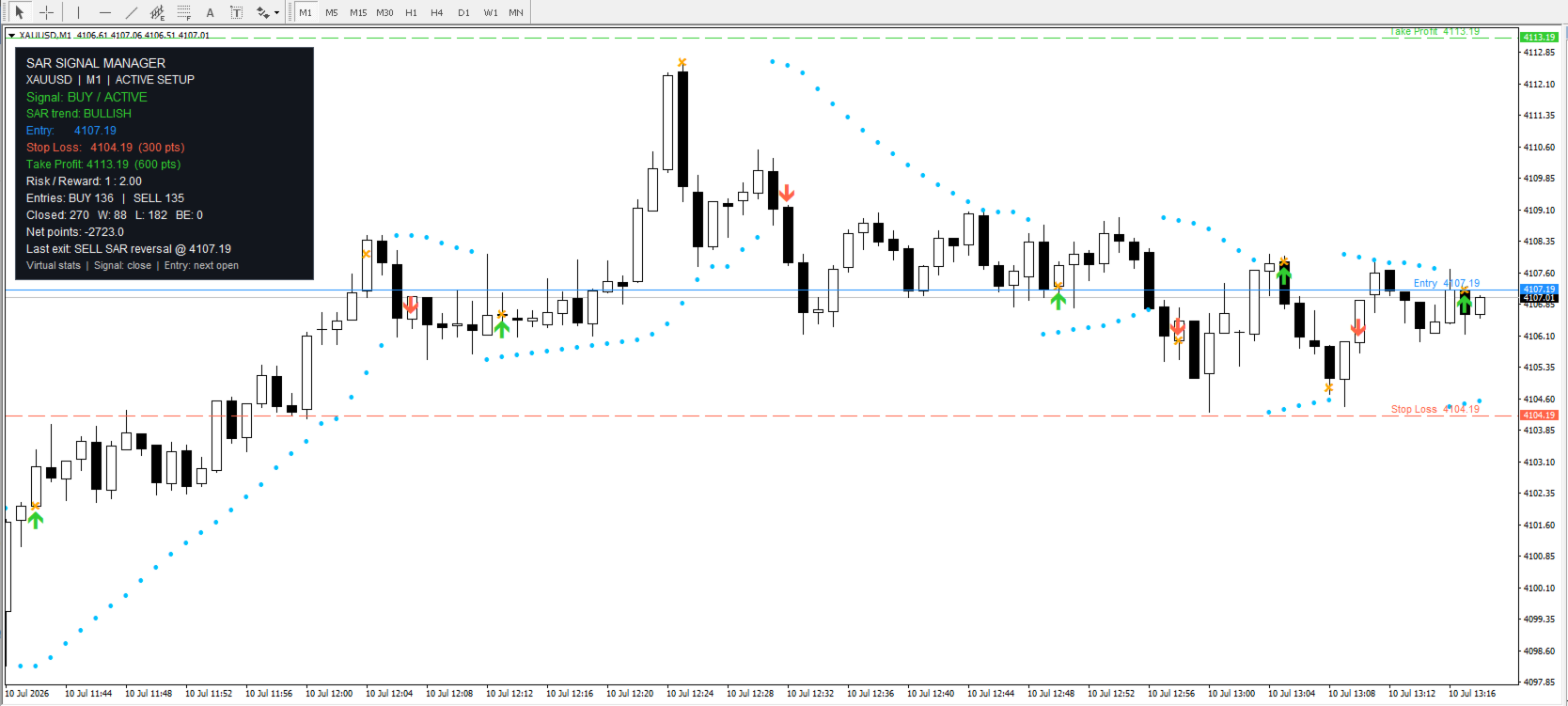
It transforms standard SAR dots into a complete visual trading system. The indicator identifies market direction, marks entries and exits, calculates virtual Stop Loss and Take Profit levels, sends notifications, and displays signal statistics directly on the chart.

Instead of working with isolated Parabolic SAR dots, the trader receives a clear overview of:

  • Current SAR direction

  • BUY or SELL signal

  • ACTIVE or WAIT position status

  • Calculated entry price

  • Stop Loss and Take Profit levels

  • Entry arrows and exit markers

  • Virtual trade statistics

  • Notifications about new events

How SAR Manager Works

The indicator monitors the position of Parabolic SAR relative to the price.

A BUY signal appears when SAR moves from above the price to below it. A SELL signal is generated when SAR moves from below the price to above it.

To prevent unstable intrabar signals, a reversal is confirmed only after the candle closes. The calculated entry is then performed at the opening price of the next candle.

This approach creates a clear and consistent signal history: confirmed entries do not disappear or change direction afterward.

Complete Chart Visualization

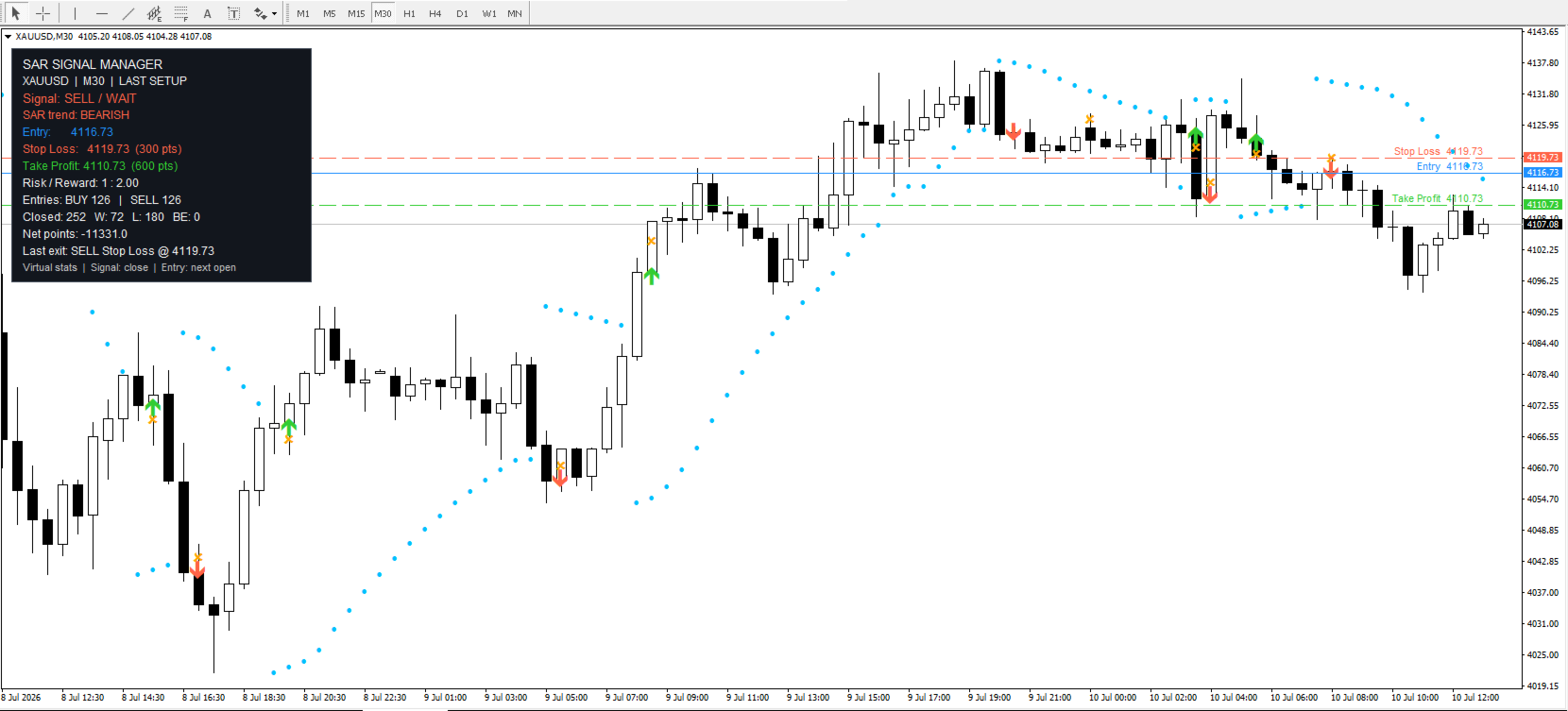
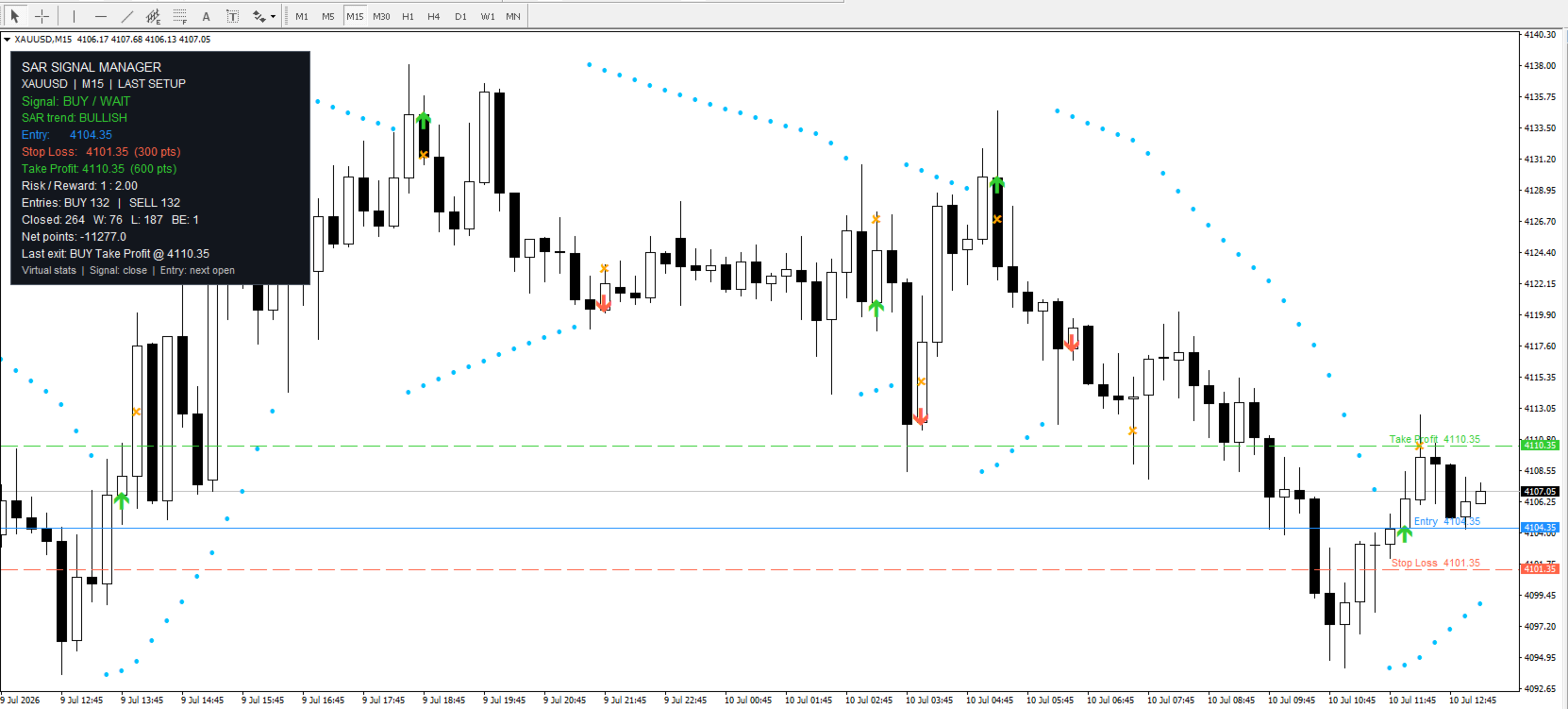
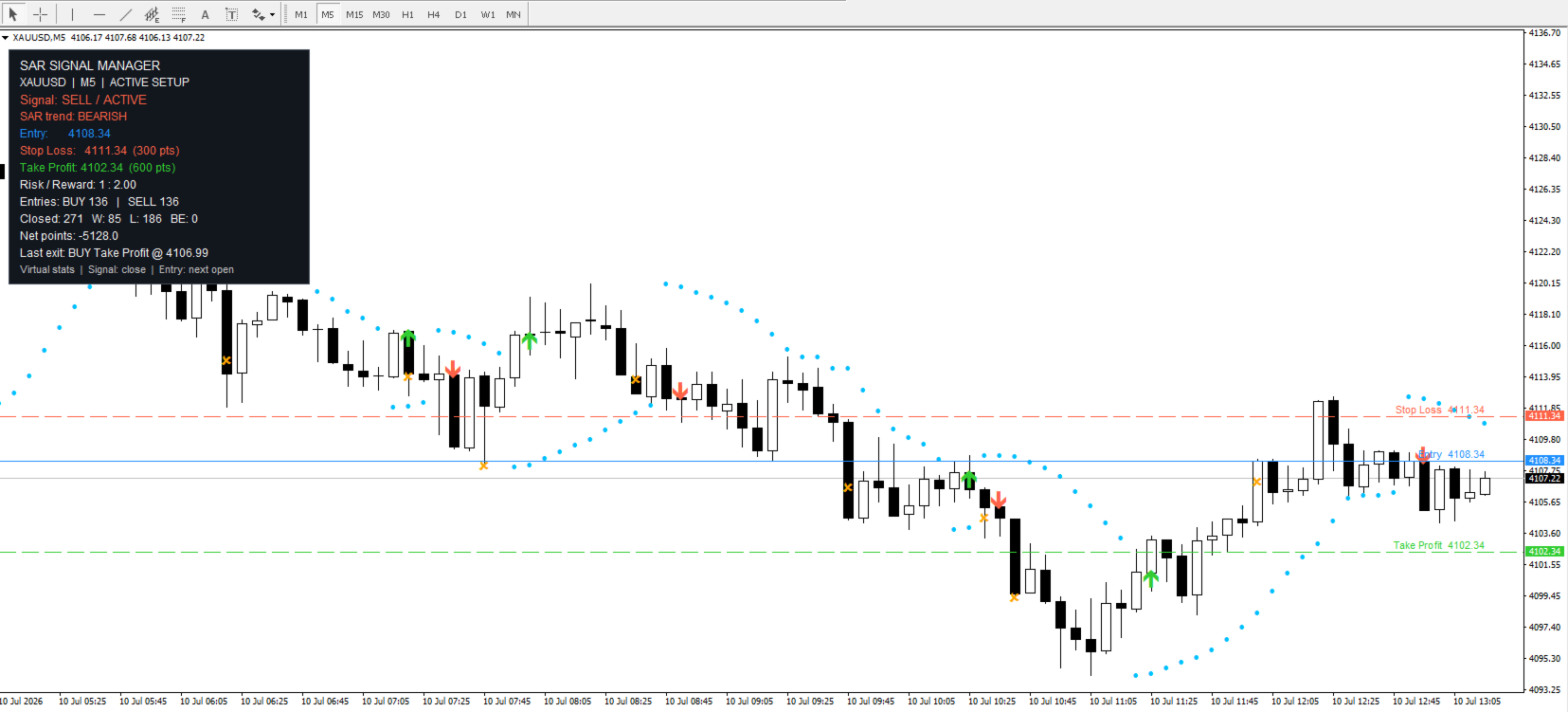
SAR Manager displays all important information directly on the price chart:

  • Parabolic SAR dots

  • Green BUY arrows

  • Red SELL arrows

  • Virtual position exit markers

  • Blue Entry line

  • Red Stop Loss line

  • Green Take Profit line

  • Price labels for all trading levels

The lines allow traders to evaluate the potential risk and target of every signal without performing manual calculations.

If required, the indicator can keep the levels of the most recent signal on the chart even after the virtual position has been closed. This is useful for reviewing subsequent price movement.

Stop Loss and Take Profit in Points

Stop Loss and Take Profit distances are configured separately in the input parameters.

For BUY signals:

  • Stop Loss is placed below the entry price

  • Take Profit is placed above the entry price

For SELL signals:

  • Stop Loss is placed above the entry price

  • Take Profit is placed below the entry price

All distances are specified in MetaTrader points. For example, on a five-digit Forex symbol, 100 points are equal to 10 standard pips.

Exit Logic

A virtual position can be closed for one of the following reasons:

  • Stop Loss is reached

  • Take Profit is reached

  • An opposite Parabolic SAR signal appears

  • The market opens beyond the Stop Loss or Take Profit level due to a price gap

If the price opens beyond an established level, the indicator records the exit using the actual candle opening price.

When both Stop Loss and Take Profit are reached within the same historical candle, the exact sequence of price movement cannot be determined from OHLC data alone. SAR Manager therefore provides a dedicated calculation setting:

  • Stop Loss First — conservative calculation

  • Take Profit First — alternative calculation

The conservative Stop Loss First rule is used by default.

Advanced Information Panel

The information panel displays the current system state and signal results calculated over the selected historical period.

The panel includes:

  • Symbol and timeframe

  • Current BUY or SELL signal

  • ACTIVE or WAIT status

  • Current SAR direction

  • Entry price

  • Stop Loss level

  • Take Profit level

  • Risk-to-reward ratio

  • Number of BUY entries

  • Number of SELL entries

  • Number of closed virtual trades

  • Winning trades

  • Losing trades

  • Breakeven trades

  • Win rate

  • Total result in points

  • Reason and price of the latest exit

Color-coded information makes it easy to identify the current direction and distinguish between Entry, Stop Loss, and Take Profit levels.

Entry and Exit Notifications

SAR Manager can notify the trader about new signals and virtual position exits.

The following notification methods are supported:

  • MetaTrader popup alerts

  • Mobile Push notifications

  • Email notifications

  • Sound alerts

Entry and exit notifications can be enabled separately.

An entry notification contains:

  • BUY or SELL direction

  • Symbol and timeframe

  • Entry price

  • Stop Loss

  • Take Profit

An exit notification contains:

  • Direction of the closed position

  • Exit reason

  • Exit price

  • Result in points

After installation, the indicator does not send notifications for old historical signals. Every new event is processed only once, preventing repeated messages on every tick.

Main Features

  • Classic Parabolic SAR logic

  • Adjustable SAR Step and Maximum parameters

  • Signals confirmed using closed candles

  • Calculated entry at the opening of the next candle

  • Stop Loss and Take Profit in points

  • Exit on an opposite SAR signal

  • Price gap processing

  • Adjustable policy when SL and TP are reached within the same candle

  • BUY and SELL arrows

  • Visual exit markers

  • Entry, Stop Loss, and Take Profit lines

  • Price labels for trading levels

  • Option to keep the latest levels after an exit

  • Detailed information panel

  • Virtual signal statistics

  • Popup, Push, Email, and Sound notifications

  • Separate control of entry and exit notifications

  • Customizable colors and panel position

  • Compatible with different symbols and timeframes

Main Input Parameters

InpSarStep — Parabolic SAR acceleration step.

InpSarMaximum — maximum SAR acceleration value.

InpStopLossPoints — Stop Loss distance in points.

InpTakeProfitPoints — Take Profit distance in points.

InpArrowOffsetPoints — distance between entry arrows and the price.

InpHistoryBars — number of candles used to calculate signals and statistics.

InpSameBarPolicy — calculation rule when one candle reaches both SL and TP.

InpShowLevelLines — displays Entry, Stop Loss, and Take Profit lines.

InpKeepLastLevels — keeps the most recent levels visible after an exit.

InpEntryAlerts — enables entry notifications.

InpExitAlerts — enables exit notifications.

InpAlertPopup — enables MetaTrader popup alerts.

InpAlertPush — enables mobile Push notifications.

InpAlertEmail — enables email notifications.

InpAlertSound — enables sound alerts.

InpShowPanel — displays the information panel.

Who Is SAR Manager Designed For?

SAR Manager is suitable for traders who:

  • Use Parabolic SAR in their trading

  • Want clear signals instead of manually interpreting SAR dots

  • Prefer to know the protective level and target in advance

  • Analyze signals across different symbols and timeframes

  • Want to receive notifications without constantly watching the chart

  • Test different SAR, Stop Loss, and Take Profit settings

  • Need a clear visual instrument for manual trading

Important Information

SAR Manager is an indicator and does not open real market orders.

All positions, levels, and results displayed in the information panel are virtual. The statistics do not include exact historical spreads, commissions, swaps, or possible slippage. Therefore, they should not be treated as a complete strategy backtest.

The indicator provides structured signals and visual information but does not guarantee profitable trading. Test your selected settings on historical data and a demo account before using them in live trading.


Mais do autor
Astra BB RSI Arrows — Visual Trading Signals Based on Bollinger Bands and RSI Astra BB RSI Arrows is designed for traders who want a clear, visual, and practical tool for identifying potential market entries and exits. The indicator combines two well-known technical analysis tools: Bollinger Bands and RSI. Instead of constantly switching between indicators, checking overbought and oversold zones manually, and trying to catch every market reaction by eye, you get a ready-to-use visual signal syst
FREE
Turtle Path MT5 — an indicator for traders who want to see the market clearly Turtle Path MT5 is designed for traders who do not want to guess, but want to see the market structure directly on the chart. The indicator is based on the classic logic of the Turtle Trading system and helps quickly identify key breakout levels, signal direction, Take Profit zones, and Stop Loss zones. Every signal is displayed visually: channel lines, entry level, target, stop loss, and arrows on the chart. You do no
FREE
MA EMA Cross Risk EA is a trading Expert Advisor for MetaTrader 5, created for traders who want to trade using a clear, logical, and visually transparent moving average crossover strategy. The EA is based on one of the most well-known concepts in technical analysis: the crossover of fast and slow MA/EMA lines. When the market changes direction, moving averages can help identify this moment without unnecessary noise, emotions, or manual signal searching. The Expert Advisor automatically tracks Mo
FREE
Universal Trade Copier MT5 is a professional local trade copying utility designed to copy trades between MetaTrader 4 and MetaTrader 5 terminals on the same computer or VPS. The product supports multiple copying directions: MT4 → MT4 MT5 → MT5 MT4 → MT5 MT5 → MT4 To copy trades in MT4, you need to purchase  Universal Trade Copier MT4   The copier is suitable for traders who manage multiple accounts, use different MetaTrader terminals, work with different brokers, or need to copy trades betwee
Astra BB RSI Arrows — Visual Trading Signals Based on Bollinger Bands and RSI Astra BB RSI Arrows is designed for traders who want a clear, visual, and practical tool for identifying potential market entries and exits. The indicator combines two well-known technical analysis tools: Bollinger Bands and RSI. Instead of constantly switching between indicators, checking overbought and oversold zones manually, and trying to catch every market reaction by eye, you get a ready-to-use visual signal syst
FREE
MA EMA Cross Risk EA is a trading Expert Advisor for MetaTrader 4, created for traders who want to trade using a clear, logical, and visually transparent moving average crossover strategy. The EA is based on one of the most well-known concepts in technical analysis: the crossover of fast and slow MA/EMA lines. When the market changes direction, moving averages can help identify this moment without unnecessary noise, emotions, or manual signal searching. The Expert Advisor automatically tracks Mo
FREE
Turtle Path MT4 — an indicator for traders who want to see the market clearly Turtle Path MT4 is designed for traders who do not want to guess, but want to see the market structure directly on the chart. The indicator is based on the classic logic of the Turtle Trading system and helps quickly identify key breakout levels, signal direction, Take Profit zones, and Stop Loss zones. Every signal is displayed visually: channel lines, entry level, target, stop loss, and arrows on the chart. You do no
FREE
SAR Manager — Visual Control of Parabolic SAR Signals SAR Manager is an advanced information and signal indicator for MetaTrader 5 based on the classic Parabolic SAR. It transforms standard SAR dots into a complete visual trading system. The indicator identifies market direction, marks entries and exits, calculates virtual Stop Loss and Take Profit levels, sends notifications, and displays signal statistics directly on the chart. Instead of working with isolated Parabolic SAR dots, the trader re
FREE
Session Atlas — Professional Trading Session Map for MetaTrader 5 Session Atlas is a powerful visual session indicator for MetaTrader 5 that turns your chart into a clear, structured map of the trading day. The market does not move the same way throughout the day. Asian, European, and American sessions often have completely different behavior, volatility, liquidity, and price rhythm. Session Atlas helps you see this structure instantly — directly on your chart. No manual drawing. No checking ses
FREE
CandleCloseTimer — full control over candle closing time CandleCloseTimer is a compact utility for MetaTrader 5 that shows a countdown to the close of the current candle directly on the chart. The timer is placed near the current price, so the key information stays exactly where traders look most often — next to the price scale. The utility does not open trades, does not provide trading signals, and does not interfere with terminal operation. Its only purpose is to help you clearly see how much
FREE
Instruções de uso: abrir instruções do Trade Assistant MT4/MT5 PRO Instruções de uso do Trade Assistant MT4/MT5 PRO Trade Assistant MT4/MT5 PRO é um painel de trading profissional para MetaTrader 4/5, criado para traders que precisam de controle rápido, prático e visualmente claro sobre suas operações. O produto ajuda a reduzir ações repetitivas, acelerar a abertura e o acompanhamento de ordens, padronizar o gerenciamento de risco e tornar o trading manual mais disciplinado. Esta ferramenta não
CandleCloseTimer — full control over candle closing time CandleCloseTimer is a compact utility for MetaTrader 4 that shows a countdown to the close of the current candle directly on the chart. The timer is placed near the current price, so the key information stays exactly where traders look most often — next to the price scale. The utility does not open trades, does not provide trading signals, and does not interfere with terminal operation. Its only purpose is to help you clearly see how much
FREE
Session Atlas — Professional Trading Session Map for MetaTrader 4 Session Atlas is a powerful visual session indicator for MetaTrader 4 that turns your chart into a clear, structured map of the trading day. The market does not move the same way throughout the day. Asian, European, and American sessions often have completely different behavior, volatility, liquidity, and price rhythm. Session Atlas helps you see this structure instantly — directly on your chart. No manual drawing. No checking ses
FREE
Universal Trade Copier MT4  is a professional local trade copying utility designed to copy trades between MetaTrader 4 and MetaTrader 5 terminals on the same computer or VPS. The product supports multiple copying directions: MT4 → MT4 MT5 → MT5 MT4 → MT5 MT5 → MT4 To copy trades in MT5, you need to purchase  Universal Trade Copier MT5   The copier is suitable for traders who manage multiple accounts, use different MetaTrader terminals, work with different brokers, or need to copy trades betwe
My products   User Guide   Multi-Currency Candlestick Pattern Scanner for MT4 Multi-Currency Candlestick Pattern Scanner for MT4 is a professional multi-currency and multi-timeframe Japanese candlestick pattern scanner for MetaTrader 4. The indicator analyzes multiple trading instruments and timeframes simultaneously, displays detected bullish and bearish candlestick patterns in a dashboard panel, and can also show arrows, text labels, and a Moving Average directly on the active chart. This tool
Instruções de uso:   abrir instruções do Trade Assistant MT4/MT5 PRO Instruções de uso do Trade Assistant MT4/MT5 PRO Trade Assistant MT4/MT5 PRO é um painel de trading profissional para MetaTrader 4/5, criado para traders que precisam de controle rápido, prático e visualmente claro sobre suas operações. O produto ajuda a reduzir ações repetitivas, acelerar a abertura e o acompanhamento de ordens, padronizar o gerenciamento de risco e tornar o trading manual mais disciplinado. Esta ferramenta nã
My products   Quantum SuperTrend AI is an indicator with AI-powered intelligent signal filtering: the indicator analyzes market conditions, filters out part of weak impulses, and helps traders see a cleaner market picture without unnecessary noise. Quantum SuperTrend AI is a professional trading indicator for MetaTrader 4, created for traders who need a clear visual tool for trend analysis, trading signals, and control of possible exit zones. The name Quantum SuperTrend AI reflects the core ide
PatternGuard VWAP Trader — a Smart Expert Advisor for Market Structure-Based Trading PatternGuard VWAP Trader is an advanced trading Expert Advisor designed to identify high-quality entry points after price exits a zone of market uncertainty. The strategy is based on a combination of VWAP logic, a NO TRADE zone, candlestick pattern confirmation, trend filtering, and flexible trade management. The EA does not open trades randomly. It analyzes market structure, waits for price to leave a consolida
Gold Wolf EA MT4
Andrei Strashko
Gold Wolf EA — Automated Gold Trading Expert Advisor for MT4 / MT5 Gold Wolf EA is an automated trading Expert Advisor for MetaTrader 4 and MetaTrader 5, developed for trading XAUUSD based on trend-following logic, market condition filtering, and controlled risk management. The EA is not designed for aggressive high-frequency trading. Its main objective is to identify suitable market conditions, avoid unnecessary entries, and trade only when the internal strategy conditions are met. Gold Wolf EA
Dream of the Golden Wolf EA The gold market moves fast, but not every movement is suitable for trading. Dream of the Golden Wolf EA is an automated trading Expert Advisor designed for XAUUSD and optimized for the M5 timeframe . The EA analyzes market structure, trend direction, momentum, price activity, and additional confirmation signals before opening a trade. The main goal of the EA is not to open as many trades as possible, but to identify higher-quality trading conditions where several fact
Golden Wolf Grid PRO is an Expert Advisor for MetaTrader 4 , designed for automated trading on Gold / XAUUSD using the M15 timeframe . The EA is based on a grid trading strategy and is created to work with market fluctuations, opening and managing trades automatically according to the selected parameters. Golden Wolf Grid PRO comes with optimized settings for XAUUSD M15 , so you can use the prepared configuration or perform your own optimization and forward testing according to your broker, acco
MPA Trend Dashboard — Multi-Symbol Market Scanner for MetaTrader 4 MPA Trend Dashboard is a multi-symbol technical analysis indicator for MetaTrader 4. It is designed to help traders monitor several trading instruments from one chart and quickly evaluate market direction using a combination of popular technical indicators. The indicator displays a compact signal dashboard directly on the chart. For each selected symbol, it shows BUY, SELL or WAIT signals based on multiple market analysis tools.
Golden Wolf SMC Trendline Alerts is a professional indicator for MetaTrader 4, designed for traders who want to analyze the market through price structure, liquidity, trendlines, and key areas of interest. The indicator is based on the Smart Money Concepts approach, widely known among traders as SMC. This analytical method helps traders look at the market not only through standard signals, but also through the logic of price movement: where structure is formed, where the character of movement c
BÔNUS: ao comprar o Golden Wolf GameChanger, você recebe de presente o Trade Assistant MT5 PRO . Após a compra, envie-me uma mensagem pelo MQL. Oferta limitada. Golden Wolf GameChanger é um poderoso Expert Advisor de trading para MetaTrader 5, criado para quem deseja transformar os sinais do indicador Game Changer em um sistema de negociação automática com gestão flexível de ordens, risco, séries de operações e algoritmos de proteção. O Expert Advisor foi criado e otimizado para negociar ouro X
Second and Custom Timeframe Charts See the market between standard timeframes. Second and Custom Timeframe Charts is a professional chart utility for MetaTrader 4 that creates synthetic candles for non-standard timeframes directly from market data. It is designed for traders who need more flexibility than the default MT4 timeframe set can provide. Standard charts show only fixed periods. But the market does not always move in standard blocks. Sometimes the most important structure is visible on
My products   User Guide   Multi-Currency Candlestick Pattern Scanner for MT5 is a professional dashboard indicator that automatically scans multiple symbols and timeframes for Japanese candlestick patterns in real time. Instead of opening dozens of charts manually, you can monitor the entire market from one clean scanner panel. The indicator helps you quickly find bullish and bearish candlestick setups, check the active timeframe, and switch directly to the chart where the pattern appeared. Thi
My products   Quantum SuperTrend AI Alerts MT5- user guid   Quantum SuperTrend AI is an indicator with AI-powered intelligent signal filtering: the indicator analyzes market conditions, filters out part of weak impulses, and helps traders see a cleaner market picture without unnecessary noise. Quantum SuperTrend AI is a professional trading indicator for MetaTrader 5, created for traders who need a clear visual tool for trend analysis, trading signals, and control of possible exit zones. The na
PatternGuard VWAP Trader — A uthor's  Smart Trading Advisor for VWAP Breakout and Pattern-Based Entries PatternGuard VWAP Trader is a professional Expert Advisor for MetaTrader 5 designed to identify trading opportunities after price exits a dynamic NO TRADE zone based on VWAP and volatility bands. The main idea of the system is simple and effective: avoid trading inside uncertain, low-quality market zones and look for entries only when price breaks out of consolidation, confirms direction with
Gold Wolf EA
Andrei Strashko
Gold Wolf EA — Automated Gold Trading Expert Advisor for MT4 / MT5 Gold Wolf EA is an automated trading Expert Advisor for MetaTrader 4 and MetaTrader 5, developed for trading XAUUSD based on trend-following logic, market condition filtering, and controlled risk management. The EA is not designed for aggressive high-frequency trading. Its main objective is to identify suitable market conditions, avoid unnecessary entries, and trade only when the internal strategy conditions are met. Gold Wolf EA
Dream of the Golden Wolf EA The gold market moves fast, but not every movement is suitable for trading. Dream of the Golden Wolf EA is an automated trading Expert Advisor designed for XAUUSD and optimized for the M5 timeframe . The EA analyzes market structure, trend direction, momentum, price activity, and additional confirmation signals before opening a trade. The main goal of the EA is not to open as many trades as possible, but to identify higher-quality trading conditions where several fact
Filtro:
Sem comentários
Responder ao comentário