TradeStats Panel
- Indicatori
-
Shin Kojima
 MT4 indicator developer with 10+ years of live trading experience.
Specializing in alert tools and scanners for ICT-based traders.
Zero complaints. Reliable tools. Real support.
MQL4 / MQL5 Development Services
• Custom Indicator Modifications - Versione: 1.0
================================================================
TradeInfoS_en - Trade Statistics Indicator for MT4
Copyright (C) 2014 fx-mt4ea.com
================================================================
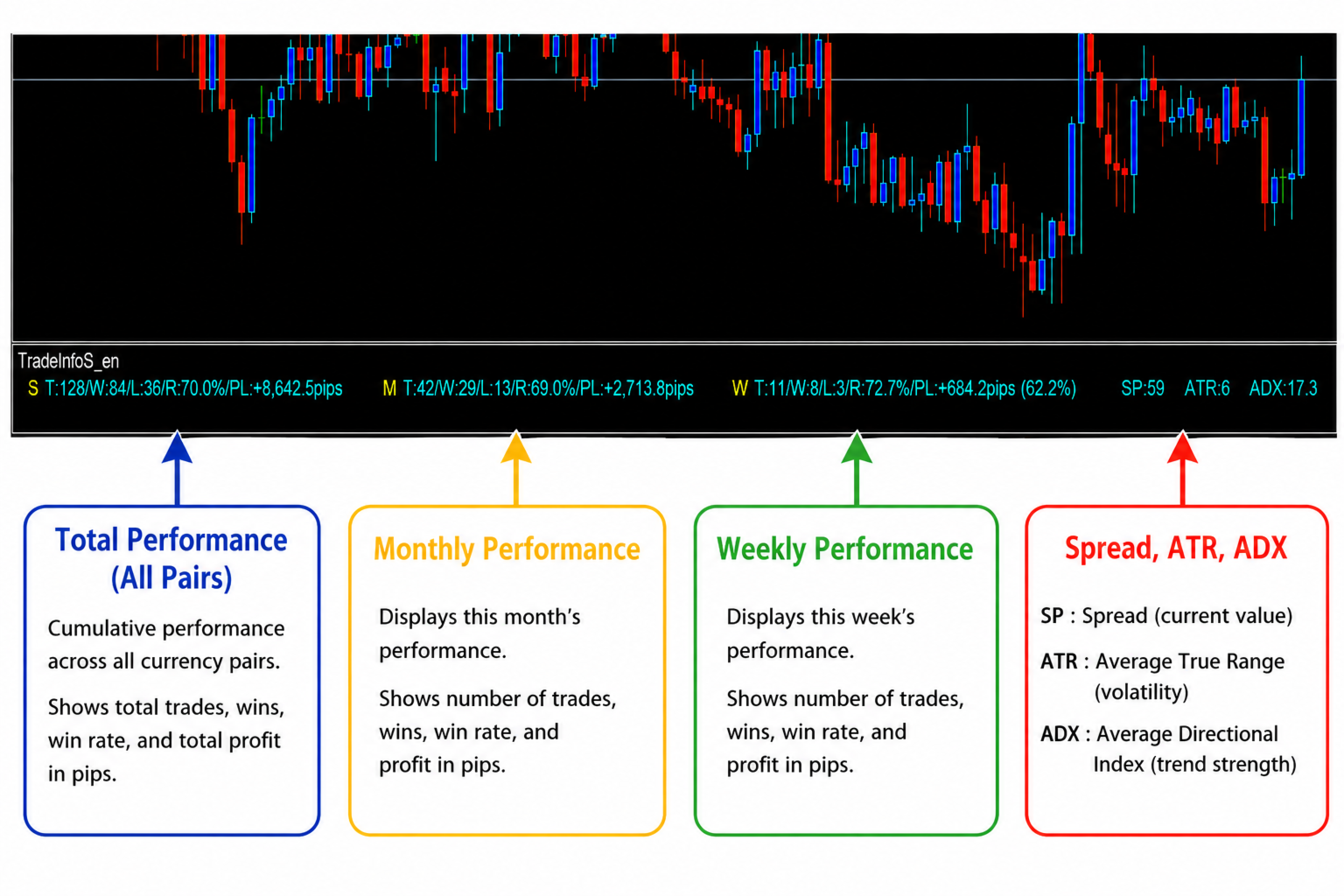
OVERVIEW
--------
Displays trade history statistics and market info in a separate
indicator window. Shows results for All-time, This Month, and
This Week in three columns.
DISPLAY LAYOUT
--------------
[ S ] T:xx/W:xx/L:xx/R:xx%/PL:xx <- All-time stats
[ M ] T:xx/W:xx/L:xx/R:xx%/PL:xx <- This Month stats
[ W ] T:xx/W:xx/L:xx/R:xx%/PL:xx <- This Week stats
SP:x ATR:xxx ADX:xx.x <- Market info
Column headers:
S = Symbol (all trades or current symbol)
M = Month (current month)
W = Week (current week)
Stat labels:
T = Total trades
W = Wins
L = Losses
R = Win Rate (%)
PL = Profit & Loss (account currency)
Market info (right side):
SP = Current Spread (points)
ATR = Average True Range (points)
ADX = ADX value
Color coding:
Aqua = Profitable (PL >= 0)
DeepPink = Loss (PL < 0)
----------------------------------------------------------------
PARAMETERS
----------
bAlert : Enable/disable alerts (default: true)
TargetMagic : Filter by EA Magic Number (-1 = all EAs)
bCurSymbol : true = current symbol only / false = all symbols
rrOff1 : X offset for Month column (default: 370)
rrOff2 : X offset for Week column (default: 690)
FontSize1 : Font size for stat labels (default: 9)
FontSize2 : Font size for market info (default: 9)
XPos1 : Base X position for Symbol column (default: 5)
ATRPeriod : ATR calculation period (default: 14)
ADXPeriod : ADX calculation period (default: 14)
----------------------------------------------------------------
INSTALLATION
------------
1. Copy TradeInfoS_en.mq4 to:
[MT4 Data Folder]\MQL4\Indicators\
2. Open MetaEditor and compile the file (F7)
- 0 errors expected
- Warnings about implicit conversion are resolved
3. In MT4 chart, go to:
Insert > Indicators > Custom > TradeInfoS_en
4. The indicator opens in a separate sub-window below the chart.
----------------------------------------------------------------
TIPS
----
- To filter a specific EA, set TargetMagic to the EA's magic number
- To view only the current symbol's trades, set bCurSymbol = true
- PL shown in This Week column includes % of account balance
- ATR and ADX update every tick
- Stats update only when order history changes
================================================================
fx-mt4ea.com
================================================================