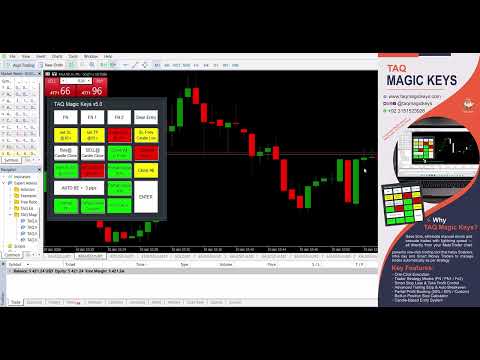
TAQ Magic Keys Trade Manager MT5
- Utilità
-
Tauqeer Ahmad
 Welcome to TAQ Magic Keys
I’m Tauqeer, a professional MQL5 developer, Owner and CEO of TAQ Magic Keys
since 2020 TAQ Magic Keys develops practical trading solutions for:-
✅ MetaTrader Tools & Expert Advisors
✅ Trading panels, testing tools and automation systems - Versione: 5.0
- Attivazioni: 5
TAQ Magic Keys Trade Manager is for MetaTrader5 (MT5). It has an advanced trade management tool and Lot size calculator for MetaTrader 5. It is designed to help traders to trades faster, precise and manage open positions directly with one click.
Demo 3 Days Free Trial
https://taqmagickeys.com/product/taq-magic-keys-v5-0-demo-3days-free-trial/
FN key is the best functions which automatically manage trades up to TP4 with auto partial closing and trailing SL. Define your trade strategy in FN keys setting with TP1 to TP4 partial take profits and trailing SL. Execute with single click and let the TAQ Magic Keys to manage your trades. On chart it shows real-time SL and TP values in pips, account currency with draggable lines. Every trade is organized and managed effortlessly.
To activate License , please message us:-
1. Broker trading account ID number
2. TAQMagicKeys Version in which you are interested
so we can securely register it in our online licensing system.
Please note that the software will not function on any unregistered or unauthorized accounts.
Key Features:
FN1 TP4 Strategy Settings
You can manage your trades automatically by setting this function key up to TP4.
Initial set SL & Final TP
Profit Target up to TP4 with partial closing & Trailing SL
Following is step wise default setting and you can change as per your strategy and trade management.
FN1 TP1 Pips
Set pips for TP1, where first partial booking will be done. For example, set 50 pips.
FN1 TP1 Partial Closing %
Set how much Lot size to be closed at TP1 as partial booking. For example 50. It means 50% of lot size will be automatically closed at TP1 and remaining continues.
FN1 TP1 Trailed SL pips
This function also reduces the risk by trailing SL. Set 50 pips to trailed SL at TP1. For example initial SL was 100 pips, when TP1 hit, SL trailed to 50 pips.
FN1 TP2 Pips
Set pips for TP2, where second partial booking will be done. For example, set 80 pips.
FN1 TP2 Partial Closing %
Set how much Lot size to be closed at TP2 as partial booking. For example 50. It means 50% of lot size will be automatically closed from remaining at TP2 and rest to continue.
FN1 TP2 Trailed SL pips
This function also reduces the risk by trailing SL. Set 10 pips to trailed SL at TP2. For example, when TP1 hit, SL trailed to 50pips. Now when TP2 hit, SL more trailed to 10 pips.
FN1 TP3 Pips
Set pips for TP3. For example, set 100 pips. At TP3 no partial booking will be done only trailed SL to Break Even. Ensure no loss after this level.
FN1 TP3 Trailed SL to BE+ pips
For example set value to 30 pips. Trailed SL 30 pips into profit side (not just BE).
FN1 Final TP4 pips
Set pips for TP4. For example, set 200 pips. Final Take Profit for FN1 trades. Close all remaining position.
FN1 SL
Initial maximum risk, Stop Loss for FN1 trades. Set 100 pips.
- Note:- You can change all keys values from INPUT setting as per your strategy and requirement while setting up TAQ Magic Keys Trade Manager V5.0
Advanced Tools
Lot / Position Size Calculator
TAQ Magic Keys v5.0 has this strongest feature. The Lot size / Position Size Calculator helps traders determine the correct lot size based on risk percentage and stop loss, so every trade is controlled and consistent.
Instead of guessing lot size, the calculator automatically tells you:
• What is Lot size to trade?
• How much money you are Risking?
• What is your SL?
How It Works (Easy)
It needs only 4 values:
Account Balance
Automatically pick your current trading balance
Example: $5493
Stop Loss (Pips)
Enter your SL here
What is your SL for trade, or how much pips you want to give for SL
Example: 30 pips
Risk %
Enter your Risk here
How much of your account you want to risk. 1% or 2% or 3% of account
Example: 3%
Contract Size
Contract Size defines: How many units you control with 1 lot. Depends on broker, but commonly (standard = 100)
(1 Lot = 100 ounces of gold) (1 Lot = 1 BTC)
default value is 100
Now click button “Calculate”
What the Calculator Does, Based on your inputs, it calculates:
Lot Size
How big your trade should be
Example: Lots: 0.55
Units
Actual position size
Example: Units: 55
Money at Risk
Maximum loss if SL is hit
Example: Money at Risk: $164.81
details for all keys available here