TCL MA Crossovers
- Indicatori
- Versione: 1.4

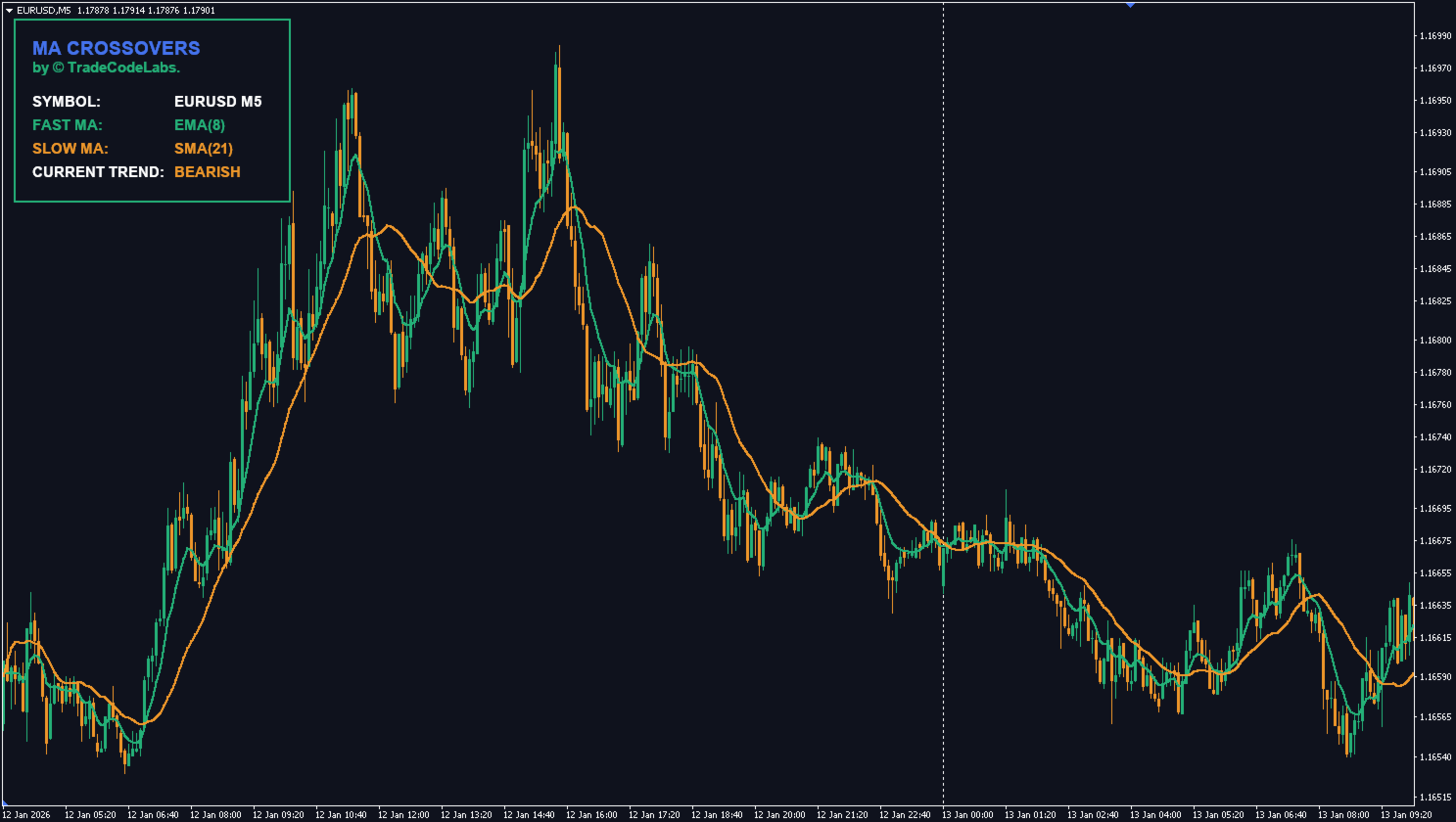
TCL MA Crossovers is a Moving Average crossover indicator for MetaTrader 4 with independent Fast and Slow MA settings for every chart timeframe. It plots crossover markers and sends multi-channel alerts when a confirmed crossover occurs.
How It Works
Most crossover indicators apply one Fast and one Slow Moving Average to whichever timeframe is open. This indicator stores a separate Fast and Slow MA configuration for each timeframe (M1, M5, M15, M30, H1, H4, D1, W1, MN). When the chart timeframe changes, the indicator automatically loads the appropriate settings, so the same indicator can be tuned per timeframe without manual reconfiguration.
Components
- Per-Timeframe MA Settings — independent Fast and Slow Moving Average period and method for each of the nine standard timeframes.
- Crossover Markers — visual markers at each confirmed crossover, color-coded by direction.
- Live Dashboard — on-chart panel showing the current Fast and Slow MA values and the active crossover state.
- Multi-Channel Alerts — Popup, Sound, Email, and Mobile Push notifications can be enabled independently.
Inputs
- Show Dashboard Panel — toggle the on-chart dashboard (default true)
- Dashboard Location — chart corner for the panel (default top-left)
- Alert Popup, Sound, Email, Mobile — enable each alert channel independently
- MA Applied Price — price source for both MAs (default Close)
- MA Shift — horizontal shift for the MAs (default 0)
- For each of M1, M5, M15, M30, H1, H4, D1, W1, MN: Fast MA Period and Method, Slow MA Period and Method (defaults vary by timeframe)
Compatibility
The indicator works on MetaTrader 4. It is compatible with all instruments. Each chart timeframe loads its own MA configuration automatically. Crossover signals are confirmed at bar close.
Installation
- Download the file from MQL5 Market
- Restart MetaTrader if needed
- Drag the indicator onto any chart
For questions about parameters or behavior, please use the Comments tab.