TheMegathronTradeManager
- Utilità
- Versione: 6.2
- Aggiornato: 10 maggio 2026
- Attivazioni: 5

MetaTrader 5 Trade Manager — Virtual SL/TP, OCO Orders, Multi-Position
TheMegathron Trade Manager
Professional Trade Execution and Risk Management Panel for MetaTrader 5
================================================================================
OVERVIEW
--------
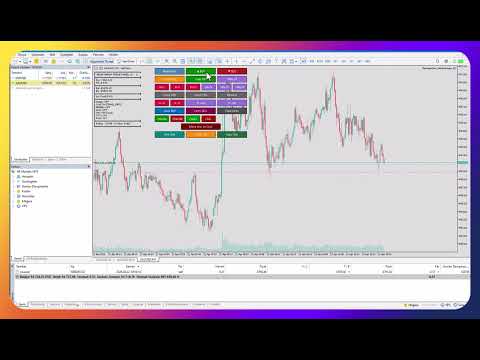
TheMegathron Trade Manager is a trade execution panel I built out of necessity.
Most panels on the market either do too little or bury the useful features behind
complicated menus. This one is designed to get out of your way — it sits to the
right of your chart's info area, does not shift when you add indicators, and lets
you execute and manage trades without taking your eyes off the price.
It works on all instruments: Forex, Gold, indices, commodities, crypto. If MT5
can trade it, this panel handles it.
CHART LINE SYSTEM
-----------------
Before you open a trade, you can mark your entry, stop loss and take profit
directly on the chart as draggable horizontal lines. The panel reads those lines
in real time and shows you the resulting lot size, pip distance, dollar risk and
reward, and risk-to-reward ratio as labels next to the lines. A shaded zone fills
the space between entry and TP in green, and between entry and SL in red.
When you drag any line, all values update instantly. If you have the R/R ratio
mode enabled, moving the SL line automatically repositions the TP line to keep
your ratio constant.
Clicking Buy or Sell executes the trade using exactly the levels you have drawn.
LOT SIZING
----------
The panel supports five calculation modes. You choose once in the settings and
the lot is calculated automatically on every trade.
Fixed Lot uses whatever size you enter. Percentage of Balance, Equity or Free
Margin calculates a lot that risks that percentage of the selected account value.
Dollar Risk calculates the lot such that your stop loss costs a specific dollar
amount if hit. In all risk-based modes, the lot is derived from the actual stop
distance on the chart — so your dollar or percentage risk stays accurate regardless
of where you place your stop.
STOP LOSS AND TAKE PROFIT BUTTONS
----------------------------------
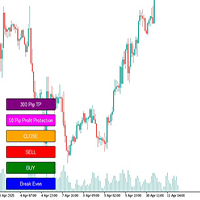
Three quick-set SL buttons let you apply a dollar-denominated stop loss to all
open positions with one click. Three TP buttons apply a pip-based take profit from
the position's entry price. Fine adjustment buttons let you move the SL by one
dollar or the TP by ten pips at a time, which is useful when you want to scale
out of a stop without rebuilding it from scratch.
BREAK EVEN
----------
The standard break even button moves all stops to entry. The Move Loss to Cost
button targets a different situation — it takes a losing position and shifts its
take profit to the entry price, so if the market reverses you exit at breakeven
rather than the original target.
Multi-level break even lets you define up to four automatic checkpoints. For
example: move SL to entry when profit reaches 20 pips, lock in 20 pips of profit
when profit reaches 50 pips, lock in 50 pips when profit reaches 100 pips. Each
level only moves the stop in the favorable direction and never widens it.
AUTO-TRAILING
-------------
Trailing is toggled with a single button on the panel. Five trailing modes are
available.
Pip-based trailing keeps the stop at a fixed pip distance behind the current
price, advancing by a defined step to reduce noise.
ATR trailing sets the stop at current price minus a multiple of the Average True
Range, so the stop naturally widens in volatile markets and tightens in calm ones.
Parabolic SAR trailing follows the SAR indicator value, which accelerates as the
trend extends.
Moving Average trailing keeps the stop at the MA value, useful for trend-following
approaches where you want to stay in a trade as long as price holds above the MA.
Fractal trailing places the stop at the most recent fractal high or low, which
tends to keep stops behind the last significant swing point.
All trailing modes share the same rule: the stop only moves in the profitable
direction and never widens.
VIRTUAL STOP LOSS AND TAKE PROFIT
-----------------------------------
When Virtual mode is active, positions are opened with no stop or target sent to
the broker. The panel stores your intended levels internally and monitors price on
every tick. When price reaches your level, the EA closes the position immediately.
The broker never sees your stop loss. This is useful on brokers where tight stops
attract unusual price behavior around round numbers or obvious levels.
OCO ORDERS
----------
When you have multiple pending orders active and OCO is enabled, the panel watches
for any of them to fill. The moment one is triggered and becomes a position, all
remaining pending orders with the same magic number are cancelled automatically.
Standard practice for breakout setups where you bracket the price with a buy stop
and a sell stop.
TRADE TIME MANAGER
------------------
You can specify times for automatic actions: open a buy at a given time, open a
sell at a given time, or close all positions at a given time. Times are entered in
HH:MM format. Each action fires once per trading day and resets at midnight. Leave
any field blank to disable that action.
This is intended for traders who enter at a fixed time each session or who need to
ensure flat positions before a rollover or news release.
EQUITY PROTECTION
-----------------
Define a maximum daily loss and a maximum daily profit in dollars. When equity
change for the day crosses either threshold, all positions are closed and the panel
locks out new trades for the remainder of that day. The day resets at midnight
broker time. Useful for funded account traders who are working within drawdown
limits.
CLOSE FILTERS
-------------
Beyond closing everything at once, you can close only buy positions, only sell
positions, only positions currently in profit, or only positions currently in loss.
Partial close buttons at 50 percent and 75 percent of position volume are also
available, as is a reverse button that closes all current positions and reopens the
same volume in the opposite direction.
AUTO-HEDGE
----------
When a position's floating loss exceeds a set dollar threshold, the panel
automatically opens a hedge position of equal size in the opposite direction. Each
position is hedged only once. This feature is off by default.
PANEL DESIGN
------------
The panel uses three vertical columns anchored to the upper-left corner of the
chart window, positioned to the right of the built-in comment text area. Because
it anchors to the top of the chart rather than the bottom, adding sub-window
indicators below the main chart does not shift the button positions.
All colors, button dimensions, font and spacing are configurable in the input
parameters. The panel refreshes its z-order at a configurable interval to stay in
front of any objects you draw on the chart.
Keyboard shortcuts cover the most time-critical actions. The chart must have
focus (click anywhere on it first).
B Open buy position
S Open sell position
C Close all positions
E Move all stops to break even
X Move all stops to break even (alternative)
T Toggle auto-trailing on/off
R Reverse all positions (close and flip)
P Partial close 50% of all positions
Escape Close all positions
The Escape key and C key are intentionally identical — both close everything
immediately. In a fast-moving situation you do not want to hunt for a specific key.
Shortcuts can be toggled on and off at any time using the Keys button on the panel.
This matters in multi-monitor setups where you might be working on another
application in the same session — a keystroke intended for a browser, a spreadsheet
or a chat window could accidentally trigger a trade if the MT5 chart happens to have
focus. Turning shortcuts off when you are not actively trading removes that risk
entirely. The setting is also available as an input parameter so you can choose
whether shortcuts start enabled or disabled each time the panel loads.
TECHNICAL NOTES
---------------
Magic number filtering ensures the panel only manages positions it opened itself,
or positions you loaded from a prior session on the same symbol and magic number.
The Today's Positions filter optionally ignores positions from previous days, which
keeps the break even and trailing logic from interfering with positions you are
carrying overnight.
All indicator handles used by the trailing modes are created on initialization and
released on removal. There are no persistent indicator windows added to the chart.
The panel is compatible with standard MT5 charts. It has been tested on XAUUSD,
major Forex pairs and indices.
WHAT IS INCLUDED
----------------
Full version: all features described above, no restrictions on lot size or account
type.
Demo version: fully functional on demo accounts, lot size fixed at 0.01, Virtual
SL/TP and OCO locked.
================================================================================
Version 6.0 | Compatible with MetaTrader 5 | All instruments
================================================================================