Daily limiter
- Utilità
- Versione: 1.0

DAILY LIMITER PRO v1.0 – COMPLETE USER GUIDE
WHAT IS DAILY LIMITER
Daily Limiter PRO is a utility Expert Advisor for MetaTrader 5 (MT5) designed to act as your daily risk manager. This EA does NOT open trades automatically. Instead, it:
Monitors daily profit/loss across your entire account (all symbols).
Closes all positions when a daily profit target or daily loss limit is hit.
Blocks any new positions (manual or from other EAs) after a limit is reached.
Displays a real-time dashboard with account stats, progress bars, and ideal position size (lot) recommendations based on your risk settings.
Works across all symbols – one EA on one chart is enough to protect your whole account.
INPUT PARAMETERS (CONFIGURATION)
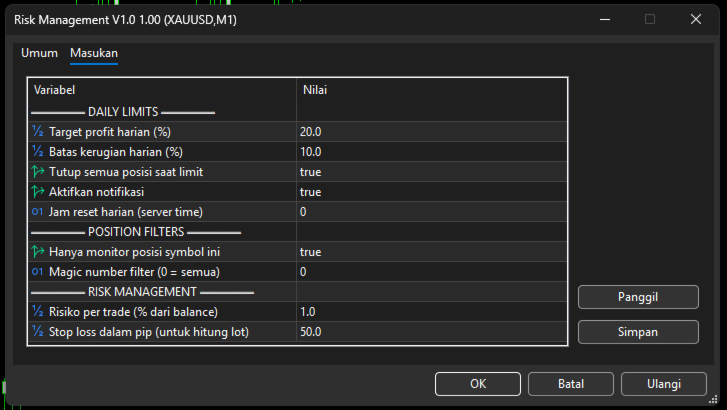
The EA has three parameter groups. You can change them before attaching the EA or via Properties (F7).
Group 1 – DAILY LIMITS
| Parameter | Example | Description |
|---|---|---|
| ProfitTargetPercent | 20.0 | If daily profit reaches +20% of the starting balance, all positions are closed and trading is blocked. |
| LossLimitPercent | 10.0 | If daily loss reaches -10% of the starting balance, all positions are closed and trading is blocked. |
| CloseAllOnLimit | true | If true , EA closes all positions when a limit is hit. If false , it only blocks new positions. |
| EnableNotification | true | Enables popup alerts and push notifications to MT5 mobile app. |
| ResetHour | 0 | Daily reset hour (server time). 0 = midnight (00:00). For example, 5 = reset at 05:00 server time. |
Group 2 – POSITION FILTERS
| Parameter | Example | Description |
|---|---|---|
| FilterBySymbol | true | If true , EA only monitors/closes positions with the same symbol as the chart it is attached to. If false , it monitors all symbols on the account. |
| MagicNumber | 0 | Magic number filter. Use 0 to affect all positions regardless of magic number. Enter a specific number (e.g., 12345 ) to only act on positions with that magic number. |
Group 3 – RISK MANAGEMENT (for lot calculator)
| Parameter | Example | Description |
|---|---|---|
| RiskPercent | 1.0 | Risk per trade as a percentage of current balance. Used to calculate the ideal lot displayed on the dashboard. |
| StopLossPips | 50.0 | Stop loss in pips. Used together with RiskPercent to compute the recommended lot size. |
What the numbers mean:
-
Starting Balance = account balance when the EA started today (or after last reset).
-
Progress bar = how close you are to hitting the profit target or loss limit.
-
IDEAL LOT = recommended position size based on current balance, risk %, and stop loss in pips. This is a recommendation only – the EA does not open trades automatically.
📢 DISCLAIMER (MUST READ BEFORE LIVE USE)
Trading Forex, CFDs, and other leveraged instruments carries a high level of risk and may not be suitable for all investors.
This EA is a risk management tool only – it does not guarantee profits.
No warranty is provided; past performance does not indicate future results.
Always test thoroughly on a demo account for at least two weeks before using on a live account.
The user assumes full responsibility for any trading decisions and losses.