AccMan

Good money/risk management is more than just position sizing, it's much more.

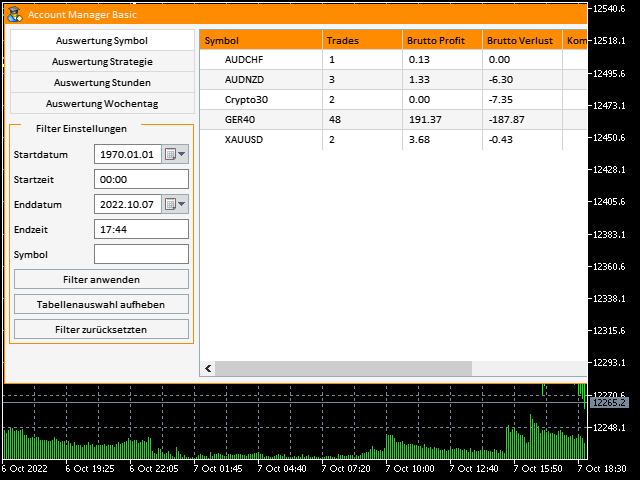
Successful traders analyze your trading activities and keep an eye on your key figures. With the help of AccountMan you can also do this very conveniently, analyze your trading activities for the purpose of professional money / risk management.

Evaluate your trades by trade symbol to see if trading is profitable overall with these. Would you like to keep an eye on your individual strategies? e.g. which strategy works best?

No problem, you can read exactly at what time and on what day of the week etc. the best trading results were achieved.

Based on the evaluation symbol, strategy, hours, day of the week, the trading activities can be traced back precisely, while the program calculates important key figures such as

  • trading frequency
  • gross profit and loss
  • commissions
  • swap
  • net profit
  • Number of winning trades
  • Number of losing trades
  • Expected Payout
  • profit in %
  • Loss in %
  • profit average
  • loss average
  • profit factor

Based on the data displayed, you can see exactly how high the performance of the strategy is. The calculated values ​​thus provide information about possible optimization of trading and thus also a possible increase in profitability.

The existing filter options according to date and time enable you to calculate any period. With the "Symbol" filter you can specifically select the data that is available on the respective trading symbol.

All information at a glance:


Features:

  • Language selection German/English
  • Evaluation by trading symbol
  • Evaluation according to strategy (bound magic number)
  • Evaluation by hourEvaluation by day of the week
  • Filter by trading symbol (optional when evaluating strategy, hours, day of the week), this ensures that the correct data set is displayed
  • Filter by time period (any time period can be examined in this way)

Information included:

  • trading frequency
  • gross profit and loss
  • commissions
  • swap
  • net profit
  • Number of winning trades
  • Number of losing trades
  • Expected Payout
  • profit in %
  • Loss in %
  • profit average
  • loss average
  • profit factor



Prodotti consigliati
Automated Timeframe cycling with Symbols centered.  Force every timeframe onto one clock window, so the story you see on Daily is the same story you are slicing on H4, H1, and M1.  Traders usually flip timeframes and lose the span. A Daily chart shows a few weeks, then M15 shows a few hours, and the eye treats them as different markets. TASSERACT locks the window to N bars of the highest enabled timeframe — default 10 Daily — and maps every lower timeframe to that same stretch. You stay inside o
FREE
Grid Trading EA is a semi-automated one-click trading EA for both Normal Trading and Grid/Martingale Trading . Normal Trading Simply click Buy or Sell directly from the chart. The EA will automatically manage trades by: Setting Stop Loss and Take Profit Managing Trailing Stop Grid / Martingale Trading (For Hedging Account Type Only) When Grid Trading mode is enabled, the EA will automatically open additional grid orders at specified distances while increasing the lot size based on your settings.
EA Nation
Joseph Anthony Aya-ay Yutig
The Expert Advisors' strategy came from a Facebook Group EA Nation. The group has over 40k members. It opens a hedge trade for every new candle and opens grid when the position is on the losing side of the trade.  Average Grid = N                     = the sum of 6 bars before the current bar/ N Timeframe = it opens a new hedge trade when a new bar appears Auto Lot = 1 Lot means in $10,000 Lot Size will be 0.01 NO MORE HEDGE = When one side reaches to N trades, it won't open a hedge trade un
DeepTrade SessionIntel
Yasir Mohammed Sachit Sachit
Most session tools try to cover everything. DeepTrade Session Intel does the opposite — it focuses on what actually moves the market: the London and New York sessions, tuned for Gold (XAUUSD) and US30. It maps the liquidity and the real activity window so you trade when the market is alive, not when it's dead.   WHAT IT SHOWS - London and New York session boxes drawn at their real server hours - Session HIGH and LOW lines — the liquidity that price hunts - Pre-session breakout range — the conso
Chart Navigator Pro
ELITE FOREX TRADERS LLC
Introducing the   Elite Chart Navigator   — your ultimate MetaTrader 5 Expert Advisor designed to revolutionize multi-symbol trading with seamless chart navigation and superior usability. Product Overview The   Elite Chart Navigator EA   is a sophisticated trading utility enabling rapid switching between multiple trading pairs through an intuitive on-chart button interface. Built for professional traders managing numerous instruments, this EA dramatically improves workflow efficiency, ensuring

Smart Strategy EA v6 VISUAL
Sergio Millares Raposo
XAUUSD Smart Strategy EA Price Action • Market Structure • Fibonacci • Smart Risk Management XAUUSD Smart Strategy EA is a professional MetaTrader 5 Expert Advisor designed specifically for Gold (XAUUSD) , combining Price Action, Market Structure, Dynamic Fibonacci analysis, trend confirmation, momentum filters, volatility analysis and advanced trade management into one integrated trading system. The EA is designed to identify structured trading opportunities rather than relying on a single tech
Smart Risk Manager
Abderrahmane Benali
5 (1)
Smart Risk Manager – Master Your Trades with Precision and Confidence Take complete control of your manual trading with Smart Risk Manager , a professional all-in-one trade and risk management Expert Advisor for MetaTrader 5 . Designed for traders who value speed, precision, and capital protection, it simplifies every step of trade execution while ensuring your risk remains under control. Whether you trade Forex, Gold, Indices, or Cryptocurrencies , Smart Risk Manager helps you execute trades w
This is a simple EA Can only open ONE trade EVER then MUST be reattached to the chart everytime you want to use it. Designed to help manual traders Has lot sizes and stops / targets in pips. For a buy trade the engulfing bar must close above the previous red bars high Includes Alarm and Phone notifications Basically if you find a price zone you like and will take a trade if there is an engulfing bar . use this.
FREE
Lightning Hotkeys  Trade Faster, Smarter & Safer Ever felt like you missed a great trade because you couldn't execute fast enough? Lightning Hotkeys turns your keyboard into a powerful trading command center, helping you trade in mili-seconds instead of minutes. Speed Up Your Trading Game Trade with the press of a key. No more clicking through menus or missing opportunities. Lightning Hotkeys lets you: Open buy/sell positions instantly Manage stop losses on the fly Close trades when you need to
Veltrion Trade Panel
Atha Ilham Pratama
Short Description Veltrion Trade Panel is a professional manual execution and risk control panel for MetaTrader 5. It helps traders calculate lot size, execute trades faster, and manage open positions with discipline. Full Description Veltrion Trade Panel is a clean and practical manual trading panel for MT5, designed for traders who want faster execution and better risk control directly from the chart. This Expert Advisor is not an automated trading strategy. It does not open trades by itself
Algo Pumping
Ihor Otkydach
4.77 (22)
PUMPING STATION – La tua strategia personale "all inclusive" Ti presentiamo PUMPING STATION — un indicatore Forex rivoluzionario che trasformerà il tuo modo di fare trading in un’esperienza efficace ed entusiasmante. Non si tratta solo di un assistente, ma di un vero e proprio sistema di trading completo con potenti algoritmi che ti aiuteranno a operare in modo più stabile. Acquistando questo prodotto, riceverai GRATUITAMENTE: File di configurazione esclusivi: per un'impostazione automatica e pr
The Telegram Blue Chili Alerter is still in full development. Many more options are still being programmed. Signals for trades will be added next. I am also happy to respond to customer requests. The only thing you need to do is create a Telegram bot and enter the bot token and chat ID in the presets. If you have any questions or want to know which features are still to come, just get in touch with me. I will be happy to help you and answer your questions as quickly as possible. Quick guide: 1:
Prop Firm Shield Full
Pablo Adolfo Cantos
Prop Firm Shield is a risk management panel for MetaTrader 5, built for prop firm traders who need control over their daily limits. You configure each limit and the tool watches the account around the clock, acting automatically when a limit is reached: closing positions, deleting pending orders and blocking new trading until the next day. Features: - Daily Take Profit - three modes: fixed USD, percent of the day-start balance, or target balance - Daily Stop Loss - three modes: fixed USD, percen
UMNi-CMND MT5 Remote Command & Trade Control System UMNi-CMND turns Telegram into a full remote control panel for your MetaTrader terminal. Send commands from your phone to open trades, manage positions, query account status, and receive complete trade telemetry — all without touching the platform. KEY FEATURES Full remote trade execution via Telegram Open, close, and manage positions by command Move SL/TP, set breakeven, partial close Live status, account, and position q
The utility is designed to display on the chart the margin zones built on the basis of margin requirements for futures of the Chicago Mercantile exchange (CME). These margin zones are good levels of resistance and support, as seen in the screenshots. How to use To trade on margin zones, use the following rules: buy after the day has closed above one of the zones to the next zone; sell after the day has closed below one of the zones to the next zone; after opening a sell trade, place limit sell
Multi-Level Trading Dashboard - Professional Market Analysis Tool Transform Your Trading Experience with Advanced Multi-Symbol Monitoring The Multi-Level Trading Dashboard is a sophisticated MetaTrader indicator that revolutionizes how you monitor and analyze multiple currency pairs simultaneously. Built with professional traders in mind, this comprehensive tool combines real-time market data, technical analysis, and account management in one intuitive, Windows-style interface. Key Features
Aurex Strategy
Medina Cortez Edison Armando
Transform your trading with an advanced hybrid system. Receive ultra-precise structural alerts on your mobile phone and platform, or let the algorithm execute and manage your trades for you 100% automatically. This Expert Advisor has been meticulously designed using a proven strategy to solve the two biggest problems for modern traders: the lack of time to scan the market and the difficulty of managing risk accurately and with discipline. Unlike traditional bots that clutter your chart with g
Reality Engine Standard | Live Spread · Slippage · Latency Monitor What is Reality Engine? Reality Engine is a non-invasive monitoring utility that simulates and logs the real-world execution conditions your algorithmic strategies actually face — spread widening, slippage, and network latency — in real time, on any symbol, for any EA running on your terminal. It does not place trades. It does not interfere with your existing strategies. It attaches silently to a separate chart and watches everyt
AlgoRadar
Stephen J Martret
5 (4)
AlgoRadar is an on-chart analytics dashboard for MT5 that aggregates Expert Advisor performance across multiple accounts, brokers, and platforms, including both MT4 and MT5 data, into a single live view on your MT5 chart. All analysis runs from the chart interface, with no external applications or manual report processing required. EA Analysis and Ranking For traders running multiple Expert Advisors, AlgoRadar provides a consolidated view of each EA's performance across accounts. Active EAs a
The Stop Loss Manger - SL Mange With the Stop Loss Manager you can finally sleep peacefully while it effectively manages your risk in stock market trading. Simply set your individual stop loss limits and let the manager trade for you. Never worry about losses again - the Stop Loss Manager takes care of it for you! Get the ultimate support for your trading now and maximize your profits with ease. Join the community of successful traders who swear by Stop Loss Manager today. Function overview: 1.
Exit Lab MT5 — EA Exit Comparison Display Compare 5 exit methods of your backtest in one panel. Exit Lab MT5 reads a MetaTrader 5 Strategy Tester HTML report and replays the same trades under 5 exit rules, showing the comparison at the top-left of your chart. How to use (2 steps): Run a backtest in the Strategy Tester and save the HTML report Put the file into MQL5\Files\ExitLabReports\ and drag Exit Lab MT5 onto the chart of the same symbol It then automatically: Scans the folder and picks the
XAU OPR GENESIS MATRIXThe Ultimate XAUUSD Impulse Scalping System — ATR Dynamic + Ghost Protocol + Aegis Shield Xau OPR Genesis Matrix  is a next-generation Expert Advisor engineered for professional scalping on XAUUSD. It combines ATR-based impulse detection, a 10-point scoring system, virtual (hidden) SL/TP via Ghost Protocol V3, and the battle-tested Aegis Shield capital protection — all inside a single plug-and-play package optimized for the M1 timeframe. Inspired by the OPR (Opening Price
Manual ATR Grid Manager is a manual trading system for gold (XAUUSD) that lets you choose your entry and then hands the ongoing trade management to the EA. Place a market buy or sell, or a buy/sell limit or stop order, directly from the chart. Set your lot size and entry price, with on-screen instructions guiding each step. Once the position opens, the EA manages its profit target. If price moves against you, an adjustable ATR-based grid can add positions at intervals that respond to market vola
FREE
Telegram Buddy
Evgenii Kriachkin
Telegram Buddy – Professional Trade Reporting & Alerting Tool Are you worried about drawdown when you are away from your computer? Do you need to check your account balance frequently, but find it inconvenient to access the mobile MT5 terminal every time? The Problem with Standard Reports: Most Telegram tools send huge blocks of text listing details of every single trade. Reading such messages on a smartphone is inconvenient, and over time, traders stop paying attention to them, risking missin
Haven MT5 to Telegram 2.0 — Pubblica le operazioni MT5 su Telegram Haven MT5 to Telegram è un'utilità per pubblicare automaticamente su Telegram gli eventi di trading di MetaTrader 5. Monitora l'apertura e la chiusura delle posizioni, le modifiche di Stop Loss e Take Profit, le chiusure parziali e gli eventi degli ordini pendenti. I messaggi possono includere anche screenshot del grafico, Trade ID e il risultato dell'operazione. Guida utente   |   Gli altri miei prodotti ->  QUI . Novità di Hav
Strategy Manager is a  Multi-Time-Frame & Multi-Currency  Dashboard for  Metatrader 4 and 5. Thanks to a free, external graphical user interface, build your own strategy by combining any indicators and loading them into the dashboard to see the result ! In addition, you can precisely  set-up your Auto-trading & Notifications and use indicators for Stop-Loss, partial profit or limit. Filter your automatic trading & notifications with forex calendar and more. Open and Manage your orders directly w
Smart Trader Bridge turns TradingView webhook alerts into real orders on your MetaTrader 5 account, and then keeps the broker in step with your strategy. Most TradingView-to-MT5 tools send an order and forget it. Smart Trader Bridge tracks every position your strategy holds, executes partial take-profits, moves the real broker stop-loss as targets are hit, and repairs positions that drift out of sync. That is what prop-firm accounts with open-risk limits need. How it works TradingView sends an a
Atlas Trade Desk
Bernhard Wurzlbauer
Atlas Trade Desk MT5 Atlas Trade Desk MT5 is a visual trade panel, risk manager and lot calculator for manual MetaTrader 5 traders. Plan market and pending orders directly on the chart, calculate position size from your selected risk, adjust Entry, Stop Loss and Take Profit visually, and manage open positions from one clean dashboard. The tool is built for discretionary traders who want faster order preparation, clearer risk control and safer position management without switching between multipl
YuRaLytics Trade Analyzer
Dakshal Kailash Raijada
YuRaLytics Trade Analyzer reads the trade history of your account and breaks it down. You see which Expert Advisors and symbols make or lose money and how much commission and swap take out of the result. It also tests whether the average trade is large enough to tell apart from luck. The panel only reads history and never opens, changes or closes a trade, so you can run it next to live Expert Advisors. What it shows Summary: trades, win rate, profit factor, average trade, net result, gross resul
FREE
Gli utenti di questo prodotto hanno anche acquistato
Trade Assistant MT5
Evgeniy Kravchenko
4.43 (216)
It helps to calculate the risk per trade, the easy installation of a new order, order management with partial closing functions, trailing stop of 7 types and other useful functions. Additional materials and instructions Installation instructions - Application instructions Line function -   shows on the chart the Opening line, Stop Loss, Take Profit. With this function it is easy to set a new order and see its additional characteristics before opening.   Risk management  - The risk calculation
Forex Trade Manager MT5
InvestSoft
4.98 (688)
Benvenuto a Trade Manager EA, lo strumento definitivo per la gestione del rischio , progettato per rendere il trading più intuitivo, preciso ed efficiente. Non è solo uno strumento per l'esecuzione degli ordini, ma una soluzione completa per la pianificazione delle operazioni, la gestione delle posizioni e il controllo del rischio. Che tu sia un principiante, un trader avanzato o uno scalper che necessita di esecuzioni rapide, Trade Manager EA si adatta alle tue esigenze, offrendo flessibilità s
Telegram to MT5 MultiChannel Copier
Sergio Marquez Uroz
4.65 (20)
Telegram to MT5 Multi-Channel Copier   copia automaticamente i segnali di trading dai tuoi canali Telegram e Discord direttamente su MetaTrader 5. Niente bot, niente estensioni del browser, niente copia manuale. Il segnale arriva su Telegram o Discord e l'EA apre l'operazione nel tuo terminale in pochi secondi. E prima di copiare un canale, il backtester integrato ti mostra cosa avrebbe fatto quel canale sul tuo conto. Il prodotto include due componenti: un'applicazione Windows che ascolta i tuo
FarmedHedge Pair Trading Dashboard
Tanapisit Tepawarapruek
5 (6)
Farmed Hedge Yield Farming | All Markets (Manual - Hybrid - Semi/Automated EA) VERIFIED TRADING RESULTS - Farmed Hedge Yield Axi Copy:  https://www.mql5.com/en/signals/2356376 - Farmed Hedge Yield Exn Copy:   https://www.mql5.com/en/signals/2356404 - Farmed Hedge Yield V Copy:  https://www.mql5.com/en/signals/2357156 IMPORTANT NOTICE: FarmedHedge is a MANUAL-FOCUSED TRADING UTILITY ,not a fully automated EA. Results shown on this Signal include manual trades and overall strategic management.
Copia i segnali Telegram con le tue regole di trading Telegram to MT5 Signal Trader copia automaticamente i segnali di trading testuali dai canali e gruppi Telegram pubblici e privati in MetaTrader 5. Gestisci più fornitori e conti MT5 da un'unica applicazione desktop, con impostazioni di rischio e di trading specifiche per ogni fornitore . Per copiare i segnali non servono bot Telegram né configurazioni API. Accedi semplicemente con il tuo account Telegram tramite numero di telefono o codice QR
================================================================================ POC BREAKOUT - V20.72. Full Professional Grade Toolkit ================================================================================ POC Breakout is a full MetaTrader 5 trading dashboard for discretionary traders who want breakout signals, Point of Control (POC) context, volume profiles, order flow, market structure, news, alerts, and advanced trade planning in one professional workspace. Attached directly to you
TradePanel MT5
Alfiya Fazylova
4.88 (170)
Trade Panel è un assistente commerciale multifunzionale. L'applicazione contiene più di 50 funzioni di trading per il trading manuale e permette di automatizzare la maggior parte delle attività commerciali. Istruzioni per l'applicazione: https://www.mql5.com/it/blogs/post/762331 Versione di prova dell'applicazione per un conto demo: https://www.mql5.com/it/blogs/post/762419 Come installare l'applicazione: https://www.mql5.com/it/blogs/post/762362 Come testare l'applicazione in modalità visuale:
News Trade EA MT5
Konstantin Kulikov
4.55 (11)
Presento un utile robot che io stesso utilizzo da diversi anni. Questo robot può essere utilizzato sia in modalità semiautomatica che completamente automatica. >>> Chat <<< Il programma contiene le impostazioni flessibili per fare trading sulle notizie del calendario economico. Non può essere verificato nel tester delle strategie. Soltanto il vero lavoro. Nelle impostazioni del terminale è necessario aggiungere il sito delle notizie all’elenco degli URL consentiti. Fare clic su Strumenti > Opz
Master Your Trading Discipline   Stop losing your hard-earned gains to overtrading and emotional decisions. The Discipline Tool is your ultimate trading assistant, ensuring strict risk management in real-time. Key Protection Features: Advanced Drawdown Defense : Automatically halts trading if your daily drawdown exceeds a preset threshold (percentage or dollar amount). Real-Time Equity Lock : Safeguard profits by referencing peak equity, ensuring drawdown stays within control. Hard Profit Target
Power Candles Strategy Scanner - Strumento di ricerca configurazioni multi-simbolo con ottimizzazione automatica Power Candles Strategy Scanner utilizza lo stesso motore di auto-ottimizzazione che alimenta l'indicatore Power Candles, applicandolo a tutti i simboli presenti nel tuo Market Watch, uno accanto all'altro. Un unico pannello ti indica quali simboli sono statisticamente negoziabili in questo momento, quale strategia è vincente su ciascuno di essi, la coppia ottimale di Stop Loss / Take
The product will copy all telegram signal to MT5 ( which you are member) , also it can work as remote copier.  Easy to set up, copy order instant, can work with almost signal formats, image signal,  s upport to translate other language to English Work with all type of channel or group, even channel have "Restrict Saving Content", work with  multi channel, multi MT5 Work as remote copier: with signal have ticket number, it will copy exactly via ticket number. Support to backtest signal. How to s
Entry In The Zone with SMC Multi Timeframe is a real-time market analysis tool based on Smart Money Concepts (SMC), designed to analyze market structure, price direction, and key trading zones. It supports both Single-Timeframe and Multi-Timeframe Analysis, providing a clearer view of overall market structure across multiple timeframes, with real-time BUY / SELL signals designed with a strict focus on No-Repaint principles.   The signals are designed to help filter unclear setups and evaluate tr
EasyInsight AIO MT5
Alain Verleyen
4.92 (12)
EASY Insight AIO – La soluzione all-in-one per un trading intelligente e senza sforzo Panoramica Immagina di poter analizzare l’intero mercato — Forex, Oro, Cripto, Indici e persino Azioni — in pochi secondi, senza dover controllare manualmente i grafici, installare indicatori o affrontare configurazioni complicate. EASY Insight AIO è il tuo strumento definitivo di esportazione per il trading alimentato dall’IA, pronto all’uso. Offre una panoramica completa del mercato in un unico file CSV pul
Trade Indicator Assistant   is a powerful MT5 utility designed to turn indicators into automated trading systems. Its main feature is the ability to automatically detect an indicator’s   BUY and SELL signal buffers , without requiring you to know the buffer numbers, search through indicator settings, or modify the indicator source code. Bonus Indicator:   After purchasing Trade Indicator Assistant, contact me to receive   Trade Signal Pro   completely free as a bonus indicator. [Download Demo V
Grid Manual MT5
Alfiya Fazylova
4.73 (22)
Grid Manual è un pannello di trading per lavorare con una griglia di ordini. L'utilità è universale, ha impostazioni flessibili e un'interfaccia intuitiva. Funziona con una griglia di ordini non solo nella direzione delle perdite, ma anche nella direzione dell'aumento dei profitti. Il trader non ha bisogno di creare e mantenere una griglia di ordini, lo farà l'utilità. È sufficiente aprire un ordine e il manuale di Grid creerà automaticamente una griglia di ordini per esso e lo accompagnerà fino
The Patch
Mian Rameez Ali
The Patch It never opens a trade. It walks behind the ones that did. Every open position, every pending order — checked twice a second for the one thing that's easy to forget: a stop, a target. Found bare, it doesn't ask. It writes the missing number in, measured in points from wherever the position began, and moves on to the next. No strategy, no opinion on direction. Just the quiet assumption that nothing should ever sit on the market unprotected — not because someone decided it shouldn't,
Floor Watch
Syed Tauqeer Hussain Shah
Floor Watch One number, watched every thirty seconds: how far equity has fallen since the day began — or since its highest point, if it's told to trail the peak instead of the open. Cross the line and it doesn't argue. Every open position closes, every pending order vanishes, and anything that slips through afterward gets shut the moment it appears. Not asked. Removed. The floor holds until the clock turns 5 AM Pakistan time — then, and only then, does the day start over. One rule. No except
RETAILBERG FOOTPRINT CHART PRO — Order-Flow Workspace for MetaTrader 5 Version 7.00  |  Professional System  |  31 tools  |  One chart A full 150-page illustrated User Manual is included. Please read the full manual to understand this feature packed footprint chart elements and ui. https://www.mql5.com/en/blogs/post/777982 DEMO / STRATEGY TESTER — PLEASE READ FIRST
Un solo acquisto. Tutti i miei indicatori MT4 e MT5, disponibili oggi e pubblicati in futuro, senza costi aggiuntivi. Dopo l’acquisto, contattami per sapere come riceverli. È previsto un aumento di 50$ ogni 10 acquisti, fino a 999$. Si applica il prezzo del Market al momento del pagamento. Mantieni l’indicatore di cui ti fidi. Automatizza il lavoro che lo circonda. Il tuo segnale. Le tue regole. La tua esecuzione. Hai già un indicatore MT5 su cui fai affidamento, ma devi ancora sorvegliare il g
Anchor Trade Manager
Kalinskie Gilliam
5 (9)
Your EAs cannot see each other, but Anchor can. Anchor gives you one place to coordinate your EAs, manage risk, and decide when trading is allowed. It works alongside the trading bots you already use without any changes to them. The Problem One EA opens a trade. Then another starts trading. The next thing you know, you wake up to multiple grids built across your account. Each EA may be doing exactly what it was designed to do, but together they can place far more risk on your account than you in
EA Overfitter
Stephen J Martret
5 (1)
That backtest looks great. But will it still be making money tomorrow, next week, next month? EA Overfitter re-runs your EA on 100 price histories it has never seen. One score tells you if the edge is real. A backtest tells you what an EA did on one price history — the one that happened to occur. What you cannot tell from it is how much of that result was the strategy and how much was the particular path. EA Overfitter answers that. It builds up to 100 synthetic price histories your EA has n
Premium Trade Manager - Il pannello di trading con un coach integrato Premium Trade Manager porta un coach di trading direttamente nel tuo grafico, con un motore di esecuzione completo al di sotto. Imposta il trade come fai sempre, poi lascia che Max, il tuo coach di trading IA, legga esattamente quel setup rispetto al tuo conto live e ti dia un verdetto chiaro prima che tu confermi: lo stop rispetta un approccio disciplinato, il rischio è ragionevole, c'è un evento ad alto impatto tra pochi min
YuClusters
Yury Kulikov
4.93 (43)
Attention: You can view the program operation in the free version  YuClusters DEMO .  YuClusters is a professional market analysis system. The trader has unique opportunities to analyze the flow of orders, trade volumes, price movements using various charts, profiles, indicators, and graphical objects. YuClusters operates on data based on Time&Sales or ticks information, depending on what is available in the quotes of a financial instrument. YuClusters allows you to build graphs by combining da
Quant AI Agents
Ho Tuan Thang
5 (1)
Quant AI Agents are independent trading Expert Advisors. Instead of trading using a fixed strategy like other conventional EAs, Quant AI Agents   is a   multi-agent AI trading framework   that turns natural-language strategy prompts into live.  WANT THE SAME RESULTS AS MY LIVE SIGNAL?   Use the exact same brokers I do:   IC MARKETS , IC TRADING   .  Unlike the centralized stock market, Forex has no single, unified price feed.  Every broker sources liquidity from different providers, creating un
Daily Trading Limiter
AL MOOSAWI ABDULLAH JAFFER BAQER
5 (8)
• Please test the product in the Strategy Tester before purchasing to understand how it works. • If you face any issues, contact me via private message—I’m always available to help. • After purchase, send me a screenshot of your order to receive a FREE EA as a gift. Daily Trading Limiter — the rule you cannot break Every trader knows the number. Three trades. Two percent. One bad day and stop. And every trader has watched themselves take the fourth trade anyway. The problem was never knowing th
FUTURES ORDERFLOW FOOTPRINT CHART Professional OrderFlow EA for MetaTrader 5 Version 1.01| Professional tool for real traders | Institutional-Grade Visualization STRATEGY TESTER USERS - PLEASE SELECT EVERY REAL TICK WHEN TESTING AND YOU HAVE DOWNLOADED HISTORICAL DATA. IF YOU SEE A WAITING SCREEN AND IT IS NOT DOWNLOADING, IT MEANS YOU HAVE LOW HISTORICAL DATA. TRY 1 MIN AND 5 MIN FIRST ON 1 DAY DATA. ONE DAY DATA SHOULD BE THE NEWEST AND MOST CURRENT DATE. PLEASE WAIT UNTIL THE MARKET HAS ROL
Trading Chaos Expert
Hennadii Stanilevych
5 (11)
This software has no equals in the world and represents a universal trade "console" covering trading signals, automated market entry, setting of Stop Loss and Take Profit, as well as Trailing Profit for multiple trades at the same time in a single open window. Intuitive control of the Expert Advisor in "three clicks" ensures a comprehensive use of all its functions on different computers, including tablets PCs. Interacting with additional signal indicators that mark the chart to give a real mark
Copy your MT5 trades to Interactive Brokers You keep using MT5. Every order you open or close is sent to your IB account. In real time. No coding. No changes to your strategy or EA. Try it first Rent 1 month: $30. Test on a live or paper account. What it does Real-time copying: same direction, reverse, or one side only. Map any MT5 symbol to any IB symbol. Set a lot ratio for each. Forex, Futures, Stocks, CFDs, Metals and Crypto. Position sync: both accounts checked, any difference fixed. Optio
Quant Panel
Kevin Craig E Gittins
Quant Panel is a strategy analysis utility for MetaTrader 5. It helps traders review several Expert Advisors or trading strategies running on the same account. The panel groups closed positions by Expert Advisor comment or magic number and calculates each strategy's results separately. You can compare strategy performance, review individual drawdowns and export detailed reports from one dashboard. Independent strategy analysis Each strategy has its own virtual starting balance and closed-trade b
EA Slipstream
Stephen J Martret
5 (1)
Your backtest filled every order at the price it asked for. Your account does not. EA Slipstream measures what execution costs your EA, using your own fills, slippages and spreads to show you the true performance of your EA. A backtest prices every trade at the level the EA named. In live trading a pending order fills at whatever price is available when it triggers, a stop closes wherever the market is when it is hit, and the spread at that moment is whatever the account was quoting. The differ
Filtro:
Nessuna recensione
Rispondi alla recensione