Scalp Signal with SL TP
- Indicatori
- Minh Vuong Pham
- Versione: 1.0
Scalp Signal with SL TP Indicator — Trading Guide
What It Does
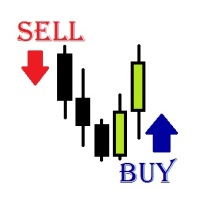
Scalp Signal with SL TP detects high-probability reversal entries by combining RSI extremes with candlestick patterns. It prints buy/sell arrows on chart with auto-calculated SL and 3 TP levels based on ATR.
Built for scalping and intraday trading on MT5.
Signal Types
The indicator generates 3 types of signals. Each requires RSI to be at an extreme level before triggering.
1. Engulfing (Default: ON) The primary and strongest signal. A bullish engulfing candle forms while RSI is at or just left oversold territory — or a bearish engulfing while RSI is at/just left overbought. This captures momentum shifts confirmed by price action.
- Buy: Current close > previous open + previous candle was bearish + RSI ≤ 15 (current or prior bar)
- Sell: Current close < previous open + previous candle was bullish + RSI ≥ 85 (current or prior bar)
2. Hammer / Shooting Star (Default: OFF) Detects single-bar reversal patterns using a Fibonacci body ratio. A hammer with a tiny body near the high during oversold RSI suggests buyers stepped in. A shooting star with body near the low during overbought RSI suggests rejection.
- Buy: Hammer pattern + RSI ≤ 15
- Sell: Shooting star + RSI ≥ 85
3. Two Bull/Bear Bars (Default: OFF) Two consecutive bullish candles while RSI is oversold, or two consecutive bearish candles while RSI is overbought. This confirms sustained directional pressure at extremes.
- Buy: 2 green bars + RSI ≤ 15
- Sell: 2 red bars + RSI ≥ 85
You can enable multiple signal types simultaneously. Engulfing alone works well for most traders.
SL & TP Logic (ATR-Based)
Every signal automatically draws SL and 3 TP levels using ATR (default period: 14). This adapts to current volatility — wider stops in volatile markets, tighter in calm ones.
| Level | Default Multiplier | Purpose |
| SL | ATR × 1.5 | Stop loss — room for noise without excessive risk |
| TP1 | ATR × 1.0 | Conservative target — secure partial profit early |
| TP2 | ATR × 2.0 | Main target — where most of the position closes |
| TP3 | ATR × 3.0 | Extended target — let runners ride with trailing |
Example: If ATR = 20 pips on EUR/USD M15, a buy signal at 1.08500 gives:
- SL: 1.08200 (30 pips)
- TP1: 1.08700 (20 pips)
- TP2: 1.08900 (40 pips)
- TP3: 1.09100 (60 pips)
All multipliers are adjustable in settings.
Recommended Settings by Style
Aggressive Scalping (M1–M5)
- RSI Length: 5–7
- RSI Levels: 80/20
- ATR Period: 10
- SL: ATR × 1.0
- TP1/TP2/TP3: 0.8 / 1.5 / 2.0
- Signals: Engulfing ON, others optional
Standard Scalping (M15–M30)
- RSI Length: 7 (default)
- RSI Levels: 85/15 (default)
- ATR Period: 14
- SL/TP: Default multipliers
- Signals: Engulfing ON
Intraday Swing (H1–H4)
- RSI Length: 9–14
- RSI Levels: 80/20
- ATR Period: 14–20
- SL: ATR × 2.0
- TP1/TP2/TP3: 1.5 / 3.0 / 4.5
- Signals: All three ON
How to Trade — Step by Step
Entry
- Wait for an arrow to appear on a closed bar. Do not act on the current forming bar.
- Check the signal label for entry price.
- Enter at market or set a limit order near the signal price.
Position Management
- Set SL at the drawn SL line immediately.
- At TP1 — close 30-50% of position, move SL to breakeven.
- At TP2 — close another 30-40%, trail SL behind recent swing.
- At TP3 — close remaining position or continue trailing.
Filters (Recommended)
- Trade in the direction of the higher timeframe trend. If H4 is bearish, prioritize sell signals on M15.
- Avoid signals during major news releases (NFP, FOMC, CPI).
- Skip signals with unusually small candles — they often lack conviction.
- Best pairs: major forex pairs, gold, and indices with good liquidity.
Key Settings Reference
| Parameter | Default | Description |
| RSI Length | 7 | Shorter = more reactive, noisier |
| RSI Overbought | 85 | Higher = fewer but stronger sell signals |
| RSI Oversold | 15 | Lower = fewer but stronger buy signals |
| Hammer Body Ratio | 0.333 | Smaller = stricter hammer detection |
| ATR Period | 14 | Period for volatility measurement |
| SL Multiplier | 1.5 | Distance of stop loss in ATR units |
| TP1/TP2/TP3 | 1.0/2.0/3.0 | Take profit distances in ATR units |
| Max Calc Bars | 500 | Limits calculation range for speed |
| Show SL/TP Lines | ON | Draw SL/TP levels on chart |
| Alert Enabled | ON | Pop-up + push notification on signal |
Recommended Companion Toolkits
Scalp Signal with SL TP is a signal generator — it tells you when and where to enter. To build a complete trading workflow, pair it with these toolkits based on your needs.
1. One-Click Trade Panel ⭐ HIGHLY RECOMMENDED
Why you need it: When a signal fires, speed matters. The indicator shows you the entry price and SL/TP levels, but manually typing lot size, SL, and TP into the order window costs precious seconds — especially on M1–M15 where price moves fast.
What it does: A one-click panel lets you execute buy/sell with pre-configured lot size, SL, and TP in a single click. Many panels support risk-based lot calculation (e.g., "risk 1% of balance per trade") and can read price levels directly from chart lines.
How to combine:
- Read the SL/TP lines drawn by the indicator.
- Set your risk % or fixed lot on the panel.
- When a signal arrow appears on a closed bar, one-click to execute.
- This cuts execution from 10-15 seconds down to under 2 seconds.
Priority: Essential for manual scalping. If you only add one toolkit, make it this one. Without it, you risk entering late or mistyping SL/TP levels under pressure.
2. Trailing Stop & Breakeven Manager ⭐ RECOMMENDED
Why you need it: The indicator draws 3 TP levels for a reason — the strategy works best when you scale out gradually. But manually moving SL to breakeven at TP1, then trailing behind swings toward TP2 and TP3, requires constant chart monitoring. This is impractical if you trade multiple pairs or cannot watch the screen non-stop.
What it does: Automatically moves your stop loss based on rules you define. Typical features include breakeven trigger (move SL to entry when price reaches TP1), step trailing (trail SL by X pips as price moves in your favor), and ATR-based trailing.
How to combine:
- Set breakeven trigger at TP1 distance (ATR × 1.0 from entry).
- Set trailing step to activate after TP1 is hit.
- Let the manager handle TP2 → TP3 zone automatically while you focus on new signals.
Priority: Highly recommended for multi-pair traders and anyone who cannot monitor charts full-time. Less critical if you only trade one pair and can watch every tick. The partial close at TP1 + trail to TP2/TP3 approach is where most of the strategy's edge comes from, so automating this step protects your profits.
3. Trade Journal & Dashboard 📋 NICE TO HAVE
Why you need it: The indicator does not track historical performance — it only shows signals in real time. Without journaling, you have no way to know your actual win rate, average R:R, which signal type performs best, or which sessions/pairs give you the best results.
What it does: Logs every trade automatically (entry, exit, SL hit, TP hit, duration, profit/loss) and presents statistics. Good journals show metrics like win rate by signal type, profit factor, drawdown, and performance by session or day of week.
How to combine:
- Tag each trade with the signal type (Engulfing, Hammer, 2-Bar) to compare performance.
- Review weekly: if Hammer signals show <40% win rate on your pair, consider disabling them.
- Track which timeframe and session gives you the best results — then double down on those.
Priority: Important for long-term improvement, but not urgent for day-to-day execution. You can start trading without a journal, but you should add one within your first 2-4 weeks. Traders who journal consistently improve significantly faster because they make data-driven decisions instead of guessing.
Toolkit Priority Summary
| Toolkit | Priority | When to Add | Impact |
| One-Click Trade Panel | ⭐ Essential | Day 1 | Fast execution, fewer errors |
| Trailing Stop & BE Manager | ⭐ Recommended | Day 1–7 | Protects profits automatically |
| Trade Journal & Dashboard | 📋 Nice to Have | Week 2–4 | Long-term performance optimization |
Minimum viable setup: Scalp Signal with SL TP + One-Click Panel. This covers signal generation and fast execution. Add the trailing manager when you start trading multiple pairs, and the journal when you want to optimize your edge.
Tips
- RSI 85/15 is strict by design. It filters out most noise but means fewer signals. If your pair rarely hits these levels on your timeframe, loosen to 80/20.
- The "Max Calc Bars" setting (default 500) limits how far back the indicator calculates. Set to 0 for full history, but 500 is enough for live trading and keeps the chart fast.

- ATR-based SL/TP automatically adjusts to session volatility. London and New York sessions will produce wider levels than Asian session — this is correct behavior.
- Combine with support/resistance or supply/demand zones for higher conviction entries.
- Always use proper risk management: 1-2% of account per trade maximum.
Scalp Signal with SL TP is a signal indicator, not an automated trading system. All trading decisions and risk management are the trader's responsibility. Past signals do not guarantee future results.