Smart SR Levels
- Indicatori
- Versione: 1.10
- Aggiornato: 12 febbraio 2026

⚡ WANT TO AUTOMATE THESE ZONES? ⚡ Stop waiting for setups! The Smart SR Levels Sniper EA is now live. It reads these exact indicator zones, filters for high-probability "thin" zones , auto-calculates your risk , and targets the next SR levels for Take Profit . It can even scan all your open charts at once!
Stop guessing where the market will turn. Let the volatility tell you.
🔗 Smart SR Levels Sniper EA https://www.mql5.com/en/market/product/165191
LogicLadder SR Zones
-----------------------------
LogicLadder SR Zones is not just another "line drawing" tool. It is an intelligent market structure analyzer that adapts to market volatility (ATR) to draw high-probability Support and Resistance zones automatically.
Unlike standard indicators that draw thin, useless lines, this tool understands that price is a zone, not a number.
📊 The Secret of Zone Thickness (Why Size Matters)
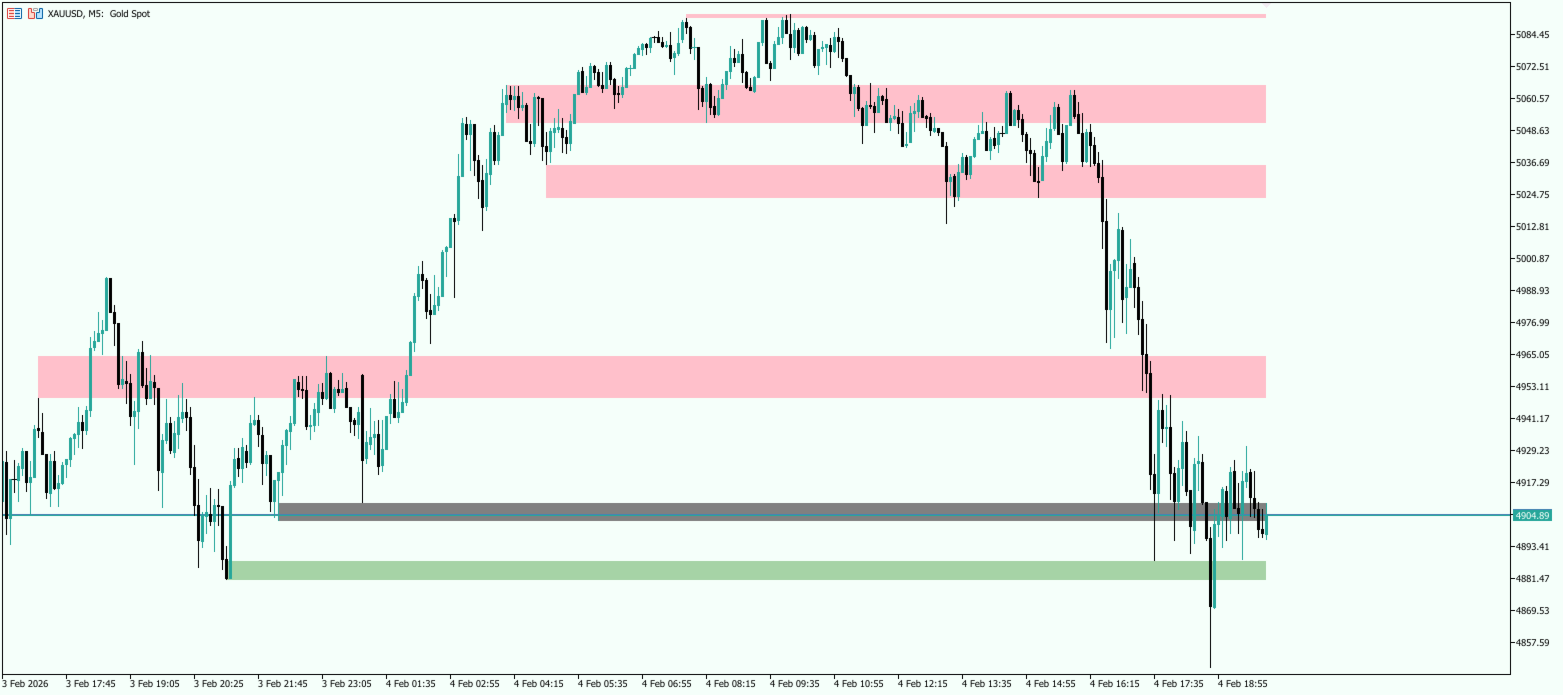
One of the most powerful features of this indicator is the varying thickness of the zones. This is not random—it is calculated using the Average True Range (ATR) to tell you the story of the market.
-
⚡ Thin Zones (Precision Levels): Created by sharp, V-shape reversals. These represent clear decisions by the market. Perfect for Sniper Entries.
-
🧱 Thick Zones (Battlefields): Created when price pivots multiple times in a general area. These represent high-volume accumulation/distribution blocks. Strategy: Never trade in the middle of a thick zone—trade the edges!
🎨 Visual Intelligence: What the Colors Mean
The zones change color dynamically based on live price action, keeping your charts clean and your decisions fast.
-
🟢 Green (Active Support): Price is Above. The floor is held by buyers. Look for Buys on dips.
-
🔴 Pink (Active Resistance): Price is Below. The ceiling is held by sellers. Look for Sells on rallies.
-
⚪ Gray (The "No-Trade" Zone): Price is Inside the zone. The market is fighting. WAIT for the zone to turn Green or Pink before acting. This unique feature prevents over-trading in choppy conditions.
🎯 Best Areas to Trade (Strategy Guide)
1. The "Fresh Touch" (Reversal) The most powerful reaction happens on the first return to a zone.
-
Strategy: If price approaches a Zone that hasn't been touched in a long time, place a pending order at the edge.
2. The "Zone Flip" (Break & Retest)
-
Strategy: When a Pink Resistance Zone is broken, it stays on the chart and flips to Green Support.
-
Trigger: Wait for a bullish candle pattern to bounce off the new Green zone.
3. The "Trap" (Thick Zone Fake-out)
-
Strategy: Price often pokes into a Thick Zone to grab liquidity.
-
Rule: If trading a Thick Zone, put your Stop Loss well behind the zone, not just at the edge. Give the trade room to breathe.
⚙️ Key Features & Parameters
-
Smart Merging: Automatically groups messy highs/lows into clean, actionable blocks.
-
Noise Filtering: "Minimum Touches" filter hides weak levels.
-
Non-Repainting: Once a zone is confirmed, it stays fixed.
Parameters:
-
SR BackBars : History depth to scan (default: 300).
-
Pivot Strength : Sensitivity of reversals (Higher = Major levels only).
-
Min Touches : Confirmation filter.
Take the emotion out of your analysis. Trade the Zones.
Here is why you need the EA to complete your system:
| Feature | 👁️ Free Indicator | 🤖 Sniper EA (Paid) |
| Visual Zones | ✅ Draws Zones perfectly | ✅ Reads Zones internally |
| Alerts | ✅ Sends Popups/Push | ✅ Executes the Trade |
| Availability | ❌ You must be at PC | ✅ Trades while you sleep |
| Emotions | ❌ Fear of pulling the trigger | ✅ Zero Hesitation |
| Risk Mgmt | ❌ Manual Calculation | ✅ Auto-Lots (Risk %) |
| Multi-Chart | ❌ Watch 1 chart at a time | ✅ Scans 20+ pairs instantly |
The Perfect Ecosystem: Use the Free Indicator to visually double-check the market and let the EA handle the speed and precision of entry.