AutoECPointer
- Utilità
- Versione: 1.0

# AutoECPointer
**AutoECPointer** stands for **Auto Entry Close Pointer**.
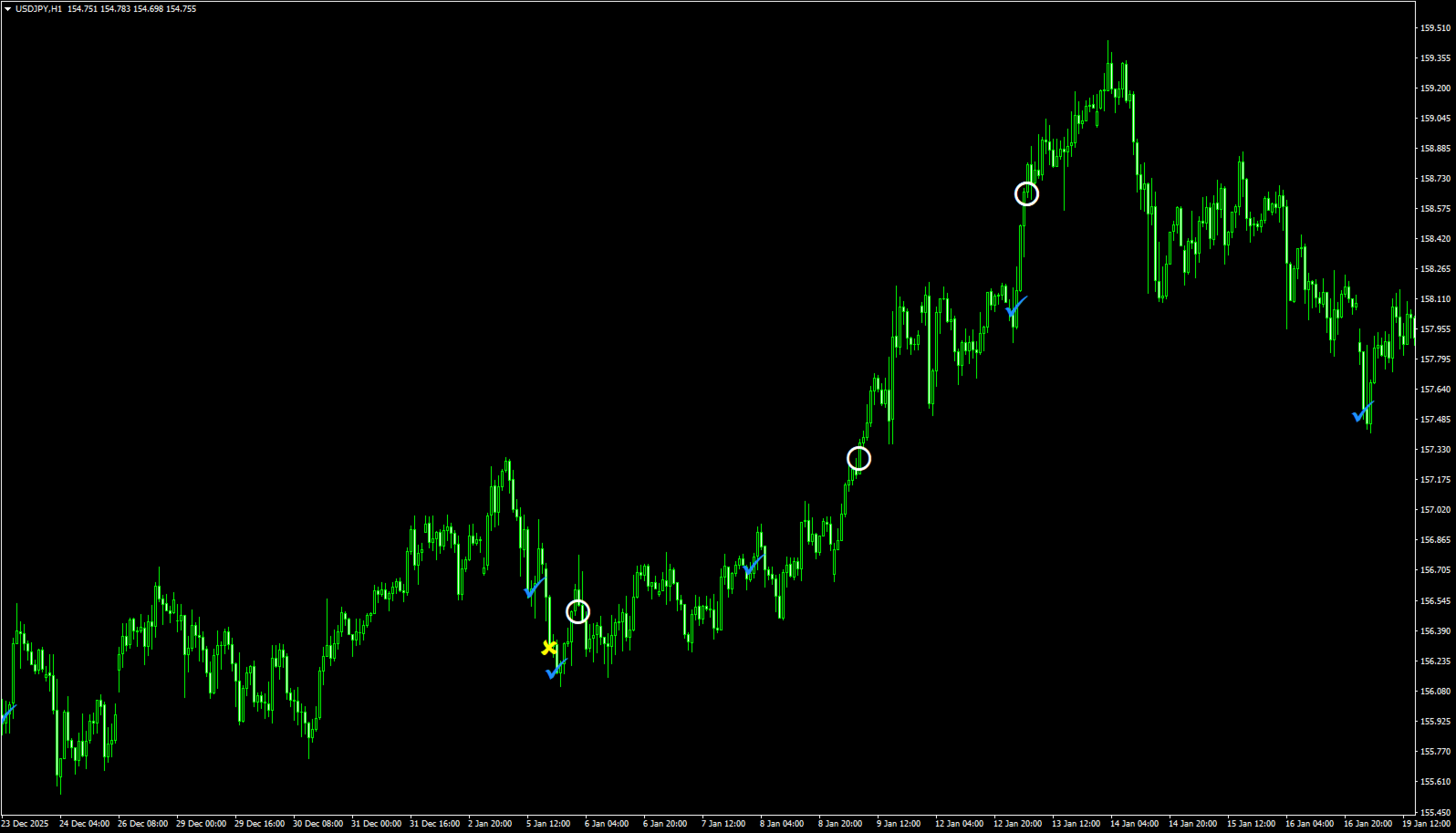
AutoECPointer is a custom indicator for MetaTrader 4 (MT4) designed to visualize your trade history directly on the chart. It automatically draws arrows for trade entries and exits, distinguishing between profitable and losing trades, helping traders review their past performance visually.
## Features
- **Automatic History Visualization**: Scans account history and plots trades on the chart.
- **Entry & Exit Markers**: Clearly marks where trades were opened and closed.
- **Profit/Loss Distinction**: Uses different colors and arrow codes to distinguish between winning and losing trades.
- **Auto-Update**: Periodically checks for new history updates (default every 5 seconds).
- **Customizable Appearance**: Fully customizable arrow codes, colors, and sizes.
- **Filtering Options**:
- Show trades only for the current symbol or all symbols.
- Filter trades by time (lookback period).
## Installation
1. Download `AutoECPointer.mq4`.
2. Open your MetaTrader 4 terminal.
3. Go to `File` -> `Open Data Folder`.
4. Navigate to `MQL4` -> `Indicators`.
5. Copy `AutoECPointer.mq4` into this folder.
6. Restart MT4 or right-click `Indicators` in the Navigator panel and select `Refresh`.
7. Drag and drop `AutoECPointer` from the Navigator onto your chart.
## Parameters
| Parameter | Type | Default | Description |
|-----------|------|---------|-------------|
| **EntryArrowCode** | `int` | `252` | Arrow code used for trade entries. |
| **EntryBuyColor** | `color` | `clrDodgerBlue` | Color for Buy entry arrows. |
| **EntrySellColor** | `color` | `clrRed` | Color for Sell entry arrows. |
| **CloseWinArrowCode** | `int` | `116` | Arrow code for profitable closes. |
| **CloseWinColor** | `color` | `clrWhite` | Color for profitable closes. |
| **CloseLossArrowCode** | `int` | `251` | Arrow code for losing closes. |
| **CloseLossColor** | `color` | `clrYellow` | Color for losing closes. |
| **OnlyCurrentSymbol** | `bool` | `true` | If `true`, only shows trades for the current chart symbol. |
| **LookbackDays** | `int` | `365` | Number of days to look back in history. |
| **UpdateSeconds** | `int` | `5` | Refresh interval in seconds. |
| **ArrowSize** | `int` | `1` | Size (width) of the arrows. |
| **PriceOffsetPoints** | `int` | `0` | Offset in points to shift arrows away from price (prevents overlap). |
## Usage
Once attached to a chart, the indicator will automatically draw arrows for past trades found in your account history that match the filter criteria.
- **Entry Arrows**: Indicate the point of market entry.
- **Close Arrows**: Indicate where the position was closed.
- **Start (Entry)**: Blue (Buy) / Red (Sell) by default.
- **End (Close)**: White (Win) / Yellow (Loss) by default.
Adjust `PriceOffsetPoints` if you find the arrows are overlapping too much with the candlesticks.
## Uninstallation
To remove the indicator, right-click on the chart, select `Indicators List`, select `AutoECPointer`, and click `Delete`.
---
**Author**: Sano