TrendPulse Ultimate
- Experts
- Versione: 1.2
- Attivazioni: 5

TrendPulse Ultimate - Professional Swing Trading Expert Advisor
What is TrendPulse Ultimate?
TrendPulse Ultimate is a sophisticated Expert Advisor designed for traders who want to capture high-probability trend moves with precision and professional risk management.
Unlike basic trend-following EAs, TrendPulse Ultimate waits for strong momentum pulses before entering, ensuring you're trading with the market's energy, not against it. The intelligent fractal-based stop loss adapts to actual market structure, providing optimal protection while giving your trades room to breathe.
Key Features
Smart Entry System
- Trend Confirmation - Uses Moving Average (50 period) to identify market direction
- Momentum Pulse Detection - Requires minimum pip movement before entry
- Time-Based Filtering - Prevents overtrading with configurable time between trades
- Dual Confirmation - Only enters when trend AND momentum align perfectly
Intelligent Stop Loss Management
- Fractal-Based Stops - Uses actual price swings for logical stop placement
- ATR Fallback - Automatically switches to ATR if no valid fractal found
- Minimum Stop Protection - Prevents stops that are too tight
- Adapts to Volatility - Adjusts to current market conditions
Professional Risk Management
- Position Sizing - Automatically calculates lot size based on % of balance
- Risk/Reward Ratio - Configurable R:R (default 1:1)
- Daily Loss Limit - Optional daily loss protection (% based)
- Consistent Risk - Never risks more than your defined percentage
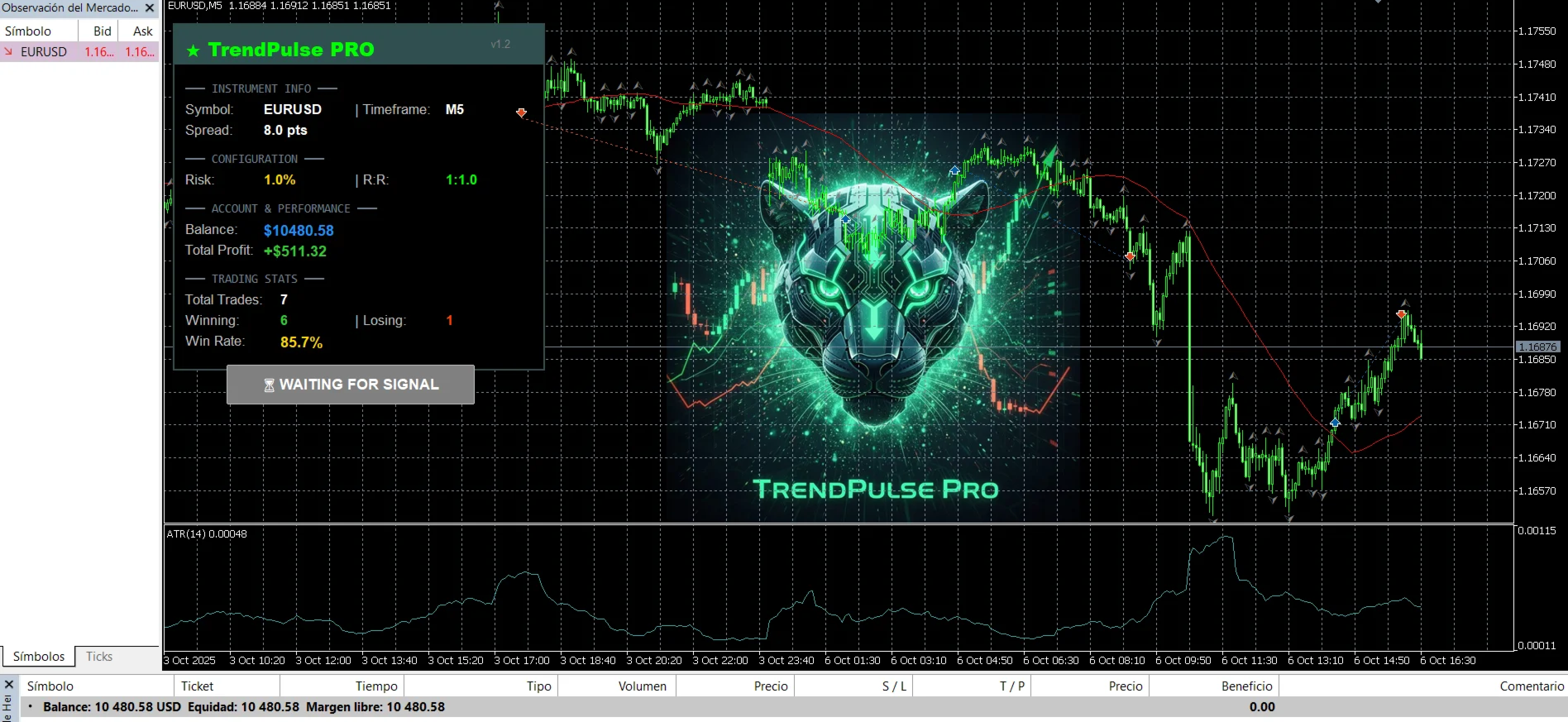
Real-Time Dashboard
- Live Performance Tracking - Win rate, total profit, trade count
- Current Signal Status - Visual indicator of active positions
- Account Information - Balance, spread, timeframe
- Configuration Display - Current risk settings at a glance
Trading Strategy
TrendPulse Ultimate combines three powerful concepts:
1. TREND - Uses Moving Average to identify market direction
2. PULSE - Waits for momentum confirmation before entry
3. PROTECTION - Uses fractals for logical, structure-based stop placement
This creates a complete professional trading system that:
✓ Follows the trend (not counter-trend)
✓ Enters on momentum (not during consolidation)
✓ Protects capital (intelligent stop placement)
✓ Manages risk (automatic position sizing)
Main Parameters
Trend Configuration
- MA Period (default: 50) - Moving Average period for trend detection
- MA Method (default: SMA) - Calculation method
Entry Filters
- Min Pips Move (default: 10) - Minimum momentum required
- Minutes Between Trades (default: 20) - Time filter to prevent overtrading
Stop Loss Settings
- Use Fractal SL (default: true) - Enable intelligent fractal stops
- Fractal Lookback (default: 200) - Bars to search for fractals
- ATR Multiplier (default: 1.5) - ATR multiplier for fallback
- Min SL Pips (default: 20) - Minimum stop loss distance
Risk Management
- Risk Percent (default: 1.0) - Risk per trade in % of balance
- Risk/Reward (default: 1.0) - Target profit as multiple of risk
- Max Daily Loss % (default: 2.0) - Optional daily loss limit
Technical Specifications
- Platform: MetaTrader 5 only
- Minimum Balance: $500 recommended
- Timeframe: M5 (optimized and recommended)
- Instruments: All major forex pairs
- Execution: Market orders with SL/TP
- Max Positions: 1 per symbol
Recommended Settings
Conservative (Beginners)
- Risk: 0.5% - 1.0%
- R:R: 2.0 - 3.0
- Daily Loss Limit: 2.0% - 3.0%
Moderate (Balanced)
- Risk: 1.0% - 2.0%
- R:R: 1.5 - 2.0
- Daily Loss Limit: 3.0% - 5.0%
Aggressive (Experienced)
- Risk: 2.0% - 3.0%
- R:R: 1.0 - 1.5
- Daily Loss Limit: 5.0% - 10.0%
Important Notes
⚠ This EA is not a "holy grail" - it follows a specific trend-following strategy
⚠ Best results in trending markets (not ideal for ranging/sideways)
⚠ Always test on demo account first for at least 2-4 weeks
⚠ Use proper risk management (1-2% per trade recommended)
⚠ VPS recommended for 24/7 operation
⚠ Past performance does not guarantee future results
⚠ Trading carries risk - never invest more than you can afford to lose
Getting Started
1. Install the EA in MetaTrader 5
2. Test on demo account with default settings
3. Optimize parameters for your trading style
4. Monitor performance for 2-4 weeks
5. Go live with proper risk management
Best Practices
✓ Start with demo account
✓ Use recommended risk settings (1-2%)
✓ Trade on M5 timeframe
✓ Focus on major pairs with low spreads (confirmed: EURUSD).
✓ Use VPS for continuous operation
✓ Monitor and adjust based on performance
Professional trend following. Intelligent risk management. Real results.