CandleFrame Sync
- Indicatori
- Versione: 1.0

✅ Short Market Description (recommended)
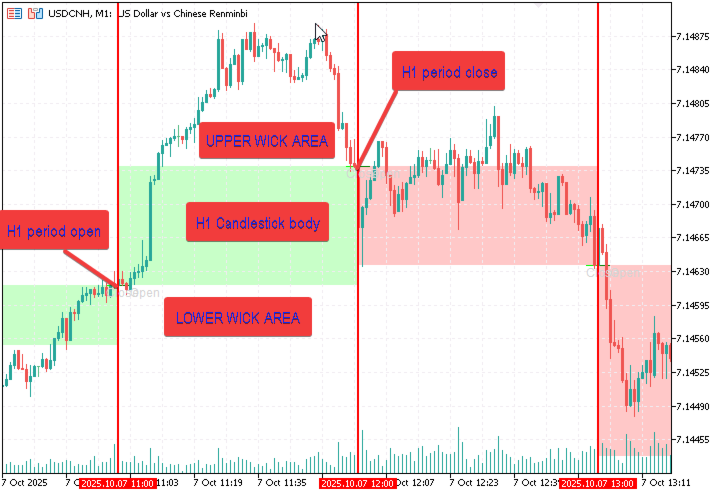
Market Periods Synchronizer highlights higher-timeframe (HTF) sessions directly on your current chart, so you can trade the lower timeframe with full higher-timeframe context.
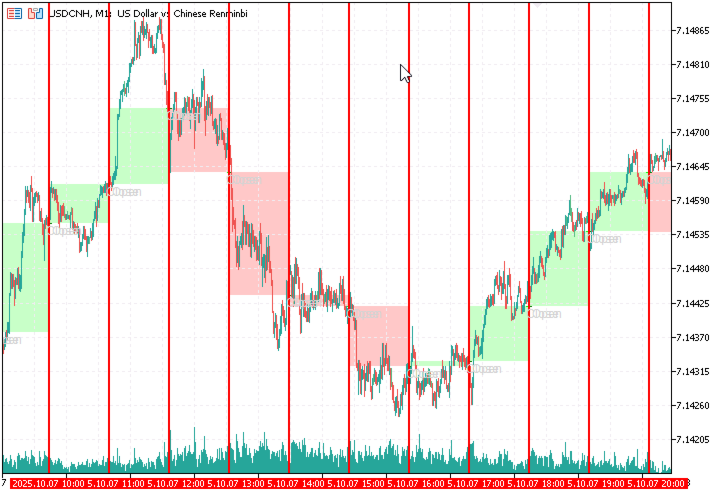
Draws vertical lines for each HTF bar (e.g., H1 on an M5 chart)
Optional body fill (green for bullish, red for bearish) for each HTF candle
Optional Open/Close markers with labels to spot key reference levels fast
Optional minor-timeframe dividers (e.g., M30 & M15) only inside each HTF bar
Auto refresh every N seconds; cleans up old objects to keep charts tidy
Why it helps
See structure, levels, and timing of higher-timeframe candles without switching charts—great for intraday timing, breakout windows, and session-based strategies.
How to use
Attach to any symbol/timeframe.
Set Higher TF (e.g., H1).
Toggle body fill and Open/Close markers as you prefer.
(Optional) Enable Minor 1/2 to subdivide each HTF bar.
Inputs (quick)
Higher TF, Lookback, Refresh Sec
ShowFill, Bull/Bear Colors
ShowOpenClose, style/length
ShowMinor1/2 with colors & widths
Lightweight, no trading signals, works with any broker/symbol.
🧩 Full Description (optional, for details section)
What it is
Market Periods Synchronizer overlays your current chart with the exact boundaries of a selected Higher Timeframe (HTF). It draws:
A vertical line at the start of each HTF candle
An optional filled rectangle covering the HTF candle’s price body (bullish/green, bearish/red)
Optional Open and Close horizontal markers with labels
Optional Minor TF vertical dividers (e.g., M30/M15) strictly inside each HTF candle—no clutter, no overlaps
Key Benefits
Trade the micro with macro context always visible
Fast visual read of Open/Close levels for the current/previous HTF bar
Clean sub-division of each HTF candle into minor windows for timing entries/exits
Automatic refresh and self-cleaning of old objects to keep the chart responsive
Typical Setups
Scalpers/Day traders: Major = H1, Minor1 = M30, Minor2 = M15 on M5/M1 charts
Intraday swing: Major = H4, Minor1 = H1 on M15/M5
Session mapping: Major = D1 with Open/Close markers on M15
How it works (under the hood)
The indicator copies times, opens, and closes of the chosen Higher TF, draws vertical markers and optional rectangles for body fill, then (if enabled) copies Minor TF times and creates vertical markers only when they fall strictly between two adjacent HTF times. A periodic timer (Refresh Sec) updates drawings; unmanaged objects are removed to avoid clutter.
Performance Tips
Large Lookback + very low chart TF can create many objects → start with 100–200.
Keep Refresh Sec ≥ 3–5s unless you truly need faster updates.
Enabling both minors on very low TFs increases object count; use as needed.
What it is NOT
No buy/sell signals, no alerts, no backtesting stats—pure visual context tool.
🛠 Inputs & Parameters
Input Description
InpHigherTF Higher timeframe to project (e.g., H1, H4, D1).
InpLookback Number of HTF bars to draw (recommended 100–200 to start).
InpRefreshSec Auto-refresh interval in seconds (≥1).
InpColorMajor / InpWidthMajor Style of HTF vertical dividers.
InpShowFill Toggle body fill rectangles per HTF candle.
InpFillBull / InpFillBear Fill colors for bullish/bearish HTF bodies.
InpShowOpenClose Toggle Open/Close horizontal markers.
InpColorOpen / InpColorClose Colors for Open/Close lines.
InpWidthOC / InpStyleOC Width/style of Open/Close lines.
InpHorizOffsetBars Horizontal length (in current chart bars) for the Open/Close lines.
InpShowMinor1 / InpMinor1TF Enable Minor-1 grid and choose its timeframe.
InpColorMin1 / InpWidthMin1 Style for Minor-1 vertical lines.
InpShowMinor2 / InpMinor2TF Enable Minor-2 grid and choose its timeframe.
InpColorMin2 / InpWidthMin2 Style for Minor-2 vertical lines.
Note: The indicator creates chart objects (VLINE, RECTANGLE, TREND, TEXT). It also includes a hidden/dummy plot to satisfy platform requirements—no values are drawn on the indicator pane.
💡 Examples
H1 on M5 (day trading):
Higher TF = H1, ShowFill = true, ShowOpenClose = true, Minor1 = M30, Minor2 = M15, Lookback = 150, Refresh Sec = 5.
D1 on M15 (session framing):
Higher TF = D1, ShowOpenClose = true, ShowFill = false, Minor1 = H4, Lookback = 60.
❓FAQ
Q: Will it repaint?
A: HTF markers update only when the HTF bar opens/closes. The shapes reflect real HTF opens/closes—no signal logic, so “repaint” isn’t applicable.
Q: Does it slow my chart?
A: It’s lightweight, but creating many objects can impact very low TFs. Reduce Lookback, disable unused minors, or increase Refresh Sec.
Q: Works on offline/renko charts?
A: It relies on standard timeframe series. Custom/offline charts may not be supported by all brokers.
🧾 Change Log
v1.0 – Initial release: HTF dividers, optional body fill, Open/Close markers with labels, Minor-TF dividers, timed auto-refresh & cleanup.