Delta Quantum
- Experts
-
Ioannis Xenos
 Hi! My name is Ioannis Xenos. As a Professional MQL Developer with over 12 years of experience in the IT industry, I have a strong track record of success in developing and implementing software solutions for financial services companies, including whenfx.com, ditto.trade, FXTRADING.com and two
 - Versione: 1.0
- Attivazioni: 5
Delta Quantum EA by Xignal Coding
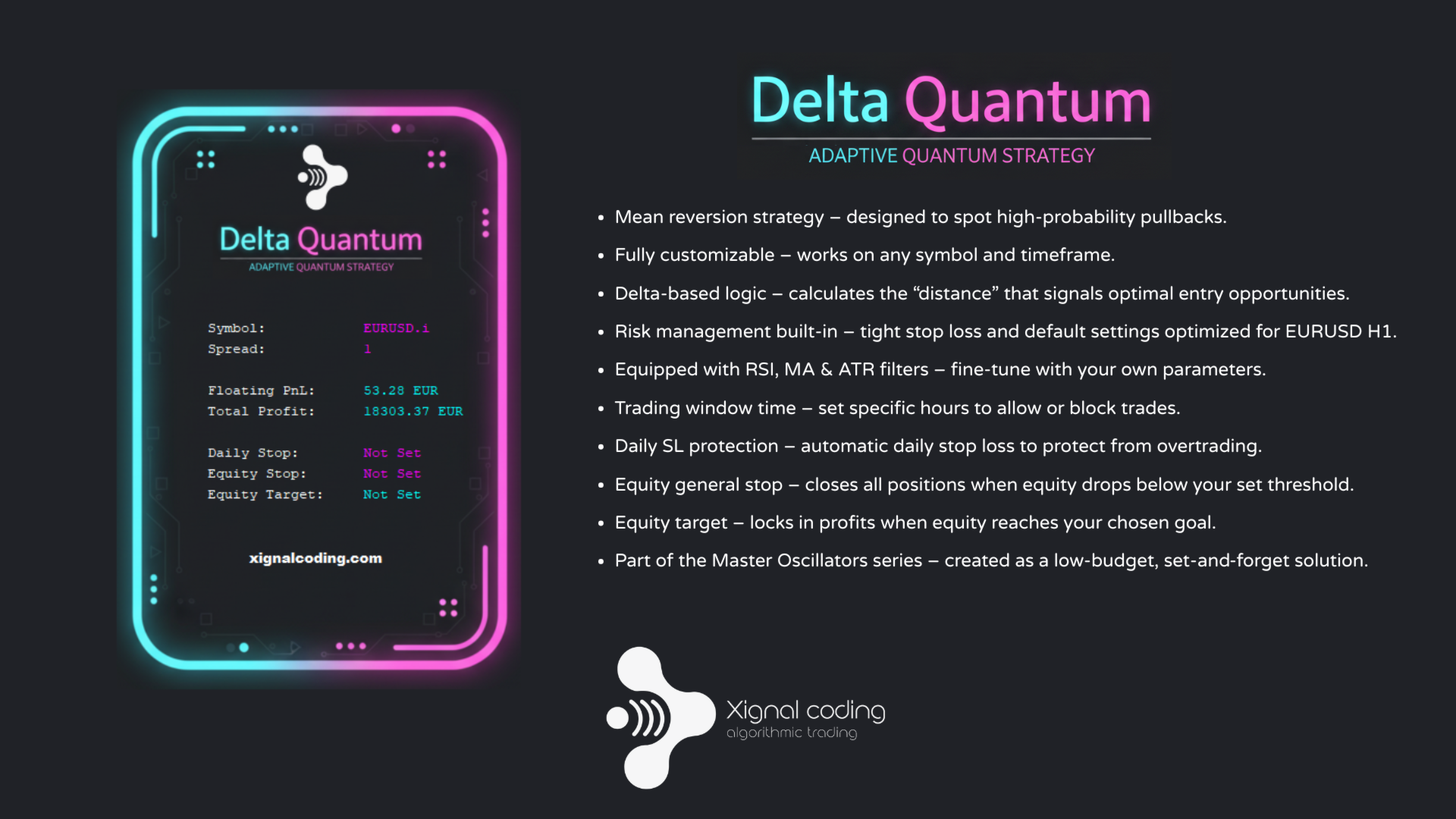
Delta Quantum is a mean reversion Expert Advisor designed for traders who want both simplicity and power.
It calculates the Delta (distance) – a unique measurement that highlights potential turning points in the market – and uses this as a signal for precise entries.
Why choose Delta Quantum?
-
Beginner-friendly with ready-to-use defaults for EURUSD H1.
-
Advanced customization for traders who want to take it to the next level.
-
Runs on multiple assets, allowing you to build a portfolio strategy.
-
Works on any symbol and timeframe.
Strategy & Filters
-
Two different types of Stop Loss (choose the one that fits your style, or create your own set).
-
RSI, Moving Average and ATR filters for extra precision.
-
Tight stop loss ensures controlled risk from the start.
Risk & Money Management
-
Trade window – define the hours when the EA is allowed to open positions.
-
Daily Stop Loss protection – avoid overtrading in volatile markets.
-
Equity General Stop – closes all trades when equity falls below your set limit.
-
Equity Target – lock in profits when your goal is reached.
Part of the Master Oscillators Series, Delta Quantum is your low-budget, set-and-forget solution – yet powerful enough for experienced traders to customize and scale.
Delta Quantum Inputs
Position Settings
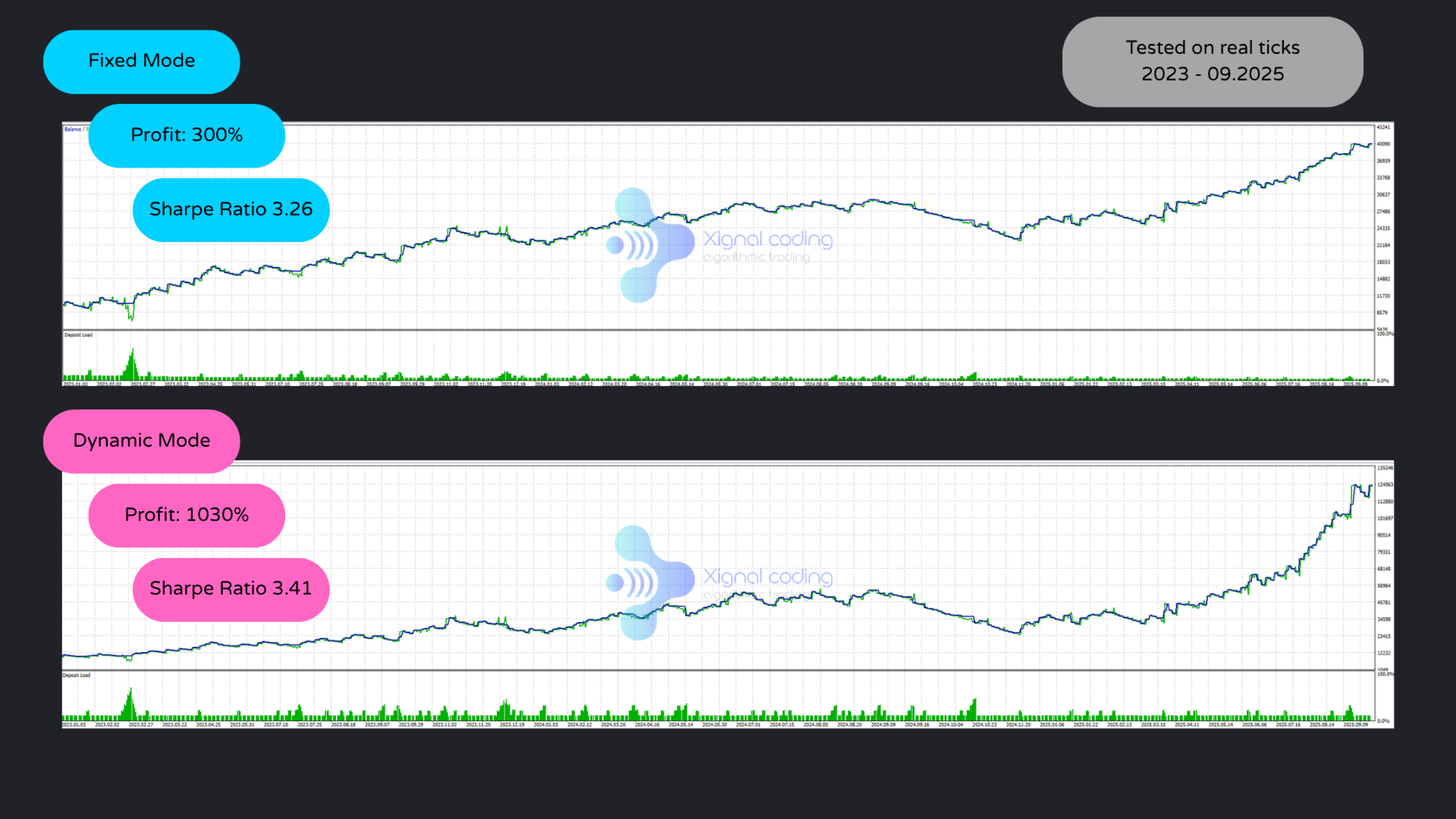
- Lot Size Mode: You can select between Fixed Lot and Dynamic Lot per 10,000 of your account currency. With the dynamic mode, the lot increases (or decreases) together with your account balance.
- Lot Size: The Lot Size of your choice
- Magic Number: Remember to change it if you want to trade more assets and/or timeframes at the same time
- Expert Deviation in points: How much slippage you want to allow to your broser for the order execution
- Trade window start time: When you want to start trading (string format)
- Trade window end time: When you want the EA to stop placing new positions
- Close positions at the end time: If true, all positions are gonna close at the end time
Strategy Settings
- RSI period
- RSI calculation method
- MA period
- MA calculation method
- MA timeframe
- Stoploss method: You can select between Points, ATR, Xignal Method (tight - recomended) and No Stoploss (not recommended)
- Stoploss points or ATR multiplier: In case you selected points or ATR above
- Stoploss extra gap in points: Used in xignal stoploss method. It adds some extra points
- Minimum Delta distance: A minimum distance to open your positions. Only in points
- ATR period: For your stoploss (if selected)
- ATR timeframe
Account Protection Settings
- Daily Stop in %: It updates every new day (brokers time). If you lose more than this %, the EA is gonna close all positions and it start trading teh next day
- Equity Stop: An absolute value of your account currency. If you drop below this, the EA is gonna close all open positions and it is gonna exit
- Equity Target: Absolute value again here. If you reach a specific target, the program is gonna close all open positions and it is gonna stop trading.
General Inputs
- Show dashboard: Turn it to false when backtesting. It will make the process much faster.
Disclaimer
Trading Forex and CFDs involves significant risk and may not be suitable for all investors. Past performance is not indicative of future results. This Expert Advisor provides automated trading based on user-defined parameters, but it does not guarantee profits or protect against losses. Always test on a demo account before using it on a live account, and never trade with money you cannot afford to lose. The author assumes no responsibility for any financial losses incurred.