 MetaTrader 5
 Sistemi Esperti
 Indicatori
 Script
 Librerie
 Archiviazione
Guarda come scaricare robot di trading gratuitamente
Ci trovi su Facebook!
Unisciti alla nostra fan page
Unisciti alla nostra fan page
Ti è piaciuto lo script? Provalo nel Terminale MetaTrader 5

Exp_ColorZerolagMomentum_X2 - sistema esperto per MetaTrader 5

- Visualizzazioni:
- 5097
- Valutazioni:
- Pubblicato:
- Aggiornato:
-
 Ti stai perdendo delle opportunità di trading:
- App di trading gratuite
- Oltre 8.000 segnali per il copy trading
- Notizie economiche per esplorare i mercati finanziari
Registrazione AccediAccetti la politica del sito e le condizioni d’uso
Se non hai un account, registrati -
 Hai bisogno di un robot o indicatore basato su questo codice? Ordinalo su Freelance
Vai a Freelance
The Exp_ColorZerolagMomentum_X2 trend trading system based on the signals from two ColorZerolagMomentum indicators. The first indicator determines the direction of the slow trend based on the position of the main and signal lines. The second indicator determines the moment for opening a trade, when the lines are crossed or touched. The signal is formed when a bar is closing if two conditions are met:
- Signals of the fast and slow trend match;
- Direction of the fast trend has changed.
Input parameters for the Expert Advisor:
//+-------------------------------------------------+
//| Input parameters of the EA indicator |
//+-------------------------------------------------+
input string Trade="Trade management"; //+============== TRADE MANAGEMENT ==============+
input double MM=0.1; //Share of a deposit in a deal
input MarginMode MMMode=LOT; //lot value detection method
input uint StopLoss_=1000; //Stop Loss in points
input uint TakeProfit_=2000; //Take Profit in points
input string MustTrade="Trade permissions"; //+============== TRADE PERMISSION ==============+
input int Deviation_=10; //max. price deviation in points
input bool BuyPosOpen=true; //Permission to enter long position
input bool SellPosOpen=true; //Permission to enter short position
//+-------------------------------------------------+
//| Input parameters of the filter indicator |
//+-------------------------------------------------+
input string Filter="PARAMETERS FOR SLOW TREND"; //+============== PARAMETERS FOR SLOW TREND ==============+
input ENUM_TIMEFRAMES TimeFrame=PERIOD_H6; //1 Chart period for the trend
input uint smoothing=15;
input ENUM_APPLIED_PRICE IPC=PRICE_CLOSE;//Applied price
//----
input double Factor1=0.05;
input uint Momentum_period1=8;
//----
input double Factor2=0.10;
input uint Momentum_period2=21;
//----
input double Factor3=0.16;
input uint Momentum_period3=34;
//----
input double Factor4=0.26;
input int Momentum_period4=55;
//----
input double Factor5=0.43;
input uint Momentum_period5=89;
input uint SignalBar=1; //bar index for getting an entry signal
input bool BuyPosClose=true; //Permission to exit long positions by trend
input bool SellPosClose=true; //Permission to exit short positions by trend
//+-------------------------------------------------+
//| Input parameters of the entry indicator |
//+-------------------------------------------------+
input string Input="ENTRY PARAMETERS"; //+=============== ENTRY PARAMETERS ===============+
input ENUM_TIMEFRAMES TimeFrame_=PERIOD_M30; //2 Chart period for the entry
input uint smoothing_=15;
input ENUM_APPLIED_PRICE IPC_=PRICE_CLOSE;//Applied price
//----
input double Factor1_=0.05;
input uint Momentum_period1_=8;
//----
input double Factor2_=0.10;
input uint Momentum_period2_=21;
//----
input double Factor3_=0.16;
input uint Momentum_period3_=34;
//----
input double Factor4_=0.26;
input int Momentum_period4_=55;
//----
input double Factor5_=0.43;
input uint Momentum_period5_=89;
input uint SignalBar_=1;//bar index for getting an entry signal
input bool BuyPosClose_=false; //Permission to exit long positions by signal
input bool SellPosClose_=false; //Permission to exit short positions by signal
//+-------------------------------------------------+
//| Input parameters of the EA indicator |
//+-------------------------------------------------+
input string Trade="Trade management"; //+============== TRADE MANAGEMENT ==============+
input double MM=0.1; //Share of a deposit in a deal
input MarginMode MMMode=LOT; //lot value detection method
input uint StopLoss_=1000; //Stop Loss in points
input uint TakeProfit_=2000; //Take Profit in points
input string MustTrade="Trade permissions"; //+============== TRADE PERMISSION ==============+
input int Deviation_=10; //max. price deviation in points
input bool BuyPosOpen=true; //Permission to enter long position
input bool SellPosOpen=true; //Permission to enter short position
//+-------------------------------------------------+
//| Input parameters of the filter indicator |
//+-------------------------------------------------+
input string Filter="PARAMETERS FOR SLOW TREND"; //+============== PARAMETERS FOR SLOW TREND ==============+
input ENUM_TIMEFRAMES TimeFrame=PERIOD_H6; //1 Chart period for the trend
input uint smoothing=15;
input ENUM_APPLIED_PRICE IPC=PRICE_CLOSE;//Applied price
//----
input double Factor1=0.05;
input uint Momentum_period1=8;
//----
input double Factor2=0.10;
input uint Momentum_period2=21;
//----
input double Factor3=0.16;
input uint Momentum_period3=34;
//----
input double Factor4=0.26;
input int Momentum_period4=55;
//----
input double Factor5=0.43;
input uint Momentum_period5=89;
input uint SignalBar=1; //bar index for getting an entry signal
input bool BuyPosClose=true; //Permission to exit long positions by trend
input bool SellPosClose=true; //Permission to exit short positions by trend
//+-------------------------------------------------+
//| Input parameters of the entry indicator |
//+-------------------------------------------------+
input string Input="ENTRY PARAMETERS"; //+=============== ENTRY PARAMETERS ===============+
input ENUM_TIMEFRAMES TimeFrame_=PERIOD_M30; //2 Chart period for the entry
input uint smoothing_=15;
input ENUM_APPLIED_PRICE IPC_=PRICE_CLOSE;//Applied price
//----
input double Factor1_=0.05;
input uint Momentum_period1_=8;
//----
input double Factor2_=0.10;
input uint Momentum_period2_=21;
//----
input double Factor3_=0.16;
input uint Momentum_period3_=34;
//----
input double Factor4_=0.26;
input int Momentum_period4_=55;
//----
input double Factor5_=0.43;
input uint Momentum_period5_=89;
input uint SignalBar_=1;//bar index for getting an entry signal
input bool BuyPosClose_=false; //Permission to exit long positions by signal
input bool SellPosClose_=false; //Permission to exit short positions by signal
//+-------------------------------------------------+
String parameters with text in the code of input parameters are only for better visualization of the input parametera window of the expert.
The ColorZerolagMomentum_HTF indicators in the EA are intended only for a more convenient visualization of trends in the strategy tester, in other operation modes they are inactive.
Place ColorZerolagMomentum.ex5 and ColorZerolagMomentum_HTF.ex5 compiled files to the <terminal_data_folder>\MQL5\Indicators.
After compilation, the Exp_ColorZerolagMomentum.ex5 expert file contains the ColorZerolagMomentum.ex5 and ColorZerolagMomentum_HTF.ex5 indicators as resources, and therefore, they are not required to be present in the terminal folder for the compiled EA to work! For this purpose, the corresponding code has been added to the EA code in order to include these indicators in the expert's executable file.
The indicator executable files have been added as resources at the global scope
//---- Include the indicators in the EA code as resources
#resource "\\Indicators\\ColorZerolagMomentum.ex5"
#resource "\\Indicators\\ColorZerolagMomentum_HTF.ex5"
#resource "\\Indicators\\ColorZerolagMomentum.ex5"
#resource "\\Indicators\\ColorZerolagMomentum_HTF.ex5"
Changed the string paths to the indicators used as resources in the block of the OnInit() function
//---- getting handle of the ColorZerolagMomentum indicator
InpInd_Handle=iCustom(Symbol(),TimeFrame,"::Indicators\\ColorZerolagMomentum",
smoothing,IPC,Factor1,Momentum_period1,Factor2,Momentum_period2,Factor3,Momentum_period3,Factor4,Momentum_period4,Factor5,Momentum_period5);
if(InpInd_Handle==INVALID_HANDLE)
{
Print(" Failed to get handle of the ColorZerolagMomentum indicator");
return(INIT_FAILED);
}
//---- getting handle of the ColorZerolagMomentum indicator
InpInd_Handle_=iCustom(Symbol(),TimeFrame_,"::Indicators\\ColorZerolagMomentum",
smoothing_,IPC_,Factor1_,Momentum_period1_,Factor2_,Momentum_period2_,Factor3_,Momentum_period3_,Factor4_,Momentum_period4_,Factor5_,Momentum_period5_);
if(InpInd_Handle_==INVALID_HANDLE)
{
Print(" Failed to get handle of the ColorZerolagMomentum indicator");
return(INIT_FAILED);
}
if(MQLInfoInteger(MQL_VISUAL_MODE))
{
//---- getting handle of the ColorZerolagMomentum_HTF indicator
int Ind_Handle=iCustom(Symbol(),Period(),"::Indicators\\ColorZerolagMomentum_HTF",TimeFrame,
smoothing,IPC,Factor1,Momentum_period1,Factor2,Momentum_period2,Factor3,Momentum_period3,Factor4,Momentum_period4,Factor5,Momentum_period5);
if(Ind_Handle==INVALID_HANDLE)
{
Print(" Failed to get handle of the ColorZerolagMomentum_HTF indicator");
return(INIT_FAILED);
}
//---- getting handle of the ColorZerolagMomentum_HTF indicator
Ind_Handle=iCustom(Symbol(),Period(),"::Indicators\\ColorZerolagMomentum_HTF",TimeFrame_,
smoothing_,IPC_,Factor1_,Momentum_period1_,Factor2_,Momentum_period2_,Factor3_,Momentum_period3_,Factor4_,Momentum_period4_,Factor5_,Momentum_period5_);
if(Ind_Handle==INVALID_HANDLE)
{
Print(" Failed to get handle of the ColorZerolagMomentum_HTF indicator");
return(INIT_FAILED);
}
}
InpInd_Handle=iCustom(Symbol(),TimeFrame,"::Indicators\\ColorZerolagMomentum",
smoothing,IPC,Factor1,Momentum_period1,Factor2,Momentum_period2,Factor3,Momentum_period3,Factor4,Momentum_period4,Factor5,Momentum_period5);
if(InpInd_Handle==INVALID_HANDLE)
{
Print(" Failed to get handle of the ColorZerolagMomentum indicator");
return(INIT_FAILED);
}
//---- getting handle of the ColorZerolagMomentum indicator
InpInd_Handle_=iCustom(Symbol(),TimeFrame_,"::Indicators\\ColorZerolagMomentum",
smoothing_,IPC_,Factor1_,Momentum_period1_,Factor2_,Momentum_period2_,Factor3_,Momentum_period3_,Factor4_,Momentum_period4_,Factor5_,Momentum_period5_);
if(InpInd_Handle_==INVALID_HANDLE)
{
Print(" Failed to get handle of the ColorZerolagMomentum indicator");
return(INIT_FAILED);
}
if(MQLInfoInteger(MQL_VISUAL_MODE))
{
//---- getting handle of the ColorZerolagMomentum_HTF indicator
int Ind_Handle=iCustom(Symbol(),Period(),"::Indicators\\ColorZerolagMomentum_HTF",TimeFrame,
smoothing,IPC,Factor1,Momentum_period1,Factor2,Momentum_period2,Factor3,Momentum_period3,Factor4,Momentum_period4,Factor5,Momentum_period5);
if(Ind_Handle==INVALID_HANDLE)
{
Print(" Failed to get handle of the ColorZerolagMomentum_HTF indicator");
return(INIT_FAILED);
}
//---- getting handle of the ColorZerolagMomentum_HTF indicator
Ind_Handle=iCustom(Symbol(),Period(),"::Indicators\\ColorZerolagMomentum_HTF",TimeFrame_,
smoothing_,IPC_,Factor1_,Momentum_period1_,Factor2_,Momentum_period2_,Factor3_,Momentum_period3_,Factor4_,Momentum_period4_,Factor5_,Momentum_period5_);
if(Ind_Handle==INVALID_HANDLE)
{
Print(" Failed to get handle of the ColorZerolagMomentum_HTF indicator");
return(INIT_FAILED);
}
}
Thus, the compiled executable file of the expert can be used on other trade terminals on its own without the indicators.
Note that the TradeAlgorithms.mqh library file allows using Expert Advisors with brokers who offer nonzero spread and the option of setting Stop Loss and Take Profit together with position opening. You can download more variants of the library at the following link: Trade Algorithms.
Default Expert Advisor's input parameters have been used during the tests shown below. Stop Loss and Take Profit have not been used during the tests.
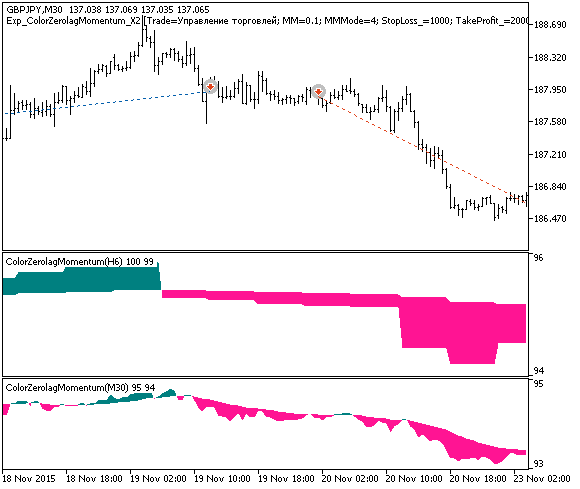
Fig. 1. Examples of deals on the chart
Testing results for 2015 on GBPJPY, slow trend on H6, entry by fast trend on M30:
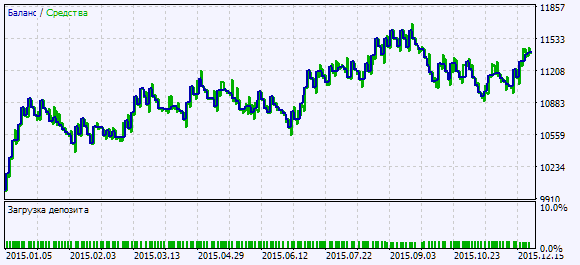
Fig. 2. Chart of testing results
Tradotto dal russo da MetaQuotes Ltd.
Codice originale https://www.mql5.com/ru/code/16981
 Fractal_DeMarker
Fractal DeMarker oscillator.
Fractal_Keltner_HTF
The Fractal_Keltner indicator with the timeframe selection option available in the input parameters.
LifeHack Balance Equity
The indicator displays the balance and equity of the trade account.
Stoch
Trades using the pending Sell Limit and Buy Limit orders. Removes all orders and closes positions at 23:59.