CT Order Manager Pro

# CT Order Manager Pro – Professional Order Management Panel for MetaTrader 5

**ALGI – Mustafa Konya**

**Manual Trading | Fast Order Management | Full Control**

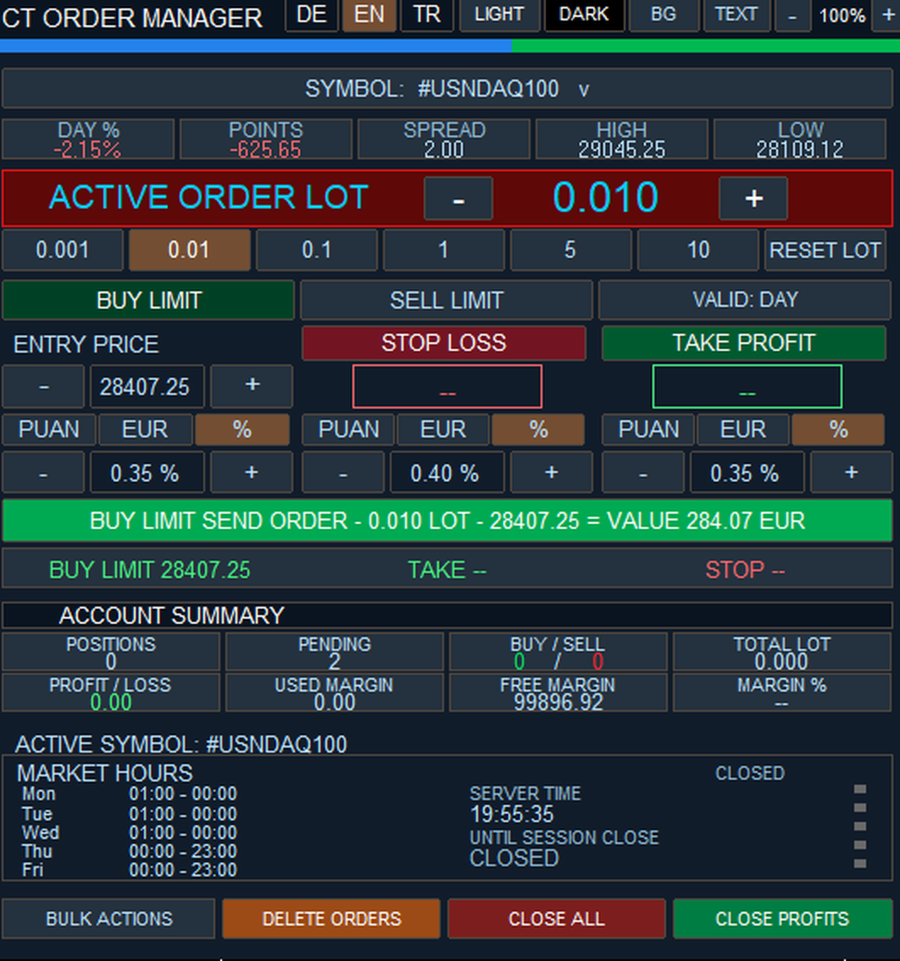
CT Order Manager Pro is a professional manual trading and order management utility developed for MetaTrader 5 (MT5).

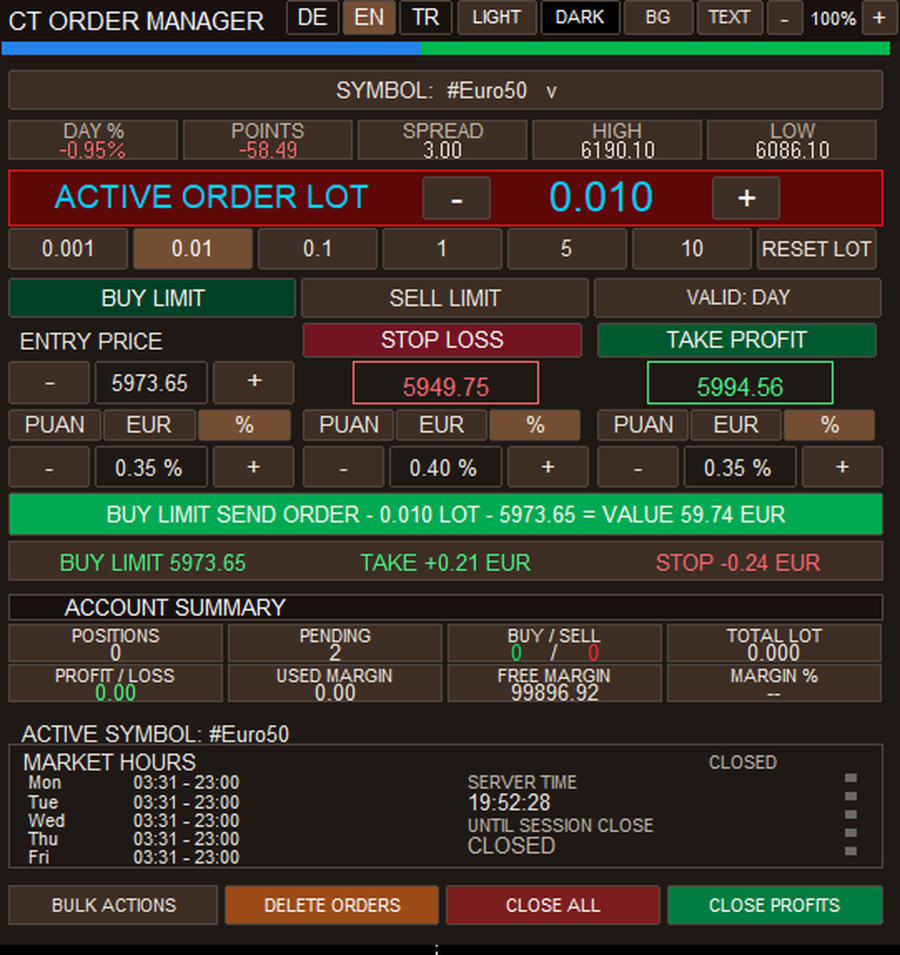
It provides a practical interface for managing trading orders directly from the chart. Traders can adjust order volume, entry prices, Stop Loss and Take Profit settings, and monitor open positions and pending orders.

The software is not an automated trading strategy. All trading decisions remain under the user's control.

## 1. Main Features

**Order Management**
- BUY and SELL trading controls
- BUY LIMIT and SELL LIMIT orders
- Pending order monitoring and management
- Open position monitoring and closing
- Manual entry price adjustment
- Stop Loss and Take Profit controls
- Order information review before submission

**Lot Management**
- Manual lot size entry
- Quick lot selection buttons
- Plus (+) and minus (−) lot adjustment
- Lot reset function
- Broker-compatible minimum and maximum trading volume
- Support for broker-permitted volume steps

**Account and Market Overview**
- Number of open positions
- Number of pending orders
- Total trading volume
- BUY and SELL position summary
- Profit and loss information
- Used margin and free margin
- Selected symbol market information
- Trading session information

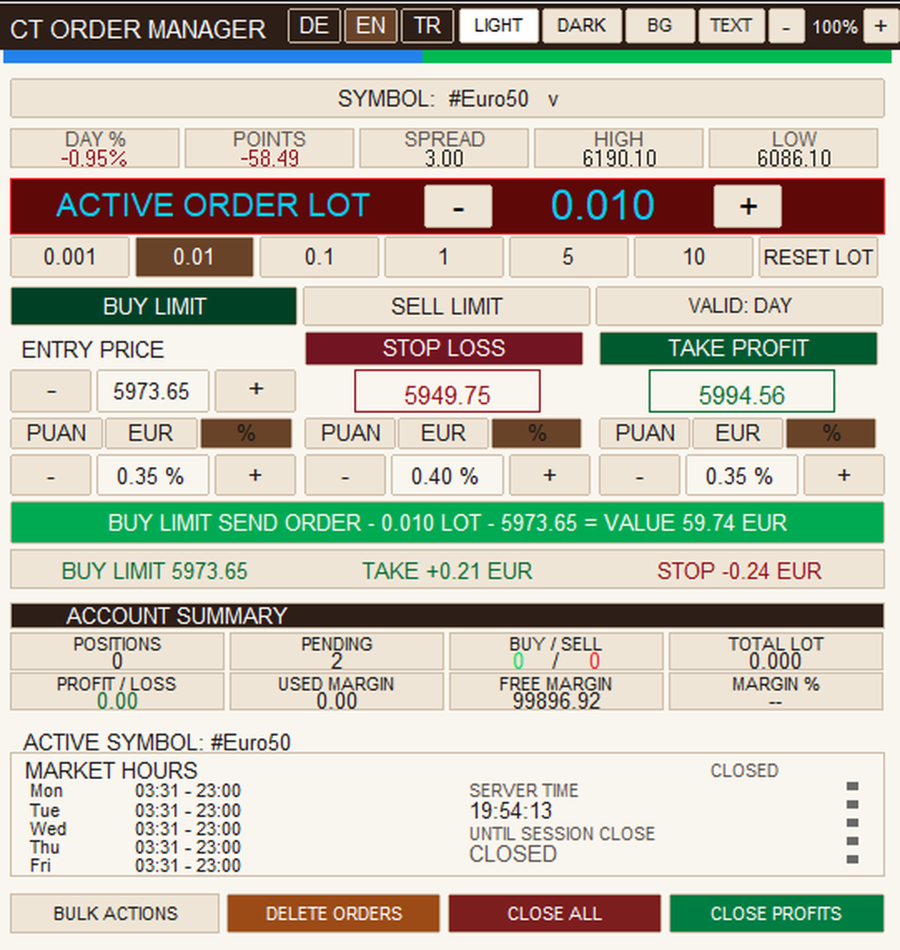
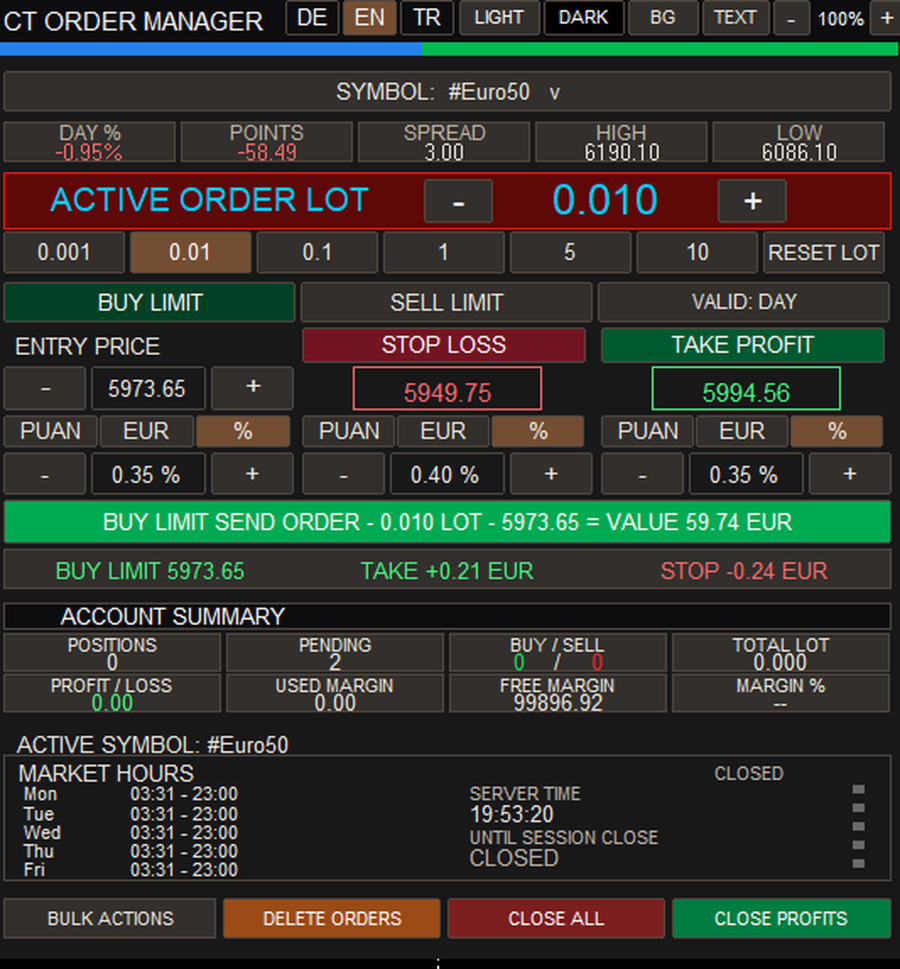
## 2. Theme, Colors and Panel Size

The interface can be customized according to the user's preferences.

- **LIGHT (AÇIK):** Switch to light theme
- **DARK (KOYU):** Switch to dark theme
- **BACKGROUND (ZEMİN):** Change panel background color
- **TEXT (YAZI):** Change panel text color
- **+ :** Increase panel size proportionally
- **− :** Decrease panel size proportionally
- **% :** Display the current panel scaling percentage

These options help traders adapt the interface to different screen sizes and personal preferences.

## 3. Multilingual Interface

Three interface languages are available:

- EN – English
- DE – German
- TR – Turkish

The language can be changed directly using the buttons at the top of the panel.

## 4. Installation in MetaTrader 5 – Step by Step

### Step 1 – Open MetaTrader 5

1. Start MetaTrader 5 on your computer.
2. Log in to your broker account.
3. We recommend using a demo account for initial testing.
4. Wait until the platform has fully loaded.

### Step 2 – Sign In to Your MQL5 Account

1. Open the MQL5.community login settings in MetaTrader 5.
2. Enter your MQL5 username and password.
3. Use the same MQL5 account that purchased or rented the product.

### Step 3 – Install CT Order Manager Pro

1. Open **Market** inside MetaTrader 5.
2. Navigate to **Purchased**.
3. Find **CT Order Manager Pro**.
4. Click **Install**.
5. Wait for the installation to finish.

MetaTrader 5 will install the purchased product automatically.

**Customers purchasing through MQL5 Market do not need to copy or compile MQ5 source files.**

### Step 4 – Open a Trading Chart

1. Press **Ctrl + M** to open Market Watch.
2. Find your desired trading symbol.
3. Right-click the symbol.
4. Select **Chart Window**.

The chart will open.

### Step 5 – Attach the Trading Panel

1. Press **Ctrl + N** to open Navigator.
2. Expand **Expert Advisors**.
3. Find **CT Order Manager Pro**.
4. Double-click the product or drag it onto the chart.
5. Review the input settings and permissions.
6. Click **OK**.

The panel should now appear on the chart.

### Step 6 – Check Trading Permissions

1. Check the **Algo Trading** button in MetaTrader 5.
2. Enable it if required.
3. Review the program's trading permissions.
4. Check the order confirmation settings.
5. Make sure your broker allows trading for the selected symbol.

Algo Trading permission may be required for the program to submit or manage orders. This does not mean that CT Order Manager Pro independently executes an automated trading strategy.

### Step 7 – Prepare Your First Order

1. Select your trading symbol.
2. Enter the desired lot size.
3. Choose the order type.
4. Set the entry price.
5. Configure Stop Loss if required.
6. Configure Take Profit if required.
7. Review all order details.
8. Click the relevant order submission button.
9. Confirm the order if prompted.

Order acceptance and execution depend on the broker's trading conditions.

## 5. Saving Program Settings

MetaTrader 5 allows users to save Expert Advisor input parameters.

1. Open the chart containing CT Order Manager Pro.
2. Press **F7**.
3. Select the **Inputs** tab.
4. Adjust the required input parameters.
5. Click **Save** to store them in a `.set` file.
6. Click **OK** to apply the settings.

To restore previously saved input parameters, open the same settings window and click **Load**.

Note: A `.set` file stores input parameters. Permanent storage of every visual change made directly through the panel depends on the program's supported functionality.

## 6. Manual Source File Installation – Developers Only

This section is intended only for developers who legally possess an MQ5 source file. It is not required for MQL5 Market customers.

1. Open MetaTrader 5.
2. Press **F4** to open MetaEditor.
3. In MT5, select **File → Open Data Folder**.
4. Navigate to `MQL5/Experts`.
5. Copy the MQ5 source file into the folder.
6. Open the file in MetaEditor.
7. Press **F7** to compile.
8. Check the compilation results.
9. Return to MetaTrader 5.
10. Refresh Navigator and attach the program to a chart.

MQ5 source files and compiled EX5 programs are different file types. MQL5 Market customers do not receive the MQ5 source code.

## 7. Troubleshooting

**Panel does not appear:** Check installation, Navigator and chart attachment.

**Trading disabled:** Check Algo Trading permissions, account permissions and program settings.

**Market Closed:** The selected instrument is currently closed for trading.

**Invalid Volume:** The requested lot size does not meet the broker's volume requirements.

**Invalid Price:** The requested price or order type does not meet current broker trading conditions.

**Product not found:** Verify that you are signed in to the MQL5 account used for the purchase or rental.

## 8. Important Information

- Developed for MetaTrader 5 only
- Trading conditions depend on the broker
- Available order types may vary by instrument
- Demo testing is recommended before live trading
- Financial trading involves the risk of capital loss
- No profit or performance guarantee is provided

**ALGI – Mustafa Konya**

**CT Order Manager Pro – Professional Manual Trading and Order Management in One Panel.**
Produits recommandés
Xiao Dan Kuai Pao is a fast and clean one-click order panel for MetaTrader 5. Open and manage your trades instantly, with Stop Loss and Take Profit placed automatically — no more typing TP distances by hand. Key features: - One-click buttons: BUY, SELL, CLOSE, BREAK EVEN - Custom Stop Loss and Take Profit (in points) — set any distance you want - Flexible risk/reward — combine SL and TP freely to build any ratio, such as 1:1, 1:2, 1:3, 1:4 or 1:5 - Real-time price display (Bid) - Bar countdown t
TradeManager is an automatic stop loss, breakeven and trailing stop utility for MetaTrader 5. It manages the exits on your open positions by fixed rules: auto-breakeven, a fixed or ATR-based trailing stop, and a one-shot partial take-profit. It is not a trading panel - no buttons, no clicking, nothing to babysit. Attach it once and it works on positions opened manually, from your phone, or by another EA. This makes it a set-and-forget trade management tool for traders who want consistent risk ma
Local Trade Copier Pro est un copieur de transactions local haute performance et un cadre complet de gestion des risques conçu pour les défis du trading actuel. Des défis des sociétés de prop trading à la gestion de portefeuilles personnels, il s'adapte à toutes les situations grâce à une combinaison d'exécution robuste, de protection du capital, de configuration flexible et de gestion avancée des transactions. Le copieur fonctionne en modes Maître (émetteur) et Esclave (récepteur) au sein du
All In One Trade Manager is a trade manager and one-click trading panel for manual traders on MetaTrader 5. It works as a trading assistant, risk manager and position size calculator in one dashboard. It brings together everything below in one panel: order entry with risk sizing automatic trade management advanced order types account protection statistics Its entry checks run in the background and tell you, before you click BUY or SELL, when something speaks against the trade. Also available
Partial
Pablo Filipe Soares De Almeida
Partial Close Manager – Outil d’Ajustement du Volume de Transaction Cet outil permet d’effectuer des fermetures partielles sur les positions ouvertes dans MetaTrader 5. Fonctionnalités Fermeture Partielle : Fermez une partie de vos positions ouvertes en une seule action. Calcul du Volume : Calcule automatiquement le volume à fermer, sans saisie manuelle. Support Multi-Ordres : Applique la fermeture partielle à toutes les positions ouvertes du même symbole. Table Déplaçable : Cliquez et maintenez
One click to close all (OCCA) provides you posibility to close all open position with one click. Here is no any settings, just run the script and all your open positions will be closed and it will happen very fast ! Works with all types of accounts, with all currency pairs and any broker. The number of open positions is not limited. The script will be useful for trading strategies, in which you need to manage a large number of positions.
NHS Risk Manager PRO NHS Risk Manager PRO is a professional trade-management and risk-control Expert Advisor for MetaTrader 5, built around one core idea: protect the account first, execute with precision second . At its center is a dedicated prop-firm compliance framework that tracks the rules that actually get funded accounts disqualified — daily drawdown, total drawdown, profit targets, and minimum trading days — and enforces them automatically instead of relying on the trader to remember the
**Forex Trade Manager Pro MT5** **Trade Manager MT5** est un utilitaire complet de gestion de transactions pour MetaTrader 5 qui vous donne un contrôle total sur chaque aspect de votre position, du moment où vous planifiez une transaction au moment où vous la clôturez. Il est conçu pour les traders qui prennent le risque au sérieux, du débutant qui construit sa discipline au scalpeur professionnel qui a besoin d'une exécution instantanée sur plusieurs positions. L'outil s'attache à n'importe
Black Volume By ZeeAM Khan a Multi-Engine EA Professional Multi-Timeframe Volume & Breakout Trading System Black Volume Multi-Engine EA is an advanced automated trading system that combines volume analysis, spread analysis, liquidity sweeps, support/resistance breakouts, and multi-basket trade management into one powerful Expert Advisor. The EA continuously scans higher-timeframe candles to identify significant market activity, automatically draws key support and resistance zones, and executes
FREE
EVA Gold Trade Manager MT5
Martin Alejandro Bamonte
EVA Gold Trade Manager est un panneau de trading en un clic, un calculateur de taille de position et une protection de compte pour MetaTrader 5, pensé pour le XAUUSD et disponible en 11 langues. Vous faites glisser sur le graphique les lignes d'entrée, de stop et d'objectif, et vous voyez le lot, le montant risqué et le gain à l'objectif avant de cliquer. Le breakeven, la clôture de la moitié et le trailing gèrent vos trades, y compris ceux que vous ouvrez depuis votre téléphone. Quand une limit
Pass the challenge by following the rules every day, even on the bad ones. EdgeProof Account Guardian watches your whole account in real time and enforces prop firm rules for you: daily loss, maximum drawdown, profit target, and your own trading rules. ACCOUNT LIMITS - Daily loss limit as a percent of the day-start value (balance, or the higher of balance and equity at reset). - Maximum drawdown: static from the initial balance, or trailing from the highest equity, with an option to stop traili
Veron Link Slave – Synchronized Grid, Martingale & Breakout Management Short Description Advanced synchronization tool designed to manage Grid, Martingale, and Breakout EAs. Automatically sends close-basket signals to the Master account upon profit target completion, minimizing slippage across different brokers. Full Description Veron Link Slave is a specialized utility developed to enhance the execution efficiency and risk management of multi-account or multi-broker trading setups. It is desig
ONE PANEL. COMPLETE CONTROL OF YOUR MT5 TRADING. Plan → Calculate Risk → Price Alert   →   Execute → Protect → Copy   →  Notification ( Telegram/Pushover/ntfy/webhook ) Everything a manual MT5 trader needs in one utility Risk-based lot sizing • R:R planning • Auto BE • Trailing SL • Partial TP • Basket protection • Price alerts • Telegram/Pushover/ntfy notifications • Scheduled trades • Local Copy Trading Trade Manager Ultimate is an on-chart trading utility for discretionary traders who want
KS Auto Trade Close Manager Time Base est un Expert Advisor (EA) pour MetaTrader 5 qui clôture automatiquement les positions ouvertes à une heure locale définie par l'utilisateur, via un panneau de contrôle simple affiché directement sur le graphique. Caractéristiques principales Clôture automatique programmée (optionnelle) : clôture les positions à une heure locale précise (HH:MM, ex. : 23:55). Utilise l'heure locale du terminal ou de l'ordinateur (TimeLocal()) et non celle du serveur. Trois
DTK Scalping Panel
Thiago Pereira Pinho
A powerful and intuitive trade management tool designed for scalpers and intraday traders. Created to complement the Nampim Samba Scalper strategy , it allows traders to open, manage, and close positions quickly without leaving the chart.  Key Features: Customizable trading panel – choose position (left, right, center, top, bottom). One-click trading buttons – instantly open Buy/Sell trades with pre-set lot sizes. Close management – close last 1/2/3 trades or all Buy/Sell positions with one clic
Un seul EA au lieu d'une dizaine d'outils : assistant de trading, gestion du risque et 17 indicateurs dans un seul panneau. Posez-le sur le graphique — tout l'essentiel est à portée de main.   Prix de lancement : les 20 premières copies à 49$, ensuite 99$. -50%, maintenant seulement.   TRADEZ EN UN CLIC Le lot se calcule tout seul à partir du risque en % du solde — fini les calculatrices. Stop fractal sur n'importe quelle UT ou manuel, take profit selon le R:R, clôtures partielles TP1/TP2/TP3, b
Crystal Trade Manager
Muhammad Jawad Shabir
4.25 (4)
Crystal Trade Manager – Outil de Gestion de Trading Présentation Crystal Trade Manager (CTM) est un gestionnaire de risques et exécution instantanée pour MetaTrader 5. Conçu pour traders manuels et prop firms. Fonctions principales Limite de drawdown journalière (1–70%), auto-fermeture, lockout. Objectifs profit/perte avec auto-close. SL/TP auto. Break-Even + buffer. Trailing Stop dynamique. Contrôle de lot max. Panel Magic Keys avec 6 actions rapides. Affichage info compte. Notifications push
FREE
Close Assistant 5
Gheis Mohammadi
5 (2)
Close Assistant (CA)  is a full featured utility for monitoring and closing a set of positions placed by trader or EA. It closes filtered orders in specified time or level or candle patterns or when a certain profit or loss of the total positions is reached. CA uses Zero Profit Lock function to save deposit when total profit falls to zero. Profit and loss levels can be set in fixed amount of account currency or percentage of balance or equity or margin. CA only monitors and works on filtered pos
Signals Executor for Telegram is a Utility that allows you to execute and manage positions from messages sent in Telegram Chats. Chat messages are processed to check for the existence of commands, and the command will be executed if its parameters are valid. You need the Telegram Bot Token and Chat Id to configure the input parameters. It is possible to restrict the sending of commands through the User Id, which must be configured in the input parameters. Valid Commands: Buy and Sell: Market or
Cascade Exit Conductor
Syarief Azman Bin Rosli
Cascade Exit Conductor est un utilitaire de gestion de positions pour MetaTrader 5. Il surveille les trades que vous avez deja ouverts - a la main ou par n'importe quel Expert Advisor - et conduit leurs sorties a votre place : il verrouille le stop au point mort, securise le gain par une cascade de cloturess partielles par paliers, suit le reste avec un trailing ATR ou a distance fixe, et peut fermer une position apres une duree de detention maximale. Il se pilote depuis un cockpit compact sur l
Stop juggling a lot-size calculator, a trade manager, and a fistful of indicators. Smart Risk Manager combines precise risk-based execution, complete position management, and a professional Market Structure toolkit in one clean, draggable panel — built for Forex, Metals, Indices, Crypto and CFDs. Plan a trade visually, see your exact lot size, risk and reward before you click, and manage every position straight from the chart with a single tap. Utility for MetaTrader 5. Trades manual entries
Système Martin semi-automatique introduire Cet outil est utilisé pour le trading Martin semi-automatique, cliquez sur le panneau pour passer une commande et l'EA gérera la position Décidez simplement de la direction de la transaction et laissez le reste à la direction d'EA Martin automatique, ajoutez un entrepôt selon la grille définie, vous pouvez également désactiver cette fonction Liquidation en un clic Une fonction de verrouillage à clé contrôle du temps Invite sonore d'avertissement car
Présentation de Local Trade Copier Pro MT5, l'outil ultime pour les traders cherchant à copier efficacement des trades entre différents comptes MT5. Cet outil puissant est conçu pour les traders qui souhaitent automatiser leur stratégie de trading et améliorer leurs performances en utilisant plusieurs comptes de manière transparente. Découvrez les avantages de la copie de trades en temps réel avec un délai minimal, garantissant que vous ne manquiez jamais une opportunité rentable. Que vous gérie
RiskPilot Pro
Mohamed Zein Mohamed Zein Soliman
RiskPilot Pro Plan risk clearly. Execute efficiently. Manage positions from one professional MT5 dashboard. RiskPilot Pro is a visual trade-planning and position-management utility for MetaTrader 5. It helps manual traders define risk before entry, calculate position size, place market or pending orders, and manage open positions from one chart panel. Important: RiskPilot Pro does not generate trading signals and does not choose trade direction. The trader defines the setup and remains responsib
JMM Trade Panel MT5 JMM Trade Panel MT5 est un outil d’exécution et de gestion des trades pour MetaTrader 5. Il permet d’ouvrir des positions Buy et Sell directement depuis le graphique, d’ajuster rapidement le volume, de suivre les paniers de positions et de gérer les trades selon le Magic Number et les symboles sélectionnés. Manuel utilisateur complet :  Télécharger Fonctionnalités principales Boutons Buy, Sell et Close All sur le graphique. Fermeture en un clic de toutes les positions gérée
XAU NR7 Range Break H4 Expert Advisor for MetaTrader 5 — Gold / XAUUSD focus Version: 1.00 What it is XAU NR7 Range Break H4 is an Expert Advisor for gold on the H4 chart. Architecture is deliberate and high-tension: Compress — the market tightens into a compressed range episode. Break — price punches through the mapped range lid or floor. Expand — the system joins the directional expansion with selectable exit style. Built for structured automated participation — not grid , not martingale . Ev
FREE
Click Trading
Jawad Tauheed
5 (2)
One Click Trading – Auto TP SL Developer TraderLinkz Version 1.00 Category Utility What it does Adds missing TP and SL to your manual trades and pending orders Sets them once per ticket Lets you move TP and SL afterward Works on hedging and netting accounts Scans on every tick and reacts on trade events Why you want it You place faster entries You get consistent risk and exit targets You reduce fat finger errors You keep full manual control Quick start Attach the EA to any chart Keep TP and SL e
FREE
Order Flow Footprint Workspace est un espace de travail d'analyse de l'order flow et de la microstructure de marché pour MetaTrader 5, entièrement en lecture seule. Il transforme les données de ticks fournies par votre broker en une représentation footprint interactive par session avec activité par niveau de prix, profils, navigation historique et outils de diagnostic. Le workspace s'adapte automatiquement aux informations réellement disponibles dans le flux du broker et n'invente pas de direc
Don't want to risk or loose your personal trading account or prop trading firm account because of a simple Margin Call or exceeded Loss Limit? Then this Utility Expert Advisor is the solution for you! This Expert Advisor monitors your account Equity or Balance or even both! If the Equity and/ or Balance fall under your defined stop limits, the EA closes all of your positions and keeps you so on track. Options and Variables: Monitored Values: Choose which values should get monitored Equity: if
Easy Trade Executor est un outil de calcul rapide de la taille de position, d’exécution des ordres et de gestion des trades pour MT5. Placez les niveaux Open Price, Stop Loss et Take Profit directement sur le graphique, obtenez automatiquement la taille de position appropriée et ouvrez des trades avec un risque maîtrisé en seulement quelques clics. Pourquoi choisir Easy Trade Executor ? Easy Trade Executor a été conçu pour les traders qui veulent aller au-delà du simple calcul du risque et gére
Les acheteurs de ce produit ont également acheté
Trade Assistant MT5
Evgeniy Kravchenko
4.43 (216)
It helps to calculate the risk per trade, the easy installation of a new order, order management with partial closing functions, trailing stop of 7 types and other useful functions. Additional materials and instructions Installation instructions - Application instructions Line function -   shows on the chart the Opening line, Stop Loss, Take Profit. With this function it is easy to set a new order and see its additional characteristics before opening.   Risk management  - The risk calculation
Bienvenue sur Trade Manager EA, l’outil ultime de gestion des risques conçu pour rendre le trading plus intuitif, précis et efficace. Ce n’est pas seulement un outil d’exécution d’ordres ; c’est une solution complète pour la planification des trades, la gestion des positions et le contrôle des risques. Que vous soyez débutant, trader expérimenté ou scalpeur ayant besoin d’une exécution rapide, Trade Manager EA s’adapte à vos besoins, offrant une flexibilité sur tous les marchés, des devises et i
Farmed Hedge Yield Farming | All Markets (Manual - Hybrid - Semi/Automated EA) VERIFIED TRADING RESULTS - Farmed Hedge Yield Axi Copy:  https://www.mql5.com/en/signals/2356376 - Farmed Hedge Yield Exn Copy:   https://www.mql5.com/en/signals/2356404 - Farmed Hedge Yield V Copy:  https://www.mql5.com/en/signals/2357156 IMPORTANT NOTICE: FarmedHedge is a MANUAL-FOCUSED TRADING UTILITY ,not a fully automated EA. Results shown on this Signal include manual trades and overall strategic management.
Telegram to MT5 Multi-Channel Copier   copie automatiquement les signaux de trading de vos canaux Telegram et Discord directement vers MetaTrader 5. Pas de bots, pas d'extensions de navigateur, pas de copie manuelle. Un signal arrive sur Telegram ou Discord et l'EA ouvre le trade dans votre terminal en quelques secondes. Et avant de copier un canal, le backtester intégré vous montre ce que ce canal aurait fait sur votre compte. Le produit comprend deux composants : une application Windows qui éc
Copiez les signaux Telegram avec vos propres règles de trading Telegram to MT5 Signal Trader copie automatiquement les signaux de trading au format texte provenant de canaux et de groupes Telegram publics et privés vers MetaTrader 5. Gérez plusieurs fournisseurs et comptes MT5 depuis une seule application de bureau, avec des paramètres de risque et de trading propres à chaque fournisseur . Aucun bot Telegram ni configuration d'API n'est nécessaire pour copier les signaux. Connectez-vous simpleme
TradePanel MT5
Alfiya Fazylova
4.88 (170)
Trade Panel est un assistant commercial multifonction. L'application contient plus de 50 fonctions de trading pour le trading manuel et permet d'automatiser la plupart des tâches commerciales. Instructions d'utilisation : https://www.mql5.com/fr/blogs/post/762589 Version d'essai de l'application pour un compte démo : https://www.mql5.com/fr/blogs/post/762644 Comment installer l'application : https://www.mql5.com/fr/blogs/post/762645 Comment tester l'application en mode visuel : https://www.mql5.
================================================================================ POC BREAKOUT - V20.72. Full Professional Grade Toolkit ================================================================================ POC Breakout is a full MetaTrader 5 trading dashboard for discretionary traders who want breakout signals, Point of Control (POC) context, volume profiles, order flow, market structure, news, alerts, and advanced trade planning in one professional workspace. Attached directly to you
REVDEN AI Desk : pilotez votre trading depuis une seule conversation avec votre propre IA, sur le contexte de marché de REVDEN Imaginez piloter votre trading depuis une seule conversation. REVDEN AI Desk l'apporte dans MetaTrader 5 : vous demandez à votre propre IA comment elle lit le marché, et elle répond à partir du contexte complet de REVDEN sur les symboles que vous tradez, avec leur état, leur profil de risque et les publications à venir. Ses propositions arrivent avec entrée, stop, object
News Trade EA MT5
Konstantin Kulikov
4.55 (11)
Je voudrais vous présenter un robot efficace que j'utilise depuis plusieurs années. Il peut être utilisé en mode semi-automatique, comme en mode totalement automatique. >>> Chat <<< Le programme comporte des paramètres souples pour le commerce sur les nouvelles du calendrier économique. Il est impossible de le vérifier dans le testeur des stratégies. Ce qu’il faut, c’est le travail réel. Téléchargez la dernière archive des paramètres : https://www.mql5.com/en/blogs/post/747929 Surveillance des
RETAILBERG FOOTPRINT CHART PRO — Order-Flow Workspace for MetaTrader 5 Version 7.00  |  Professional System  |  31 tools  |  One chart A full 150-page illustrated User Manual is included. Please read the full manual to understand this feature packed footprint chart elements and ui. https://www.mql5.com/en/blogs/post/777982 DEMO / STRATEGY TESTER — PLEASE READ FIRST
The Patch
Mian Rameez Ali
The Patch It never opens a trade. It walks behind the ones that did. Every open position, every pending order — checked twice a second for the one thing that's easy to forget: a stop, a target. Found bare, it doesn't ask. It writes the missing number in, measured in points from wherever the position began, and moves on to the next. No strategy, no opinion on direction. Just the quiet assumption that nothing should ever sit on the market unprotected — not because someone decided it shouldn't,
Prochaine mise à jour — Version 2.52 bientôt disponible ! [NOUVEAU] Préparez-vous à découvrir 4 nouvelles fonctionnalités majeures conçues pour améliorer votre analyse du marché et votre flux de travail de trading Nous faisons passer l’analyse du marché au niveau supérieur avec 4 nouvelles fonctionnalités conçues pour répondre à vos besoins en trading. Découvrez : 1. TRADE OVERVIEW DASHBOARD 2. CONFLUENCE AT ZONE 3. STRONG & WEAK HIGH/LOW 4. OTE 1. TRADE OVERVIEW DASHBOARD Un tableau de bord qu
Grid Manual MT5
Alfiya Fazylova
4.73 (22)
Grid Manual est un panneau de trading permettant de travailler avec une grille d'ordres. L'utilitaire est universel, possède des paramètres flexibles et une interface intuitive. Il fonctionne avec une grille d'ordres non seulement dans le sens des pertes, mais aussi dans le sens de l'augmentation des profits. Le commerçant n'a pas besoin de créer et de maintenir une grille d'ordres, l'utilitaire le fera. Il suffit d'ouvrir une ordre et "Grid Manual" créera automatiquement une grille de ordres po
EA Portfolio Control & Cloud Monitoring for MetaTrader 5 Your EAs manage trades. KONTROL_01 manages your EAs. A control system for traders running multiple Expert Advisors on the same account. Coordinate EA activity, manage trading risks and monitor your setup remotely. A detailed User Manual is available via DM after purchase. IN PRACTICE Multiple EAs. No coordination. Your EAs trade independently, unaware of each other's activity. KONTROL_01 coordinates them, limits simultaneous activity a
The product will copy all telegram signal to MT5 ( which you are member) , also it can work as remote copier.  Easy to set up, copy order instant, can work with almost signal formats, image signal,  s upport to translate other language to English Work with all type of channel or group, even channel have "Restrict Saving Content", work with  multi channel, multi MT5 Work as remote copier: with signal have ticket number, it will copy exactly via ticket number. Support to backtest signal. How to s
Floor Watch
Syed Tauqeer Hussain Shah
Floor Watch One number, watched every thirty seconds: how far equity has fallen since the day began — or since its highest point, if it's told to trail the peak instead of the open. Cross the line and it doesn't argue. Every open position closes, every pending order vanishes, and anything that slips through afterward gets shut the moment it appears. Not asked. Removed. The floor holds until the clock turns 5 AM Pakistan time — then, and only then, does the day start over. One rule. No except
Power Candles Strategy Scanner - Outil de recherche de configurations multi-symboles à optimisation automatique Le Power Candles Strategy Scanner utilise le même moteur d'auto-optimisation que celui qui alimente l'indicateur Power Candles, pour chaque symbole de votre Market Watch, en parallèle. Un panneau vous indique quels symboles sont statistiquement négociables à l'instant, quelle stratégie est la plus performante pour chacun, la paire Stop Loss / Take Profit optimale, et vous alerte dès qu
EA Auditor
Stephen J Martret
5 (6)
EA Auditor is an independent analysis tool for traders evaluating Expert Advisors and trading signals on MetaTrader 5. It audits backtest reports, reviews posted developer signals, and cross-verifies the two against each other to help traders assess strategies before committing capital. The MQL5 market offers a wide range of Expert Advisors from many developers, with varying approaches, quality, and transparency. EA Auditor provides a consistent, data-driven framework for reviewing them, answer
YuClusters
Yury Kulikov
4.93 (43)
Attention: You can view the program operation in the free version  YuClusters DEMO .  YuClusters is a professional market analysis system. The trader has unique opportunities to analyze the flow of orders, trade volumes, price movements using various charts, profiles, indicators, and graphical objects. YuClusters operates on data based on Time&Sales or ticks information, depending on what is available in the quotes of a financial instrument. YuClusters allows you to build graphs by combining da
DrawDown Limiter
Haidar Lionel Haj Ali
5 (23)
DrawDown Limiter v5.0 — Contrôleur avancé de protection de compte DrawDown Limiter v5.0 est un contrôleur de protection de compte côté client conçu pour surveiller votre compte de trading et réagir automatiquement lorsque les limites configurées de risque, de profit, d’actualités, de planification, de rollover ou de nombre de positions sont atteintes. Il peut surveiller les opérations manuelles, les stratégies automatisées, plusieurs Expert Advisors, les ordres en attente et les positions ouvert
Master Your Trading Discipline   Stop losing your hard-earned gains to overtrading and emotional decisions. The Discipline Tool is your ultimate trading assistant, ensuring strict risk management in real-time. Key Protection Features: Advanced Drawdown Defense : Automatically halts trading if your daily drawdown exceeds a preset threshold (percentage or dollar amount). Real-Time Equity Lock : Safeguard profits by referencing peak equity, ensuring drawdown stays within control. Hard Profit Target
Dealer Panel
Mian Rameez Ali
Dealer's Panel No signal decides anything here — a hand does. One click, and the panel calculates what's underneath: lot size from risk, target from a 30-step balance ladder that remembers exactly how far an account has climbed. Toggle between market and pending without touching an input field. Set a stop, and the take-profit can write itself — a fixed share of the balance, translated into price with no arithmetic left for the trader to get wrong. One trade live at a time; it won't let a seco
Besoin d'aide ? Comment le configurer ? Des questions ? Demandez ici dans votre langue, réponse rapide : https://www.mql5.com/en/market/product/139088/comments Télécharger la démo fonctionnelle Copy Cat More (Chat Copieur) — Copieur de Trades (Trade Copier) MT5 est un copieur de trades local et un cadre complet de gestion du risque et d'exécution, conçu pour les défis du trading d'aujourd'hui. Des challenges de prop firm à la gestion de portefeuille personnel, il s'adapte à chaque situation gr
Trade Indicator Assistant   is a powerful MT5 utility designed to turn indicators into automated trading systems. Its main feature is the ability to automatically detect an indicator’s   BUY and SELL signal buffers , without requiring you to know the buffer numbers, search through indicator settings, or modify the indicator source code. Bonus Indicator:   After purchasing Trade Indicator Assistant, contact me to receive   Trade Signal Pro   completely free as a bonus indicator. [Download Demo V
Un seul achat. Tous mes indicateurs et robots de trading (EA) pour MT4 et MT5, disponibles aujourd’hui et publiés à l’avenir, sans frais supplémentaires. Contactez-moi après l’achat pour connaître la procédure de réception. Il est prévu d’augmenter le prix de 50$ toutes les 10 ventes, jusqu’à 999$. Le prix du Market au moment du paiement fait foi. Gardez l’indicateur auquel vous faites confiance. Automatisez les tâches qui l’entourent. Votre signal. Vos règles. Votre exécution. Vous utilisez dé
Quant AI Agents
Ho Tuan Thang
5 (1)
Quant AI Agents are independent trading Expert Advisors. Instead of trading using a fixed strategy like other conventional EAs, Quant AI Agents   is a   multi-agent AI trading framework   that turns natural-language strategy prompts into live.  WANT THE SAME RESULTS AS MY LIVE SIGNAL?   Use the exact same brokers I do:   IC MARKETS , IC TRADING   .  Unlike the centralized stock market, Forex has no single, unified price feed.  Every broker sources liquidity from different providers, creating un
EasyInsight AIO MT5
Alain Verleyen
4.92 (12)
EASY Insight AIO – La solution tout-en-un pour un trading intelligent et sans effort Présentation Imaginez pouvoir analyser l’ensemble du marché — Forex, Or, Crypto, Indices et même Actions — en quelques secondes, sans aucune analyse manuelle de graphiques, sans installation complexe ni configuration d’indicateurs. EASY Insight AIO est votre outil d’exportation ultime, prêt à l’emploi, pour un trading alimenté par l’IA. Il fournit une vue d’ensemble du marché dans un fichier CSV propre — prêt
Daily Trading Limiter
AL MOOSAWI ABDULLAH JAFFER BAQER
5 (8)
• Please test the product in the Strategy Tester before purchasing to understand how it works. • If you face any issues, contact me via private message—I’m always available to help. • After purchase, send me a screenshot of your order to receive a FREE EA as a gift. Daily Trading Limiter — the rule you cannot break Every trader knows the number. Three trades. Two percent. One bad day and stop. And every trader has watched themselves take the fourth trade anyway. The problem was never knowing th
EA Overfitter
Stephen J Martret
5 (1)
That backtest looks great. But will it still be making money tomorrow, next week, next month? EA Overfitter re-runs your EA on 100 price histories it has never seen. One score tells you if the edge is real. A backtest tells you what an EA did on one price history — the one that happened to occur. What you cannot tell from it is how much of that result was the strategy and how much was the particular path. EA Overfitter answers that. It builds up to 100 synthetic price histories your EA has n
FUTURES ORDERFLOW FOOTPRINT CHART Professional OrderFlow EA for MetaTrader 5 Version 1.01| Professional tool for real traders | Institutional-Grade Visualization STRATEGY TESTER USERS - PLEASE SELECT EVERY REAL TICK WHEN TESTING AND YOU HAVE DOWNLOADED HISTORICAL DATA. IF YOU SEE A WAITING SCREEN AND IT IS NOT DOWNLOADING, IT MEANS YOU HAVE LOW HISTORICAL DATA. TRY 1 MIN AND 5 MIN FIRST ON 1 DAY DATA. ONE DAY DATA SHOULD BE THE NEWEST AND MOST CURRENT DATE. PLEASE WAIT UNTIL THE MARKET HAS ROL
Plus de l'auteur
CT Limit Trading Panel MT5 – Professional Manual Trading Made Easy Trade Faster. Place Orders Precisely. Stay in Control. CT Limit Trading Panel MT5 is a powerful, user-friendly manual trading and order management tool designed for MetaTrader 5. It helps traders place pending orders, adjust entry prices visually, manage trading volumes, and monitor important account information directly from the chart. Designed for traders who prefer to make their own trading decisions, the panel combines essent
CT All in One Trading Manager V603 | Professional Trading, Order & Market Management for MetaTrader 5 One Screen. Full Control. Professional Trading Management. CT All in One Trading Manager is a multifunctional manual trading and market monitoring utility developed for MetaTrader 5 (MT5). The software brings manual order execution, pending order management, position monitoring, live market charts, trading hours, and account information together in a single interface. Instead of switching betwee
Filtrer:
Aucun avis
Répondre à l'avis