RiskPilot Pro
- Utilitaires
-
Mohamed Zein Mohamed Zein Soliman
 I entered the trading field with my passion to it and love for this field, I have been in this field from 2016 until now and have developed my trading strategy and wrote my own analytical tools.
 - Version: 1.0
- Activations: 10
Plan risk clearly. Execute efficiently. Manage positions from one professional MT5 dashboard.
RiskPilot Pro is a visual trade-planning and position-management utility for MetaTrader 5. It helps manual traders define risk before entry, calculate position size, place market or pending orders, and manage open positions from one chart panel.
Important: RiskPilot Pro does not generate trading signals and does not choose trade direction. The trader defines the setup and remains responsible for every trading decision.
Main Advantages
- Risk-first workflow: review planned loss, reward, lot size, margin, spread, and risk-to-reward before placing an order.
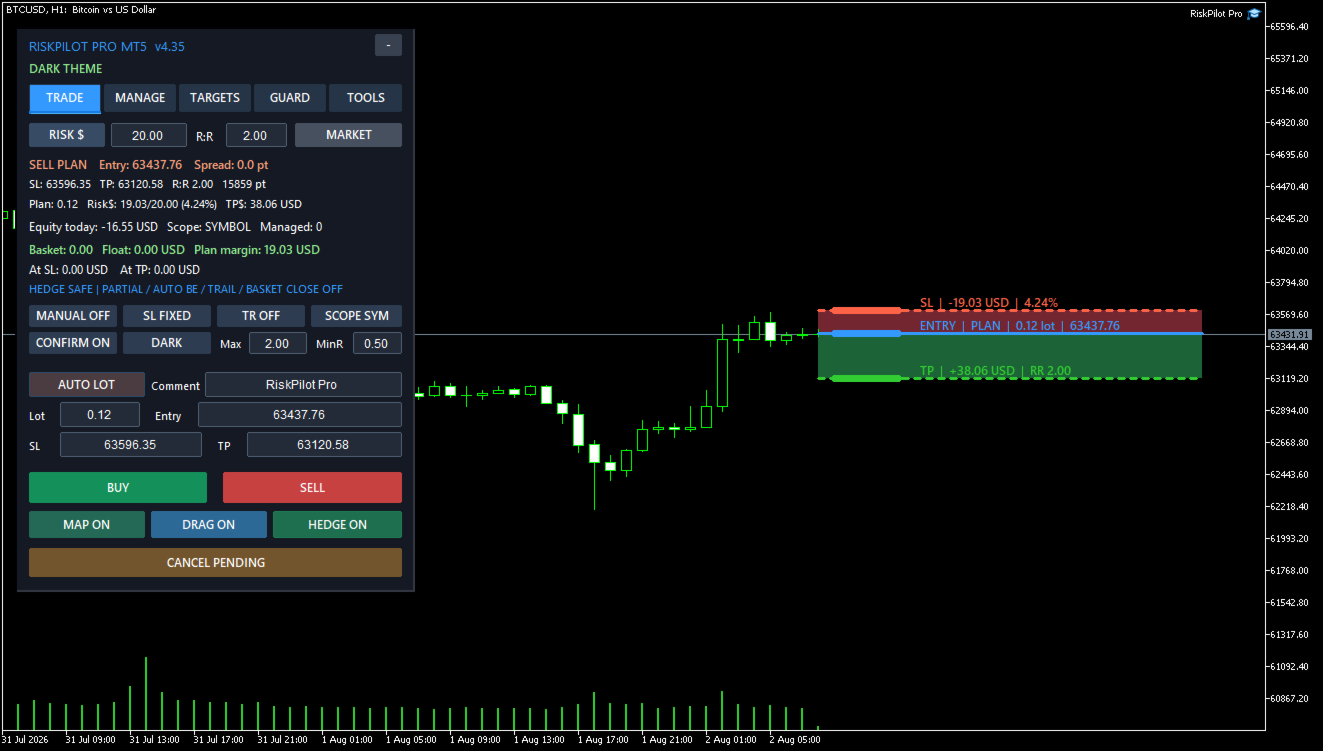
- Visual trade map: plan with clear Entry, Stop Loss, Take Profit, risk-zone, and reward-zone objects directly on the chart.
- Dashboard control: operational settings are managed from the panel instead of a large and confusing Inputs list.
- Multi-asset calculation: designed to use the broker's symbol specifications for Forex, metals, indices, cryptocurrencies, and other MT5 symbols.
- Optional automation: partial close, break-even, trailing, hidden levels, and account protection remain under the trader's control.
- Hedging and netting support: account-mode behavior is handled according to MetaTrader 5 rules.
Visual Trade Planning
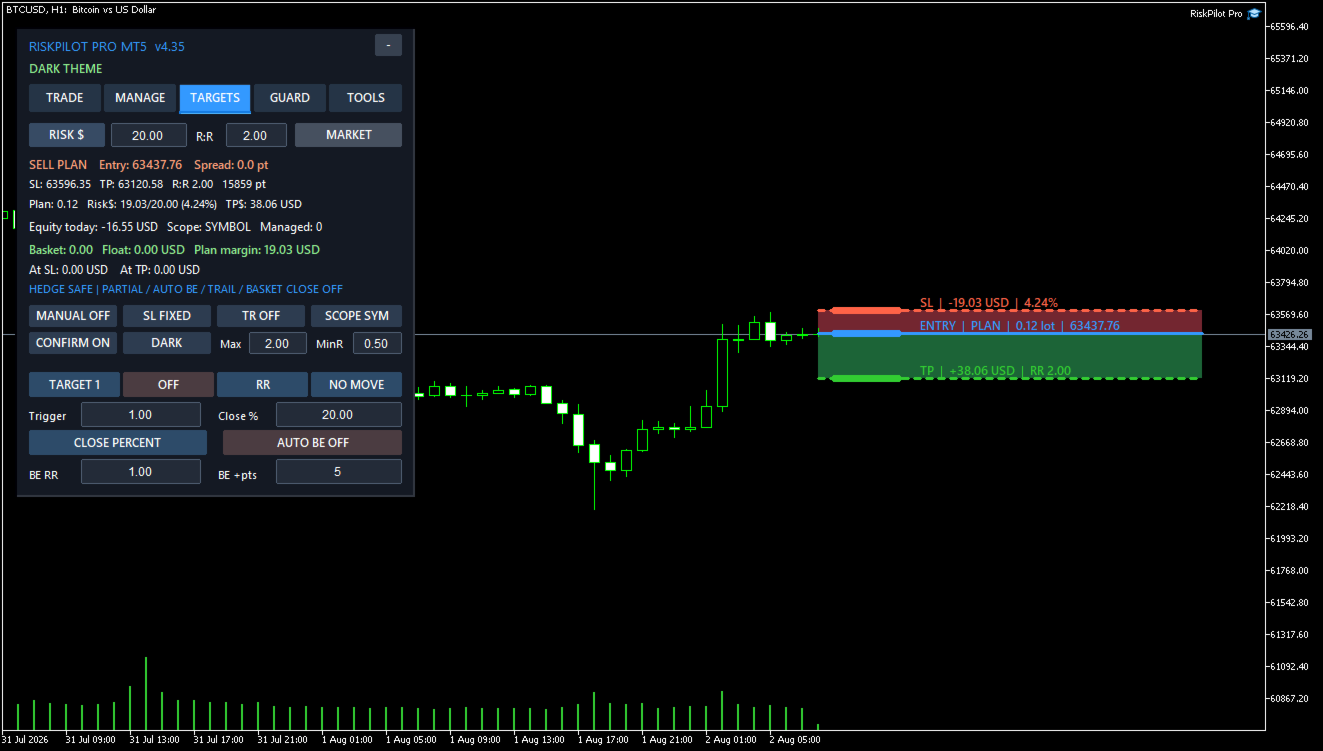
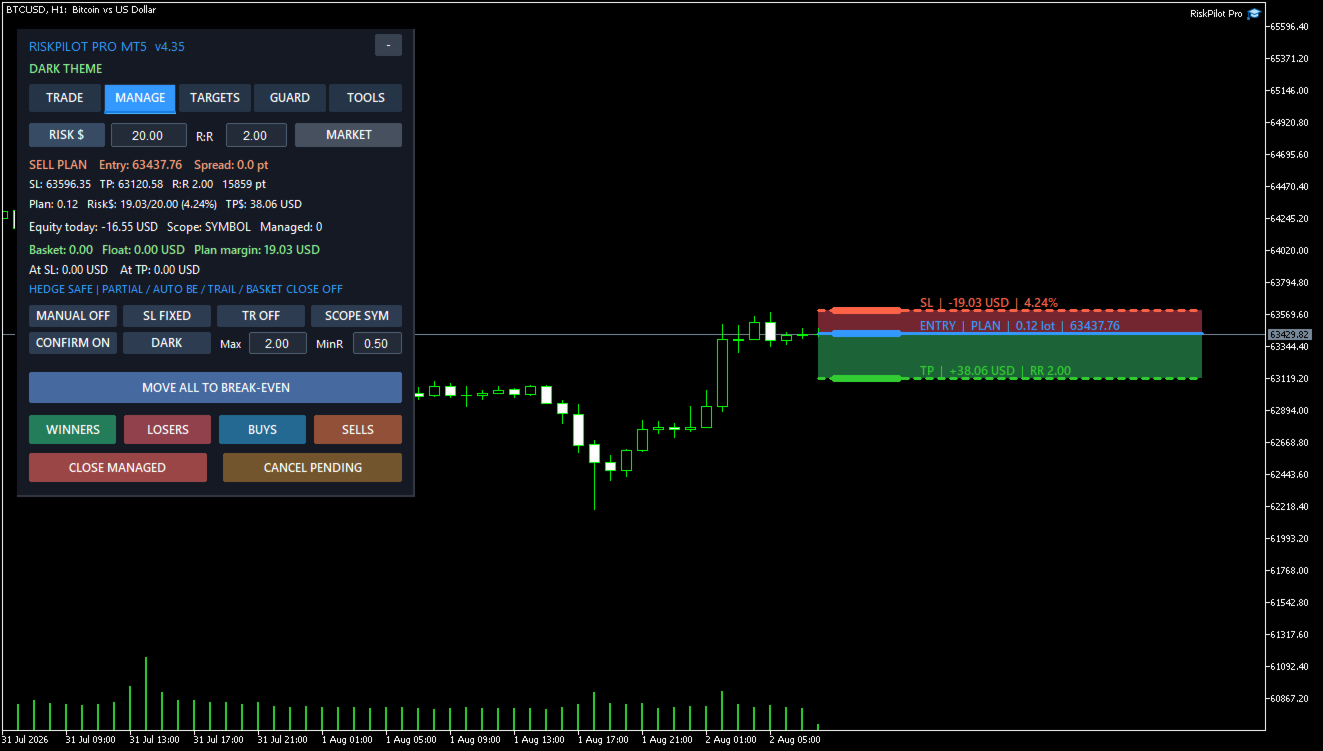
The chart trade map displays Entry, Stop Loss, and Take Profit levels with separate risk and reward zones. Levels can be adjusted on the chart or entered directly in the panel. Planned lot size, monetary risk, expected reward, risk-to-reward ratio, price distance, and estimated margin update with the plan.
Supported Order Tools
- Market Buy and Sell
- Buy Limit and Sell Limit
- Buy Stop and Sell Stop
- Automatic risk-based lot calculation or manual lot entry
- One-click mode or a professional confirmation step
- Split execution and multiple entries
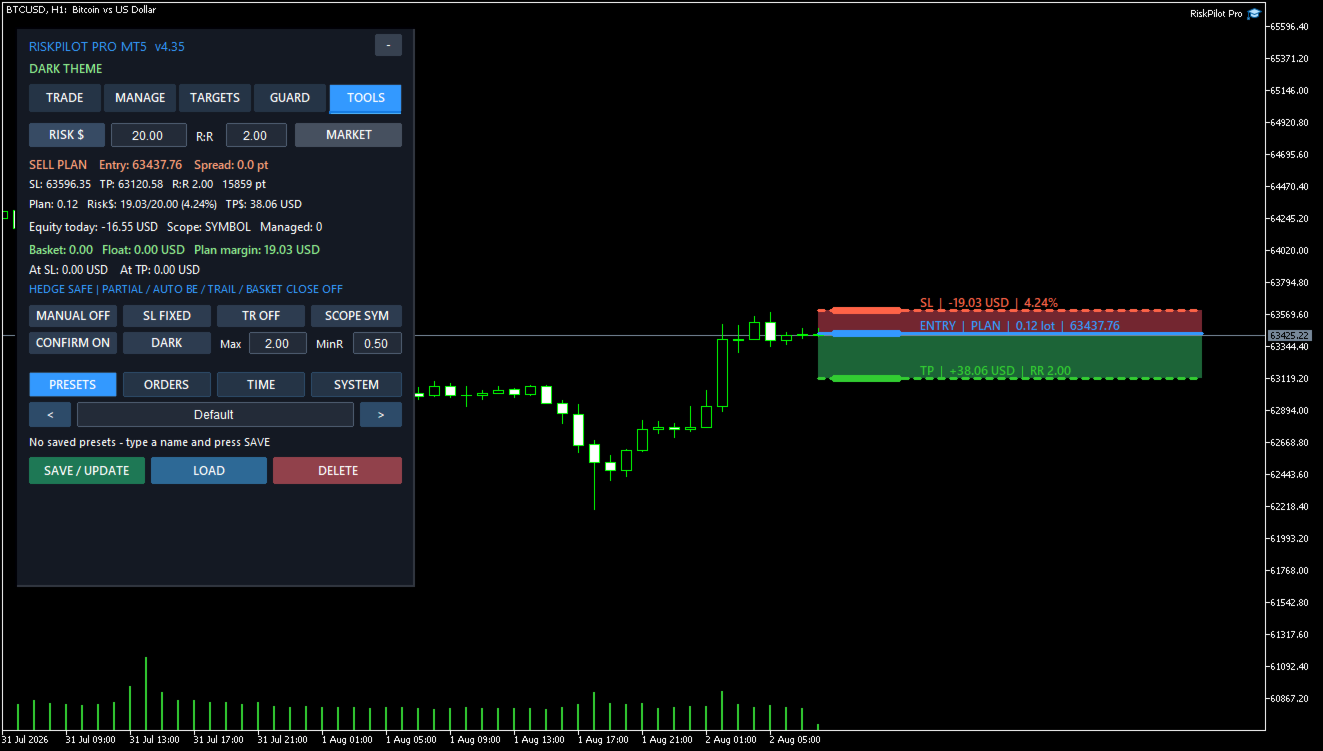
- Order comments and reusable presets
Risk Calculation
Position size can be calculated from a fixed amount in the account currency or from a percentage of balance, equity, or free margin. The calculation uses the broker's symbol specifications and is designed for Forex, metals, indices, cryptocurrencies, and other symbols available in MetaTrader 5.
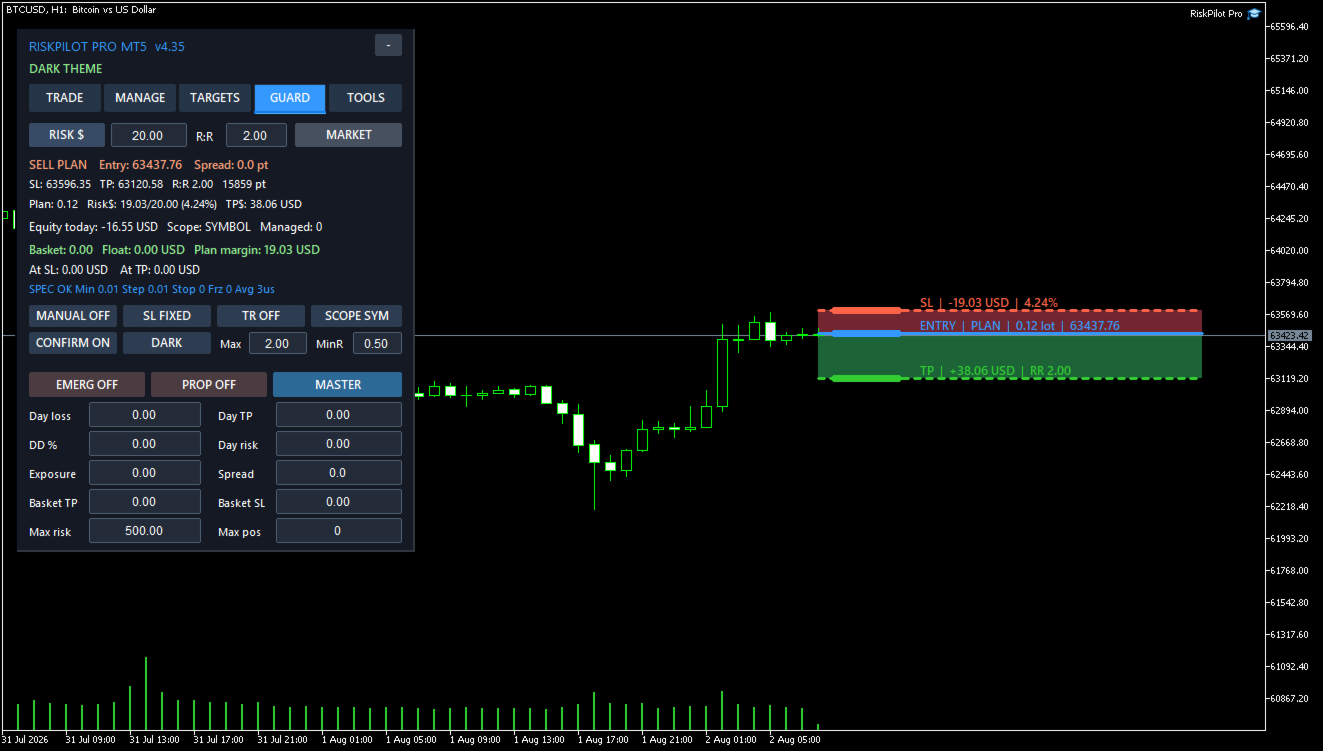
The plan can include live spread and an estimated commission per lot. Safety controls can limit maximum lot size, maximum planned risk, minimum risk-to-reward ratio, spread, deviation, margin use, and the number of managed positions.
Information Displayed Before Entry
- Calculated or manually selected lot size
- Stop Loss risk in account currency and percentage
- Expected Take Profit value
- Risk-to-reward ratio
- Estimated margin requirement
- Entry, Stop Loss, and Take Profit distances
- Current spread and planned commission estimate
- Maximum-lot and risk-cap warnings
Position Management
RiskPilot Pro can manage its own trades and, when enabled by the user, manual or mobile trades. Management scope can be limited to the utility's trades, the current symbol, a selected magic number, or account positions permitted by the selected scope.
Management Tools
- Up to five partial-close targets
- Targets defined by risk-to-reward, points, price, or percentage of the planned distance
- Break-even with a configurable offset
- Optional Stop Loss movement after a target
- Fixed-distance trailing
- ATR trailing
- Previous-candle trailing
- Swing-structure trailing
- Moving-average trailing
- Risk-to-reward step trailing
- Profit-lock staircase trailing
- Close winners, losers, buys, sells, or all managed positions
- Basket profit and loss limits in the account currency
Safe defaults: Partial close, automatic break-even, and trailing are disabled by default. They operate only after the user enables and configures them.
Pending and Private Execution Tools
- OCO pending-order handling
- Pending-order cancellation level
- Pending-order trailing
- Virtual pending orders
- Optional hidden Stop Loss and Take Profit levels
- Split orders and multi-entry execution
Terminal-dependant functions: Virtual orders and hidden protective levels are managed locally. MetaTrader 5, RiskPilot Pro, the trading account connection, and Algo Trading must remain active. Broker-side Stop Loss and Take Profit are generally safer when terminal or VPS availability is uncertain.
Account Protection
Optional controls include daily loss, daily profit target, overall drawdown, daily risk, simultaneous exposure, maximum spread, and basket profit or loss limits. Protection values remain disabled until the user sets and enables them.
RiskPilot Pro supports netting and hedging accounts. On hedging accounts, Hedge mode permits opposite positions. Hedge safety suspends automatic partial-close, break-even, trailing, and basket-close actions that could unintentionally reduce a hedge. On netting accounts, an opposite order can reduce or reverse the existing net position according to MetaTrader 5 account rules.
Workflow Tools
- Professional tabbed dashboard
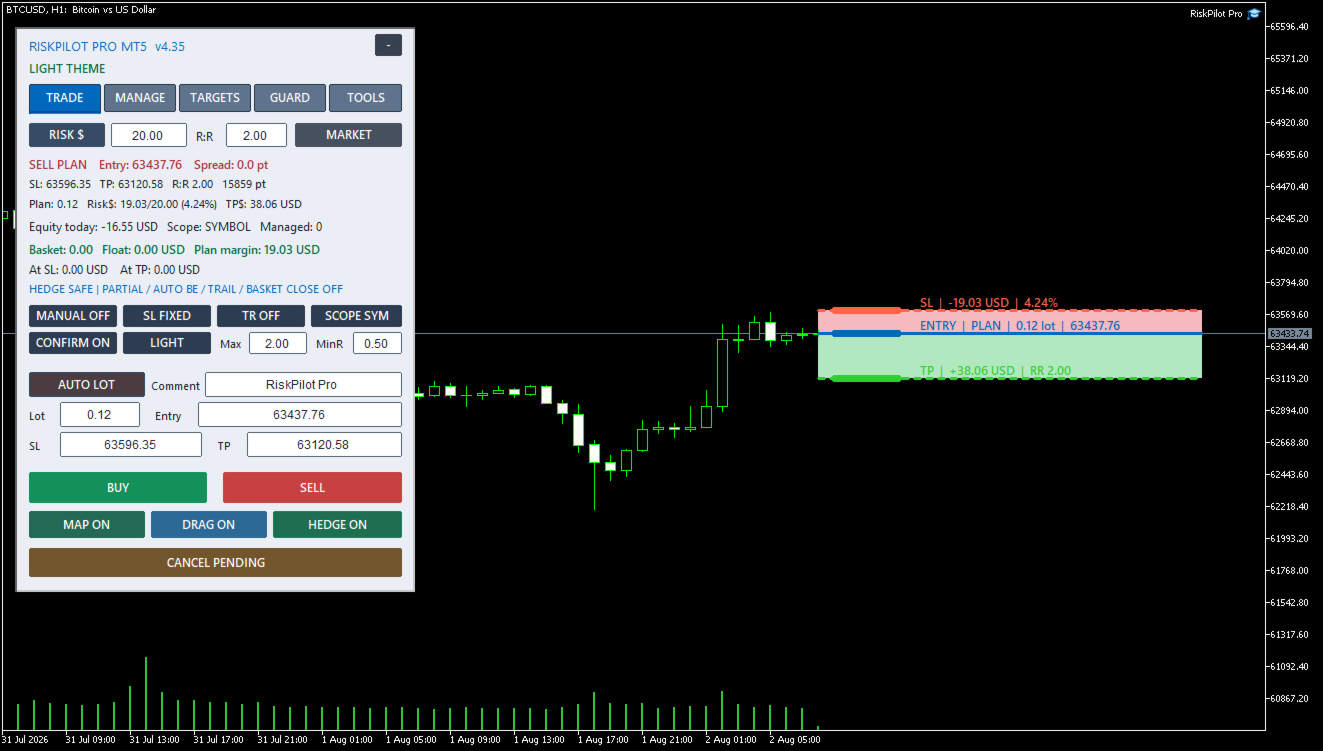
- Dark and light themes
- Compact and expanded layouts
- Movable panel with saved position
- Reusable presets
- Time restrictions and scheduled actions
- Symbol switching
- Price alerts and optional notifications
- Hotkeys
- Broker diagnostics
- Persistent position-management state
- Master-chart management for enabled symbols
Input Parameters
RiskPilot Pro keeps the MT5 Inputs tab intentionally short. Trading and management settings are changed from the on-chart dashboard and saved per account.
- InpMagicNumber - Unique identifier used to recognize positions and orders created by RiskPilot Pro. Use a different number for another independent instance or strategy.
- InpOrderComment - Comment added to orders created from the panel.
- InpPanelCorner - Selects the chart corner used as the panel anchor.
- InpPanelX - Horizontal panel distance in pixels from the selected corner.
- InpPanelY - Vertical panel distance in pixels from the selected corner.
The dashboard provides runtime controls for risk mode, risk value, risk-to-reward ratio, lot cap, confirmation, order mode, initial Stop Loss mode, management scope, manual-trade management, partial targets, break-even, trailing, account protection, OCO, virtual orders, hidden levels, schedules, presets, alerts, split execution, theme, and layout.
Compatibility
- Platform: MetaTrader 5
- Account types: Hedging and netting
- Symbols: Forex, metals, indices, cryptocurrencies, and other broker-supported MT5 instruments
- Risk currency: Account deposit currency
- Trading style: Manual and semi-automatic trade planning and management
Symbol availability, minimum volume, volume step, tick value, stop distance, freeze level, execution mode, spread, commission, and margin rules depend on the broker.
Basic Setup
- Attach RiskPilot Pro to a chart and allow Algo Trading.
- Select the risk mode and enter the allowed risk.
- Choose Market, Limit, or Stop order mode.
- Set Entry, Stop Loss, and Take Profit on the chart or in the panel.
- Review lot size, monetary risk, risk-to-reward ratio, spread, and margin.
- Press Buy or Sell and approve the confirmation window when confirmation is enabled.
- Enable partial targets, break-even, trailing, or account protection only when required.
Before Live Trading
- Test the current broker and symbol on a demo account.
- Confirm that Entry, Stop Loss, Take Profit, lot size, risk, and margin are correct.
- Review every protection setting and management scope.
- Use a VPS when relying on virtual orders, hidden levels, schedules, or continuous trade management.
Risk warning: Trading involves risk. RiskPilot Pro does not guarantee profit, prevent every loss, or remove execution risks such as slippage, gaps, disconnections, latency, or broker rejection.