Panel Trading MT5

Panel Trading MT5 - On-Chart Trading Panel for Manual Trading

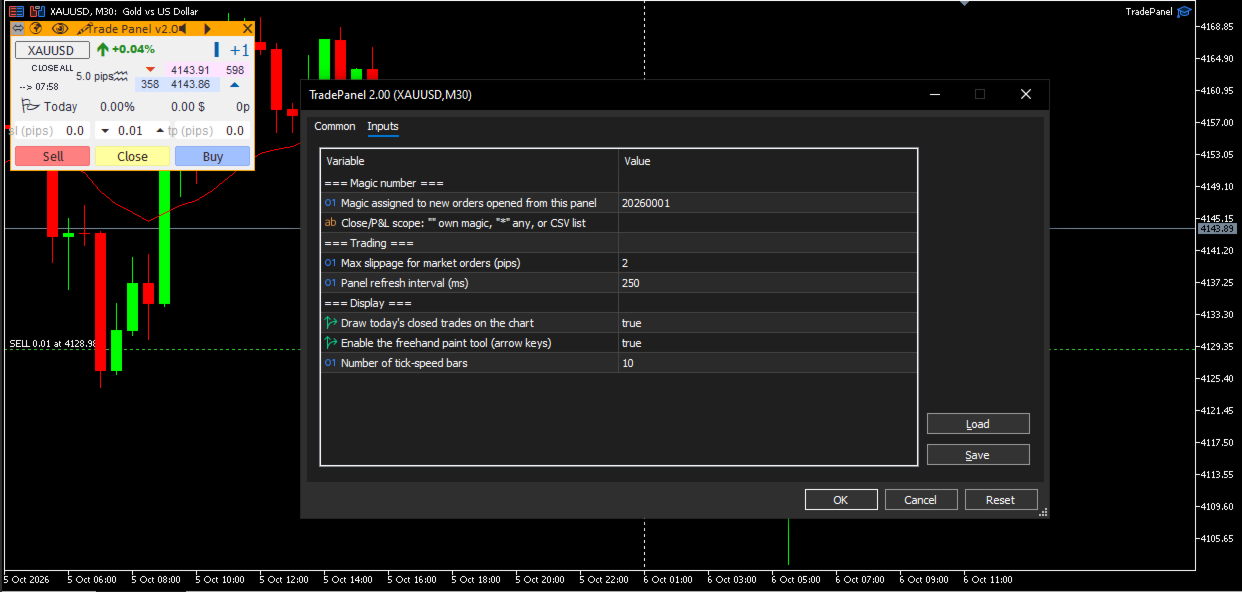
Panel Trading MT5 is a compact, draggable control panel for manual trading in MetaTrader 5. It lets you open and close positions, watch the live price and profit/loss, and switch symbols without leaving the chart or opening the order ticket.

This utility does not trade by itself and does not generate trading signals. Every order is placed by you.

The panel is built on the standard CTrade class. Close requests are retried automatically, lot size follows the broker's step, minimum and maximum, and settings are stored separately for each chart.

Usage guide (every button explained, close modes, magic number scope, FAQ): TradePanel v2.0 - Usage Guide

Main functions

Opening orders

  • Buy and Sell buttons with an adjustable lot field. Lot step, minimum and maximum are read from the broker.
  • Stop Loss and Take Profit are entered in pips and sent in the same request as the order.

Closing positions

  • Five close modes: Close All, Close Last, Close Profit, Close Loss and Close Partial. [Describe what Close Partial does, for example which part of the position is closed.]
  • Each close is retried up to 3 times. If a position still cannot be closed, the panel shows an alert and writes the reason to the Experts tab.
  • The tooltip of the Close button shows which positions it will affect.

Magic number scope

The Close button and the statistics can work with:

  • only trades opened by the panel,
  • all positions on the symbol, including manual trades,
  • a custom comma-separated list of magic numbers.

Information shown on the panel

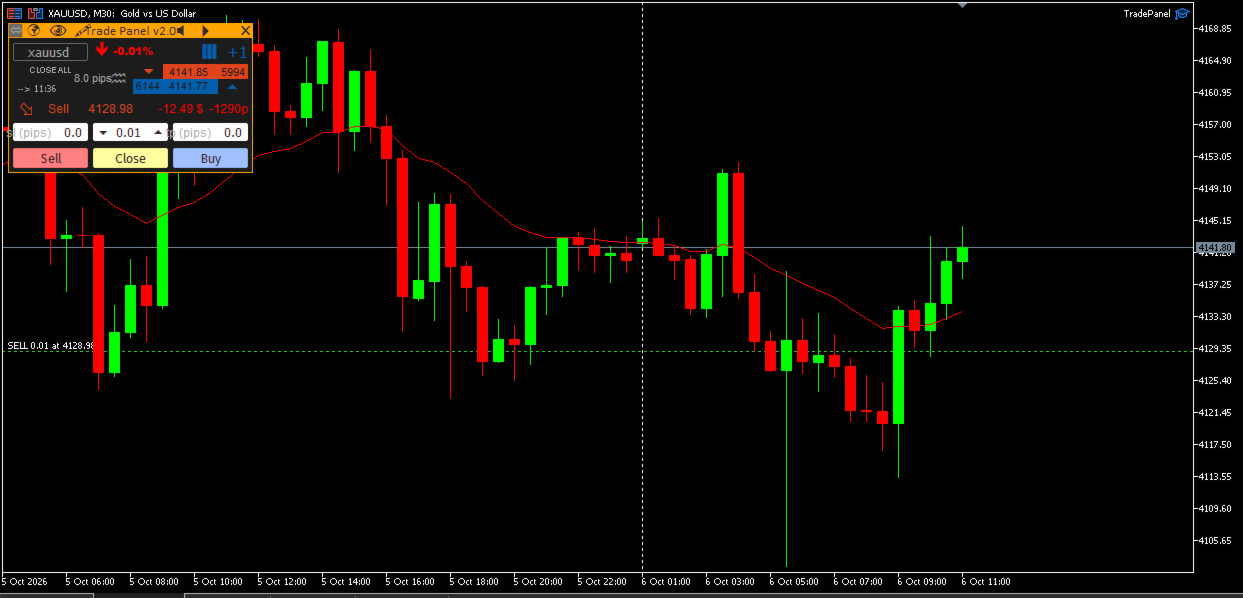
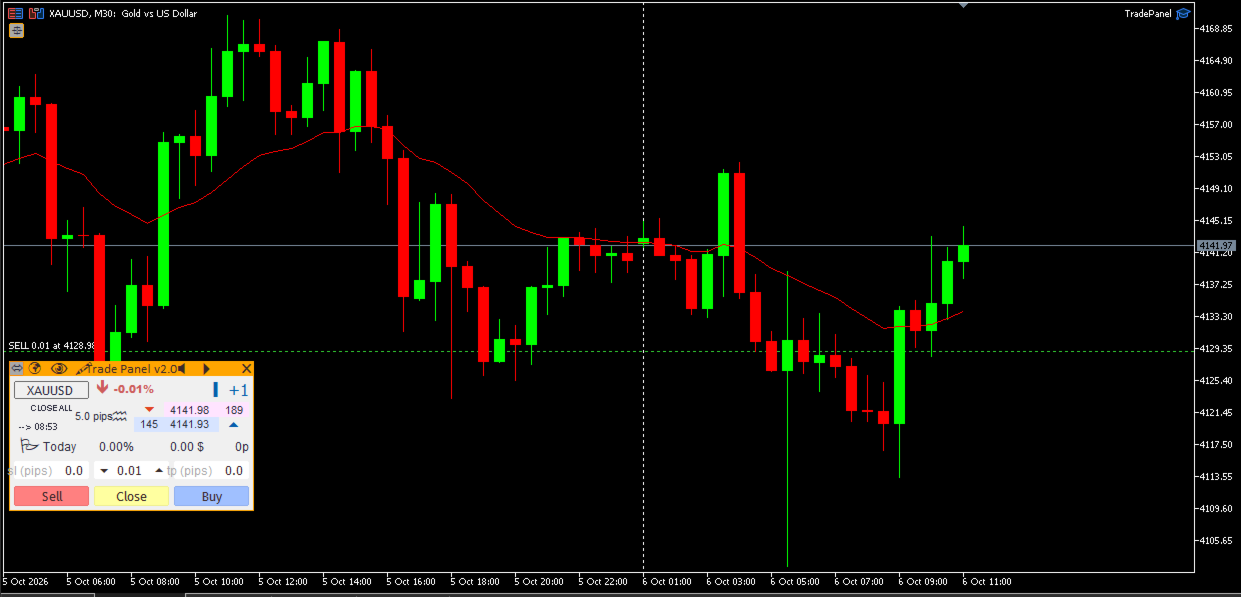
  • Floating profit/loss and points while a position is open; daily profit/loss and points when there is no open position. Only the managed magic numbers are counted.
  • Ask/Bid, spread in pips, daily % change, a tick-speed meter and a countdown to the candle close.

Other tools

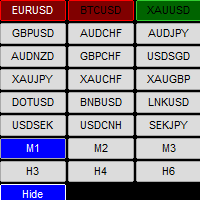
  • Symbol switcher: type a symbol (not case-sensitive) to open its chart; the symbol is added to Market Watch automatically.
  • Freehand drawing tool controlled with the keyboard. [List the hotkeys for line style, color and clear.]
  • Today's closed trades drawn on the chart: entry and exit markers joined by a dotted line.
  • Per-chart memory of position, lot, SL/TP and close mode, so several charts do not overwrite each other.
  • Light and dark theme, with tooltips on every control.

How to use

  1. Attach the EA to a chart and enable "Allow Algo Trading".
  2. Set the lot size, Stop Loss and Take Profit (in pips) on the panel.
  3. Press Buy or Sell to open a position.
  4. Select a close mode and press Close to close positions within the chosen magic number scope.

Inputs

Input Default Description
InpMagicNumber 20260001 Magic number assigned to orders opened from the panel.
InpManagedMagics "" (empty) Magic numbers that the Close button and the statistics apply to. Empty = InpMagicNumber only; "*" = every position on the symbol; or a list such as "1001,1002".
InpSlippagePips 2 Maximum slippage for market orders, in pips.
InpTimerMs 250 Panel refresh interval, in milliseconds.
InpShowOrderHistory true Draw today's closed trades on the chart.
InpShowPaintTool true Enable the freehand drawing tool.
InpMaxSpeedBars 10 Number of bars shown on the tick-speed meter.

Requirements and notes

  • Works on any symbol and timeframe.
  • "Allow Algo Trading" must be enabled.
  • [Account types supported: hedging / netting.]
  • [Strategy Tester: state whether the panel works in the tester.]

Risk notice

Trading leveraged products involves a risk of loss. This utility is a tool for order execution and does not provide signals or guarantee any result. Test it on a demo account first.
Produits recommandés
Task Panel Nxfx Trade Manager Task Panel Nxfx Trade Manager is a trading utility designed to simplify manual trading, position management, and risk control in MetaTrader 4 and MetaTrader 5. The panel provides quick access to trading functions directly from the chart. Traders can place orders, configure Stop Loss and Take Profit levels, manage position sizes, and monitor open trades through a clear and convenient interface. The tool is suitable for scalping, day trading, swing trading, and other
FREE
VPOB Smart Order Block Alert MT5 VPOB Smart Order Block Alert MT5 is an Order Block detection and alert system designed for MetaTrader 5. The system automatically analyzes price structure, detects Bullish and Bearish Order Blocks, evaluates Volume Profile information and POC, and provides a Quality Score to help traders identify important price zones. MAIN FEATURES • Automatic Bullish Order Block detection • Automatic Bearish Order Block detection • Volume Profile analysis • Point of Contro
FREE
Shved Position Pips Label   is a professional utility indicator for MetaTrader 5 that displays the real-time floating profit or loss of all your active positions directly on the chart. No more switching to the "Trade" tab at the bottom of the terminal — all crucial information about your running trades is positioned right in front of your eyes next to the current price line! Key Advantages: Smooth Price-Anchored Alignment:   The labels are anchored to the last bar and smoothly slide vertically f
FREE
Position Manager Pro v1.0 (MT5) Dual Magic Number Independent Group Manager with Live P&L Dashboard Overview Position Manager Pro   is a powerful trade management Expert Advisor for MetaTrader 5 that operates as an   overlay manager   — it does not open positions itself, but instead manages and monitors positions opened by other EAs or manually by the trader. The core concept is   two fully independent groups , each identified by a unique   Magic Number . Each group has its own Take Profit, Stop
FREE
Simple Position Manager
Mathew Louis Sau Kinminja
Simple Position Manager is a professional-grade MT5 script designed for efficient trade management. This versatile tool allows traders to quickly apply Take Profit, Stop Loss, and Breakeven settings across multiple open positions with precision and reliability. Key Features Multi-Position Management Apply TP/SL to all open positions of the current symbol simultaneously Intelligent position filtering by symbol Batch modification capabilities Smart Breakeven Technology Automated breakeven tri
FREE
ARMOR Risk Calculator Trade with a plan. Calculate your risk before you enter the market. ARMOR Risk Calculator is a professional and easy-to-use risk management tool for MetaTrader 5, designed to help traders calculate their position size and potential trade risk before placing a trade. Instead of manually calculating lot sizes and risk values, ARMOR Risk Calculator provides a clean and intuitive dashboard where you can enter your trade parameters and instantly review the calculated results. Ke
FREE
AQ RiskOptimizer MT5
HIT HYPERTECH INNOVATIONS LTD
4 (1)
Risk Optimizer is the absolute solution for applying risk management on your account. Bad risk management is the main reason that causes traders to lose money. Risk Optimizer calculates and suggests the correct lot size for each position according to your personal, customized risk profile. You can give directly your preferred risk as percentage (%) for each position or you can trust our algorithms to calculate and optimize according to your risk category selection. But it is not only that! Selec
FREE
Ind5 InfoPad Information Panel
Vladislav Andruschenko
4.89 (9)
INFOPad est un panneau d'information qui crée des informations sur la paire de devises sélectionnée dans le terminal MetaTrader 5. Il y a 5 fonctions de cet indicateur : Affiche les informations principales et principales sur le symbole sélectionné : Ask BID, Spread, Stop Level, Swap, Tick value, Commissions ; Affiche les objectifs futurs de la cible SL et de la cible TP (le nombre de points du stop loss et du take profit établis, le montant en dollars); Il montre le bénéfice reçu pour les péri
FREE
SL TP Manager MMS
Muhammad Masood Sarkar
5 (2)
SL TP Manager is a compact on-chart panel that sets the stop loss or take profit of all open trades on a symbol in one click, or moves every stop loss to break-even. It is designed for traders who scale in with several positions and do not want to edit each trade one by one. HOW IT WORKS - Type a price in the SL box and click Set SL: the stop loss is applied to every open trade on the chart's symbol. - Type a price in the TP box and click Set TP: the take profit is applied the same way. - Clic
FREE
SAB Advance Assistant est un panneau de gestion de trades manuel pour MetaTrader 5. Construisez chaque trade visuellement sur le graphique, maîtrisez votre risque au centime près, et laissez le moteur intégré gérer les prises de profit partielles, le break-even et le trailing — le tout depuis un panneau clair et redimensionnable. Conçu pour les traders discrétionnaires et ICT/SMC qui veulent de la précision sans tableur. FONCTIONNALITÉS CLÉS - Lignes Entrée, Stop Loss, TP1-TP5 et TP Final dép
Broker Quality Monitor is a free utility that measures the real quality of your broker for trading. What it measures: - Live spread (current, average, min and max) - Real slippage from your own fills, separated by BUY and SELL - Execution latency - Broker Quality Score (0-100) - Suitability verdict for gold scalping Features: - Live panel with all metrics and color-coded status - Per-session spread averages (Asia, London, London+NY, NY close) - Alerts when spread or slippage exceed your configur
FREE
Funded Account Guard
Edgar Alexis Benitez
Funded Account Guard monitors the whole trading account and enforces the risk limits you set. When a limit is reached, it closes all positions, deletes pending orders and blocks new entries until the limit period ends. It is intended for funded and evaluation accounts with a daily loss limit and a maximum drawdown limit, and for any trader who wants a fixed daily stop. The utility does not open trades, does not give signals and does not move stop loss or take profit levels. Rules - Daily loss
FREE
️ AutoProtect R13: Your Intelligent Trade Guardian Tired of manual management and emotional exits? AutoProtect R13 is a professional-grade utility designed to automate your risk management. This tool ensures your account stays protected 24/7. WHAT’S NEW IN V1.1 Optimized Execution: Faster processing for high-volatility market conditions. New User Interface: Professional GUI Dialog panel (replacing basic chart comments). Smart Break-Even+: Move Stop Loss to entry plus a small profit buffer
FREE
Basic Theme Builder MT5
Mehran Sepah Mansoor
5 (2)
Basic Theme Builder : Simplifiez la personnalisation de vos graphiques Transformez votre expérience de trading avec l'indicateur Basic Theme Builder , un outil polyvalent conçu pour simplifier la personnalisation de l'apparence de vos graphiques sur MetaTrader 5. Cet indicateur intuitif offre un panneau facile à utiliser qui vous permet de passer d'un thème à l'autre et de changer les schémas de couleurs en toute simplicité, améliorant ainsi l'apparence visuelle et la fonctionnalité de votre en
FREE
Product Title:   MT5 GoldSilver Trade Panel Lite Short Description: Free manual trading panel for gold and silver. Market order execution, SL/TP setting, one-click close all, and basic daily statistics. Advanced features are available in the full paid version. Description: MT5 GoldSilver Trade Panel Lite   is a free, easy-to-use manual trading panel designed for gold and silver traders. It automatically detects your broker’s gold and silver symbols and lets you place market orders quickly with
FREE
Quick Close 1S
Tan Au Phuong
5 (9)
Quick Close 1S est un outil conçu pour une gestion des trades rapide et organisée. Il offre un panneau de contrôle clair pour ouvrir ou fermer des ordres instantanément, appliquer des réglages SL/TP flexibles, gérer les objectifs de panier et contrôler le profit ou la perte global(e). Convient aux traders qui apprécient la précision, l’efficacité et une exécution claire dans leur trading quotidien. Fonctionnalités principales Contrôle simplifié des trades : Gérez les positions depuis un panneau
FREE
MMTrader Manager
Mateusz Makarewicz
Welcome to my MMTrader Manager product. EA that allows You for simple managing trades and positions. Key Features: Position Opening – Open trades quickly with customizable Take Profit (TP), Stop Loss (SL), and lot size settings. Position Closing – Close trades with one click. Grid System – Automatically create a grid of orders. Recovery Mode – Loss recovery lot calculation. Trade History Data – Acces data to historical positions. User-Friendly Interface – A clear and simple panel designed. This
FREE
INFINITY STAT PANEL — account statistics for MetaTrader 5 The INFINITY STAT PANEL shows the trading results directly on the chart. Analyze profits and losses based on Expert Advisor comments, transaction wizards and trading instruments, track commissions and swaps, and compare results for a selected period. The panel is suitable for any type of account, including when using multiple Expert Advisors on the same account. Additional information about the broker, account type, and the broker’s
FREE
G Spikes Trade Assistant G Spikes Trade Assistant is a MetaTrader 5 utility panel designed to help users manage manual trading actions more efficiently. It provides quick access to order execution, stop-loss settings, target-price settings, and position-management controls from the chart. Main features Buy and Sell market order buttons. Pending order options. Stop-loss and target-price management. Close All and selected close options. Customizable display settings and trade comments. Interface t
FREE
Gestionnaire de transactions avec contrôle des positions basé sur le risque Ce conseiller expert est un outil de gestion manuelle des transactions conçu pour aider les traders à planifier, gérer et contrôler leurs positions ouvertes sur les graphiques MetaTrader 5. Ce produit ne génère pas de signaux de trading et ne prend aucune décision de trading indépendante. Toutes les entrées sont initiées manuellement par l'utilisateur ou par d'autres conseillers experts. Cet outil se concentre exclusi
FREE
More Advanced version is available as  QuantView AnalyticsPro  at  https://www.mql5.com/en/market/product/205251 with a limited time offer of $50 for lifetime license. =========================================================================================================================================================== QuantView Analytics Master Advanced On-Chart Portfolio Diagnostics & Equity Forensics for MetaTrader 5 Standard MT5 history reports simply show you how much money was made o
FREE
Guardian Magic GT
Carlos Eduardo Rivas Istacuy
Guardian Magic GT - Risk Management Expert Advisor for MetaTrader 5 PROTECT YOUR TRADING CAPITAL WITH INTELLIGENT RISK MANAGEMENT Guardian Magic GT is a professional-grade Expert Advisor designed to safeguard your trading operations by implementing sophisticated risk control mechanisms. Whether you run a single bot or manage multiple automated trading systems simultaneously, Guardian Magic GT provides real-time monitoring and automatic position management to ensure your account stays within your
Close All Trades Button
PHOENIX GLOBAL INVESTMENTS LTD
5 (2)
Fermer plusieurs positions ouvertes une par une lorsque le marché évolue rapidement ou en cas de problème technique sur la plateforme fait perdre du temps, et chaque seconde supplémentaire augmente le risque de slippage. Le bouton « Fermer toutes les transactions » vous permet de clôturer instantanément toutes les positions de votre portefeuille d’un simple clic. Appuyez sur ce bouton et toutes les positions ouvertes se clôturent séquentiellement, grâce à un mécanisme de réessai automatique
FREE
Close In Quick Script
Mathew Louis Sau Kinminja
The Close In Quick Script is an optimized, high-performance MQL5 script designed to swiftly close all open positions for the current chart's symbol on the MetaTrader 5 platform. Engineered for speed and reliability, it leverages asynchronous trading, minimal system checks, and robust error handling to ensure seamless trade closure. Whether you're a day trader, scalper, or portfolio manager, this script is an essential tool for efficiently managing and exiting trades. Key Features: Asynchronous t
FREE
MT Radar For MT5
Rustamzhan Salidzhanov
MT-Radar — surveillance gratuite des terminaux MetaTrader depuis votre téléphone Vous voulez savoir si votre Expert Advisor tourne et si votre terminal est connecté, sans vous connecter à votre VPS par RDP à chaque fois ? MT-Radar affiche l'état de tous vos terminaux MT4/MT5 dans un seul panneau web sécurisé. Ouvrez-le sur votre téléphone, votre tablette ou n'importe quel ordinateur et vérifiez en quelques secondes que tout fonctionne comme prévu. Ce que montre MT-Radar : Compte et terminal —
FREE
Symbol Spec Auditor rassemble dans un seul panneau sur le graphique la partie de la spécification du contrat d'un symbole qui détermine la taille de position et le coût de trading : valeur du point, coût du spread, marge, swap, règles d'exécution et sessions de trading. Les valeurs brutes de la spécification sont converties en montant pour 1,00 lot dans la devise du compte, et les réglages du courtier qui faussent silencieusement le code de calcul de la taille de lot sont signalés comme avertiss
FREE
ATC Alert Manager vous permet de définir des alarmes de prix directement sur le graphique et de les gérer depuis un petit panneau. Chaque alarme est affichée comme une ligne sur le graphique que vous pouvez faire glisser vers un nouveau prix. Une alarme se déclenche une fois, au moment où le prix croise votre niveau, avec une alerte popup, un son et une notification push optionnelle sur votre téléphone. Un prix déjà au-delà du niveau ne la déclenche pas, donc vous ne recevez jamais d'alertes ré
FREE
TradingTimeControl is a utility implemented as an Expert Advisor for MetaTrader 5. It automatically closes all open positions and deletes pending orders at a specified time each day. This tool is designed for traders who need to automate position management with flexible settings. Key Features Closes positions and orders at the specified time ( CloseHour , CloseMinute ) daily. Allows you to change the closing time at any moment, applying new settings immediately. Supports MagicNumber : 0 for al
FREE
TradePanelPro
Dang Tam Tran
5 (1)
TradePanel Pro v1.0 – Professional Manual Trading Panel for MT5 TradePanel Pro v1.0 is a professional, high-performance manual trading panel built exclusively for the MetaTrader 5 platform. Designed for speed and precision, it allows traders to execute trades instantly with a single click directly from the chart, eliminating the need for manual order calculations and repetitive trading dialogs. Featuring a modern, elegant dark-themed interface with fully adjustable scaling, TradePanel Pro maxim
FREE
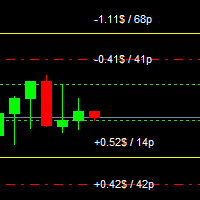
The DD_Profit_Monitor MT5  indicator is a trading tool developed by the Dagangduit Core Team . This indicator is designed to monitor profits in real-time with the following key features: All Time Profit : Displays the total profit earned since the beginning of the trading account's usage. This feature helps traders see the overall performance of their trading activities. Daily Profit : Displays daily profits, allowing traders to monitor their daily performance more specifically. Key Features: Al
Les acheteurs de ce produit ont également acheté
Trade Assistant MT5
Evgeniy Kravchenko
4.43 (216)
It helps to calculate the risk per trade, the easy installation of a new order, order management with partial closing functions, trailing stop of 7 types and other useful functions. Additional materials and instructions Installation instructions - Application instructions Line function -   shows on the chart the Opening line, Stop Loss, Take Profit. With this function it is easy to set a new order and see its additional characteristics before opening.   Risk management  - The risk calculation
Bienvenue sur Trade Manager EA, l’outil ultime de gestion des risques conçu pour rendre le trading plus intuitif, précis et efficace. Ce n’est pas seulement un outil d’exécution d’ordres ; c’est une solution complète pour la planification des trades, la gestion des positions et le contrôle des risques. Que vous soyez débutant, trader expérimenté ou scalpeur ayant besoin d’une exécution rapide, Trade Manager EA s’adapte à vos besoins, offrant une flexibilité sur tous les marchés, des devises et i
Farmed Hedge Yield Farming | All Markets (Manual - Hybrid - Semi/Automated EA) VERIFIED TRADING RESULTS - Farmed Hedge Yield Axi Copy:  https://www.mql5.com/en/signals/2356376 - Farmed Hedge Yield Exn Copy:   https://www.mql5.com/en/signals/2356404 - Farmed Hedge Yield V Copy:  https://www.mql5.com/en/signals/2357156 IMPORTANT NOTICE: FarmedHedge is a MANUAL-FOCUSED TRADING UTILITY ,not a fully automated EA. Results shown on this Signal include manual trades and overall strategic management.
Local Trade Copier EA MT5
Juvenille Emperor Limited
4.94 (150)
Local Trade Copier EA MT5 est un copieur de trades rapide et flexible permettant de copier et de gérer des trades entre plusieurs comptes MetaTrader 5 sur le même ordinateur Windows ou Windows VPS. Il combine la synchronisation locale des trades avec des contrôles côté Receiver pour la taille des lots, la gestion du risque, le filtrage des trades, le mappage des symboles, la gestion des trades et la protection du compte. Configurez vos terminaux Transmitter et Receiver en environ 1 minute et co
Telegram to MT5 Multi-Channel Copier   copie automatiquement les signaux de trading de vos canaux Telegram et Discord directement vers MetaTrader 5. Pas de bots, pas d'extensions de navigateur, pas de copie manuelle. Un signal arrive sur Telegram ou Discord et l'EA ouvre le trade dans votre terminal en quelques secondes. Et avant de copier un canal, le backtester intégré vous montre ce que ce canal aurait fait sur votre compte. Le produit comprend deux composants : une application Windows qui éc
EA Overfitter
Stephen J Martret
5 (4)
That backtest looks great. But will it still be making money tomorrow, next week, next month? EA Overfitter re-runs your EA on 100 price histories it has never seen. One score tells you if the edge is real. A backtest tells you what an EA did on one price history — the one that happened to occur. What you cannot tell from it is how much of that result was the strategy and how much was the particular path. EA Overfitter answers that. It builds up to 100 synthetic price histories your EA has n
TradePanel MT5
Alfiya Fazylova
4.89 (174)
Trade Panel est un assistant commercial multifonction. L'application contient plus de 50 fonctions de trading pour le trading manuel et permet d'automatiser la plupart des tâches commerciales. Instructions d'utilisation : https://www.mql5.com/fr/blogs/post/762589 Version d'essai de l'application pour un compte démo : https://www.mql5.com/fr/blogs/post/762644 Comment installer l'application : https://www.mql5.com/fr/blogs/post/762645 Comment tester l'application en mode visuel : https://www.mql5.
Exp COPYLOT CLIENT for MT5
Vladislav Andruschenko
3.97 (35)
Copieur professionnel de trades pour MetaTrader 5 Un copieur de trades rapide, professionnel et fiable pour MetaTrader . COPYLOT permet de copier des trades Forex entre les terminaux MT4 et MT5 avec prise en charge des comptes Hedge et Netting . La version MT5 de COPYLOT prend en charge : - MT5 Hedge → MT5 Hedge - MT5 Hedge → MT5 Netting - MT5 Netting → MT5 Hedge - MT5 Netting → MT5 Netting - MT4 → MT5 Hedge - MT4 → MT5 Netting Version MT4 Description complète + DEMO + PDF Comment acheter Comme
Strategy Ledger Pro
Abdullah Uygar Tuna
5 (17)
Désormais disponible en français. Strategy Ledger Pro est un panneau d'analyse de compte en lecture seule pour MetaTrader 5. Il sépare les résultats du compte par Expert Advisor, stratégie, symbole et numéro magic, pour que vous voyiez ce que chacun apporte réellement. Le panneau est disponible en 11 langues : English, Français, Deutsch, Español, Italiano, Português, Русский, Türkçe, 中文, 日本語 et 한국어. Avant de télécharger la démo. Le Market exécute la démo de tout produit payant uniquement dans l
Copiez les signaux Telegram avec vos propres règles de trading Telegram to MT5 Signal Trader copie automatiquement les signaux de trading au format texte provenant de canaux et de groupes Telegram publics et privés vers MetaTrader 5. Gérez plusieurs fournisseurs et comptes MT5 depuis une seule application de bureau, avec des paramètres de risque et de trading propres à chaque fournisseur . Aucun bot Telegram ni configuration d'API n'est nécessaire pour copier les signaux. Connectez-vous simpleme
News Trade EA MT5
Konstantin Kulikov
4.55 (11)
Je voudrais vous présenter un robot efficace que j'utilise depuis plusieurs années. Il peut être utilisé en mode semi-automatique, comme en mode totalement automatique. >>> Chat <<< Le programme comporte des paramètres souples pour le commerce sur les nouvelles du calendrier économique. Il est impossible de le vérifier dans le testeur des stratégies. Ce qu’il faut, c’est le travail réel. Téléchargez la dernière archive des paramètres : https://www.mql5.com/en/blogs/post/747929 Surveillance des
Power Candles Strategy Scanner : détecteur de setups multi-symboles auto-optimisé Un scanner qui sonne au moindre frémissement vous apprend à l'ignorer. Une clôture de bougie agitée, alerte après alerte, et le seul setup que vous tradez vraiment se noie dans le bruit. Power Candles Strategy Scanner fait tourner le moteur auto-optimisé de Power Candles sur chaque symbole de votre Market Watch et ne vous alerte que sur ce qui passe vos propres filtres : la force de la dernière bougie clôturée, le
================================================================================ POC BREAKOUT - V20.72. Full Professional Grade Toolkit ================================================================================ POC Breakout is a full MetaTrader 5 trading dashboard for discretionary traders who want breakout signals, Point of Control (POC) context, volume profiles, order flow, market structure, news, alerts, and advanced trade planning in one professional workspace. Attached directly to you
The product will copy all telegram signal to MT5 ( which you are member) , also it can work as remote copier.  Easy to set up, copy order instant, can work with almost signal formats, image signal,  s upport to translate other language to English Work with all type of channel or group, even channel have "Restrict Saving Content", work with  multi channel, multi MT5 Work as remote copier: with signal have ticket number, it will copy exactly via ticket number. Support to backtest signal. How to s
HINN MagicEntry Extra
ALGOFLOW OÜ
4.74 (19)
HINN MAGIC ENTRY – the ultimate tool for entry and position management! SIMPLE. FASTEST. INTUITIVE. MAX AUTOMATED. Place orders by selecting a level directly on the chart! full description   ::  demo-version  :: 60-sec-video-description Key features: - Market, limit, and pending orders - Automatic lot size calculation - Automatic spread and commission accounting - Unlimited partitial take-profits  - Breakeven and trailing stop-loss and take-profit  functions - Invalidation leves - Intuitive, a
VirtualTradePad PRO SE MT5 — centre de contrôle de trading professionnel pour MetaTrader 5 VirtualTradePad PRO SE est un panneau de trading premium basé sur le graphique et un espace de gestion des trades pour MetaTrader 5 . Il est conçu pour les traders qui souhaitent une exécution plus rapide, un contrôle plus clair des positions, une gestion structurée des trades, une planification visuelle des niveaux et un flux de travail professionnel directement depuis le graphique. Ce n’est pas seulement
Expert advisor order block, BOS et ChoCH pour MetaTrader 5, avec alertes Telegram SMC Trade Pilot MT5 lit la structure de marché sur votre graphique et envoie le signal sur Telegram. Il marque les cassures de structure (BOS) et les changements de caractère (ChoCH), dessine les order blocks avec une note de force , suit les fair value gaps (FVG) et les liquidity sweeps, affiche un volume profile avec point of control, value area high et value area low, et résume l'ensemble dans un tableau de bord
Timeless Charts
Samuel Manoel De Souza
5 (9)
Timeless Charts est un utilitaire de trading tout-en-un destiné aux traders professionnels. Il combine des types de graphiques personnalisés tels que les graphiques en secondes et Renko avec une analyse avancée du flux d’ordre s utilisant Footprints , Clusters , Profils de Volume , études VWAP et outils d’analyse ancrés pour une compréhension plus approfondie du marché. Le trading et la gestion des positions sont effectués directement depuis le graphique via un panneau intégré de gestion des ord
Strategy Builder offers an incredible amount of functionality. It combines a trade panel with configurable automation (covert indicators into an EA), real-time statistics (profit & draw down) plus automatic optimization of SL, TP/exit, trading hours, indicator inputs. Multiple indicators can be combined into an single alert/trade signal and can include custom indicators, even if just have ex4 file or purchased from Market. The system is easily configured via a CONFIG button and associated pop-u
News Filter EA
Rashed Samir
5 (2)
News Filter EA: Advanced Algo Trading Assistant News Filter EA is an advanced algo trading assistant designed to enhance your trading experience. By using the News Filter EA , you can integrate a Forex economic news filter into your existing expert advisor, even if you do not have access to its source code. In addition to the news filter, you can also specify trading days and hours for your expert. The News Filter EA also includes risk management  and equity protection features. MT4 Version Ma
Panneau de trading pour MetaTrader 5 — contrôle professionnel du trading en un clic depuis le graphique et le clavier Un panneau de trading avancé conçu pour les traders actifs, afin d’ouvrir, gérer et clôturer des positions bien plus rapidement qu’avec l’interface standard de MetaTrader. Cette solution s’adresse à ceux qui veulent contrôler positions, ordres en attente, profit global et exécution depuis un seul espace de travail professionnel. Il ne s’agit pas d’un simple utilitaire. C’est un
Trade Dashboard MT5
Fatemeh Ameri
4.94 (135)
Trade Dashboard simplifies how you open, manage, and control your trades, with built-in lot size calculation. It allows you to execute trades, manage risk, and control positions directly on the chart, with tools such as partial close, breakeven, and trailing stop. Designed to reduce manual work and help you stay focused on your trading decisions. A demo version is available for testing. Detailed explanations of features are provided within the MQL5 platform. Installation instructions are include
Telegram To MT5 Ultra
Mirel Daniel Gheonu
5 (5)
Telegram To MT5 — Copieur de signaux Transformez les appels de trading de vos canaux Telegram en véritables ordres MT5 — automatiquement, sur autant de comptes que vous le souhaitez, avec le risque et les règles entièrement sous votre contrôle. Telegram To MT5 relie les canaux VIP / de signaux que vous suivez déjà sur Telegram à votre terminal MetaTrader 5. Une application de bureau compagnon gratuite lit les messages (même des canaux qui bloquent les bots), et cet Expert Advisor les exécute sur
Kontrol01 Manager
Andrei Koval
5 (2)
EA Portfolio Control & Cloud Monitoring for MetaTrader 5 Your EAs manage trades. KONTROL_01 manages your EAs. A control system for traders running multiple Expert Advisors on the same account. Coordinate EA activity, manage trading risks and monitor your setup remotely. A detailed User Manual is available via DM after purchase. IN PRACTICE Multiple EAs. No coordination. Your EAs trade independently, unaware of each other's activity. KONTROL_01 coordinates them, limits simultaneous activity a
Vous avez trouvé un excellent signal, mais le lot d'un fournisseur est trop petit ? Vous avez besoin d'un volume de position plus important, mais les paramètres du terminal sont trop pauvres ? Signal Lot Manager augmentera le volume de position du fournisseur au moyen d'une commande en double du volume nécessaire. Définissez simplement une taille de lot et un nom de signal à partir duquel copier les commandes. Signal Lot Manager est un utilitaire multiplicateur de lots pour dupliquer les command
Boleta Scalper Ultra
Nelson Lopes De Paula Neto
ScalperBoleta Ultra — Panneau de Trading pour MetaTrader 5 ScalperBoleta Ultra est un panneau de trading manuel développé pour MetaTrader 5, principalement destiné au scalping et au day trading. Il centralise l'exécution des ordres, la gestion des positions et le contrôle des risques directement sur le graphique, afin de faciliter les opérations de trading. Fonctionnalités principales : Achat et vente : Exécution des ordres à l'aide de boutons ou de raccourcis clavier. Gestion des positions : Cl
Trade Manager DaneTrades
Levi Dane Benjamin
4.13 (31)
Trade Manager pour vous aider à entrer et sortir rapidement des transactions tout en calculant automatiquement votre risque. Y compris des fonctionnalités pour vous aider à éviter le sur-trading, le trading de vengeance et le trading émotionnel. Les transactions peuvent être gérées automatiquement et les mesures de performances du compte peuvent être visualisées dans un graphique. Ces fonctionnalités rendent ce panneau idéal pour tous les traders manuels et contribuent à améliorer la plateforme
Trade copier MT5
Alfiya Fazylova
4.61 (57)
Trade Copier est un utilitaire professionnel conçu pour copier et synchroniser les commandesentre les comptes de trading. Les commandes sont copiées du compte/terminal du fournisseur vers le compte/terminal du destinataire, qui sont installés sur le même ordinateur ou vps. Avant d'acheter, vous pouvez tester la version démo sur un compte démo. Version démo ici . Instructions complètes ici . Principales fonctionnalités et avantages: Prend en charge la copie des commandes MT5> MT5, MT4> MT5, MT5>
Le Local Trade Copier EA est une solution pour les commerçants individuels ou les gestionnaires de compte qui ont besoin d'exécuter des signaux commerciaux à partir de sources externes ou qui ont besoin de gérer plusieurs comptes en même temps, sans avoir besoin d'un compte MAM ou PAMM. Il copie jusqu'à 8 comptes maîtres vers un nombre illimité de comptes esclaves [ Guide d'installation | Guide de mise à jour | Dépannage | FAQ | Tous les produits ] 100% auto-hébergé Facile à installer et à util
Seconds Chart MT5
Boris Sedov
4.61 (18)
Seconds Chart - un outil unique pour créer des graphiques en secondes dans MetaTrader 5 . Grâce à Seconds Chart , vous pouvez créer un graphique avec une période définie en secondes, offrant une flexibilité et une précision idéales pour l'analyse, indisponibles sur les graphiques standards en minutes ou en heures. Par exemple, la période S15 indique un graphique avec des bougies d'une durée de 15 secondes. Vous pouvez utiliser n'importe quels indicateurs et experts advisors compatibles avec les
Plus de l'auteur
For MT4: TP SL Calculator for MT4 This tool helps you to automatically calculate profit at Take - Profit price and loss at Stop - Loss price. Feature: - Calculate profit at TP price. Apply to all operators (BUY / BUY LIMIT / BUY STOP / SELL / SELL LIMIT / SELL STOP), with TP price is greater than 0. Profit is expressed in money and points. - Calculate loss at SL price. Apply to all operators (BUY / BUY LIMIT / BUY STOP / SELL / SELL LIMIT / SELL STOP), with SL price is greater than 0.   Loss is
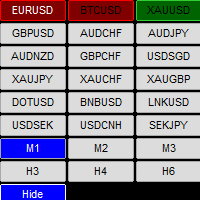
** NOTE: This indicator uses realtime data. Thus DO NOT download Demo version. If you still need demo version, please refer to trial version . Version for MT4:  https://www.mql5.com/en/market/product/123597 Symbol Chart Changer is an indicator/utility that offers you the option to switch between symbols and timeframes. You can choose any symbol and timeframe on the same chart with just a few clicks.  In addition, this indicator also shows the profit of the symbol through the color of the butt
Gold Command Dashboard is a compact information panel for XAUUSD charts in MetaTrader 5. It shows market context before you place a trade: the current session, the daily range, a macro reading for gold, the trend direction on four timeframes and the nearest key price levels. The indicator does not draw arrows, does not generate trading signals and does not place trades. It is intended to support your own analysis. What the panel shows Session - the active session (Tokyo, London, New York; overla
FREE
This indicator displays two important pieces of information on the MT5 chart: Current Spread - Trading cost measured in points, helping traders assess optimal entry timing when spread is low. Time Countdown - Remaining time (minutes:seconds) until the current candle closes and a new candle forms, supporting candle-based trading strategies. Information is displayed as compact text in a chart corner (default top-right), with customizable position, color, and font size. The indicator updates in rea
FREE
This indicator displays two important pieces of information on the MT4 chart: Current Spread - Trading cost measured in points, helping traders assess optimal entry timing when spread is low. Time Countdown - Remaining time (minutes:seconds) until the current candle closes and a new candle forms, supporting candle-based trading strategies. Information is displayed as compact text in a chart corner (default top-right), with customizable position, color, and font size. The indicator updates in rea
FREE
For MT5: TP SL Calculator This tool helps you to automatically calculate profit at Take - Profit price and loss at Stop - Loss price. Feature: - Calculate profit at TP price. Apply to all operators (BUY / BUY LIMIT / BUY STOP / SELL / SELL LIMIT / SELL STOP), with TP price is greater than 0. Profit is expressed in money and points. - Calculate loss at SL price. Apply to all operators (BUY / BUY LIMIT / BUY STOP / SELL / SELL LIMIT / SELL STOP), with SL price is greater than 0. Loss is express
** NOTE:   This indicator uses realtime data. Thus   DO NOT   download Demo version. If you still need demo version, please refer to   free version . Version for MT5:   https://www.mql5.com/en/market/product/115489 Symbol Chart Changer   is an indicator/utility that offers you the option to switch between symbols and timeframes. You can choose any symbol and timeframe on the same chart with just a few clicks.  In addition, this indicator also shows the profit of the symbol through the color o
Dashboard Basket MT5 is a multi-symbol trading dashboard for manual traders. One panel shows the market state of up to 40 symbols at a glance (spread, daily move, average daily range, candle direction on 9 timeframes and position versus a moving average) and lets you open, close and manage trades on any of them with a single click, including whole currency baskets, with an automatic basket take profit and stop loss. The EA does not trade by itself. Every position is opened by you. The dashboard
Economic Calendar: News Panel, Alerts and News Guard Economic Calendar puts the news calendar on your MetaTrader 5 chart and keeps you ready for it: the next events, vertical lines on the price chart, alerts on your phone, signals for your other Expert Advisors, and optional protections that act before the news. Everything is configured from a panel on the chart. The Expert Advisor itself needs no DLL and no external program. Please note that this product does not work in the strategy tester. To
ExpertActions: manage all Expert Advisors of your terminal from one chart Running many EAs on many charts? ExpertActions lets you list, restart and remove them, load and save their inputs and close charts, all from one small panel, without opening each chart and each input dialog. You can also do it from your phone with your own Telegram bot. User guide and free demo: Guideline The demo (demo accounts only) can be downloaded from the guide or directly here: download Free add-on for buyers: afte
Gold Command Dashboard Pro is an information panel for XAUUSD charts in MetaTrader 5. It shows market context and sends alerts when that context changes: the next high-impact news, a closing session with a short summary, macro and trend direction lining up, and price reaching a key level or a support / resistance zone. The indicator does not draw buy/sell arrows, does not generate trading signals and does not place trades. It provides context and timing for your own analysis. What the panel show
EA Silence Watch is a read-only utility for traders who run several Expert Advisors. It does not place, modify or close any order. It learns the normal entry rhythm of every EA from the deal history of the account and tells you when one of them has been silent for longer than usual. What you see on the chart Four counters at the top: SILENT, WATCH, OK and LEARNING. A status strip with the terminal state (connection, Algo Trading, ping) and the state of your expected EA list. One row per EA with

Filtrer:
Aucun avis
Répondre à l'avis