Infinity Stat Panel MT5

INFINITY STAT PANEL — account statistics for MetaTrader 5

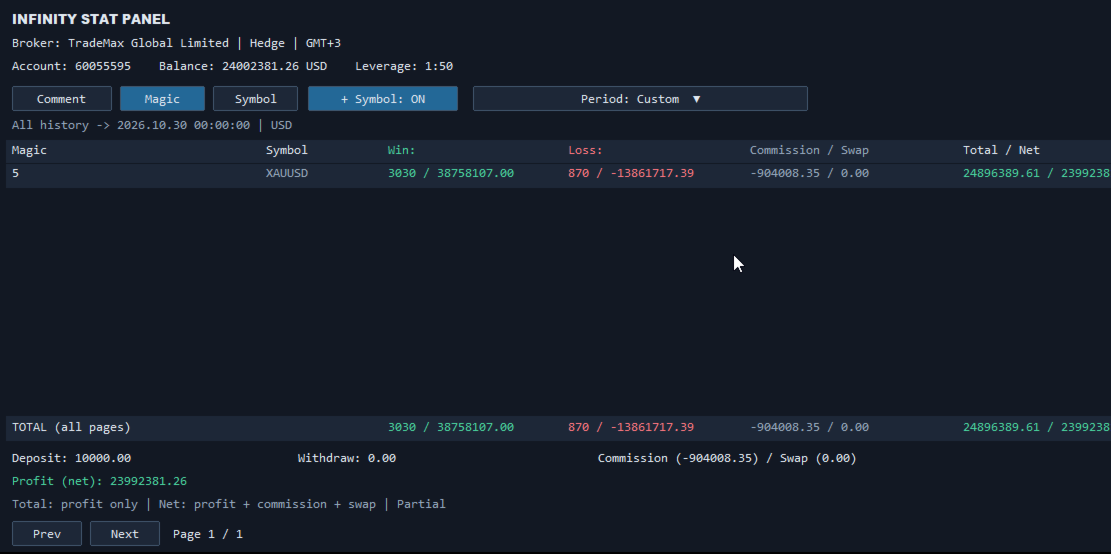
The INFINITY STAT PANEL shows the trading results directly on the chart.

Analyze profits and losses based on Expert Advisor comments, transaction wizards and trading instruments, track commissions and swaps, and compare results for a selected period.

The panel is suitable for any type of account, including when using multiple Expert Advisors on the same account.

Additional information about the broker, account type, and the broker’s current time relative to UTC.

Grouping of results

Switch the analysis mode using the buttons on the panel:

Comment — grouping by trade comment.

Magic — grouping by Magic Number.

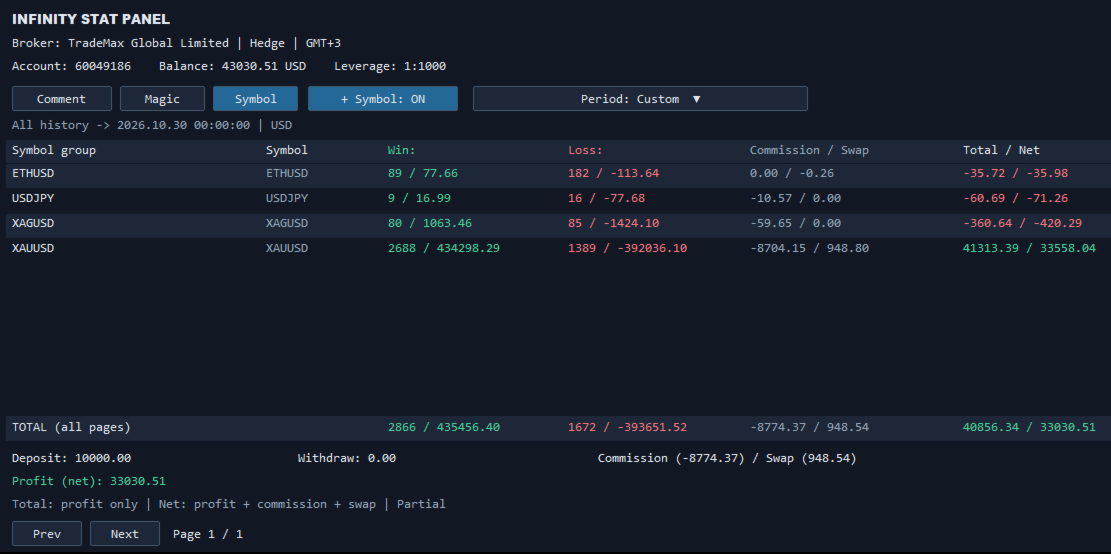
Symbol — grouping by trading instrument.

+ Symbol — additional division of groups by instruments.

When the Use opening deal comment/magic setting is enabled, the indicator uses the comment and Magic of the opening deal if it is available in the history. This helps preserve the association of closures with the advisor when the broker changes the comment.

Statistics in the table

Win — the number of profitable closures and their total result.

Loss — the number of unprofitable closures and their total result.

Commission / Swap — commissions and swaps for each group.

Total / Net — trading profit before commission and swap / result, taking them into account.

The TOTAL row displays the totals for all the pages in the table. Deposit, Withdrawal, Commission, Swap and Profit (net) are displayed separately below.

Choosing a period

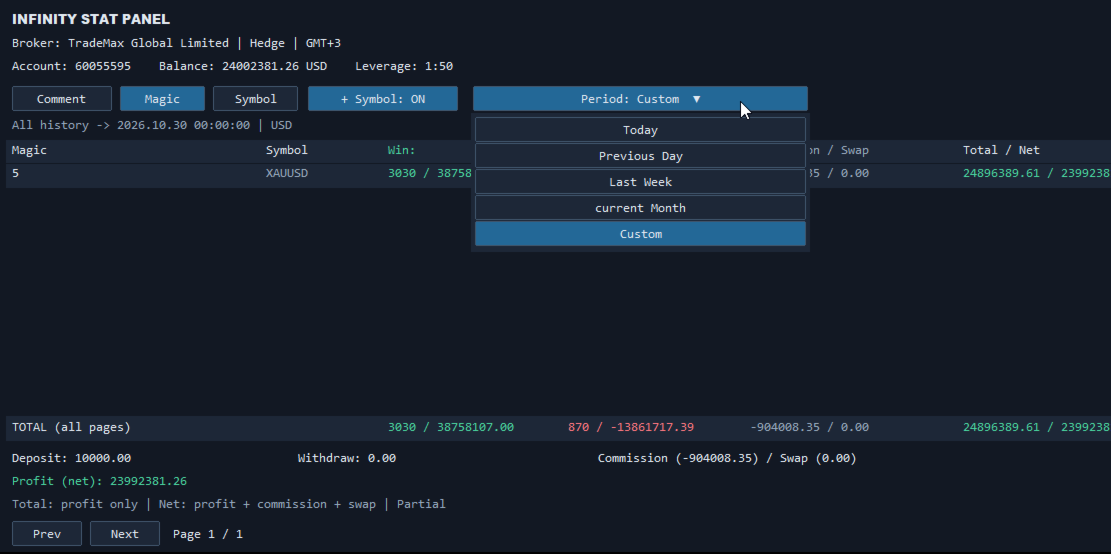
The Period menu allows you to select:

Today — the current day.

Previous Day — the previous day.

Last Week — the previous calendar week, from Monday to Sunday.

current Month — the current month from the first day to the present moment.

Custom — any period specified in the settings.

To view the entire available history, select Custom and set DateFrom = 0, DateTo = 0.

Account information and management

The upper part of the panel displays the broker's name, account number, Netting/Hedge account type, server time offset relative to GMT, balance, currency, and leverage.

Data is updated automatically every 60 seconds, as well as when the panel buttons are pressed. Page switching, panel position adjustment, scaling, font size, and number of lines are available.

Calculation features

Statistics are based on the history of executed trades in the current account. Each partial closure is recorded separately. Whether a trade is a Win or a Loss is determined by the result of the closure with swap, but before the commission.

Net = Total + Commission + Swap, with broker signs retained: deductions reduce the result, credits increase it.

Commissions and additional fees are taken into account based on the time they are incurred within the selected period, including opening commissions for positions that have not yet been closed. Commissions incurred before the start of the period are not carried over to it. Individual commission transactions without a reliable link to an Expert Advisor are displayed in the [Account charges] group.

For netting positions with different comments or Magic, the [MIXED] mark is used. The floating result of open positions is not included in the statistics. The completeness of the data depends on the history provided by the broker.

Getting started

Add the indicator to the chart, select the period and grouping method. The panel analyzes the history of account instruments regardless of the chart symbol on which it is installed.

The indicator does not perform trading operations and does not require DLL import.
Plus de l'auteur
Limited offer for the first 10 buyers: $299! Next price: $399. Final price: $999 Live Signal:  https://www.mql5.com/en/signals/2378548 Unique set files and all recommendations are provided free of charge. All future updates of the adviser are included in the price. After the purchase, contact me and I will help you install and configure the robot correctly. I will also share with you information on how to get a free VPS from a reliable broker. Price Action Gold PRO is an elite advisor that chan
GOLD EAgle mt5
Evgenii Aksenov
4.26 (35)
Promo Price $299. Regular price $399 Unique set files and all recommendations are provided free of charge. All future updates of the adviser are included in the price. After the purchase, contact me and I will help you install and configure the robot correctly. I will also share with you information on how to get a free VPS from a reliable broker. GOLD EAGLE is a swing strategy that is for the market in flat, which is 80-90% of the time. The GOLD EAGLE Expert Advisor is optimized for the XAUUSD
TrendLine PRO MT5
Evgenii Aksenov
4.68 (34)
L'indicateur   Trend Line PRO   est une stratégie de trading indépendante. Il montre le changement de tendance, le point d'entrée de la transaction, ainsi que le calcul automatique de trois niveaux de protection Take Profit et Stop Loss. Trend Line PRO   est parfait pour tous les symboles Meta Trader : devises, métaux, crypto-monnaies, actions et indices. L'indicateur est utilisé dans le trading sur des comptes réels, ce qui confirme la fiabilité de la stratégie. Pour le moment, l'indicateur
Neon EA MT5
Evgenii Aksenov
Neon EA is an Expert Advisor that uses overbought and oversold levels in combination with a unique order management system. Proven track record of stable trading on a real account for 3 years! Real signal available:  https://rb.gy/tzjnx0 75% discount is valid for a limited time. Price after the discount is $450. IMPORTANT! After purchase, send me a private message via mql5 chat to receive installation and configuration instructions. Best pairs: AUDCAD, NZDCAD, AUDNZD Timeframe: M15 Neon EA
CopyMaster mt5
Evgenii Aksenov
5 (3)
Cet utilitaire vous permettra de copier toutes les transactions d'un terminal avec le paramètre Maître vers d'autres terminaux avec le paramètre Esclave Dans le même temps, vous pouvez choisir les paires à copier, définir la taille de l'ordre copié par plusieurs paramètres. Définissez la limite des pertes par tirage au sort ou copiez uniquement les transactions rentables Vous pouvez copier des offres de MT4 ou MT5 vers MT4 ou MT5 d'autres courtiers Maintenant, il ne sera pas difficile de cop
Trend Line PRO EA mt5
Evgenii Aksenov
4.7 (27)
The Trend Line EA adviser trades based on the Trend Line PRO indicator signals in automatic mode. An additional set of functions allows the Trend Line PRO strategy to become break-even with any instrument in MT5: Gold, Forex, Indices, Stocks, Crypto. Big sale 30% OFF! Price $199. Regular price $299 All our signals are now available on myfxbook:   click here   Unique set files and all recommendations are provided free of charge. All future updates of the adviser are included in the price. After t
Trend Line Optimizer MT5
Evgenii Aksenov
4.09 (11)
This is an automatic parameter optimizer for the Trend Line PRO indicator Easily and quickly you will select the optimal parameters for your favorite Trend Line PRO indicator.  Optimization takes only a few seconds. The optimizer allows you to find the best parameters for each pair and period: Amplitude, TP1-TP3, StopLoss, as well as values for Time Filter and HTF Filter on the selected history section (Days)  To optimize different timeframes, you need a different range of history: M5-M15 set
TrendLine PRO MT4
Evgenii Aksenov
4.83 (168)
L'indicateur   Trend Line PRO   est une stratégie de trading indépendante. Il montre le changement de tendance, le point d'entrée de la transaction, ainsi que le calcul automatique de trois niveaux de protection Take Profit et Stop Loss. Trend Line PRO   est parfait pour tous les symboles Meta Trader : devises, métaux, crypto-monnaies, actions et indices. L'indicateur est utilisé dans le trading sur des comptes réels, ce qui confirme la fiabilité de la stratégie. Pour le moment, l'indicateur
Trend Line Optimizer
Evgenii Aksenov
4.11 (19)
Il s'agit d'un optimiseur de paramètres automatique pour l'indicateur Trend Line PRO Vous pouvez facilement et rapidement trouver les paramètres optimaux pour votre indicateur Trend Line PRO préféré.  L'optimisation ne prend que quelques secondes. L'optimiseur vous permet de trouver les meilleurs paramètres pour chaque paire et période: Amplitude, TP1-TP3, StopLoss, ainsi que les valeurs pour Time Filter et HTF Filter sur la section sélectionnée de l'histoire (Days)  Pour optimiser différents
GOLD EAgle mt4
Evgenii Aksenov
4.64 (119)
Promo Price $199. Regular price $499 Unique set files and all recommendations are provided free of charge. All future updates of the adviser are included in the price. After the purchase, contact me and I will help you install and configure the robot correctly. I will also share with you information on how to get a free VPS from a reliable broker. GOLD EAGLE is a swing strategy that is for the market in flat, which is 80-90% of the time. The GOLD EAGLE Expert Advisor is optimized for the XAUUSD
Copy Master mt4
Evgenii Aksenov
5 (5)
Cet utilitaire vous permettra de copier toutes les transactions d'un terminal avec le paramètre maître vers d'autres terminaux avec le paramètre esclave Dans le même temps, vous pouvez choisir les paires à copier, définir la taille de l'ordre copié sur plusieurs paramètres. Définissez une limite de perte sur le retrait ou copiez uniquement les transactions rentables Vous pouvez copier des transactions de MT4 ou MT5 à MT4 ou MT5 d'autres courtiers Maintenant, il ne sera pas difficile de copie
Trend Line PRO EA mt4
Evgenii Aksenov
4.65 (46)
The Trend Line EA adviser trades based on the Trend Line PRO indicator signals in automatic mode. An additional set of functions allows the Trend Line PRO strategy to become break-even with any instrument in MT4: Gold, Forex, Indices, Stocks, Crypto. Big sale 30% OFF! Price $199. Regular price $299 All our signals are now available on myfxbook: click here   Unique set files and all recommendations are provided free of charge. All future updates of the adviser are included in the price. After the
INFINITY STAT PANEL — account statistics for MetaTrader 5 The INFINITY STAT PANEL shows the trading results directly on the chart. Analyze profits and losses based on Expert Advisor comments, transaction wizards and trading instruments, track commissions and swaps, and compare results for a selected period. The panel is suitable for any type of account, including when using multiple Expert Advisors on the same account. Additional information about the broker, account type, and the broker’s
FREE
Filtrer:
Aucun avis
Répondre à l'avis