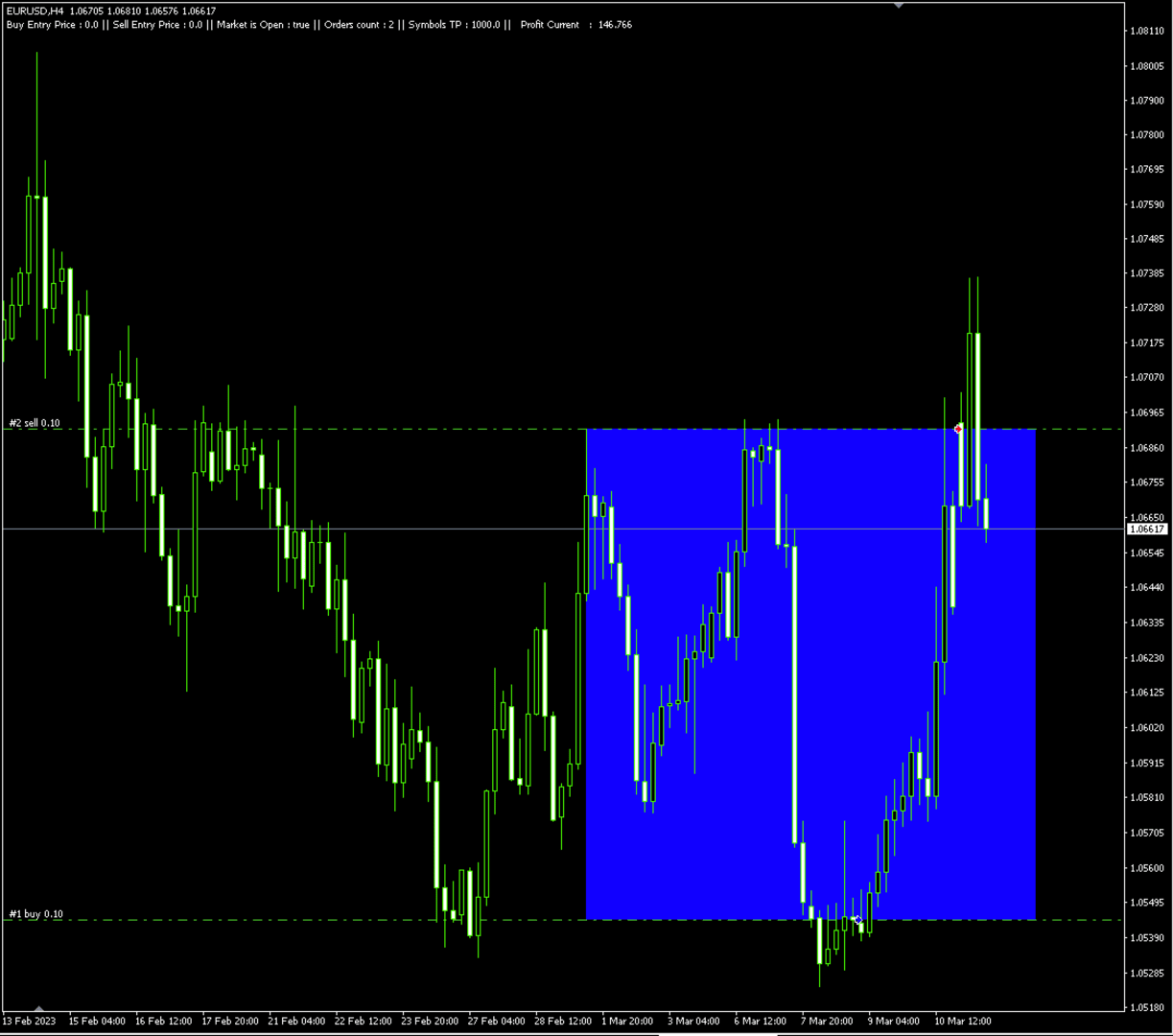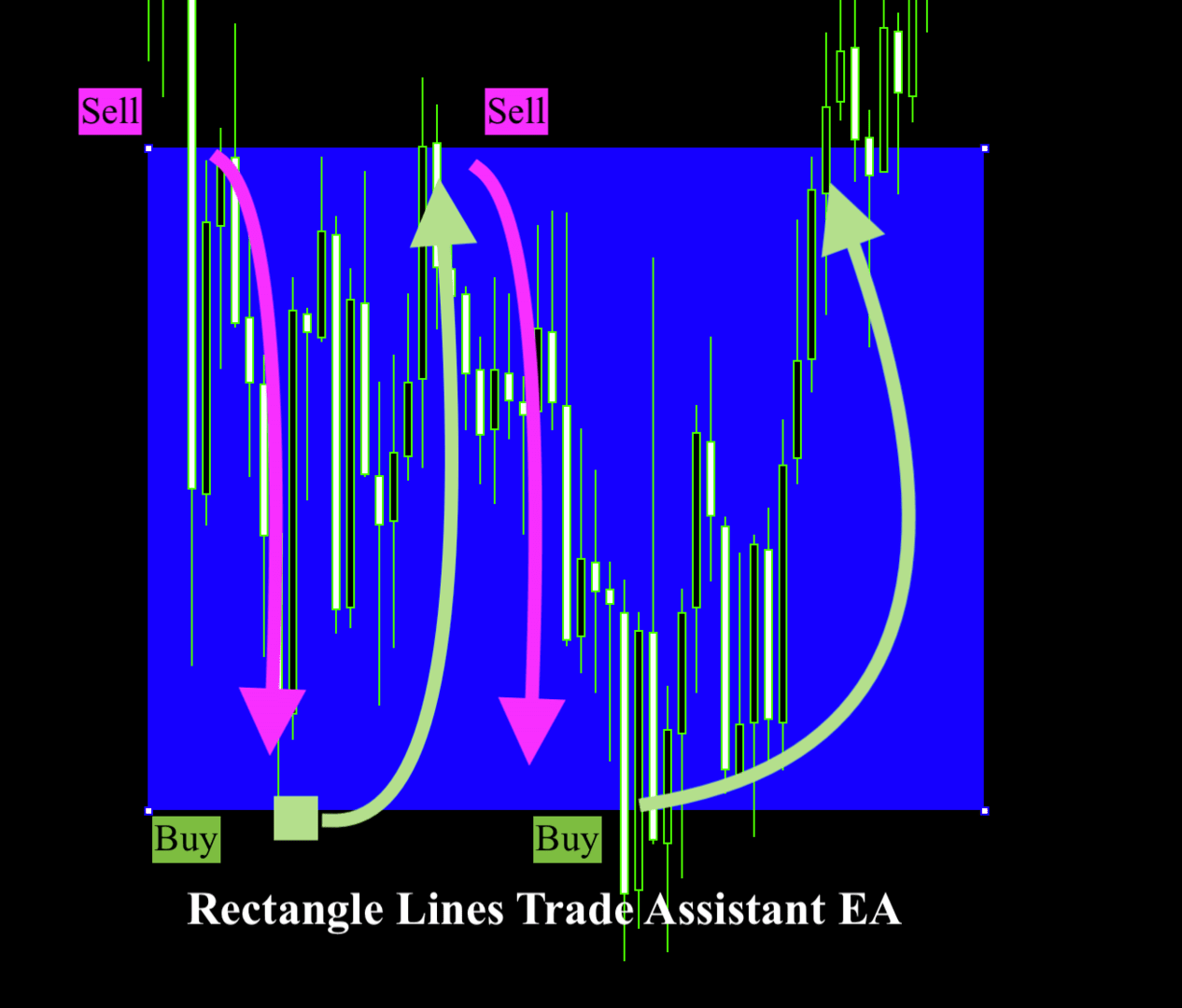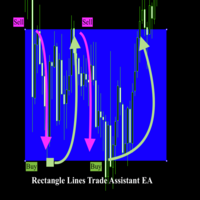
Rectangle line Trade Execution Assistant

Rectangle line Trade Execution Assistant

Rectangle Line Trade Assistant EA

 Semi-Automated Trading Assistant    

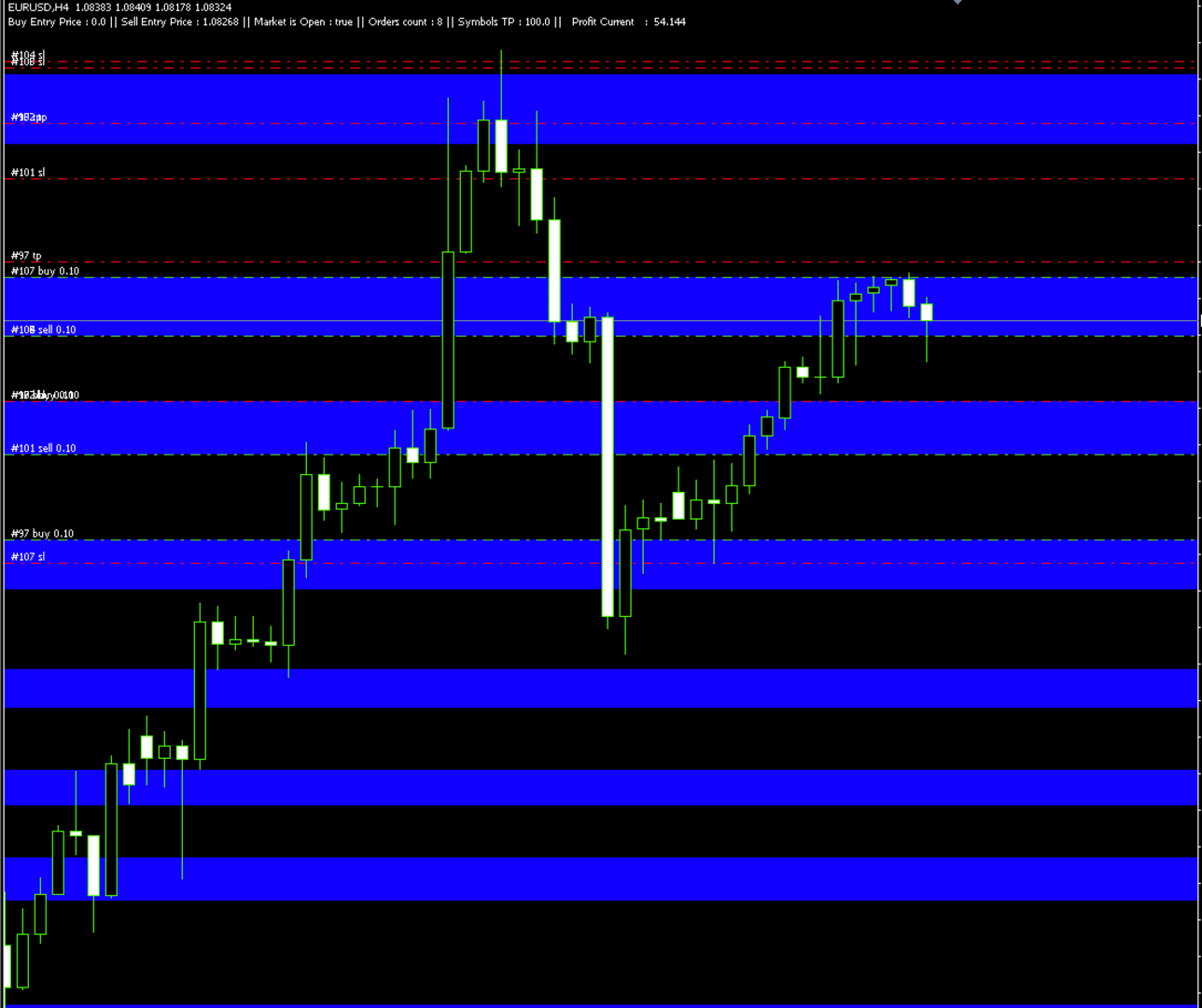
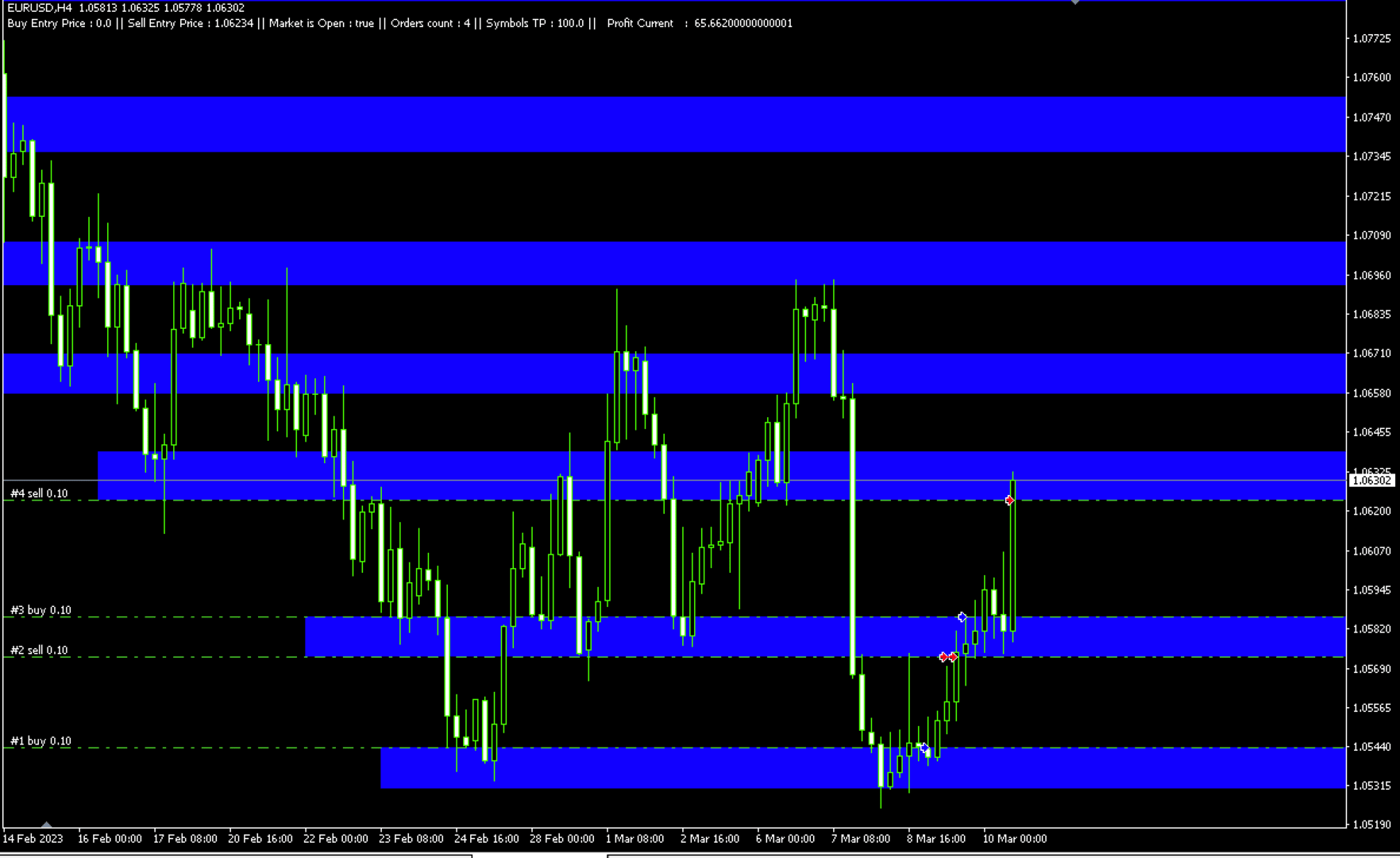
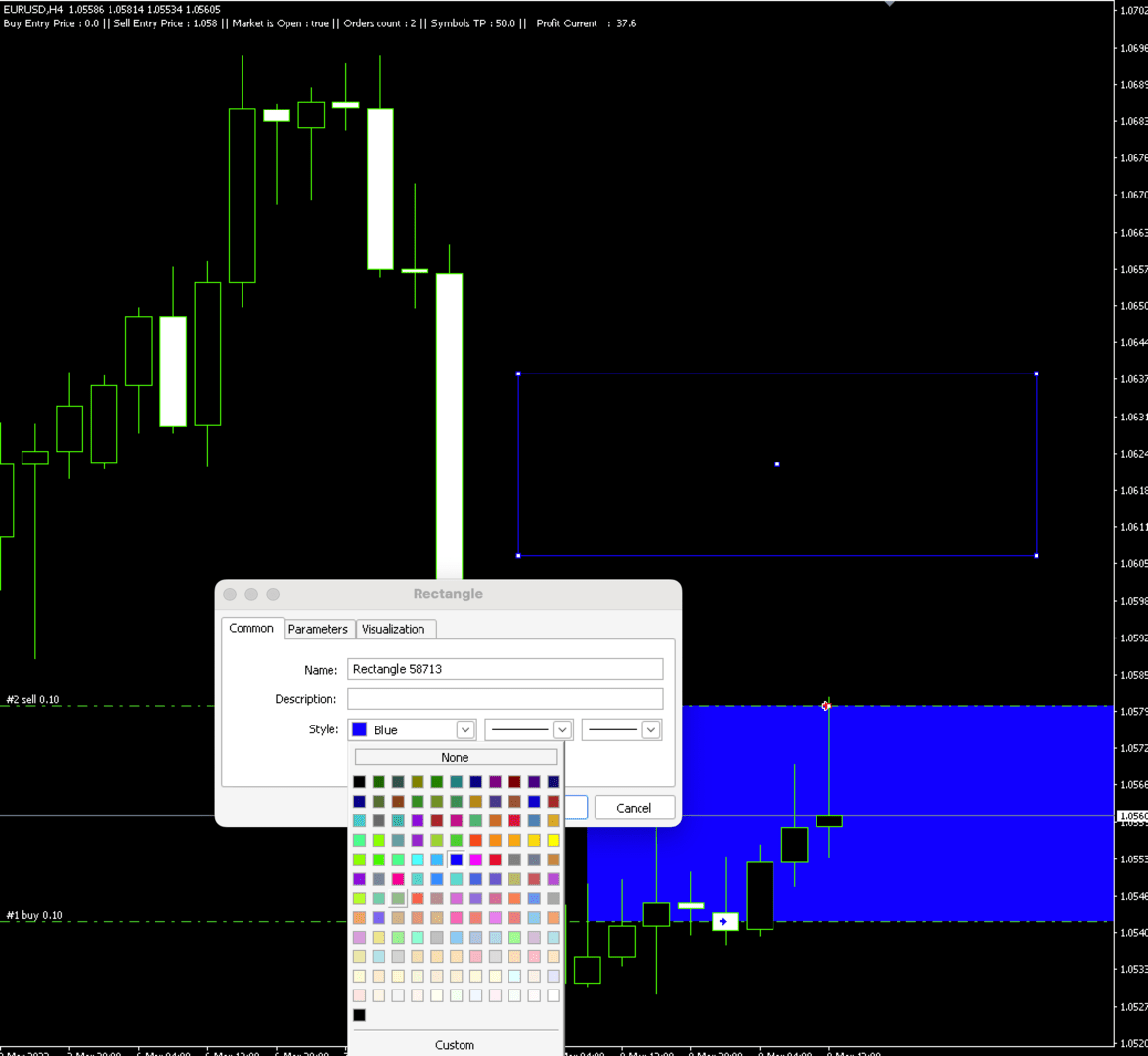
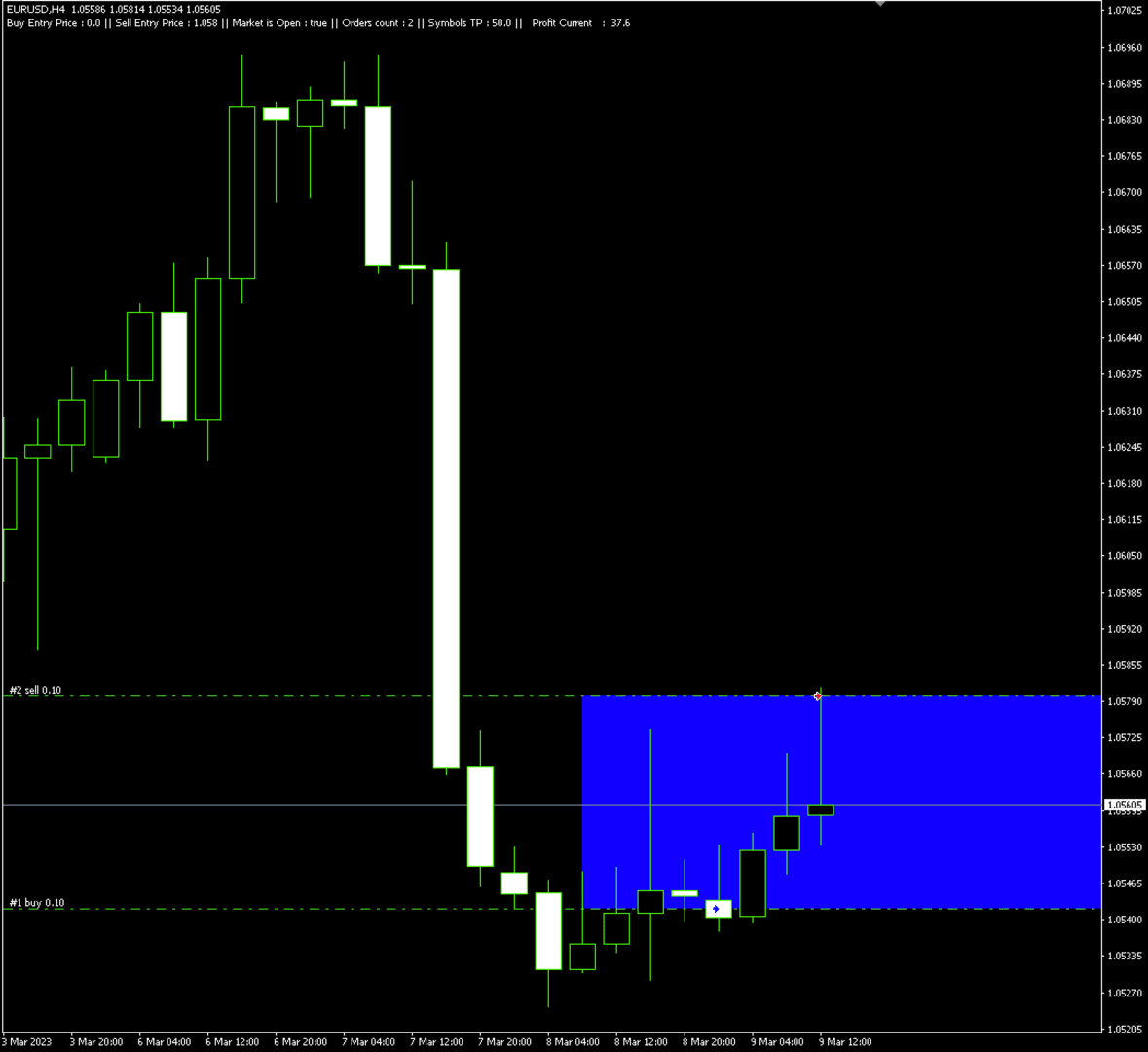
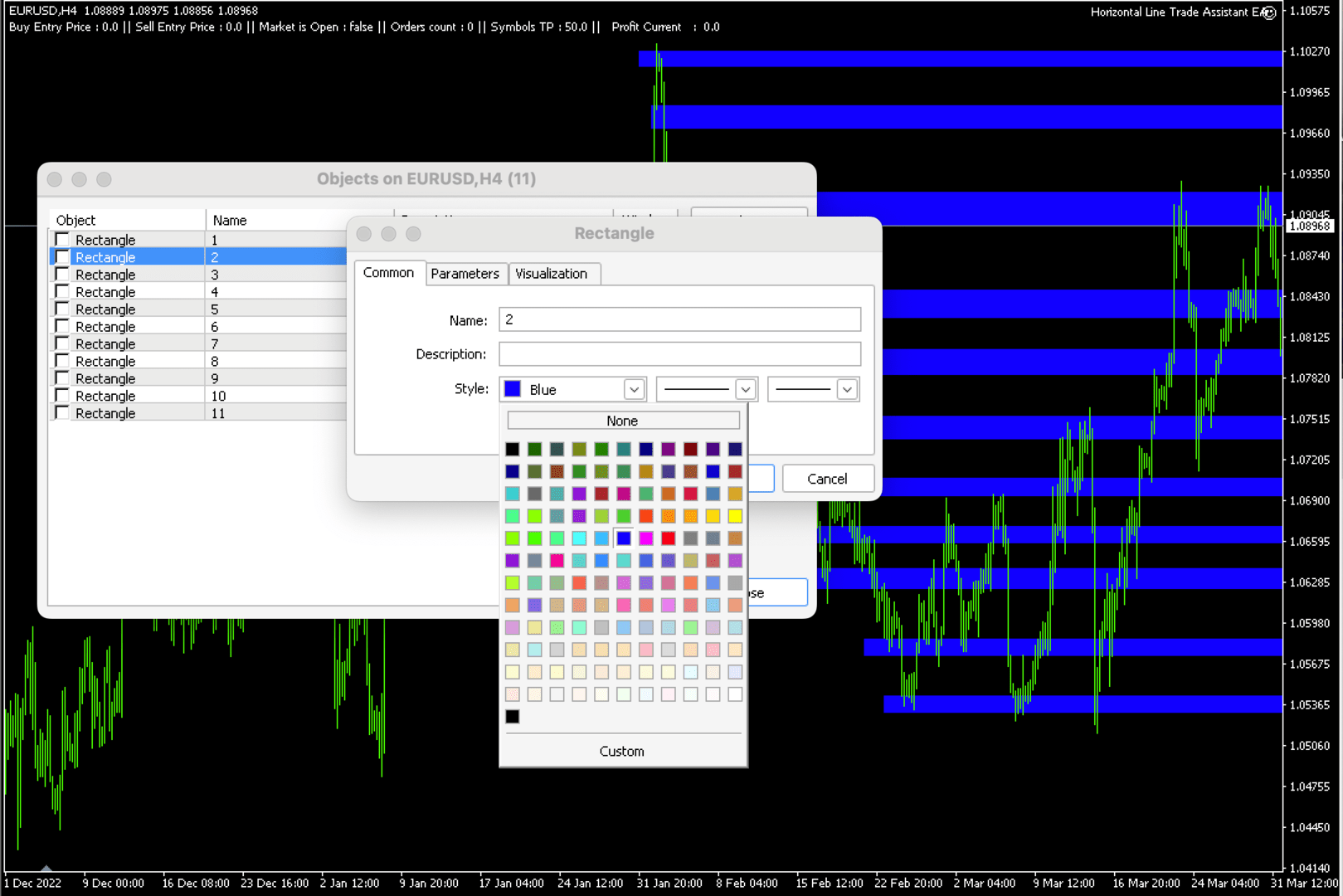
 IMPORTANT:   On the main/purchased program a user can click on the Rectangle line and move/ drag it around the chart, by double clicking on it. Please keep in mind that this option is not available on demo version, due to some restrictions/limitations of Strategy Tester, some Object related operations are not available in the Strategy Tester. But, it will not prevent you from Testing, please drop an Object to chart, then save your objects as a new templet, after, run an EA in strategy tester with that saved templet, and it will automatically assign and perform Buy or Sell positions based on your predefined parameters. 

You can drag and drop the EA to a chart, and it will automatically determine the Pair and will start working. Please See the list of instruments that are pre-coded to this EA.   

List of Pairs: AUDCAD, AUDCHF, AUDJPY, AUDNZD, AUDUSD, CADCHF, CADJPY, CHFJPY, EURAUD, EURCAD, EURCHF, EURGBP, EURJPY, EURNZD, EURUSD, GBPCAD, GBPCHF, GBPJPY, GBPUSD, NZDJPY, NZDUSD, USDCAD, USDCHF, USDJPY, XAGUSD, XAUUSD, GBPAUD, EUSTX50, FRA40, GER30, ASX200, NDX100, JPN225, UK100, US30, SPX500, VIX, US2000, HK50, USDX, CAN60, SWI20, NTH25, UKOUSD, USOUSD, XPTUSD, XZNUSD, XNIUSD, XAUJPY, XAUEUR.        

Description

Unlock the power of semi-automation Rectangle Line Trade Assistant EA, a versatile Expert Advisor Assistant designed to enhance your trading experience. This innovative tool offers a seamless integration of your trading strategies with the dynamic world of chart analysis.    

Key Features:  

Rectangle Line Object Detection and Trade Execution 

                  This EA operates by intelligently detecting Rectangle Line Objects on your trading chart. It will Automatically determine if it’s a Buy or Sell order based on users predetermined parameters.  

Flexibility in Trading: 

Choose your preferred trading direction – buy or sell – based on the positioning of the Rectangle Line Object.   

Trade on Your Terms: 

                  Say goodbye to constant chart monitoring and alert-watching. With this EA, simply draw your Rectangle Lines on the chart and let the EA do the rest.    

Enjoy the freedom to live your life while Rectangle Line Trade Assistant EA    

automates your trades according to your predefined strategies.   

Compatible with Diverse Strategies: 

Rectangle Line Trade Assistant EA caters to a broad spectrum of trading styles, including but not limited to Hedging, Support and Resistance trading, and more.    

Adapt the EA to suit your unique strategies and level of experience.    


Versatility for Personal and Prop Firm Accounts: 

                  Whether you're managing your personal account or operating within a Proprietary firm evaluation accounts, Rectangle Line Trade Assistant EA extends its capabilities to suit your trading environment.    

Ownership and Licensing: 

- The rights to this program, including but not limited to the source code, are owned by Bakyt Kenzhebek. No part of this program may be reproduced, distributed, or sold without explicit permission from the developer.
- The user (buyer) is granted a license to use this program solely for trading purposes. Any form of resale, redistribution, or sharing with third parties is strictly prohibited.
- The developer of this program does not take any responsibility for any trading losses or damages incurred by the user. The user should carefully evaluate and test the program based on their trading strategy before using it in live trading.
- By using this program, the user acknowledges and agrees to abide by these terms and conditions. Any violation of these terms may result in the termination of the user's license to use the program.
- For inquiries regarding licensing, permissions, or support, please contact y.bakyt@mail.com.   

If there is/are an Error/s, please send an email to ‘y.bakyt@mail.com’ with explanation and screenshots.   


Expert Properties explained:  

//+------------------------------------------------------------------+ 

Buy_Top_Sell_Buttom = false; - if true Buys on the top rectangle price, opposite for false.

showComment = true; - Shows or Hides Comments 

"Allow Multiple Positions at same Line/Price" 

Allow_Multiple_Positions_At_Same_Price = false; 

"Wait time between Orders, in Minutes." 

Minutes_btw_Orders = 180; 

If Market price moves away fron the pending position X Pips, the EA Deletes the order 

Delete_Pending_Order_After_X_Pips_Away = 30; 

"Minimum Difference btw Orders in Pips." 

Min_Pips_Difference_btw_Orders = 30; 

"Take Profit and Stop Loss" 

Take_Profit = 0; 

Stop_Loss = 0; 

Lots = 0.1; 

"Name for Trade Comments" 

Comment_Text = "Put Your Name";

Trailing_Allowed = false; 

Trailing_Pips = 0; 

New_TP = 0; 

" If in InProfit more or equal to X, this will close all positions for the symbol" 

InProfit_For_LessThan_3 = 70; 

InProfit_For_MoreThan_3 = 50; 

      Changning InProfit, means, if 3 or less positions are open, the Profit should be $100 (example bellow). Else if, equal or more than 3 positions the Profit is $50 and the EA will Close All positions for the Current Symbol.    

   InProfit_For_LessThan_3 = 100;    

   InProfit_For_MoreThan_3 = 50;    


   "Input Market Open and Close H:M". Military time is a technique of tracking hours in which the day runs from midnight to midnight and is broken into 24-hour increments. This is not the same as the 12-hour clock commonly used worldwide. For example, a military clock that reads 1930 hours is the same as 7:30 PM when using the 12-hour clock. Since military time reflects the counting up to 24 hours, AM and PM is not required.    

Like the 12-hour clock, the first two digits are the hours, and the last two represent the minutes. Military time ranging from 0000 to 1159 is considered AM, and military time ranging from 1200 to 2359 is PM.     

   Market_Close_Time_Hour = 15;    

   Market_Close_Time_Minute = 59;    

   Market_Open_Time_Hour = 17;    

   Market_Open_Time_Minute = 01;   


Produits recommandés
Outil professionnel pour la gestion automatique des trades dans MetaTrader 5 Simplifie le trading, protège le capital et maximise les profits sans avoir besoin de surveiller constamment les graphiques. Fonctionnalités principales ️ Configuration automatique du Stop Loss (SL) et du Take Profit (TP) ️ Trailing Stop intelligent (verrouillage des profits) ️ Fonctionne avec les ordres au marché et les ordres en attente ️ Visualisation automatique du SL/TP directement sur le graphique ️ Minut
TradesManger
Ali Abdalrasool Ai-sayyd Sobai
Ultimate Manager is the ultimate Expert Advisor (EA) for MetaTrader5, empowering traders with seamless control over every aspect of their trades. This powerful tool manages lot sizes, stop losses, trailing stops, trade durations, and trailing activation thresholds with precision. Featuring intuitive buttons, you can execute two trades simultaneously, close all positions, close buys only, close sells only, or close profitable trades in an instant. Designed for efficiency and risk management, Ulti
The analyzer makes it possible to quickly assess spread changes on historical data,   the magnitude and frequency of bursts, the dynamics and nature of the extensions by the days of the week, etc. The analyzer needs to be started in the tester (visualization mode) on the symbol and time interval required for analysis,   recommended TimeFrame H1, select "Every tick based on real ticks" mode.
Adjustable Chart Background Themes MT5
AL MOOSAWI ABDULLAH JAFFER BAQER
• Please test the product in the Strategy Tester before purchasing to understand how it works. • If you face any issues, contact me via private message—I’m always available to help. • After purchase, send me a screenshot of your order to receive a   FREE EA   as a gift. Adjustable Chart Background Themes – Perfect Your Trading Environment! Transform your MetaTrader charts with a fully customizable Day & Night Theme Manager! This utility lets you seamlessly switch between light and dark themes,
Prenez le contrôle de votre portefeuille de devises. Voyez instantanément où vous en êtes, ce qui fonctionne et ce qui vous fait mal ! VERSION MT4 DISPONIBLE ICI : https://www.mql5.com/en/market/product/58375 Le tableau de bord Trade Manager est conçu pour vous montrer en un coup d'œil où se trouve actuellement chaque position que vous détenez sur le marché des changes et faciliter la compréhension de la gestion des risques et de l'exposition aux devises. Pour les traders qui évoluent progress
Free automatic Fibonacci is an indicator that automatically plots a Fibonacci retracement based on the number of bars you select on the BarsToScan setting in the indicator. The Fibonacci is automatically updated in real time as new highest and lowest values appears amongst the selected bars. You can select which level values to be displayed in the indicator settings. You can also select the color of the levels thus enabling the trader to be able to attach the indicator several times with differe
FREE
This EA help trader to manage his pending orders, when you place many Pending Orders this utility monitor them and when of them get filed (executed) the EA cancel and delete all rest of pending orders, to avoid  opening of all of pending orders at the same time , and lose your risk management. this utility is very useful for trader when he /she is not available on the desk.
Le Gestionnaire de ratio risque/rendement est un outil visuel de gestion des ordres et de calcul de la taille des positions, conçu pour favoriser un trading rigoureux et une gestion professionnelle des risques. Il permet aux traders de définir visuellement les niveaux d'entrée, de stop-loss et de take-profit directement sur le graphique, tout en calculant automatiquement la taille du lot et le ratio risque/rendement avant l'envoi d'un ordre. Cet outil permet de standardiser la préparation des tr
Session panel
Timo Mario Hoffmann
Session Panel for MT5 Session Panel is a free MT5 indicator that gives you a fast and convenient live overview of the major trading sessions directly from the chart. Monitor Tokyo, London, and New York session times, see which session is currently active, track countdowns to the next session, and view session overlap information in one compact dashboard. Built for traders who want better market timing, clearer session awareness, and a cleaner chart workflow in live market conditions. Session Pan
FREE
Voici NAS100 Auto SL and TP Maker pour MT5 : Ne manquez plus jamais le réglage du StopLoss et du TakeProfit avec notre NAS100 Auto SL and TP Maker, un assistant indispensable pour les traders qui naviguent sur le marché du Nasdaq 100 sur MetaTrader 5. Cet outil est conçu pour ceux qui recherchent une solution transparente pour automatiser la gestion des niveaux de StopLoss et TakeProfit. Caractéristiques principales : Automatisation sans effort : Surveille automatiquement les transactions sur
FREE
If you want to try the Demo Version, please use this one: https://www.mql5.com/en/market/product/58262 Features: easy positioning of stoploss and takeprofit with horizontal Assistance-lines automatic Volume calculation fixed risk, set by the trader Closing of all trades of one type, with the click of one button (long or short, for this symbol) Creation of pending orders with one click Direct feedback through responsive buttons Made for all your needs: Forex Indices Crypto Gold, Silver, Platin
Trend Risk Monitor
Kenneth Michael Chambers
TREND RISK MONITOR EA - USER GUIDE ---------------------------------------------------- 1. OVERVIEW The Trend Risk Monitor is not a trading robot that opens new positions. Instead, it is a sophisticated risk management utility designed to work alongside another Expert Advisor (EA) on your trading account. Its primary purpose is to actively monitor trades opened by a specific EA (identified by a "Magic Number") and provide a real-time assessment of the market risk associated with each open posit
Prop Firm Lot Size Calculator
Christian Paul Anasco
5 (1)
Now, you have your very own  PROP FIRM LOT SIZE CALCULATOR ! It now has BREAKEVEN and PARTIAL CLOSURE features! There's no need to go to other websites just to compute for the exact lot size. It also opens the trade with a click of a button. All inputs on the calculator can be edited. So if you want to change the SL or TP or the lot size, you can do so before placing an order. ========================================== INPUTS (Please see screenshot for reference): 1. SL PRICE TEXT . This is clic
Babel Assistant
Iurii Bazhanov
4.33 (9)
Babel assistant 1     The MT5 netting “Babel_assistant_1” robot uses the ZigZag indicator to generate Fibonacci levels on M1, M5, M15, H1, H4, D1, W1  periods of the charts , calculates the strength of trends for buying and selling. It opens a position with "Lot for open a position" if the specified trend level 4.925 is exceeded. Then Babel places pending orders at the some Fibonacci levels and places specified Stop Loss , Take Profit. The screen displays current results of work on the position
FREE
"Clean Pending Orders" Supprimez toutes les ordres en attente pour le symbole actuel en quelques secondes ! Ce script simple mais efficace est conçu pour les traders qui apprécient la rapidité et la commodité. Lancez-le, et il supprimera instantanément tous les ordres en attente d'achat et de vente pour le symbole actuel. Avantages : Suppression instantanée : Tous les ordres sont supprimés en quelques secondes. Concentration sur le symbole actuel uniquement : Les autres instruments ne sont pas
FREE
RRtoolBox
David Ruiz Moreno
RRtoolbox - Professional Tools: Risk:Reward Trading Tool (SL/TP Horizontals + Pending orders + Diagonals), Alerts set on trend lines (for alerts on diagonal levels), SelfManagement (BE, partials...), close/cancelling by time, Statistics, Info and trading on chart. One-Click Trading with Visual Risk:Reward Management RRtoolbox is a comprehensive trading panel that combines one-click order execution,  statistics and  powerful visual Risk:Reward tools, alerts set with trendlines, on chart butt
Orion Telegram Notifier Bot  allows the trader to receive trade notifications in his Telegram whenever a position is opened or closed. The EA sends notifications showing the Symbol, Magic Number, Direction, Lot (Volume), Entry Price, Exit Price, Take Profit, Stop-Loss and Profit of the position. How to setup Orion Telegram Notifier? Open Telegram and Search for “BotFather” Click or Type “/newbot” Create a nickname and username (Example: nickname: MT5trades   - username: MT5TelegramBot) *The use
MT5 to Telegram
Alessandro Lentini
Bot to attach to any different chart than the one using to get the orders and send them to telegram Inputs: Telegram Bot Token, Telegram Chat ID Sends Open Price, Order Type, Lots, Take Profit and Stop Loss instantly after the trade is executed. Easy to SetUp and to use My other Bot for XAUUSD and USDCHF:   https://www.mql5.com/en/market/product/94001 Just remember to go to Tolls->Options->ExpertAdvisors->Allow Web Request for listed URL:  https://api.telegram.org/
Candle Countdown Timer MT5
AL MOOSAWI ABDULLAH JAFFER BAQER
Minuteur de compte à rebours de bougie – Restez en avance sur le marché Vous êtes-vous déjà demandé combien de temps il reste avant que la bougie actuelle ne se ferme ? Le timing est essentiel en trading. Le minuteur de compte à rebours de bougie est la solution idéale pour les traders qui ont besoin d'une synchronisation précise pour exécuter leurs stratégies de manière efficace. Que vous soyez scalpeur, day trader ou swing trader, cet outil vous garantit de ne jamais manquer un moment crucial.
TradingX Hotkeys
Johannes Stephanus Lombard
Inputs Available Lotsizes Partial Close % You can change lotsizes as you require On an open chart click once to select chart to be able to use hotkeys on specific chart. All Pairs can be used with this expert We created this expert to be able to still trade C300 with a 0.06 Lotsize If you enter a 0.6 lot and close 0.90% you can trade with 0.06 Lot Keys to be used: B -Buy S -Sell C -Close Profitable D -Breakeven (Note if stoploss is set it won't break even) P -Partial close X -Close all
Magic News Trade Assistant est un outil pour trader lorsque des nouvelles se produisent. Cet outil est très utile pour générer des bénéfices pour vous, car vous pouvez définir clairement votre propre Stop Loss et Take Profit. Cet outil est parfait pour trader sur XAUUSD. Les nouvelles que nous pouvons utiliser pour le trading telles que JOLTS & NFP sont très rentables. Vous serez serein et attendrez que votre commande fasse des bénéfices, tout dépend de l'actualité générée. Recommandation : • P
ZenRisk 2
Craig Joshua Binnekamp
ZenRisk 2.0 — The Minimalist Visual Trade Manager Trade with clarity. Zero chart bloat, maximum precision. Are you tired of trade managers that take up half your screen with confusing menus and unnecessary features? ZenRisk 2.0 is a professional, visual trade execution tool built specifically to remove the guesswork from risk management—without the distracting bloat. Unlike heavy, cluttered panels, ZenRisk is designed for traders who want their focus to remain entirely on the chart. It tucks a
Trading Terminal Pro
PETER OMER M DESCHEPPER
Tradez plus rapidement. Gérez les risques plus intelligemment. Exécutez vos ordres en toute confiance. Offre de lancement ! Le prix augmente tous les 15 exemplaires vendus. Prix final : 100 $. Manuel d'utilisation  -  Version d'essai de l'application pour un compte de démonstration Trading Terminal Pro est un panneau de gestion de transactions avancé pour MetaTrader 5, conçu pour les traders qui recherchent précision, rapidité et contrôle total depuis une seule interface. Au lieu de jongler avec
The   Pivot Point indicator   automatically calculates and displays the pivot point line and support and resistance levels. Pivot can be calculated according to the Classic, Floor, Fibonacci, Woodie, Camarilla or DeMark formula. It is also possible to select the period for calculating the indicator. A trader can choose from daily, weekly, monthly, or user-defined periods. Types of pivots Classic Floor Fibonacci Woodie Camarilla DeMark Main features The indicator shows the current and historic
FREE
Fibonacci MT5
Konstantin Chechnev
Fibonacci EA MT5 is an Expert Advisor for automating trading based on Fibonacci levels. It determines the minimum and maximum prices over a specified number of bars, builds Fibonacci levels, and opens trades when the current price reaches the selected levels. The EA can trade with the trend or against it, depending on the given parameters. It also allows you to configure levels for closing trades, risk management, and time filters. Features Automatic detection of local extremes and the construct
MetaOrders MT5
Sergii Povzaniuk
This trading tool will help You to place your orders faster , specify its parameters easier and control your risks more clearly. It allows You to use lines on a chart to set the entry price, stop loss, take profit for any order, considering the specified percentage of risk from the deposit or a fixed lot, and place it in one click. It automatically detects a broker’s commission and takes it into account during calculations. It also calculates available for new order funds based on already opene
Live Money Management and Position Size Calculator If you find this tool useful, please leave a review The position size you need, the levels you are trading, and the dollars at stake — always visible, always updating, always accurate. No manual calculations and  No switching to a browser tab . Place your entry and stop loss lines on the chart. Is a Live Risk Calculator that calculates your lot size, take profit levels, risk, and reward in real time. Switch to live mode and the lot size updates
Mt5RiskReward
Santiago Garcia Sanchez
5 (1)
This indicator will help you define the entry, stop loss and take profit by means of horizontal lines on a chart. In addition, it is also possible to calculate the size of a position according to the percentage of the risk that you want to assume. For this purpose, a panel consisting of the following elements is available: Button to show or hide the tool on the chart. A text box to enter the number of contracts to be used for the calculations. A text box to enter the risk/reward ratio you want
The Trade Panel Dashboard is a powerful, user-friendly interface designed to streamline and enhance your trading experience. This centralized hub provides real-time data visualization, advanced analytics, and seamless execution tools, empowering traders to make informed decisions with precision and speed. Key Features: Real-Time Market Data Access live price feeds,  market trends for multiple assets (stocks, cryptocurrencies, forex, commodities, etc.) in one consolidated view. Order Management
This EA finds Fair Value Liquidity (FVL) on the chart, tracks when they get mitigated , and then looks for an inversion signal (price “fails” through the zone). When that inversion happens, it places a trade in the opposite direction of the original Liquidity gap (an Inverse FVG approach). It also lets you control when it trades using market sessions , and it can auto-close positions at New York open (all positions or profitable-only). Key advantages Clear, rule-based entries (no guessing): trad
FREE
Les acheteurs de ce produit ont également acheté
Trade Assistant MT5
Evgeniy Kravchenko
4.42 (211)
It helps to calculate the risk per trade, the easy installation of a new order, order management with partial closing functions, trailing stop of 7 types and other useful functions. Additional materials and instructions Installation instructions - Application instructions - Trial version of the application for a demo account Line function -   shows on the chart the Opening line, Stop Loss, Take Profit. With this function it is easy to set a new order and see its additional characteristics bef
Bienvenue sur Trade Manager EA, l’outil ultime de gestion des risques conçu pour rendre le trading plus intuitif, précis et efficace. Ce n’est pas seulement un outil d’exécution d’ordres ; c’est une solution complète pour la planification des trades, la gestion des positions et le contrôle des risques. Que vous soyez débutant, trader expérimenté ou scalpeur ayant besoin d’une exécution rapide, Trade Manager EA s’adapte à vos besoins, offrant une flexibilité sur tous les marchés, des devises et i

Local Trade Copier EA MT5
Juvenille Emperor Limited
4.96 (139)
Découvrez une expérience exceptionnellement rapide de copie de trades avec le   Local Trade Copier EA MT5 . Avec sa configuration facile en 1 minute, ce copieur de trades vous permet de copier des trades entre plusieurs terminaux MetaTrader sur le même ordinateur Windows ou Windows VPS avec des vitesses de copie ultra-rapides de moins de 0.5 seconde. Que vous soyez un trader débutant ou professionnel, le   Local Trade Copier EA MT5   offre une large gamme d'options pour le personnaliser en fonc
Version Bêta Le Telegram to MT5 Signal Trader est presque prêt pour la sortie officielle en version alpha. Certaines fonctionnalités sont encore en développement et vous pourriez rencontrer de petits bugs. Si vous rencontrez des problèmes, merci de les signaler, vos retours aident à améliorer le logiciel pour tout le monde. Telegram to MT5 Signal Trader est un outil puissant qui copie automatiquement les signaux de trading depuis des chaînes ou groupes Telegram vers votre compte MetaTrader 5 .
TradePanel MT5
Alfiya Fazylova
4.87 (155)
Trade Panel est un assistant commercial multifonction. L'application contient plus de 50 fonctions de trading pour le trading manuel et permet d'automatiser la plupart des tâches commerciales. Avant l'achat, vous pouvez tester la version de démonstration sur un compte de démonstration. Télécharger la version d'essai de l'application pour un compte de démonstration : https://www.mql5.com/fr/blogs/post/762644 . Instructions complètes ici . Commerce. Permet d'effectuer des opérations commerciales e
AI Agent Supervisor is NOT an Expert Advisor. AI Agent Supervisor   is a   multi-agent AI risk & portfolio supervisor   that watches every EA on your account and intervenes in real time.  WANT AN AI PORTFOLIO MANAGER WATCHING YOUR FLEET 24/7?   Run your fleet on the same brokers I do:   IC MARKETS , IC TRADING   .  Unlike the centralized stock market, Forex has no single, unified price feed.  Every broker sources liquidity from different providers, creating unique data streams. The Supervisor r
Quant AI Agents are independent trading Expert Advisors. Instead of trading using a fixed strategy like other conventional EAs, Quant AI Agents   is a   multi-agent AI trading framework   that turns natural-language strategy prompts into live.  WANT THE SAME RESULTS AS MY LIVE SIGNAL?   Use the exact same brokers I do:   IC MARKETS , IC TRADING   .  Unlike the centralized stock market, Forex has no single, unified price feed.  Every broker sources liquidity from different providers, creating un
Farmed Hedge Yield Farming | All Markets (Manual - Hybrid - Semi/Automated EA) MULTI-ASSET SUPPORT Trade any asset available on your broker - Forex: Major, Minor, Exotic pairs - Crypto: BTC, ETH, XRP, SOL, BNB - Stocks: Apple, Tesla, Amazon, Google, etc. - Commodities: Gold, Silver, Oil, Gas - Indices: US30, NAS100, SPX500, DAX40 - Any CFD your broker offers VERIFIED TRADING RESULTS - Farmed Hedge Yield Axi Copy:  https://www.mql5.com/en/signals/2356376 - Farmed Hedge Yield Exn Copy:   https:/
Premium Trade Manager - Gestion de trades rapide et disciplinée pour MetaTrader 5 Premium Trade Manager est fait pour les traders qui veulent garder leur attention sur la décision pendant que le panneau prend en charge la routine : dimensionnement, placement, partiels, trailing, actualités et limites de prop firm, traités de la même façon disciplinée à chaque trade. C'est un panneau rapide sur le graphique pour MetaTrader 5 qui supprime le travail mécanique de chaque trade. Vous décidez de la di
Exp COPYLOT CLIENT for MT5
Vladislav Andruschenko
3.91 (33)
Copieur professionnel de trades pour MetaTrader 5 Un copieur de trades rapide, professionnel et fiable pour MetaTrader . COPYLOT permet de copier des trades Forex entre les terminaux MT4 et MT5 avec prise en charge des comptes Hedge et Netting . La version MT5 de COPYLOT prend en charge : - MT5 Hedge → MT5 Hedge - MT5 Hedge → MT5 Netting - MT5 Netting → MT5 Hedge - MT5 Netting → MT5 Netting - MT4 → MT5 Hedge - MT4 → MT5 Netting Version MT4 Description complète + DEMO + PDF Comment acheter Comme
AntiOverfit PRO MT5
Enrique Enguix
5 (6)
Avant d’acheter un EA, vérifiez s’il tient vraiment la route ou s’il a simplement eu de la chance en backtest. La plupart des robots se vendent avec un beau backtest. Une courbe qui monte. Un bon profit factor. Très peu de doutes. Et pourtant, beaucoup de ces EA s’effondrent dès que le marché cesse de se comporter comme dans cet historique précis. Pourquoi ? Parce qu’un backtest ne prouve qu’une seule chose : que cette stratégie a fonctionné sur un parcours de prix bien précis. Il ne prouve pas
Trade Dashboard MT5
Fatemeh Ameri
4.94 (126)
Trade Dashboard simplifies how you open, manage, and control your trades, with built-in lot size calculation. It allows you to execute trades, manage risk, and control positions directly on the chart, with tools such as partial close, breakeven, and trailing stop. Designed to reduce manual work and help you stay focused on your trading decisions. A demo version is available for testing. Detailed explanations of features are provided within the MQL5 platform. Installation instructions are include
Copy Cat More Trade Copier MT5 (Chat Copieur MT5) est un copieur de trades local et un framework complet de gestion des risques et d'exécution conçu pour les défis commerciaux d'aujourd'hui. Des défis de prop firms à la gestion de portefeuille personnel, il s'adapte à chaque situation avec une combinaison d'exécution robuste, de protection du capital, de configuration flexible et de gestion avancée des trades. Le copieur fonctionne à la fois en mode Master (expéditeur) et Slave (récepteur), avec
HINN MagicEntry Extra
ALGOFLOW OÜ
4.73 (15)
HINN MAGIC ENTRY – the ultimate tool for entry and position management! Place orders by selecting a level directly on the chart! full description   ::  demo-version  :: 60-sec-video-description Key features: - Market, limit, and pending orders - Automatic lot size calculation - Automatic spread and commission accounting - Unlimited partitial take-profits  - Breakeven and trailing stop-loss and take-profit  functions - Invalidation leves - Intuitive, adaptive, and customizable interface - Works
Timeless Charts
Samuel Manoel De Souza
5 (6)
Timeless Charts est un utilitaire de trading tout-en-un destiné aux traders professionnels. Il combine des types de graphiques personnalisés tels que les graphiques en secondes et Renko avec une analyse avancée du flux d’ordre s utilisant Footprints , Clusters , Profils de Volume , études VWAP et outils d’analyse ancrés pour une compréhension plus approfondie du marché. Le trading et la gestion des positions sont effectués directement depuis le graphique via un panneau intégré de gestion des ord
Trade copier MT5
Alfiya Fazylova
4.53 (43)
Trade Copier est un utilitaire professionnel conçu pour copier et synchroniser les commandesentre les comptes de trading. Les commandes sont copiées du compte/terminal du fournisseur vers le compte/terminal du destinataire, qui sont installés sur le même ordinateur ou vps. PROMOTION - Si vous avez déjà acquis le "Trade copier MT5", vous pouvez obtenir le "Trade copier MT4" gratuitement (pour la copie MT4 > MT5 et MT4 < MT5). Pour obtenir des informations plus détaillées sur les conditions, veuil
Power Candles Strategy Scanner - Outil de recherche de configurations multi-symboles à optimisation automatique Le Power Candles Strategy Scanner utilise le même moteur d'auto-optimisation que celui qui alimente l'indicateur Power Candles, pour chaque symbole de votre Market Watch, en parallèle. Un panneau vous indique quels symboles sont statistiquement négociables à l'instant, quelle stratégie est la plus performante pour chacun, la paire Stop Loss / Take Profit optimale, et vous alerte dès qu
ManHedger MT5
Peter Mueller
4.83 (6)
THIS EA IS A SEMI-AUTO EA, IT NEEDS USER INPUT. Manual & Test Version Please TEST this product before BUYING  and watch my video about it. The price of the ManHedger will increase to 250$ after 20 copies sold. Contact me for user support or bug reports or if you want the MT4 version! MT4 Version  I do not guarantee any profits or financial success using this EA. With this Expert Advisor, you can: Implement your own Zone Recovery strategy to capitalize on trending markets. Create Grid trading s
Telegram To MT5 Receiver
Levi Dane Benjamin
4.31 (16)
Copiez les signaux de n'importe quel canal dont vous êtes membre (y compris les canaux privés et restreints) directement sur votre MT5.  Cet outil a été conçu en pensant à l'utilisateur et offre de nombreuses fonctionnalités nécessaires pour gérer et surveiller les trades. Ce produit est présenté dans une interface graphique conviviale et attrayante. Personnalisez vos paramètres et commencez à utiliser le produit en quelques minutes ! Guide de l'utilisateur + Démo  | Version MT4 | Version Disc
Telegram to mt5 pro
Janet Abu Khalil
3.67 (3)
Telegram to MT5 Pro — Advanced Telegram Signal Copier with Auto-Fix, Multi-TP, Risk Control and Full Trade Management Telegram to MT5 Pro — Copieur de signaux Telegram professionnel Telegram to MT5 Pro est un copieur de trading haute performance qui exécute automatiquement les signaux de Telegram directement dans votre compte MetaTrader 5, avec un contrôle total du risque, de l’exécution et de la gestion des trades. Le système se compose de deux composants : • L’Expert Advisor (EA) exécuté dans
The News Filter MT5
Leolouiski Gan
4.77 (22)
Ce produit filtre tous les conseillers experts et les graphiques manuels pendant les heures de publication des actualités, de sorte que vous n'avez pas à vous soucier des pics de prix soudains qui pourraient détruire vos configurations de trading manuelles ou les transactions entrées par d'autres conseillers experts. Ce produit est également livré avec un système de gestion des ordres complet qui peut gérer vos positions ouvertes et vos ordres en attente avant la publication de toute actualité.
MT5 to Telegram Signal Provider est un utilitaire facile à utiliser et entièrement personnalisable qui permet l'envoi de signaux spécifiés vers un chat, un canal ou un groupe Telegram, transformant ainsi votre compte en fournisseur de signaux. Contrairement à la plupart des produits concurrents, il n'utilise pas d'importations DLL. [ Démonstration ] [ Manuel ] [ Version MT4 ] [ Version Discord ] [ Canal Telegram ]  New: [ Telegram To MT5 ] Configuration Un guide utilisateur étape par étape est
Footprint Chart Pro — Professional OrderFlow EA for MetaTrader 5 Version 6.34 | Professional tool for real traders | Institutional-Grade Visualization DEMO USERS - PLEASE SELECT EVERY TICK / REAL TICK WHEN TESTING AND YOU HAVE DOWNLOADED HISTORICAL DATA. IF YOU SEE A WAITING SCREEN AND IT IS NOT DOWNLOADING, IT MEANS YOU HAVE LOW HISTORICAL DATA. TRY 1 MIN AND 5 MIN FIRST ON 1 DAY DATA. ONE DAY DATA SHOULD BE THE NEWEST AND MOST CURRENT DATE. PLEASE WAIT UNTIL THE MARKET HAS ROLLED OVER PERIOD.
YuClusters
Yury Kulikov
4.93 (43)
Attention: You can view the program operation in the free version  YuClusters DEMO .  YuClusters is a professional market analysis system. The trader has unique opportunities to analyze the flow of orders, trade volumes, price movements using various charts, profiles, indicators, and graphical objects. YuClusters operates on data based on Time&Sales or ticks information, depending on what is available in the quotes of a financial instrument. YuClusters allows you to build graphs by combining da
The product will copy all telegram signal to MT5 ( which you are member) , also it can work as remote copier.  Easy to set up, copy order instant, can work with almost signal formats, image signal,  s upport to translate other language to English Work with all type of channel or group, even channel have "Restrict Saving Content", work with  multi channel, multi MT5 Work as remote copier: with signal have ticket number, it will copy exactly via ticket number. Support to backtest signal. How to s
EA Portfolio Analyzer
Jimmy Peter Eriksson
4 (1)
Guide d'installation :    Cliquez ici ! Analyser simultanément plusieurs conseillers experts Comparer les résultats des EA par numéro magique Suivi de la rentabilité et des pertes Filtrer les résultats par plage de dates Courbe d'équité visuelle et indicateurs détaillés Prêt à l'emploi en moins d'une minute EA Portfolio Analyzer EA Portfolio Analyzer est un   outil d'analyse professionnel   conçu pour suivre   en temps réel les performances de plusieurs Expert Advisors   de manière claire et st
Anchor Trade Manager
Kalinskie Gilliam
5 (2)
Anchor: The EA Manager Run your full EA portfolio without conflicts, without stacked risk, and without watching every chart yourself. Anchor coordinates up to 64 Expert Advisors on a single account. Attach Anchor to any chart. Type your EA names and magic numbers in one line. Click OK. Anchor begins coordinating immediately. Built for portfolios. Built for discipline. Built for prop firms. The Problem Running multiple EAs on the same account creates risk. Two gold EAs can open opposite positions
Poc Breakout Signal: The Ultimate Institutional Order Flow & Price Action System Elevate your trading with Poc Breakout, a comprehensive technical analysis tool designed to bridge the gap between retail trading and institutional market understanding. This all-in-one system combines powerful Buy/Sell signals, advanced Volume Profile analysis, real-time Order Flow (Depth of Market), and critical macroeconomic data to give you a clear, unambiguous edge in the markets. Poc Breakout Signal decodes c
Signal TradingView to MT5 Pro Automator Exécution professionnelle instantanée entre TradingView et MetaTrader 5 Automatisez votre stratégie de trading avec le pont de communication le plus robuste entre les alertes TradingView et l'exécution réelle sur MT5. Conçu pour les traders qui exigent vitesse, flexibilité et une gestion des risques impeccable, cet Expert Advisor transforme tout message d'alerte en un ordre au marché ou à cours limité précis. POINTS FORTS ET AVANTAGES Moteur d'analyse univ
Telegram to MT5 Coppy
Sergey Batudayev
5 (9)
Télégramme vers MT5 :   la solution ultime pour copier des signaux Simplifiez votre trading avec Telegram vers MT5, l'outil moderne qui copie les signaux de trading directement des canaux et chats Telegram vers votre plateforme MetaTrader 5, sans DLL. Cette solution puissante garantit une exécution précise des signaux, de nombreuses options de personnalisation, un gain de temps et une efficacité accrue. [ Instructions and DEMO ] Caractéristiques principales Intégration directe de l'API Telegram
Plus de l'auteur
Rectangle Lines Trade Assistant EA   Semi-Automated Trading Assistant   Description :   Unlock the power of semi-automation   Rectangle Lines Trade Assistant EA , a versatile Expert Advisor designed to enhance your trading experience. This innovative tool offers a seamless integration of your trading strategies with the dynamic world of chart analysis. Key   Features :     Rectangle Object Detection and Trade Execution                 This EA operates by intelligently detecting Rectangle Object
Trend Line Trade Assistant EA  Semi-Automated Trading Assistant     IMPORTANT :   On the main/purchased program a user can click on the Trend line and change it to Buy or Sell, and drag by double clicking on it. Please keep in mind that this option is not available on demo version, due to some restrictions/limitations of Strategy Tester, some Object related operations are not available in the  Strategy Tester. But, it will not prevent you from Testing, please drop an Object to chart and it will
Horizontal Line Trade Assistant EA  Semi-Automated Trading Assistant    IMPORTANT :   On the main/purchased program a user can click on the Horizontal line and change it to Buy or Sell, and drag by double clicking on it. Please keep in mind that this option is not available on demo version, due to some restrictions/limitations of Strategy Tester, some Object related operations are not available in the  Strategy Tester. But, it will not prevent you from Testing, please drop an Object to chart an
Regression Channel Trade Assistant EA   Semi-Automated Trading Assistant   Please be advised, that the Linear Regression Channel Indicator is a highly powerful tool for those who possess a comprehensive understanding of its functionality. We strongly recommend investing time in educating oneself on its proper utilization to harness its full potential. Description :   Unlock the power of semi-automation   Regression Channel Trade Assistant EA , a versatile Expert Advisor designed to enhance your
Trend Line Trade Assistant EA  Semi-Automated Trading Assistant      IMPORTANT :   On the main/purchased program a user can click on the Trend line and change it to Buy or Sell, and drag by double clicking on it. Please keep in mind that this option is not available on demo version, due to some restrictions/limitations of Strategy Tester, some Object related operations are not available in the  Strategy Tester. But, it will not prevent you from Testing, please drop an Object to chart and it wil
Horizontal Line Trade Assistant EA  Semi-Automated Trading Assistant      IMPORTANT :     On the main/purchased program a user can click on the Horizontal line and change it to Buy or Sell, and drag by double clicking on it. Please keep in mind that this option is not available on demo version, due to some restrictions/limitations of Strategy Tester, some Object related operations are not available in the  Strategy Tester. But, it will not prevent you from Testing, please drop an Object to chart
Filtrer:
Aucun avis
Répondre à l'avis