|
11+ years
experience
|
35
products
|
1008
demo versions
|
|
0
jobs
|
17
signals
|
66
subscribers
|
Trader, programmer, engineer.
Email for investors and partners: konstantin@aster.cx
Find my official products only on MQL5: https://www.mql5.com/en/users/test-standart/seller
✔ Free lifetime updates
✔ Responsive customer support
✔ Access to the latest author's settings: https://www.mql5.com/en/blogs/post/747929
+ Get spread and commission rebates on every trade with any broker, paid directly to your wallet: https://fxcash.net/en/?id=-FOREX-
My Communities
• MQL5 group: https://www.mql5.com/en/messages/011e4f235b10dc01
• Discord group: https://discord.com/invite/yjVR5x4rvf
• MQL5 channel: https://www.mql5.com/en/channels/trendsandlevels
• Telegram channel: https://t.me/EAFXPRO
Helpful Information
• Autostart of terminals when rebooting VPS: https://www.mql5.com/en/blogs/post/736914
• Disable Windows updates to avoid losing mql products activations: https://www.mql5.com/en/blogs/post/742676
• Saving VPS resources: https://www.mql5.com/en/blogs/post/746138
• Profile loading instructions: https://www.mql5.com/en/blogs/post/740359
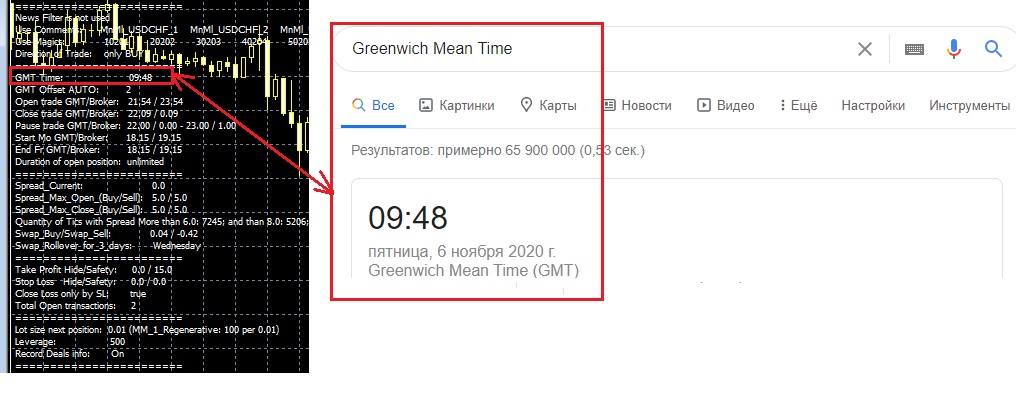
• Checking automatic GMT in EAs: https://www.mql5.com/en/blogs/post/748027
• Manual setting of GMT_OFFSET parameter in experts: https://www.mql5.com/en/blogs/post/682539
• EAs access to sites: https://www.mql5.com/en/blogs/post/750708
• Trading lot size and money management: https://www.mql5.com/en/blogs/post/748029
• The danger of using StopLoss in scalping systems: https://www.mql5.com/en/blogs/post/700262
• VPS and clipboard: https://www.mql5.com/en/blogs/post/770761
• VPS and password saving: https://www.mql5.com/en/blogs/post/770772
• Limit on the number of open terminals in Windows: https://www.mql5.com/en/blogs/post/774470
• Step-by-Step Guide on how to use Expert Advisors: https://www.mql5.com/en/blogs/post/750723
Email for investors and partners: konstantin@aster.cx
Find my official products only on MQL5: https://www.mql5.com/en/users/test-standart/seller
✔ Free lifetime updates
✔ Responsive customer support
✔ Access to the latest author's settings: https://www.mql5.com/en/blogs/post/747929
+ Get spread and commission rebates on every trade with any broker, paid directly to your wallet: https://fxcash.net/en/?id=-FOREX-
My Communities
• MQL5 group: https://www.mql5.com/en/messages/011e4f235b10dc01
• Discord group: https://discord.com/invite/yjVR5x4rvf
• MQL5 channel: https://www.mql5.com/en/channels/trendsandlevels
• Telegram channel: https://t.me/EAFXPRO
Helpful Information
• Autostart of terminals when rebooting VPS: https://www.mql5.com/en/blogs/post/736914
• Disable Windows updates to avoid losing mql products activations: https://www.mql5.com/en/blogs/post/742676
• Saving VPS resources: https://www.mql5.com/en/blogs/post/746138
• Profile loading instructions: https://www.mql5.com/en/blogs/post/740359
• Checking automatic GMT in EAs: https://www.mql5.com/en/blogs/post/748027
• Manual setting of GMT_OFFSET parameter in experts: https://www.mql5.com/en/blogs/post/682539
• EAs access to sites: https://www.mql5.com/en/blogs/post/750708
• Trading lot size and money management: https://www.mql5.com/en/blogs/post/748029
• The danger of using StopLoss in scalping systems: https://www.mql5.com/en/blogs/post/700262
• VPS and clipboard: https://www.mql5.com/en/blogs/post/770761
• VPS and password saving: https://www.mql5.com/en/blogs/post/770772
• Limit on the number of open terminals in Windows: https://www.mql5.com/en/blogs/post/774470
• Step-by-Step Guide on how to use Expert Advisors: https://www.mql5.com/en/blogs/post/750723




Konstantin Kulikov


·
2
Konstantin Kulikov
2021.04.08
Это с SL. Путь к этим сетам в архиве настроек: \Without GridMartin\Sets\Additional Sets