Francisco Gomes Da Silva / Profile
- Information
|
8+ years
experience
|
34
products
|
49
demo versions
|
|
36
jobs
|
0
signals
|
0
subscribers
|
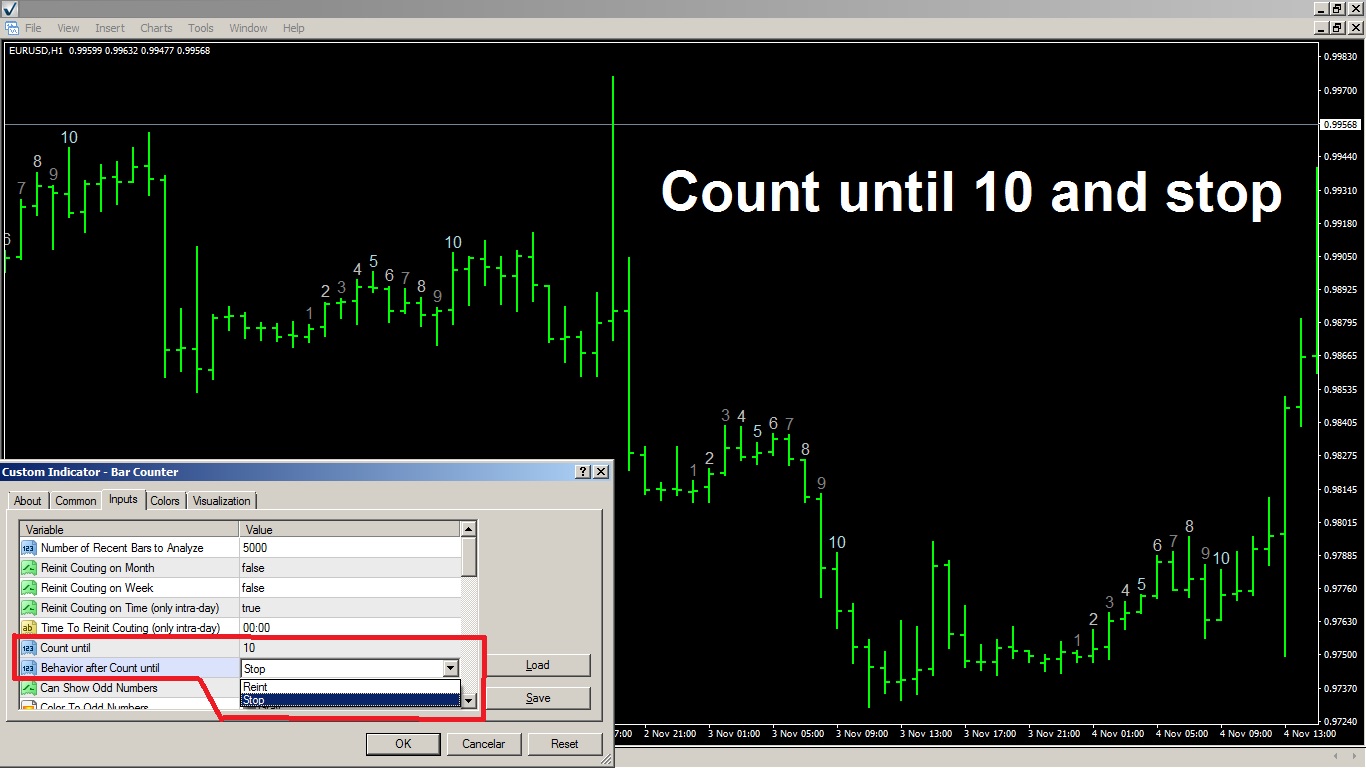
Parameter to stop the counting after the count reaches the limit. Previously, it was only resetting the count. Now, we have the option to halt the counting to isolate the numbers in the middle of the graph. This makes it easier to identify the group of numbers when zooming out of the graph.
link to MT4 version: https://www.mql5.com/pt/market/product/83825
link to MT5 version: https://www.mql5.com/pt/market/product/83489
Candle counter This indicator counts and identifies candles based on a longer time frame Bigger Timeframe You can choose the daily timeframe as " Bigger Timeframe ", and run it within any smaller chart. that it will count the bars based on the daily chart . If you pass as a parameter the timeframe " H1 " then the indicator will know how to count the bars inside the H1 chart you just need to run it on smaller charts. The main parameter is the " Bigger Timeframe " which is a larger timeframe than
Previous Day's Close and Bar Shift Indicator for MetaTrader! The Previous Day's Close and Bar Shift Indicator is a tool designed to enhance technical analysis and decision-making in trading. With this indicator, you will have access to detailed information about the opening, high, low, and closing levels of any bar, allowing for precise and comprehensive analysis of market movements. Imagine having the ability to nest one timeframe within another, enabling detailed analysis of each bar across
Unveil Trading Insights with Auto Anchored VWAPs: Auto Anchored VWAPs serve as your guiding companion in the world of trading. These indicators pinpoint crucial market turning points and illustrate them on your chart using VWAP lines. This is a game-changer for traders who employ anchored VWAP strategies. How Does It Work? Identifying High Points: If the highest price of the current candle is lower than the highest price of the previous one, And the previous high is higher than the one before
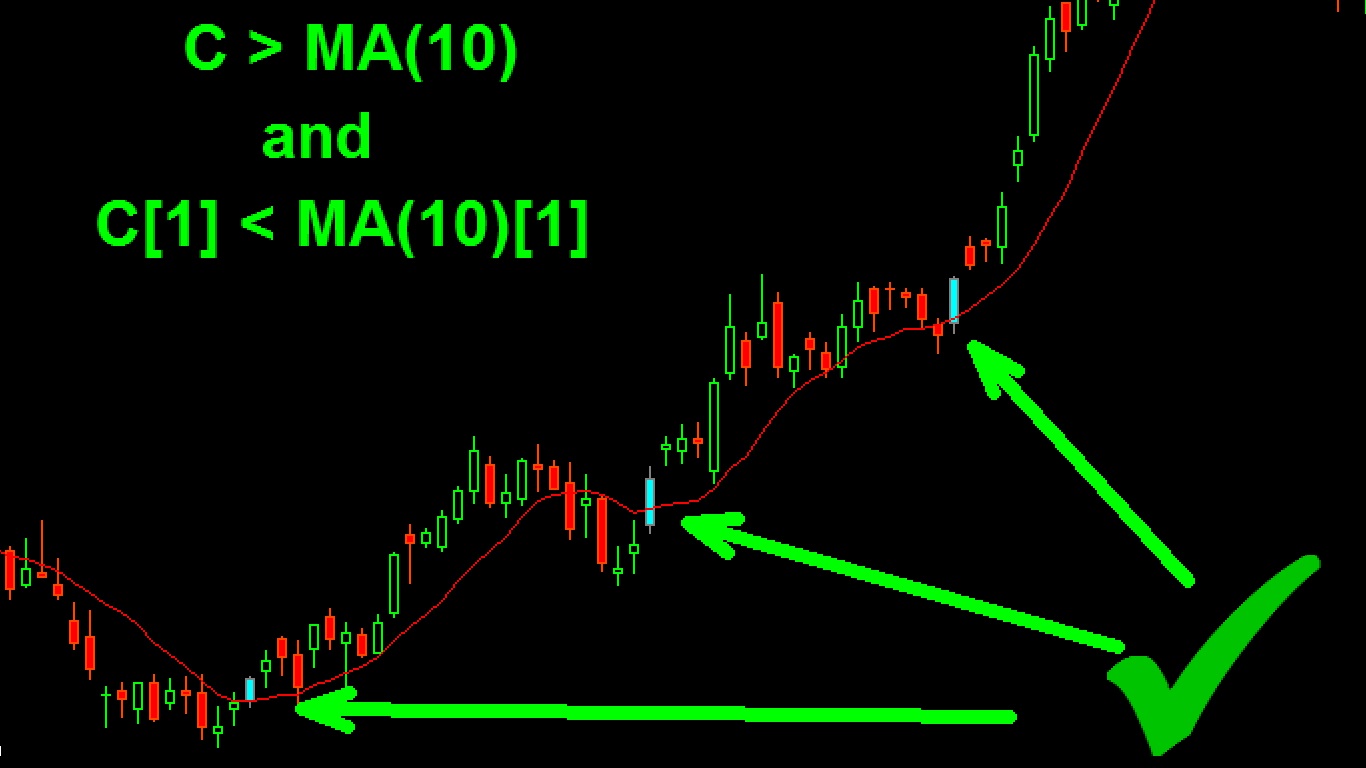
This indicator is a demo version of the complete My candle, which can be downloaded here: Candle Patterns Creator With the full version, you can create your own candle rules and modify a traditional candle pattern to be more accurate according to your strategy. The indicator includes several example candle rules, but here I will demonstrate only a few: Pattern Rule Candle Green C > O Candle Red C < O Doji C = O Hammer (C > O and (C-O) *2 < O-L and (C-O) *0.5 > H-C) or (C < O
Previous Day's Close and Bar Shift Indicator for MetaTrader! The Previous Day's Close and Bar Shift Indicator is a tool designed to enhance technical analysis and decision-making in trading. With this indicator, you will have access to detailed information about the opening, high, low, and closing levels of any bar, allowing for precise and comprehensive analysis of market movements. Imagine having the ability to nest one timeframe within another, enabling detailed analysis of each bar across
TrendPlator: Empower Your Trading Strategies with an Advanced Trend Projection Indicator Explore the potential of our innovative indicator! With the ability to analyze and project trend lines from larger timeframes directly onto your current timeframe, it provides strategic support that catches the attention of traders across the board. These points become strategic levels of support or resistance for your trades, strengthening your trading strategy. Visualize the opportunity to add an indicator
TrendPlator: A Powerful Trend Projection Indicator for Optimized Trading Strategies Discover the power of our new indicator! With the ability to calculate trend lines from larger timeframes and project them directly onto your current timeframe, it provides strategic support that captures the attention of traders. These points become powerful support or resistance levels for your trades, boosting your trading strategy. Imagine having access to an indicator that seamlessly complements your
Discover the Power of Risk Management with Price Action to Position Your Stop Loss! Have you ever experienced the situation where you know exactly when to enter a trade, but you're unsure about the right time to exit? Don't worry, you're not alone! Many traders face this challenge on a daily basis. The good news is that our price action-based risk management tool is here to solve this problem. While you focus on identifying the optimal entry points, our tool takes control and handles the trade
Hide Scale for mt5: https://www.mql5.com/pt/market/product/98077
Hide Scale for mt4: https://www.mql5.com/pt/market/product/98078
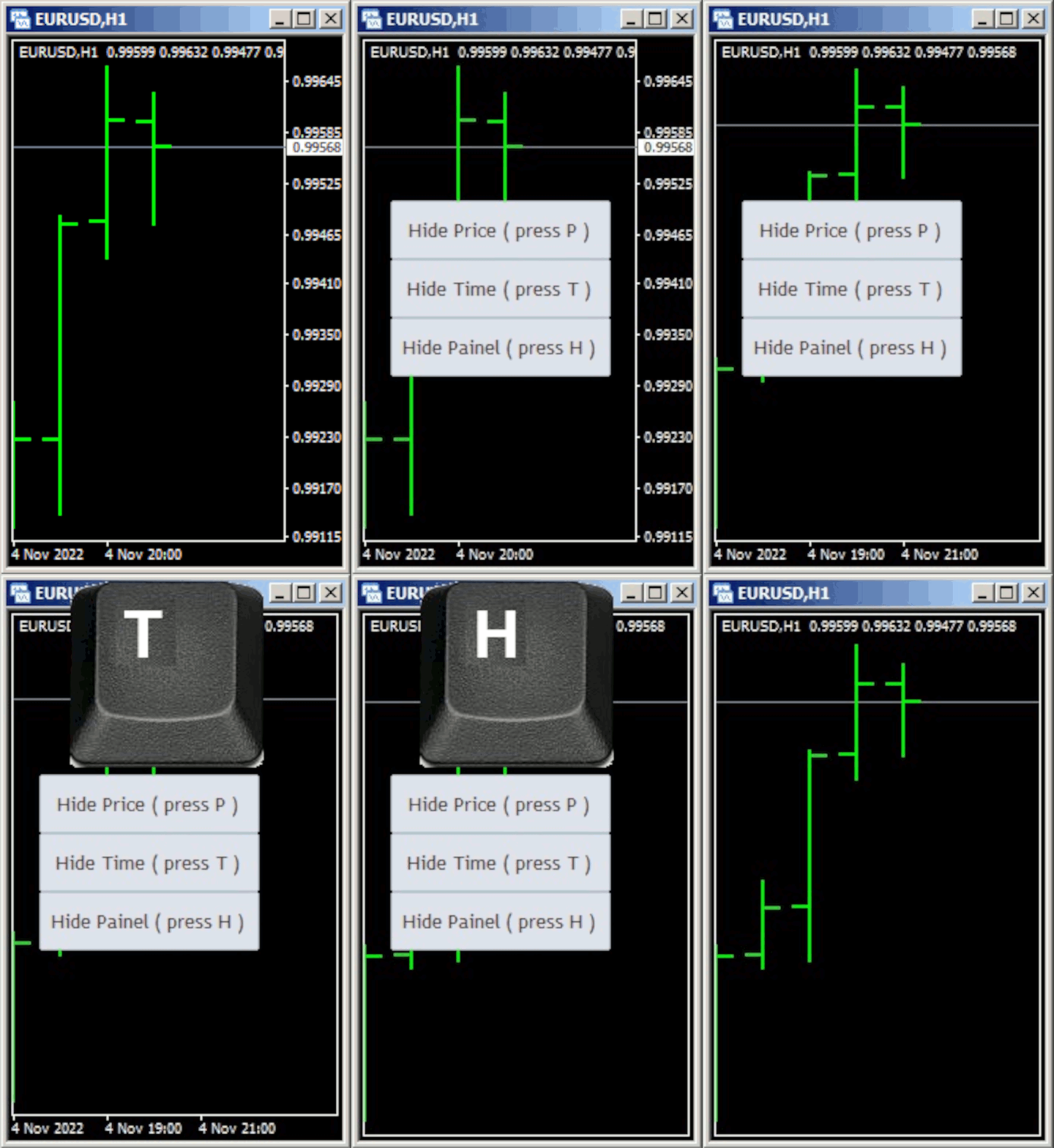
Hide Scale - Tool for Traders Who Want More Screen Space Instructions Press "T" to hide the time scale and "P" to hide the price scale. You can customize these keys by clicking the corresponding button and typing a new key on your keyboard. To hide both scales at the same time, you can assign the same key to both options. To show the scales again, simply press the corresponding key again. Why We Created This Tool We created this Hide Scale tool to help traders who use our Sweet VWAP indicator to
Hide Scale - The ideal tool for traders who want to maximize chart space How to use Hide Scale Press "T" to hide the time scale and "P" to hide the price scale. You can customize the keyboard shortcuts by clicking on the corresponding buttons and choosing a new key for each function. If you want to hide both scales at the same time, you can assign the same key to both options. To display the scales again, simply press the corresponding key again. The reason behind creating this tool We developed
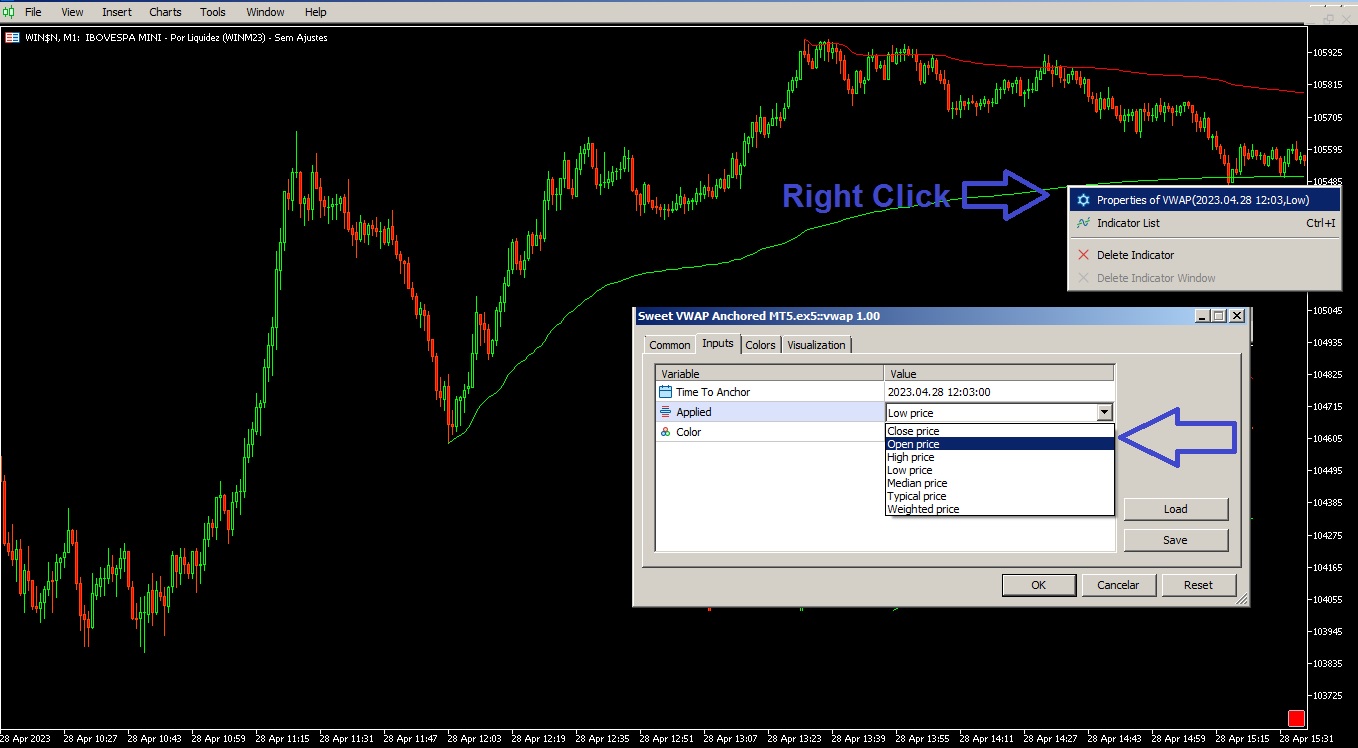
To access the parameters of the internal VWAP, the user must first plot it on the chart by left-clicking on it. Then, they should right-click on the internal VWAP to access the parameters and adjust the calculation according to their needs and trading strategies.
This update of the Sweet Anchored VWAP indicator offers a competitive advantage for traders who use Metatrader in their financial operations. With more options for calculating the VWAP, it is possible to improve analysis accuracy and make more informed and effective decisions in the market.
Traders who wish to use this new functionality should update their Metatrader version to 1.8 of the Sweet Anchored VWAP indicator. From there, they can follow the instructions described above to access and adjust the parameters of the internal VWAP. https://www.mql5.com/en/market/product/96538
Save time and make more informed decisions with Sweet VWAP Aux If you haven't already downloaded our free VWAP indicator for Metatrader 4 , do it now and experience its incredible capabilities for visualizing anchored vwap. Then come back here and get to know Sweet VWAP Aux - the perfect extension for your Sweet VWAP indicator. With just one click, Sweet VWAP allows you to anchor the VWAP indicator at the point of your choice, saving time and eliminating the need to set it up manually. In
Firstly, regarding the anchored VWAP, we now have the option to select the button corner, which allows for better customization and adjustment according to your preferences.
As for the Support and Resistance tools, we have introduced the functionality of top and bottom buffers, which allows for more precise analysis and facilitates the identification of opportunities in the market.
We hope that these updates can help you in your financial operations. Please feel free to contact us if you have any questions.
We are thrilled to announce the release of version 2.0 of our free Bar Counter! With this update, the indicator's structure has been improved, meaning it is now even faster and more efficient in helping you analyze charts with extensive history.
Additionally, we have added reset options to allow you to customize your analysis according to your specific trading style. And with additional features such as specific numbers, divisible numbers, even and odd numbers, you can have more information to make informed decisions.
Version 2.0 of our Bar Counter is free and offers more features than previous versions. If you are looking to enhance your trading experience and increase your chances of success, we highly recommend that you try the new version.
We hope you enjoy the update and that it helps improve your trading results. Thank you for considering our offer, and please don't hesitate to contact us if you have any questions or need assistance with the download.
It's called "Fibonacci on Zigzag" and it uses the native metatrade zigzag to create the tops and bottoms, it's also MTF so you can make interesting combinations with different timeframes: https://www.mql5.com/pt/market/product/79799
Save time and make more accurate decisions with Anchored VWAPs If you want to test the power of this tool, you can download the free Anchored VWAPs indicator for MT5 . In addition to this indicator working independently, it is also an extension for the free Sweet VWAP version. This is because when you click in the free version, the VWAP you see at the mouse pointer will be anchored. And for better understanding, what will be anchored there is this indicator, with all its functionalities. This