 MetaTrader 5
 Experts
 Indicators
 Scripts
 Libraries
 Storage
Watch how to download trading robots for free
Find us on Facebook!
Join our fan page
You liked the script? Try it in the MetaTrader 5 terminal

Key Levels: PDH/PDL, weekly and monthly levels, midnight open, Asian range, sweeps - indicator for MetaTrader 5
Muhammad Muqeem Korejo

Hi, I'm Muhammad Muqeem Korejo, an MQL4/MQL5 developer from Pakistan with 1.5 years of trading experience.
I build and fix trading tools for MetaTrader 4 and MetaTrader 5:
• Expert Advisors (EAs) built from your strategy rules
• Custom indicators, alerts and on-chart panels
- Views:
- 26
- Published:
-
 You are missing trading opportunities:
- Free trading apps
- Over 8,000 signals for copying
- Economic news for exploring financial markets
Registration Log inYou agree to website policy and terms of use
If you do not have an account, please register -
 Need a robot or indicator based on this code? Order it on Freelance
Go to Freelance
Many traders mark the same few levels every morning: the high and the low of the previous day, of the previous week and of the previous month, the open of the day, and the range of the Asian session. Price often reacts at these levels, and a quick move through a level that closes back on the other side (a sweep) is a setup that many people watch. This indicator draws all of them for you, on every timeframe, and tells you when a level was swept or broken.
Files
- KeyLevelsSweeps.mq5 - the indicator.
- BrokerTime.mqh - the time zone class (the same file as in the code "Broker Time"). Put both files in the same folder and compile the indicator.
What is drawn
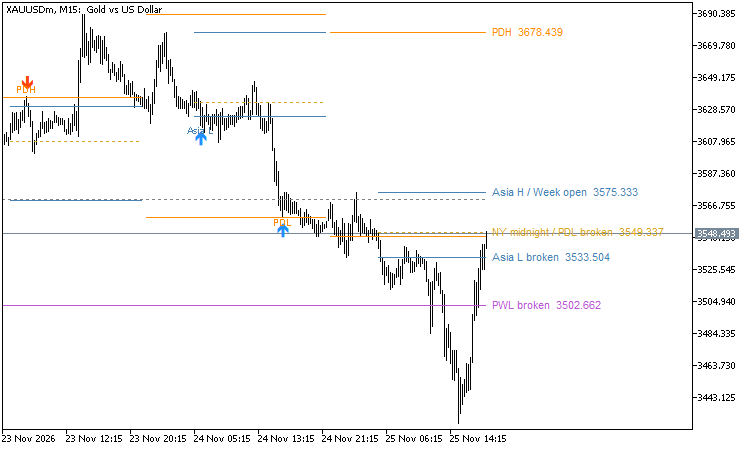
- Previous day high and low (PDH, PDL), previous week high and low (PWH, PWL), previous month high and low (PMH, PML).
- New York midnight open (00:00 New York, often called the true day open), day open, week open and month open as dotted lines.
- The Asian range (high and low of 20:00 to 00:00 New York by default; both hours are inputs).
- Every level as a line across its own period for the last 40 days (an input), so you can see how price behaved at the levels in the past.
- A label at the right edge with the name and the price. A level that has been swept or broken in the current period says so in its label ("PDH swept", "PWL broken"). Labels of levels that are very close are joined into one line, so they do not cover each other.
- Sweep marks: an arrow at the bar that traded through a high or low level and closed back inside, with the name of the level next to it.
When does the day start
The previous day high and low depend on where the day starts, and this is the most common reason why two key level tools show different numbers. You can choose:
- Broker midnight (the short Sunday session of some brokers is added to Monday, so Monday's "previous day" is Friday).
- New York midnight 00:00.
- 17:00 New York, the start of the forex day (the default).
For the New York options the class BrokerTime finds the clock of your broker from the Friday closes in the history, with the right summer time for every date (US and European summer time start on different dates). It can also be set by hand.
No repaint
- Every level is known when its line starts: the previous day, week and month are finished, an open does not change once the period has started, and the Asian range is drawn only after the Asian session has ended.
- Sweeps, breaks and alerts are decided only on closed bars. A mark, once drawn, is never moved or removed.
- The levels are built from M15 bars, so they are the same on M1, M15, H1 or H4.
Sweeps, breaks and alerts
- Sweep of a high level: the bar trades above the level and closes at or below it. Sweep of a low level: the bar trades below the level and closes at or above it.
- Break: a close beyond the level.
- Only the first event of each level in each period is used, so you get one alert per level per period, not an alert on every bar.
- Optional pop-up alert and push notification.
For Expert Advisors
Buffers 12 to 23 hold the exact values (empty when a level is switched off or not known): 12 PDH, 13 PDL, 14 PWH, 15 PWL, 16 PMH, 17 PML, 18 New York midnight open, 19 day open, 20 week open, 21 month open, 22 Asian high, 23 Asian low. Buffer 24 is set (to the high) on a bar that swept a high level, buffer 25 (to the low) on a bar that swept a low level. Buffers 0 to 11 are the drawn lines (empty on the first bar of each period, so the lines have no vertical steps); use 12 to 23 in your code.
When you call the indicator with iCustom, each "input group" counts as one parameter: pass a string for it, for example iCustom(_Symbol, _Period, "KeyLevelsSweeps", "Day", 2, 0, 2.0, ...).
Inputs: day start, broker clock, which levels, Asian session hours, days to draw, sweep marks and their text, labels (price, distance, font size), six colours, alerts.
How it was tested
- An independent calculation in Python (own code, New York time from the IANA time zone database through zoneinfo) rebuilt every level from the exported M15 bars and compared it with the buffers, for three setups on a demo account: EURUSD H1 with the day from 17:00 New York, XAUUSD M15 with the day from New York midnight, GBPUSD M5 with the day from broker midnight. 74,964 level values compared, 0 differences. The sweep marks of 6,247 bars were rebuilt the same way: 0 differences.
- Repaint test: on every new bar, a test Expert Advisor saved the values of the bar that had just closed (what an EA sees at that moment). At the end of the test the same bars were read again. 87,458 values compared, 0 changed.
- Validator-style runs in the Strategy Tester: EURUSD H1, XAUUSD D1, GBPUSD M30 and EURUSD M1 (663,241 bars): no errors. Nothing is drawn in a Strategy Tester run without visualization, but all buffers are calculated.
- The screenshot is a real XAUUSD M15 chart of a demo account.
 OrderGuard - restart-safe order sending for EAs (no duplicate trades)
An include file that makes the way an EA sends its orders safe: the same signal is never traded twice. It has no trading strategy inside and comes with a small example EA.
Pacific Clock - US Pacific time on the chart (PST/PDT)
Shows US Pacific time on the chart, with the broker's time beside it, and the Pacific time of any candle under the mouse.
Divergence Detector without repaint: RSI, MACD, Stochastic, CCI, Momentum
Regular and hidden divergences between price and RSI, MACD, Stochastic, CCI or Momentum. Swings confirmed on closed bars, signal on the confirmation bar, lines on oscillator and price. No repaint, buffers for EAs.
MACD Signals
Indicator edition for new platform.