 MetaTrader 5
 Experts
 Indicators
 Scripts
 Libraries
 Storage
Watch how to download trading robots for free
Find us on Telegram!
Join our fan page
You liked the script? Try it in the MetaTrader 5 terminal

OrderGuard - restart-safe order sending for EAs (no duplicate trades) - library for MetaTrader 5
Archie Stuart Clarke

I build and fix MT5 Expert Advisors and indicators in MQL5.
Every job is tested in the MT5 Strategy Tester before delivery, and you get a short plain-English note of what was built and how it was checked. Ask for a backtest report and you get the honest numbers, good or bad.
- Views:
- 31
- Rating:
- Published:
-
 You are missing trading opportunities:
- Free trading apps
- Over 8,000 signals for copying
- Economic news for exploring financial markets
Registration Log inYou agree to website policy and terms of use
If you do not have an account, please register -
 Need a robot or indicator based on this code? Order it on Freelance
Go to Freelance
OrderGuard is an include file for people who write their own Expert Advisors for MetaTrader 5. Its purpose is to make the way an EA sends its orders safe. It is not a robot and it has no trading strategy inside. It comes with a small example EA that shows it in use. It sends market buy and sell orders only.
It does four main things:
- The same signal is never traded twice after a restart, a reconnect or a retry.
- The limit on how many trades may be open is counted from the broker, not from a number that is lost when the EA restarts.
- No orders are sent while the terminal has lost its connection, and the outage is written to the log once, not on every tick.
- Stops and targets that sit too close to price are moved out to the broker's minimum distance and rounded properly.
Before every order it also makes these checks:
- The lot size is fitted to what the symbol allows. It is never rounded up.
- No order without enough free margin, none while the market is closed, none the symbol does not allow.
- It picks a way of filling the order that the symbol accepts.
- If the broker refuses an order, it waits a minute before trying that signal again, then longer each time (15 minutes at most).
- A skipped signal is written to the log once, not on every tick.
How to use it: put OrderGuard.mqh in MQL5\Include\OrderGuard\ and add #include <OrderGuard\OrderGuard.mqh> to your EA. Create one COrderGuard object and call Init() with your magic number in OnInit(). Then send every order through Open() with a key that names the signal. The example EA uses the direction plus the bar's open time as the key. Open() makes all the checks above and sends the order only if that key has not been traded before.
These are faults I found and fixed on my own trading system. The example EA's entry rule (two moving averages crossing) is only there to give OrderGuard something to guard. It is not a strategy and makes no claim of profit. OrderGuard works on whatever symbol and timeframe the EA that uses it trades. Free to use and change.
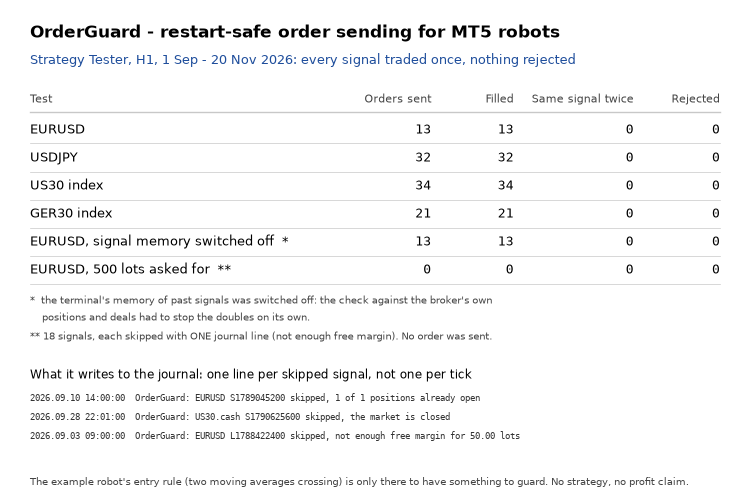
Testing: Strategy Tester, H1, 1 September to 20 November 2026, hedging account. EURUSD 13 orders sent and 13 filled, USDJPY 32 and 32, US30 34 and 34, GER30 21 and 21. On all four, no signal was traded twice and no order was refused by the broker. With its memory of past signals switched off on purpose it still made 13 trades with none doubled. Asked for 500 lots, it sent no order. The picture shows these results as a table, with three lines it wrote to the journal.
Not tested: a real restart of a live terminal, a lost connection (the tester is always connected), netting accounts, gold, any other broker, real money.
Inputs of the example EA (defaults):
- Magic number: 240117
- Lots: 0.01
- Fast MA period: 20
- Slow MA period: 50
- Stop distance, points: 300
- Target distance, points: 600
- Max open positions for this EA (counted from the broker): 1
 Pacific Clock - US Pacific time on the chart (PST/PDT)
Shows US Pacific time on the chart, with the broker's time beside it, and the Pacific time of any candle under the mouse.
 Lot Size Calculator - Risk Percent to Lots
Calculates the correct lot size from your risk (% of balance, % of equity or a fixed amount) and stop-loss distance. Shows actual risk and margin. Never places trades.
Accelerator Oscillator (AC)
The Acceleration/Deceleration Indicator (AC) measures acceleration and deceleration of the current driving force.
MACD Signals
Indicator edition for new platform.