 MetaTrader 5
 Experts
 Indicators
 Scripts
 Libraries
 Storage
Watch how to download trading robots for free
Find us on Telegram!
Join our fan page
You liked the script? Try it in the MetaTrader 5 terminal

Pacific Clock - US Pacific time on the chart (PST/PDT) - indicator for MetaTrader 5
Archie Stuart Clarke

I build and fix MT5 Expert Advisors and indicators in MQL5.
Every job is tested in the MT5 Strategy Tester before delivery, and you get a short plain-English note of what was built and how it was checked. Ask for a backtest report and you get the honest numbers, good or bad.
- Views:
- 39
- Rating:
- Published:
-
 You are missing trading opportunities:
- Free trading apps
- Over 8,000 signals for copying
- Economic news for exploring financial markets
Registration Log inYou agree to website policy and terms of use
If you do not have an account, please register -
 Need a robot or indicator based on this code? Order it on Freelance
Go to Freelance

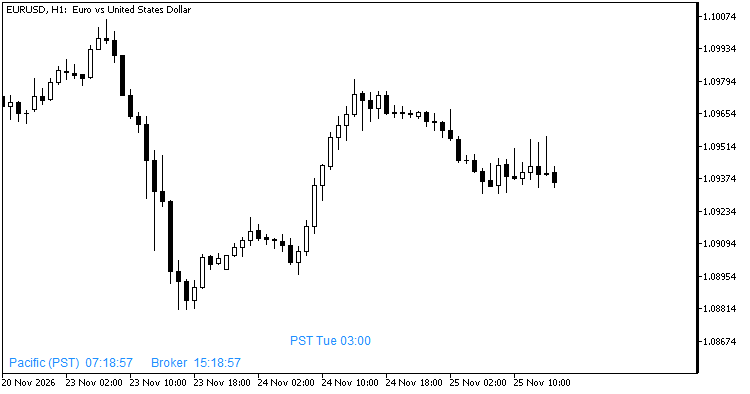
Pacific Clock is an indicator for MetaTrader 5 that shows the current US Pacific time on a line just above the chart's time scale. It updates every second and shows PST or PDT beside the time. It is for traders who think in Pacific time but use a broker whose server runs in another time zone. It can show the broker's time on the same line, so the two can be compared at a glance. Move the mouse over a candle and it shows the Pacific day and time of that candle.
It follows US daylight saving by itself: second Sunday of March to first Sunday of November. That rule was checked against the official time-zone records for 2020 to 2030 with no mismatches. It can be used on any symbol and any timeframe. The candle time is most useful on charts of one day or less per candle. It was looked at on EURUSD H1.
What it does not do: it gives no trading signals, and apart from its two text labels it draws nothing on the chart. It relies on the computer's own clock being right. The candle time is worked out from the gap between the broker's time and UTC at this moment. If the broker moves its own server clock for summer time, candles from before its last change show one hour out. It was looked at on one broker, whose server runs on UTC, so a broker in another time zone has not been seen on a chart.
Testing: a test script tried every mouse position across the chart at five zoom levels, about 6,400 positions. The label picked the nearest candle every time. The picture shows the clock line at the bottom left and the label for the candle under the mouse above it.
Inputs (defaults):
- Text before the time: Pacific
- Show seconds on the clock: on / off
- Also show the broker (server) time on the clock line: on / off
- Show the Pacific time of the candle under the mouse: on / off
- Font size: 9
- Font: Arial
- Text colour: DodgerBlue
- Clock, distance from the left edge (pixels): 6
- Distance above the time scale (pixels): 3
 Lot Size Calculator - Risk Percent to Lots
Calculates the correct lot size from your risk (% of balance, % of equity or a fixed amount) and stop-loss distance. Shows actual risk and margin. Never places trades.
Candle Timer and Spread
Shows the time left until the current candle closes and the live spread in any chart corner. Keeps counting every second, even when no ticks arrive.
 OrderGuard - restart-safe order sending for EAs (no duplicate trades)
An include file that makes the way an EA sends its orders safe: the same signal is never traded twice. It has no trading strategy inside and comes with a small example EA.
MACD Signals
Indicator edition for new platform.