 MetaTrader 5
 Experts
 Indicators
 Scripts
 Libraries
 Storage
Watch how to download trading robots for free
Find us on Telegram!
Join our fan page
Join our fan page
You liked the script? Try it in the MetaTrader 5 terminal

Market Hours Label - is the symbol open now and when it closes - script for MetaTrader 5
Eduardo Cumplido

I am a chemical engineer and EFA-certified financial advisor, with experience in portfolio management, financial markets and MQL programming since 2010. Over the years, I have combined software development, quantitative analysis and strategy evaluation to turn real trading needs into practical
- Views:
- 65
- Rating:
- Published:
- Updated:
-
 You are missing trading opportunities:
- Free trading apps
- Over 8,000 signals for copying
- Economic news for exploring financial markets
Registration Log inYou agree to website policy and terms of use
If you do not have an account, please register -
 Need a robot or indicator based on this code? Order it on Freelance
Go to Freelance
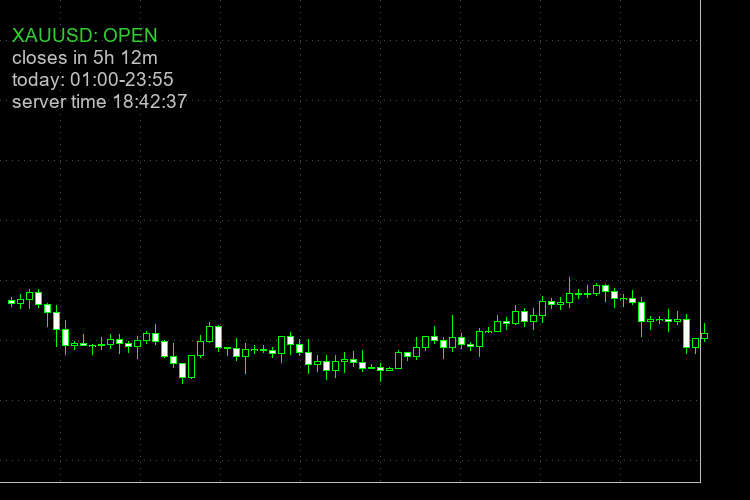
Sometimes I need the trading time of a specific symbol in my broker. The script reads the trade sessions that the broker gives for the chart symbol and writes on the chart if it is open or closed now, and how much time is left. Every broker has different hours for gold, indices and crypto, and the daily break is not at the same time everywhere, so I prefer to see it on the chart and not open the specification window each time.
What it shows:
- OPEN or CLOSED for the symbol of the chart
- the time left to the close, or to the next open when it is closed
- the sessions of today, in server time
- the server time
Inputs:
- corner, X and Y offset, font size and colors of the label
- show or hide the sessions of today
- alert some minutes before the close (0 = off), and also push notification if you want
Notes:
- It uses the session table of the broker. Holidays are not in that table, so on a holiday the label can say OPEN when the market is closed.
- If a session ends at 24:00 and the next day starts at 00:00, it counts as one session, so the time to the close is the real one.
- All the times are server time.
- Display only, it never opens or closes trades.
How to use:
- Copy MarketHoursLabel.mq5 to the MQL5\Scripts folder and compile it.
- Drag it on the chart of the symbol you want.
 Spread By Hour - average and max spread per hour, live spread vs usual
Average and maximum spread for each server hour from bar history, live spread vs the usual spread of this hour, and the spread cost of 1 lot.
Heikin Ashi Candles Drawn as a Chart Overlay
Heikin Ashi candles drawn as an overlay directly on the price chart, with optional hiding of the original candles (restored when the indicator is removed) and an on-chart label showing the trend, its strength and the run length.
Trend Strength Meter Using ADX in a Compact Dashboard
A compact on-chart dashboard that shows the trend strength of up to four timeframes using the ADX: value, strength bar, strength class and +DI/-DI direction, plus a summary row with the average ADX and the agreement of the directions.
Building a Confluence Signal Engine in MQL5: Leading Triggers, Confirmation Filters and a Live Dashboard
Free source code included: a DST-aware Market Sessions + PVSRA vector-candle indicator, 5 preset files and a printable confluence cheat sheet.