Eduardo Cumplido / Profile
- Information
|
8+ years
experience
|
10
products
|
3
demo versions
|
|
12
jobs
|
0
signals
|
0
subscribers
|
I develop professional MetaTrader tools designed to help traders and investors analyze their performance, manage risk and make data-driven decisions.
My products are designed to help traders:
• Analyze accounts, trades and performance in greater depth.
• Monitor risk, exposure and drawdown.
• Evaluate trading strategies using clear statistics.
• Automate repetitive tasks and save time.
• Improve trade management and account supervision.
• Make decisions based on data rather than emotions.
Every tool is built around a simple principle: it must solve a real problem, provide useful information and remain easy to use.
That is why I focus on:
• Clear and visual interfaces.
• Relevant information without unnecessary complexity.
• Stability and performance.
• Compatibility with different brokers and MetaTrader configurations.
• Practical features designed for real trading environments.
I do not develop products based on unrealistic promises, guaranteed profits or "miracle" trading systems. My goal is to build professional tools that help traders better understand what is happening in their accounts, work more efficiently and maintain greater control over their trading activity.
My products are software tools: through MQL5 I do not provide investment advice, portfolio management or trading signals. Trading leveraged products involves a high risk of loss.
All my products are part of the CloudPortfolios ecosystem, focused on trading analytics, risk management and quantitative tools for traders and investors.
Support via product comments or private message, Monday to Friday, replies within 24 h.
Videos and tutorials on my YouTube channel
https://www.youtube.com/@cloudportfolios
If you trade more than one account, you know the routine. The same order typed twice, a few seconds late on the second terminal, with a lot size worked out in your head. Or a strategy that runs on MT4 while your other account lives on MT5, and no simple way to mirror one into the other.
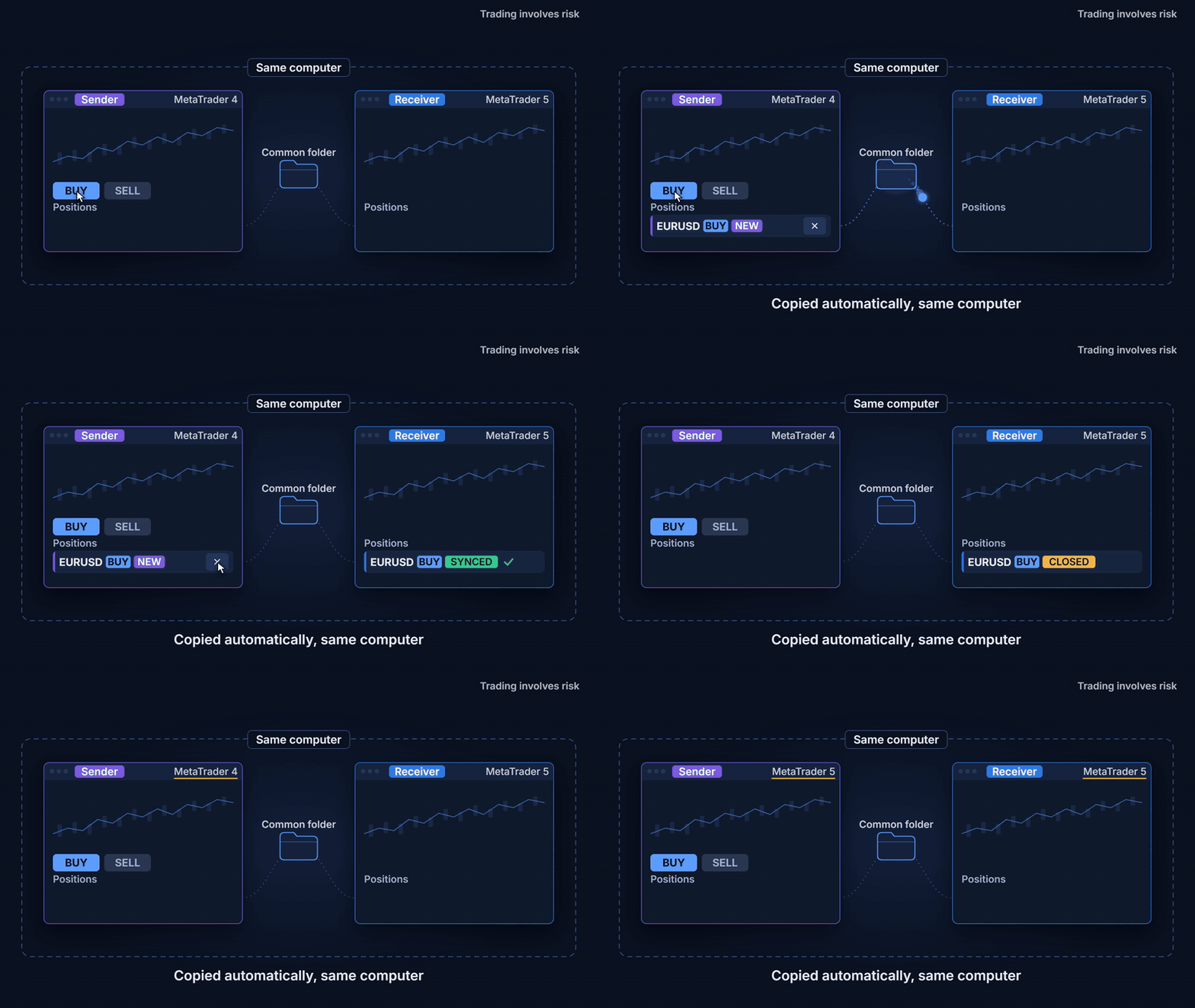
Local Trade Copier copies market positions from one Sender terminal to one or more Receiver terminals on the same computer or VPS. It works in every direction, MT4 to MT4, MT4 to MT5, MT5 to MT4 and MT5 to MT5. No DLL and no internet service are involved, because the terminals talk through the MetaTrader Common folder.
Setting it up
- On the Sender terminal, attach the EA to a dedicated chart, choose SENDER, set a channel name of your choice and press START.
- On each Receiver terminal, choose RECEIVER and the same channel, review the Risk and Advanced tabs, and press START.
- Start with Dry run ON. The Trades table shows what the copier would open, close, reduce or modify, and nothing is sent until you turn it off.
Accounts of different size, symbols with different names
On the Risk tab you choose how the volume is calculated, from the same lot to modes proportional to balance or equity, with limits on total volume, risk per trade and number of positions. Symbols are mapped automatically when brokers use different suffixes, and you can map them by hand or block them on the Mappings tab. Filters let you copy only manual trades or only some EAs, symbols or directions.
When the data is incomplete
Every file the terminals exchange carries a checksum. A partial, corrupt or stale state never opens, closes or modifies a trade, and the Diagnostics tab shows what each terminal sees. When something is blocked, the Trades table tells you why.
Try it for 4 hours
Attached to this post you will find the trial versions for MT4 and MT5. They are fully functional on demo and real accounts, with three conditions.
- The trial gives 4 hours of calendar time from its first start on your computer, even if the terminal is closed in between. Sender and Receiver share the same 4 hours.
- It can be used only once per computer. Downloading it again, reinstalling it or opening another terminal on the same computer does not restart the count.
- These files stop working on 19 November 2026, even if you have not used the 4 hours. The date is also shown in the panel.
When the trial ends, the copier stops copying and tells you so. Positions already copied stay open and are no longer synchronised, so closes, stop loss changes and reductions made on the Sender will not reach the Receiver and you will need to manage them manually. We recommend testing on a demo account first. To copy between MT4 and MT5 you need the MT4 version in the MT4 terminal and the MT5 version in the MT5 terminal.
Want to keep copying? Get the full version on the MQL5 Market, with a 3-month or a 12-month licence.
Local Trade Copier for MT5
https://www.mql5.com/en/market/product/198322
Local Trade Copier for MT4
https://www.mql5.com/en/market/product/198320
Questions are welcome in the product comments.
I am the developer of this utility. Local Trade Copier copies trades between accounts you own or are authorised to operate. Copied trades can be filled at different prices and times on each account, so results may differ between Sender and Receiver. It is not a signal service. Copying depends on your terminals, your computer and your broker execution, and cannot prevent losses caused by gaps, slippage or disconnections. Trading leveraged products involves a high risk of loss. This is not financial advice.
Multi Market Scanner — your symbols and timeframes in one panel, with a score that explains itself Multi Market Scanner watches the symbols and timeframes you choose from a single chart. Each combination gets a technical score from 0 to 100 and a technical reading, from Strong Sell to Strong Buy. The scanner then combines the timeframes into one overall reading and shows you why each result came out the way it did. You spend your time studying the instruments that meet your criteria instead of
Trading Manager — your panel to execute and manage your trades with your risk in view Trading Manager is a manual trading assistant that brings the whole process together in one panel on the chart. You choose the direction and the risk, place the stop loss and take profit, and the panel calculates the lot and shows you the loss at the stop and the profit at the target before the order is sent. Then you manage one or several positions from the same table. You decide when and in which direction to
Local Trade Copier — copy your trades between your MetaTrader 4 and MetaTrader 5 terminals on the same computer Local Trade Copier copies the market positions of one of your accounts (Sender) to other accounts of yours (Receiver) open in terminals on the same computer. Data travels through the MetaTrader common folder: no external servers, no DLL, no WebRequest and no input parameters. Everything is set in the panel. It does not generate signals or predict the market. Copy combinations (sender
Account Risk Guardian — your risk rules, watched across your whole account Every strategy controls its own trades, but nobody watches the whole account. Several Expert Advisors and manual trades at the same time can add up to more drawdown, more risk or more trades than you intended. Account Risk Guardian is installed on a single chart and watches the whole account: manual trades and trades from any Expert Advisor, on every symbol. It compares drawdown, risk to stop loss, exposure, margin and
Trading Account Analytics — your account dashboard inside MetaTrader Trading Account Analytics turns your account history into a clear, interactive dashboard right on the chart: profit, return, drawdown, costs and statistics by symbol, by Expert Advisor and by hour. No data to upload to any website and no investor password to share: everything is calculated inside your terminal. Read-only: it never opens, modifies or closes trades. What you get Trading result without cash flows. Cumulative