 MetaTrader 5
 Experts
 Indicators
 Scripts
 Libraries
 Storage
Watch how to download trading robots for free
Find us on Twitter!
Join our fan page
Join our fan page
You liked the script? Try it in the MetaTrader 5 terminal

Prop Firm Equity Guard - daily loss and max drawdown protection - expert for MetaTrader 5
Deepanshu Goyal

I build Expert Advisors and indicators for MetaTrader 5 that follow your rules exactly, coded cleanly and tested before delivery.
- Views:
- 26
- Rating:
- Published:
-
 You are missing trading opportunities:
- Free trading apps
- Over 8,000 signals for copying
- Economic news for exploring financial markets
Registration Log inYou agree to website policy and terms of use
If you do not have an account, please register -
 Need a robot or indicator based on this code? Order it on Freelance
Go to Freelance

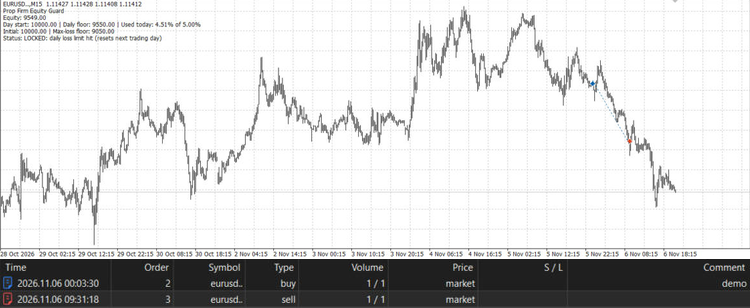
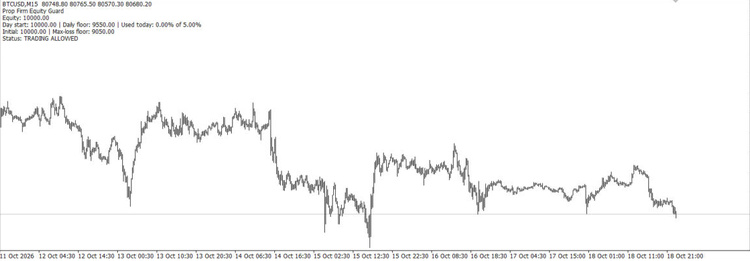 Prop Firm Equity Guard protects a funded or challenge account from breaking the two rules most prop firms enforce: the daily loss limit and the maximum overall loss. Attach it to any one chart; it watches the whole account (all symbols, manual trades and other EAs). When a limit is reached it closes all positions, deletes pending orders and keeps the account flat until the next trading day (daily limit) or until you reset it (max loss).
How the limits are calculated:
- Daily floor = day-start value x (1 - (DailyLoss% - Buffer%) / 100). The day-start value is the higher of balance and equity at the reset hour, as most prop firms do.
- Max-loss floor = initial balance x (1 - (MaxLoss% - Buffer%) / 100).
- Optional profit target closes everything when equity reaches initial balance + target %.
Inputs:
- InpDailyLossPercent (5.0): daily loss limit in %, 0 = off.
- InpMaxLossPercent (10.0): maximum overall loss in % of the initial balance, 0 = off.
- InpInitialBalance (0): initial balance of the challenge; 0 = balance when first attached.
- InpSafetyBufferPercent (0.5): acts this many % before the real limit, to absorb slippage.
- InpDayResetHour (0): server hour when the trading day resets.
- InpProfitTargetPercent (0): close all at this profit %, 0 = off.
- InpBlockAfterBreach (true): closes any new trade opened after a limit was hit.
- InpMagicFilter (-1): magic number to guard, -1 = all trades including manual.
- InpSendAlerts (true): alert and push notification on breaches and at 80% of the daily allowance.
- InpResetLocks (false): clears a saved max-loss or target lock on start.
State (day start, locks, initial balance) is stored in terminal global variables, so it survives terminal or VPS restarts. Close requests are throttled to one pass every 2 seconds to stay within server request limits. A chart comment shows equity, the floors, the share of today's allowance used and the current status.
Works on any symbol and timeframe, hedging and netting accounts. Always check your prop firm's exact rules and set the inputs to match them.
 Thanos AI Level Strength
Unbroken swing highs and lows, shaded by strength: how old each level is and how many times price was turned away from it.
Spread and Cost Monitor Panel
A panel showing the current spread, the average spread since the indicator was attached and the spread cost of a 1-lot trade in account currency.
Smart Break-Even and Partial Close - R-based trade manager
Trade manager for manual trades and other EAs: moves the stop to break-even at a chosen R multiple, closes part of the position at a second target, then trails the stop in steps. Survives terminal restarts.
MACD Signals
Indicator edition for new platform.