 MetaTrader 5
 Experts
 Indicators
 Scripts
 Libraries
 Storage
Watch how to download trading robots for free
Find us on Twitter!
Join our fan page
Join our fan page
You liked the script? Try it in the MetaTrader 5 terminal

Spread and Cost Monitor Panel - indicator for MetaTrader 5
Kenichiro Sakamoto

I'm Kenichiro Sakamoto, the developer behind FXEA365 — a studio building transparent, rule-based Expert Advisors for MetaTrader 5.
- Views:
- 37
- Rating:
- Published:
-
 You are missing trading opportunities:
- Free trading apps
- Over 8,000 signals for copying
- Economic news for exploring financial markets
Registration Log inYou agree to website policy and terms of use
If you do not have an account, please register -
 Need a robot or indicator based on this code? Order it on Freelance
Go to Freelance

The indicator shows a small panel with the trading cost of the current symbol. It displays the current spread in pips and points, the average spread since the indicator was attached, and the spread cost of a 1-lot trade converted to the account currency. The values are refreshed on every tick and by a two-second timer.
The cost is calculated from the spread, the tick size and the tick value of the symbol, so it also works for metals, indices and crypto symbols. The average is collected from incoming ticks and starts again whenever the indicator is re-attached or its inputs are changed.
The status line reads Normal while the spread is at or below InpWarnSpread points and switches to Wide in the warning colour when the spread goes above that level. This is useful for checking broker conditions before running a scalping Expert Advisor, or for watching how the spread behaves around news releases and the daily rollover.
Input parameters
- InpWarnSpread - spread level in points above which the status line shows Wide (default 30).
- InpCorner - chart corner the panel is attached to.
- InpX, InpY - distance from that corner in pixels (scaled with the screen DPI).
- InpFontSize - font size of the panel text.
- InpTextColor, InpValueColor - colours of the labels and the values.
- InpOkColor, InpWarnColor - colours of the status line in the normal and wide states.
- InpBgColor - panel background colour.
The panel scales with the screen DPI and can be placed in any corner of the chart. The indicator only displays information. It does not place or manage trades.
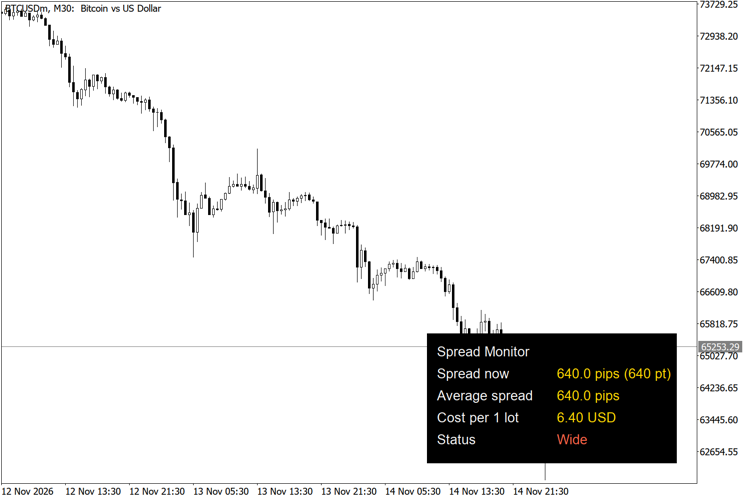
Spread monitor panel on BTCUSD M30
Trading Session Range Boxes
Draws the Tokyo, London and New York trading sessions as coloured boxes that span the high and low of each session.
Currency Strength Ranking Panel
A panel that ranks the eight major currencies (USD, EUR, GBP, JPY, AUD, NZD, CAD, CHF) by their average rate of change against each other.
Thanos AI Level Strength
Unbroken swing highs and lows, shaded by strength: how old each level is and how many times price was turned away from it.
MACD Signals
Indicator edition for new platform.