 MetaTrader 5
 Experts
 Indicators
 Scripts
 Libraries
 Storage
Watch how to download trading robots for free
Find us on Twitter!
Join our fan page
Join our fan page
You liked the script? Try it in the MetaTrader 5 terminal

Trading Session Range Boxes - indicator for MetaTrader 5
Kenichiro Sakamoto

I'm Kenichiro Sakamoto, the developer behind FXEA365 — a studio building transparent, rule-based Expert Advisors for MetaTrader 5.
- Views:
- 36
- Published:
-
 You are missing trading opportunities:
- Free trading apps
- Over 8,000 signals for copying
- Economic news for exploring financial markets
Registration Log inYou agree to website policy and terms of use
If you do not have an account, please register -
 Need a robot or indicator based on this code? Order it on Freelance
Go to Freelance

The indicator draws the Tokyo, London and New York trading sessions as coloured rectangles on the chart. Each rectangle starts at the session open, ends at the session close and spans the highest high and the lowest low reached during the session. This makes the range of every session and the overlaps between sessions visible at a glance.
Session hours are entered in broker server time, so they have to be adjusted to the GMT offset of your broker. The defaults fit a server running at GMT+2. A session that is still in progress is drawn up to the current bar and grows as new bars appear. Sessions without any bars, such as weekends and holidays, are skipped.
The boxes are redrawn once per new bar, so the indicator puts very little load on the terminal. It is intended for intraday timeframes from M1 to H1. All objects are removed from the chart when the indicator is deleted.
Input parameters
- InpDaysBack - number of days to draw (default 15).
- InpShowTokyo, InpShowLondon, InpShowNY - switch each session on or off.
- InpTokyoStart, InpTokyoEnd - start and end hour of the Tokyo session in server time (default 2 and 11).
- InpLondonStart, InpLondonEnd - start and end hour of the London session (default 10 and 19).
- InpNYStart, InpNYEnd - start and end hour of the New York session (default 15 and 24).
- InpTokyoColor, InpLondonColor, InpNYColor - colour of each session box.
- InpFill - fill the boxes or draw outlines only.
The indicator only draws objects. It does not place or manage trades.
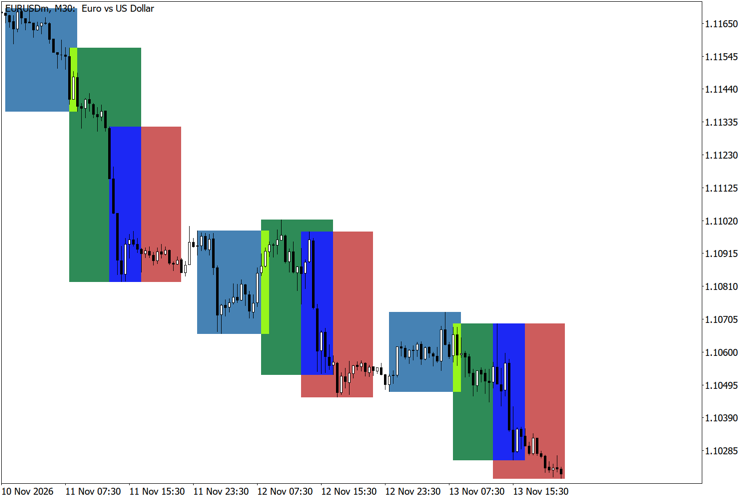
Tokyo, London and New York session boxes on EURUSD M30
Currency Strength Ranking Panel
A panel that ranks the eight major currencies (USD, EUR, GBP, JPY, AUD, NZD, CAD, CHF) by their average rate of change against each other.
Premium and Discount Zones Based on the Current Swing Range
Splits the current swing range (last swing high to last swing low) into a Premium zone above 50% and a Discount zone below 50%, with an equilibrium line and a live label that shows where the price is inside the range.
Spread and Cost Monitor Panel
A panel showing the current spread, the average spread since the indicator was attached and the spread cost of a 1-lot trade in account currency.
Thanos AI Level Strength
Unbroken swing highs and lows, shaded by strength: how old each level is and how many times price was turned away from it.