 MetaTrader 5
 Experts
 Indicators
 Scripts
 Libraries
 Storage
Join our fan page

Prior Bar Break Odds with Level Bars and a Rolling Hit Rate - indicator for MetaTrader 5

- Views:
- 133
- Rating:
- Published:
- Updated:
-
 You are missing trading opportunities:
- Free trading apps
- Over 8,000 signals for copying
- Economic news for exploring financial markets
Registration Log inYou agree to website policy and terms of use
If you do not have an account, please register -
 Need a robot or indicator based on this code? Order it on Freelance
Go to Freelance
Need a robot or indicator based on this code? Order it on Freelance
Go to Freelance
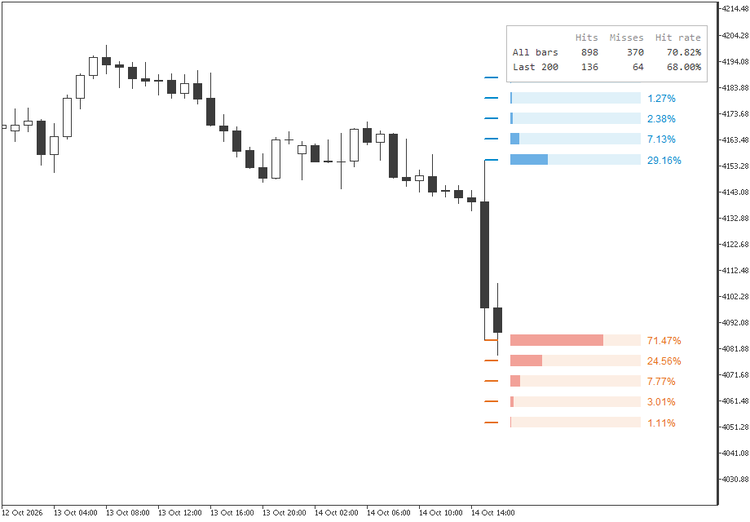
Every new bar raises two questions: will it trade above the high of the bar before it, and will it trade below that bar's low? This indicator answers both with numbers taken from the chart you are looking at. It walks the whole history, sorts each bar by the color of the bar before it, and counts how far beyond the prior high and the prior low price actually went. On the bar in progress it draws the answer as five levels per side, each with a bar as long as its odds, so the most likely move is visible before you read a single number.
Reading the levels
The first blue level sits on the prior high and the first orange level on the prior low. Each further level is one step farther out, up to five per side. Right of the bar in progress, every level has a light track and a filled part: a full track means 100%, so the filled length is the share of comparable bars that reached that price, and the exact percentage sits at the end. Comparable means the same kind of prior bar: after a bar that closed above its open, only bars that followed a bullish bar are counted; after one that closed below, only bars that followed a bearish bar. A doji counts toward neither tally, and when the prior bar is a doji the levels show the odds measured after bearish bars.
Read from the inside out, the bars show how fast the odds fade with distance. In the first screenshot, after a large bearish hourly candle on gold, the prior low was taken out 71.47% of the time, one step lower 24.56%, two steps lower 7.77%, while the prior high was reached only 29.16% of the time.
Odds that stay current
Every percentage is recomputed on every bar from two counts: how many comparable bars reached the level, and how many comparable bars there have been. A level that has not been reached for a long time keeps losing odds as new bars arrive, instead of holding the value it had the last time price got there. What the bars show is always the ratio for the whole history up to now.
Levels spaced by the average range
By default the distance between levels is half the average true range of the last 14 closed bars. The spacing follows the volatility of the symbol and timeframe, so the same setting works on gold, indices and currency pairs, on M5 or on daily bars, without hunting for a step size. Because it uses closed bars only, the levels do not move while the current bar is forming. In both screenshots the step is about 8 dollars. When a fixed distance is wanted, switch the measurement to a percent of price.
Favored side and hit rate
The two first-level numbers decide the favored side: the prior high when the odds of a higher high are equal or greater, the prior low otherwise. The same call is scored on every bar of the history, and the table in the top right corner keeps the result in two rows. All bars covers the whole chart; Last 200 covers the most recent bars, the one in progress included, and shows whether the edge still holds now. Hovering a row explains what it counts.
On the XAUUSD H1 history above, the favored side was reached 898 times and missed 370 times, a 70.82% hit rate, and 68.00% over the last 200 bars. After a bullish bar the picture flips: in the second screenshot a higher high shows 70.09% against 28.19% for a lower low, with 70.51% over all bars and 65.50% over the last 200.

For Expert Advisors and alerts
Two buffers carry the first-level odds of every bar: buffer 0, Odds of a higher high, and buffer 1, Odds of a lower low. Each closed bar keeps the values it showed when it closed, and the bar in progress updates on every tick. They draw nothing, appear in the Data Window and can be read with iCustom and CopyBuffer, so an Expert Advisor works with the same numbers the chart shows.
The optional alert fires once when a new bar opens, never when the indicator is attached, and carries the symbol, the timeframe, the prior high and low, the bias and both first-level odds.
Inputs
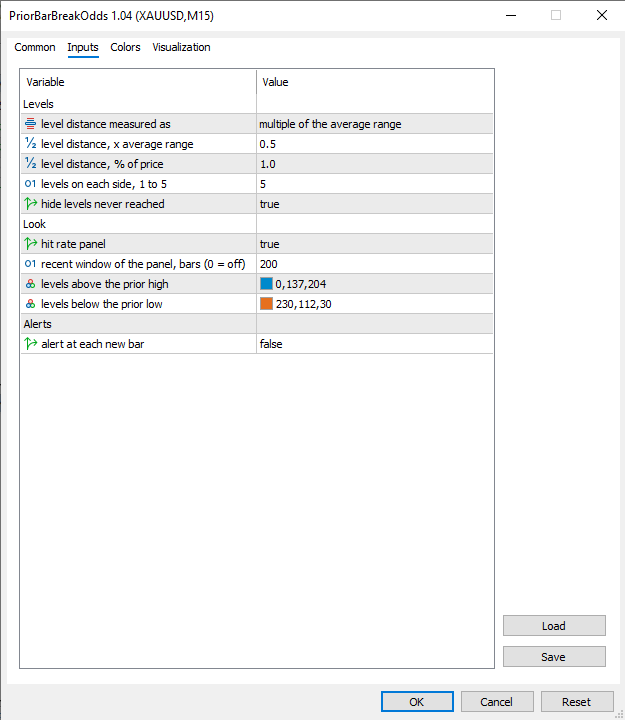
- Levels: level distance measured as a multiple of the average range or as a percent of price (average range), the multiple (0.5), the percent (1.0), levels on each side, from 1 to 5 (5), and hide levels never reached (true).
- Look: hit rate panel (true), recent window of the panel in bars, 0 to hide the row (200), and the colors of the levels above the prior high (blue) and below the prior low (orange). The probability bars and the percentages follow the same colors.
- Alerts: alert at each new bar (false).
Works on any symbol and timeframe and counts every bar on the chart. Closed bars are counted once; the bar in progress is recalculated on every tick from a copy of that tally, so a forming candle never rewrites the history. The probability bars are drawn in the space right of the last bar, so keep the chart shift on. Removing the indicator deletes everything it drew.
Educational content, not financial advice. Trading involves risk of loss.
 Pending Panel MT5 — One-Click Pending Orders with OCO
A chart panel for MT5 that places Buy Limit, Sell Limit, Buy Stop and Sell Stop pending orders with one click. Volume, distance and optional SL/TP are set on the panel; OCO cancels the opposite order automatically. Includes bulk delete, a live order list and automatic handling of broker STOPS_LEVEL and filling mode. Execution tool only - no signals, no guaranteed results.
Trend Buy/Sell Zones with Auto Lot Size - Risk Panel
Highlights potential buy zones in uptrends and sell zones in downtrends on closed candles (no repainting), with automatic lot size for your balance and a daily loss guard.
ICT Premium / Discount and OTE - dealing range, standard deviations, IPDA ranges
ICT dealing range from confirmed swings: premium and discount zones, equilibrium, the OTE band (62 - 79 %, 70.5 %), standard deviation targets and the IPDA 20 / 40 / 60-day ranges. No repaint. Alerts and EA buffers.
HTF Candles (ICT Power of Three) - higher timeframe candles next to your chart
Draws the last candles of one or two higher timeframes (auto: M15 -> H4 + D1, H1 -> D1 + W1) next to your chart at real prices, with a countdown, lines to the live candle's open, high and low, alerts and EA buffers.