 MetaTrader 5
 Experts
 Indicators
 Scripts
 Libraries
 Storage
Join our fan page
- Published by:
- Views:
- 105
- Rating:
- Published:
-
 You are missing trading opportunities:
- Free trading apps
- Over 8,000 signals for copying
- Economic news for exploring financial markets
Registration Log inYou agree to website policy and terms of use
If you do not have an account, please register -
 Need a robot or indicator based on this code? Order it on Freelance
Go to Freelance
Need a robot or indicator based on this code? Order it on Freelance
Go to Freelance

AlgoFX is a trend-following indicator for MetaTrader 5. It marks areas where price pulls back inside an established trend, so you can see at a glance where buyers or sellers may step back in. It was designed with Gold (XAUUSD) in mind, but works on any symbol and timeframe.
AlgoFX does not tell you where to enter, where to place your stop loss or where to take profit. It shows potential zones and leaves the trading decision to you.
HOW IT WORKS
Trend
- EMA 50 and EMA 200 define the trend.
- Uptrend: EMA 50 is above EMA 200 and EMA 200 is rising.
- Downtrend: EMA 50 is below EMA 200 and EMA 200 is falling.
- When neither condition is met, the indicator stays quiet and the panel shows "No clear trend".
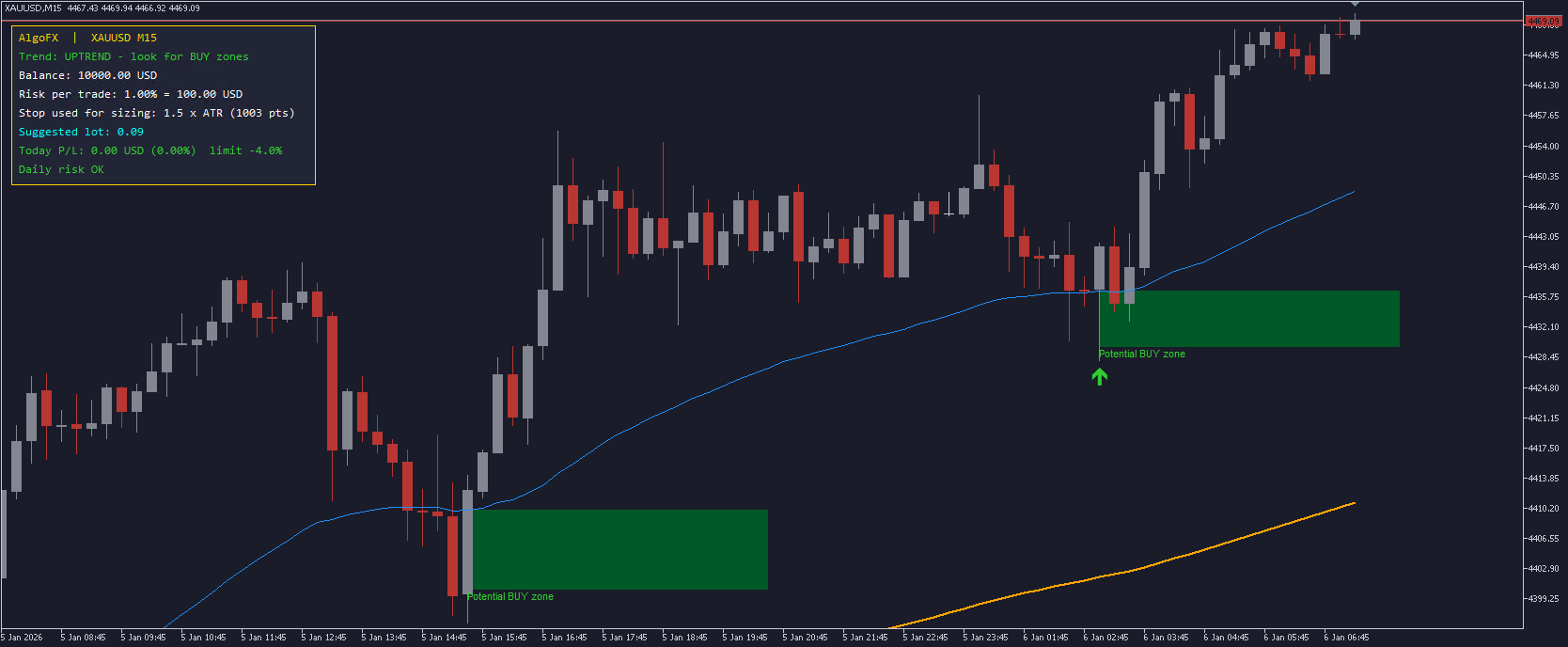
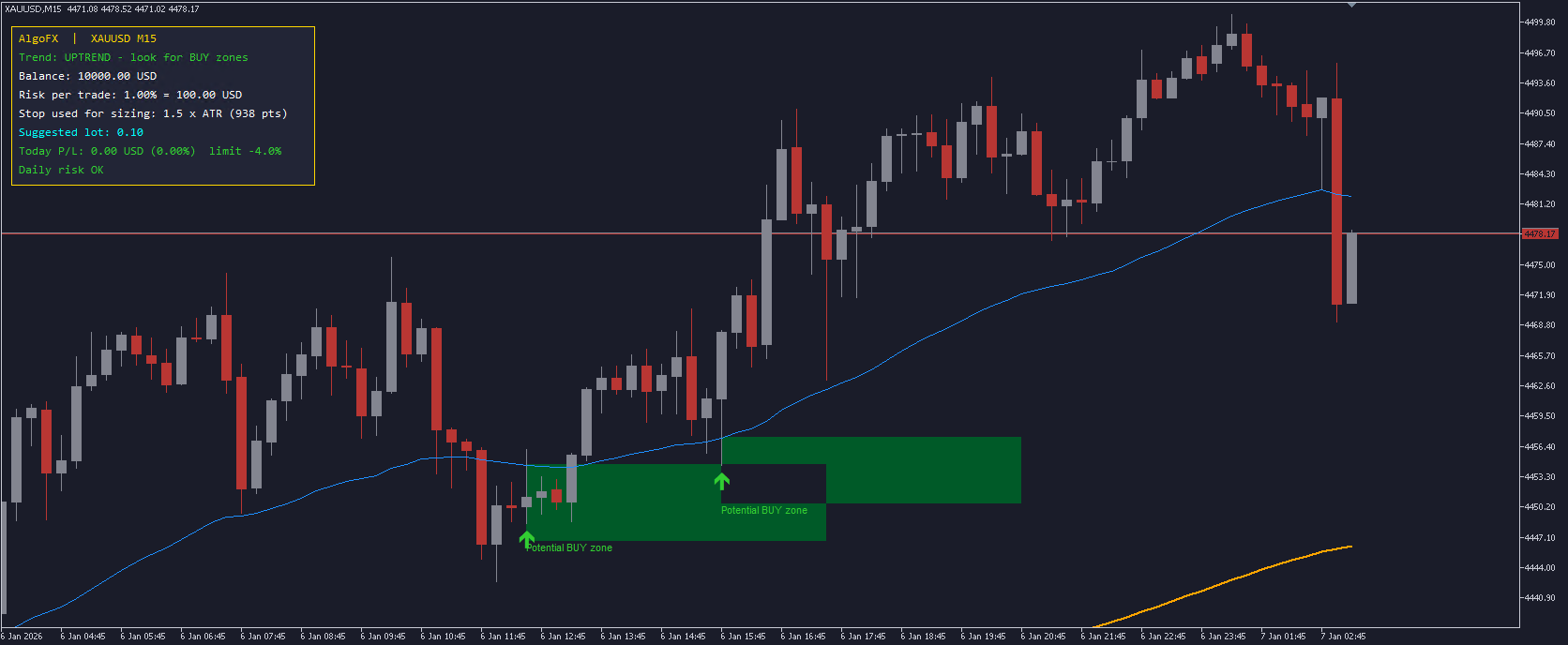
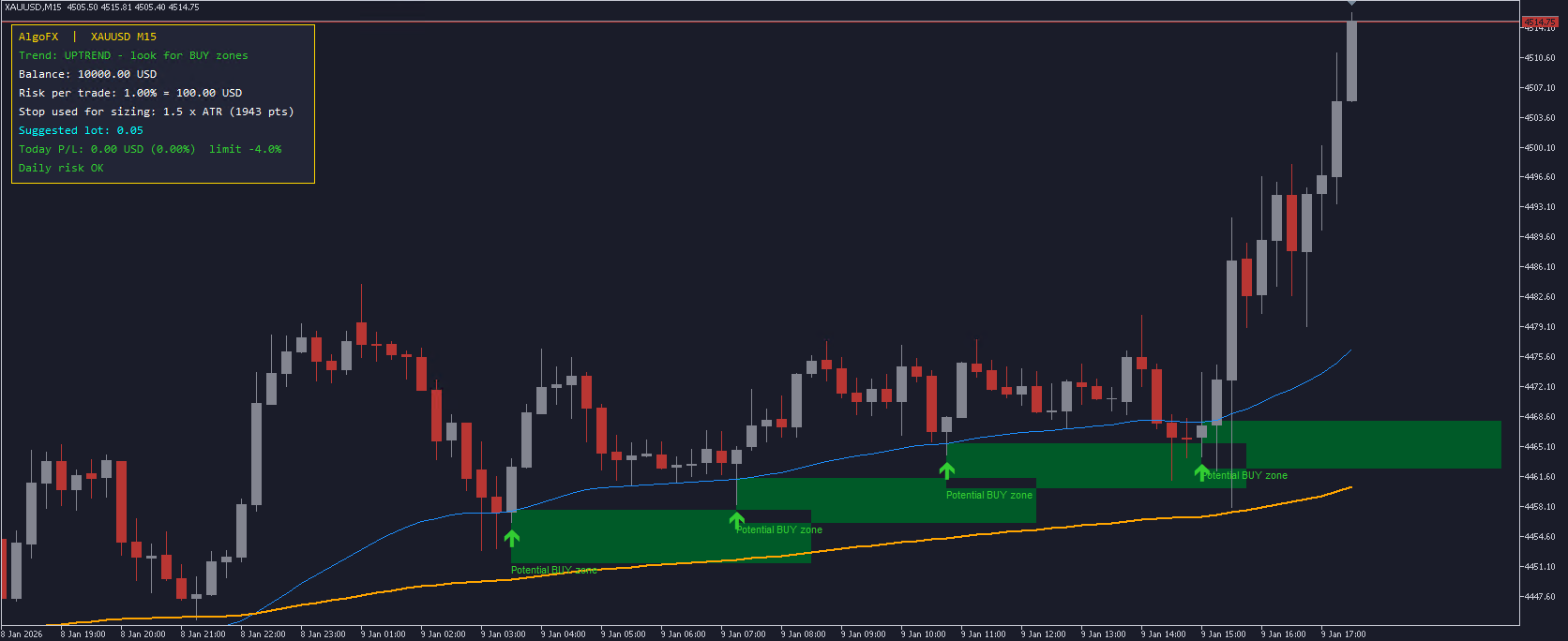
Potential BUY zone (uptrend only)
- Price pulls back into the area just below EMA 50 (depth set in ATR).
- The candle closes bullish and holds above the zone.
- A green box and arrow mark the zone with the text "Potential BUY zone".
Potential SELL zone (downtrend only)
- The mirror of the BUY zone: price rallies into the area just above EMA 50 and the candle closes bearish.
- A red box and arrow mark the zone with the text "Potential SELL zone".
Filters
- Optional RSI filter: no BUY zone when RSI is overbought, no SELL zone when RSI is oversold.
- Cooldown: a minimum number of bars between zones on the same side, to avoid clutter.
No repainting
- Zones are calculated on closed candles only. Once a zone appears, it never moves or disappears, so what you see in history is exactly what you would have seen live.
RISK PANEL
The on-chart panel shows:
- Current trend
- Account balance (or equity, if you choose)
- Risk per trade in % and in your account currency
- Suggested lot size, calculated from your risk %, an ATR-based stop distance and the symbol's tick value
- Today's profit/loss across your account
- A warning when your daily loss limit is reached
The lot size is always rounded down, so it never exceeds your chosen risk, and it respects your broker's minimum lot, maximum lot and lot step. If your risk is too small for the minimum lot, the panel tells you instead of suggesting a larger trade.
SETTINGS
Trend & zones
- Fast EMA period (default 50)
- Slow EMA period (default 200)
- Bars used to confirm the EMA 200 slope
- ATR period and zone depth (in ATR)
- RSI filter on/off, RSI period and levels
- Cooldown bars between zones
- Zone box length and history bars to scan
Risk management
- Risk per trade (% of balance)
- Use balance or equity
- Stop distance used for the lot calculation (in ATR)
- Maximum lot
- Daily loss limit (%)
Display & alerts
- Dark chart design on/off (your original chart colours come back when you remove the indicator)
- Zone boxes, text labels and panel on/off
- Panel corner, position and font size
- Pop-up alerts and push notifications for new zones
- Zone colours
HOW TO USE
1. Attach AlgoFX to any chart (M15 and H1 work well on Gold).
2. Set your risk % and daily loss limit in the inputs.
3. Trade only in the direction of the trend shown on the panel.
4. Treat zones as areas of interest, and confirm with your own analysis before trading.
5. Use the suggested lot size, and respect the daily loss warning.
IMPORTANT
This indicator is a tool for analysis and risk control, not a trading signal service. Trading carries risk, and past behaviour of any indicator does not guarantee future results. Test it on a demo account first.
Feedback and suggestions are welcome in the comments.
 GM Matrix Monitor — read-only risk dashboard for your EA matrix
Read-only panel showing per-magic net P/L, account drawdown, daily-loss breaker progress and freeze/liquidate thresholds. Does NOT trade.
 Non-Repainting Fair Value Gap Detector
Non-repainting three-bar Fair Value Gap detector for MetaTrader 5. Closed-bar detection, the 50% Consequent Encroachment level, mitigation as an explicit state machine, incremental scanning, and a built-in self-audit that re-checks the stored gap levels against the closed-bar series on attach. Pure native MQL5, no DLLs, no external dependencies.
Pending Panel MT5 — One-Click Pending Orders with OCO
A chart panel for MT5 that places Buy Limit, Sell Limit, Buy Stop and Sell Stop pending orders with one click. Volume, distance and optional SL/TP are set on the panel; OCO cancels the opposite order automatically. Includes bulk delete, a live order list and automatic handling of broker STOPS_LEVEL and filling mode. Execution tool only - no signals, no guaranteed results.
Prior Bar Break Odds with Probability Bars and a Rolling Hit Rate
Measures, on the chart's own history, how often a bar takes out the prior high or the prior low after bullish and after bearish bars, at up to five levels spaced by the average range. Each level carries a probability bar, and a table scores the favored side over all bars and over the last 200.