 MetaTrader 5
 Experts
 Indicators
 Scripts
 Libraries
 Storage
Join our fan page

Alpha Beta Trend + Dashboard - AKM - indicator for MetaTrader 5

- Views:
- 3827
- Rating:
- Published:
- Updated:
-
 You are missing trading opportunities:
- Free trading apps
- Over 8,000 signals for copying
- Economic news for exploring financial markets
Registration Log inYou agree to website policy and terms of use
If you do not have an account, please register -
 Need a robot or indicator based on this code? Order it on Freelance
Go to Freelance
Need a robot or indicator based on this code? Order it on Freelance
Go to Freelance
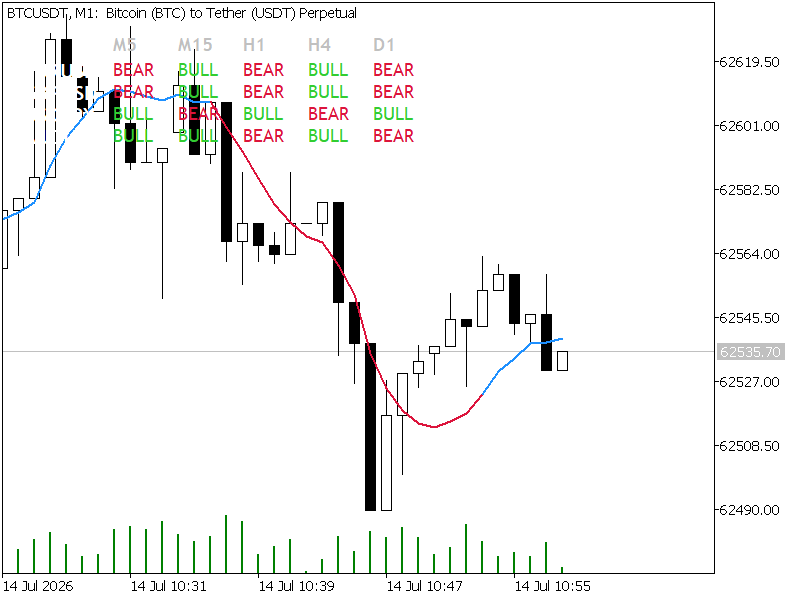
1. Overview
The Alpha-Beta Trend Filter is a predictive smoothing indicator derived from control theory and digital signal processing. Conceptually, it serves as a simplified, steady-state Kalman filter. While standard Moving Averages (SMA, EMA, LWMA) rely strictly on averaging past data—and thus inherently lag behind live price action—the Alpha-Beta filter actively estimates the current "true" price and the velocity of the trend while stripping out market noise.
This specific MQL5 implementation upgrades the classic single-line indicator by incorporating a Multi-Symbol, Multi-Timeframe Matrix Dashboard. It allows traders to monitor the Alpha-Beta trend bias across an entire portfolio directly from a single chart, updating dynamically on every tick.
2. The Mathematical Engine
The filter operates iteratively on each new price bar. It relies on two primary tuning coefficients:
-
$\alpha$ (Alpha): The price sensitivity coefficient. It controls the weight given to the raw new price observation versus the filter's internal prediction.
-
$\beta$ (Beta): The velocity sensitivity coefficient. It controls the responsiveness to changes in the trend's momentum.
The algorithm executes in two distinct phases per bar:
Phase 1: The Prediction Step
Before the current bar closes, the filter forecasts the current price ($\hat{P}_{t}$) and velocity ($\hat{V}_{t}$) based on the previous bar's calculated state:
Phase 2: The Update Step
Once the actual closing price ($Z_{t}$) prints, the filter calculates the error/residual ($E_{t}$) between its prediction and reality, and updates its internal state:
Where:
-
$Z_{t}$: Actual closing price of the current bar.
-
$P_{t}$: Updated, smoothed price estimate (plotted on the chart).
-
$V_{t}$: Updated velocity (used to determine bullish/bearish trend bias).
3. Key Features of this Implementation
-
Zero-Lag Predictive Smoothing: The main indicator line hugs price action much tighter than traditional EMAs, making it an excellent foundational layer for fast crossover strategies.
-
Dynamic Color-Coded Plotting: The main chart line utilizes DRAW_COLOR_LINE to shift automatically between Blue (Bullish velocity) and Red (Bearish velocity) based on the internal state of $V_{t}$.
-
Non-Intrusive Matrix Dashboard: An on-chart graphical UI tracks the trend state (Bull, Bear, Wait) of up to 5 timeframes across a user-defined list of external symbols.
-
Lightweight Resource Management: External symbols and timeframes in the dashboard do not load the full history. The script pulls only the minimum required bars via CopyClose() to calculate the live state, preventing terminal lag.
4. Input Parameters Explained
Filter Engine Settings
-
inpAlpha (Default: $0.2$): Range is typically $0.1$ to $0.9$. A higher $\alpha$ tracks the raw price closely (excellent for scalping); a lower $\alpha$ heavily smooths the line to ignore sideways chop (better for swing trading).
-
inpBeta (Default: $0.05$): Range is typically $0.01$ to $0.5$. A higher $\beta$ reacts aggressively to sudden momentum shifts. A very low $\beta$ assumes a steady, unwavering trend.
Dashboard Grid Settings
-
inpSymbols (Default: "EURUSD,GBPUSD,USDJPY,AUDUSD"): A comma-separated string of the symbols you wish to track. The code parses this automatically using StringSplit() .
-
Timeframe Toggles ( showM5 through showD1 ): Boolean inputs that allow you to customize which columns appear on your matrix dashboard.
5. Architecture & Code Highlights
For MQL5 developers reviewing the source code, note the following structural choices:
-
Time-Series Indexing: MQL5 natively indexes arrays from oldest to newest. To align with standard trading logic (where [0] is the current live bar), the code aggressively utilizes ArraySetAsSeries(buffer, true) for all indicator buffers and fetched arrays.
-
State Extraction Helper: The GetStateForTarget() function is a standalone loop used by the dashboard. It fetches 50 bars of close prices for the target symbol/timeframe, initializes the prediction engine, and returns an integer state ( 0 for Bull, 1 for Bear) without needing external iCustom calls.
-
Clean Object De-initialization: The OnDeinit() function loops through the UI prefix ( AB_Matrix_ ) to ensure all graphical labels are wiped from the chart the moment the indicator is removed.
6. Trading Applications
-
Scalping Configuration: Try an $\alpha$ of 0.45 and a $\beta$ of 0.12 . The color-coded line will flip rapidly, allowing you to catch micro-trends on the M1 or M5 charts.
-
Macro Swing Configuration: Lower the values to an $\alpha$ of 0.15 and a $\beta$ of 0.02 . The indicator will flatten out during intraday noise, keeping you in the trade until a genuine macroscopic velocity shift occurs.
-
Matrix Confluence: Use the dashboard to only take trades on your current chart when the H1, H4, and D1 cells for that specific symbol are completely aligned in the same color.
Trend Flasher -AKM
A multi currency multi symbols super trend dashboard
CKS Position Risk Dashboard
A read-only MT5 dashboard for risk-based lot sizing, account health, broker volume limits and current symbol exposure.
Alpha Beta Channel - AKM
1. The Core Tracking Engine (Alpha-Beta Filter)At its core, the indicator utilizes an Alpha-Beta filter—a lightweight, steady-state version of a Kalman filter designed to track position and velocity.Predictive Calculation: Instead of simply averaging past prices like an SMA or EMA, the engine calculates a predicted price based on current velocity ($v$).Error Correction:
 Aegis Quantum Lite
Educational MT5 Expert Advisor using completed-candle EMA 9/21 alignment and RSI 14 filtering, with fixed-lot execution and a compact black-and-gold dashboard.