 MetaTrader 5
 Experts
 Indicators
 Scripts
 Libraries
 Storage
Watch how to download trading robots for free
Find us on Twitter!
Join our fan page
You liked the script? Try it in the MetaTrader 5 terminal

KCI Volatility Distance - indicator for MetaTrader 5
Syamsurizal Dimjati

Hello, Traders!
I have been designing and developing high-quality trading indicators and Expert Advisors (EAs) for MetaTrader 5 since 2023.
My goal is to create reliable, practical, and innovative trading tools that help traders improve their market analysis and trading strategies.
- Views:
- 2049
- Rating:
- Published:
- Updated:
-
 You are missing trading opportunities:
- Free trading apps
- Over 8,000 signals for copying
- Economic news for exploring financial markets
Registration Log inYou agree to website policy and terms of use
If you do not have an account, please register -
 Need a robot or indicator based on this code? Order it on Freelance
Go to Freelance
Introduce :
The KCI Volatility Distance is an advanced, adaptive algorithm meticulously engineered to map market momentum and trend direction with pure precision. Utilizing a proprietary matrix-based calculation, this tool dynamically filters out market noise and provides a strictly quantitative perspective on directional strength. Built with a highly optimized Object-Oriented Programming (OOP) core, it is designed for both visual trading clarity and seamless integration into Expert Advisors or Machine
Learning modules, ensuring ultra-light CPU performance across multiple assets.
Functions & Explanations
- Matrix Momentum Engine: Computes internal price dynamics within a multidimensional array framework. Function: Identifies the true, underlying strength of the current market direction before a major breakout occurs, providing an edge in early trend detection.
- Dynamic Noise Filter: An adaptive mechanism that recalibrates itself based on live market conditions. Function: Automatically suppresses false signals and erratic price spikes during consolidation or low-volume periods, safeguarding automated algorithms from executing premature trades.
- Directional Strength Output: Translates complex mathematical matrix values into a clean, standalone numeric flow. Function: Serves as a definitive gauge for precise entry triggers, continuation patterns validation, or dynamic lot sizing in automated systems.
Requirements
- Technical Indicator / Algorithmic Trading Core / Quantitative Analysis Tool.
- Highly optimized execution, extremely lightweight for low CPU consumption on VPS environments (< 50 KB).
- Open-source script ( .mq5 file) featuring an embedded OOP class architecture.
Picture. 1

picture. 3

Simple parameter settings
Picture. 2
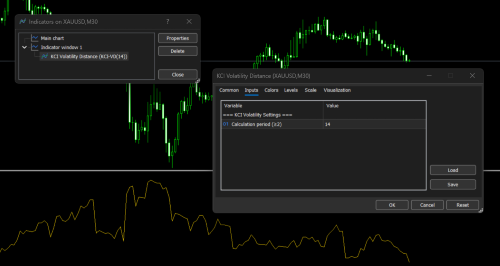
KCI Volatility Distance Integration Guide into Expert Advisor (EA)
There are two main methods for integrating this algorithm into an EA. The first method (Embedded OOP) is highly recommended for maximum CPU efficiency and Machine Learning dataset collection. The second method (iCustom Invocation) is suitable for rapid prototype testing.
Method 1: Direct Use via Embedded OOP Class (Ultra-Lightweight)
- This method embeds the engine directly into the EA without calling external indicators. The code is placed at the global level, initialized in OnInit, and executed in OnTick.
Code snippet
// --- 1. Place the OOP Class at the top of the EA file or include it via #include ---
class CKCIDirectionalMatrix
  {
   // (Insert the complete CKCIDirectionalMatrix class implementation here)
   // ...
  };

// --- 2. Declare the Global Object Instance ---
CKCIDirectionalMatrix MatrixEngine;

// EA Input Parameters
input int MatrixPeriod = 14;
input double EntryThreshold = 0.0050; // Momentum strength threshold

// --- 3. Initialize the Engine in OnInit() ---
int OnInit()
  {
   if(!MatrixEngine.Init(MatrixPeriod))
      return(INIT_PARAMETERS_INCORRECT);

   return(INIT_SUCCEEDED);
  }

// --- 4. Execute the Core Logic in OnTick() ---
void OnTick()
  {
   // Prepare arrays to store the latest market price data
   double high[], low[], close[];

   if(CopyHigh(_Symbol, _Period, 0, MatrixPeriod + 2, high) < 0)
      return;

   if(CopyLow(_Symbol, _Period, 0, MatrixPeriod + 2, low) < 0)
      return;

   if(CopyClose(_Symbol, _Period, 0, MatrixPeriod + 2, close) < 0)
      return;

   // Arrays must be configured as time series (Index 0 = most recent bar)
   ArraySetAsSeries(high, true);
   ArraySetAsSeries(low, true);
   ArraySetAsSeries(close, true);

   // Calculate the matrix output for the most recently closed bar (Index 1)
   double current_matrix_strength = MatrixEngine.Calculate(1, high, low, close);

   // --- A. Machine Learning / Feature Extraction Module ---
   // Feed 'current_matrix_strength' into your neural network
   // or AI feature vector as an input variable.

   // --- B. Trading Decision Module (Signal Filtering) ---
   if(current_matrix_strength > EntryThreshold)
     {
      // Momentum validation passed.
      // Market trend is considered sufficiently strong.

      // -> Execute BUY or SELL orders here according
      //    to your EA's directional strategy.

      // -> Alternatively, use this value to dynamically
      //    adjust Smart Grid spacing or other adaptive parameters.
     }
  }
Method 2: Calling via iCustom()
If you release the KCI Volatility Distance indicator .mq5 file separately and want the EA to read it through the standard indicator buffer.
Code snippet
// --- 1. Declare the Indicator Handle in the Global Scope ---
int MatrixHandle;

// EA Input Parameters
input int MatrixPeriod = 14;

// --- 2. Create the Indicator Handle in OnInit() ---
int OnInit()
  {
   // Ensure the indicator file name exactly matches
   // the file located in the Indicators folder.
   MatrixHandle = iCustom(_Symbol, _Period, "KCI Volatility Distance", MatrixPeriod);

   if(MatrixHandle == INVALID_HANDLE)
     {
      Print("Failed to load the KCI Volatility Distance indicator.");
      return(INIT_FAILED);
     }

   return(INIT_SUCCEEDED);
  }

// --- 3. Read Indicator Buffer Data in OnTick() ---
void OnTick()
  {
   double MatrixBuffer[];
   ArraySetAsSeries(MatrixBuffer, true);

   // Retrieve the two most recent values from Buffer 0 (KCI-VD Line)
   if(CopyBuffer(MatrixHandle, 0, 0, 2, MatrixBuffer) <= 0)
     {
      Print("Failed to copy matrix buffer data.");
      return;
     }

   // Matrix value from the most recently closed candle
   double current_matrix_strength = MatrixBuffer[1];

   // Matrix value from the currently forming candle (real-time)
   double previous_matrix_strength = MatrixBuffer[0];

   // --- Trading Decision Logic ---
   if(current_matrix_strength > previous_matrix_strength)
     {
      // Momentum is expanding.
      // -> Use this as an additional confirmation to
      //    increase the Take Profit distance.
      //
      // -> Alternatively, use it to trigger an adaptive
      //    Trailing Stop adjustment.
     }
  }
Given the highly adaptive and CPU-light architecture of the KCI Volatility Distance, its potential extends beyond traditional visual indicators. The flexibility of its Object-Oriented Programming (OOP)-based code allows it to serve as the engine for a variety of advanced algorithmic scenarios.
See how KCI Volatility Distance can be used in this indicator's Arrow Placement : KCI Arrow and on expert advisor EA KCI N-Matrix Engine
Here are some strategic implementations of the KCI Volatility Distance for various EA and complex indicator development purposes:
1. Anti Stop-Hunting Defense System (Dynamic SL & TP)
Pergerakan harga yang tiba-tiba sering kali merupakan jebakan likuiditas (liquidity grab atau stop-hunt) daripada tren nyata. KCI Volatility Distance dapat mendeteksi anomali ini.
- Logic: If there is a sharp price spike, but the Matrix values show a low level of efficiency (direction), the EA will detect it as a potential stop-hunting.
- Implementation: Instead of executing Cut Loss or placing a static SL, the EA will automatically widen the SL protection (Dynamic SL) until volatility subsides, then look for a more optimal recovery point.
Code snippet
// Example: Volatility Anomaly Detection (Anti Stop-Hunt Filter)
double matrix_value = MatrixEngine.Calculate(1, high, low, close);

// ATR serves as the baseline volatility benchmark
double atr_baseline = iATR(_Symbol, _Period, 14);

// Detect abnormal market expansion relative to the expected volatility range
if(matrix_value > (atr_baseline * 2.5))
  {
   Print("Warning: Volatility anomaly detected. Quantum SL Defense activated.");

   // Protective actions:
   // - Prevent opening new positions.
   // - Dynamically widen the Stop Loss of existing positions
   //   to reduce the probability of stop-hunt events.
   ModifySLToSafeZone(matrix_value);
  }
2. Adaptive Smart Grid & Averaging Algorithm
One of the weaknesses of the standard Grid system is its rigid spacing (steps), which is especially dangerous when a one-way trend is strong.
- Logic: Converts the Grid spacing from static values (points) to dynamic coefficients multiplied by the KCI Volatility Distance output result.
- Implementation: When the market is sideways (the Matrix expands), the distance between the grid lines will also widen. This prevents the EA from opening too many positions in a single consolidation area, making it very safe to withstand drawdowns on assets with wide movements like XAUUSD, BTC, or the US30.
Code snippet
// Example: Adaptive Grid Distance Calculation
input double GridMultiplier = 1.5;

// Obtain the latest directional matrix measurement
double current_matrix = MatrixEngine.Calculate(0, high, low, close);

// Derive the adaptive grid spacing using the matrix value
// as a dynamic representation of current market conditions
double dynamic_grid_step = current_matrix * GridMultiplier;

// Open a new grid position only after the market has moved
// beyond the dynamically calculated spacing threshold
if(MathAbs(CurrentPrice - LastOrderPrice) >= dynamic_grid_step)
  {
   // Execute the next Grid / Averaging order
   ExecuteGridOrder();
  }
3. Feature Normalization for Machine Learning (ML)
Modules Neural network models require normalized input data to accurately recognize patterns, without being distorted by price digit differences between brokers or asset classes (e.g., the stark difference between WTI oil prices and minor forex pairs).
- Logic: Within the KCI Volatility Distance formula, there is an Efficiency Ratio (ER) calculation which naturally produces a scale ratio of 0 to 1.
- Implementation: You can modify the OOP class slightly to return pure ER values. This array of Matrix values is extracted into an array as a very clean and noise-free training dataset for the Pattern Learner.
--------- Other options ---------
example Modular Header File (KCIVD.mqh)
Save the code below as KCIVD.mqh in the MQL5\Include\ folder. This file will be the main engine called by indicators, expert advisors, and ML modules.
Code snippet
//+------------------------------------------------------------------+
//|                                                        KCIVD.mqh |
//|                                   Copyright 2026, KCI Developer |
//|                         https://www.mql5.com/en/users/ritzfalih |
//+------------------------------------------------------------------+
#property copyright "Copyright 2026, KCI Developer"
#property link      "https://www.mql5.com/en/users/ritzfalih"
#property version   "1.0"

class CKCIVolatilityDistance
  {
private:
   int               m_kinetic_period;
   double            m_point;

public:
                     CKCIVolatilityDistance(void);
                    ~CKCIVolatilityDistance(void);

   bool              Init(const int period);
   double            Calculate(const int index,
                               const double &high[],
                               const double &low[],
                               const double &close[]);
  };

//+------------------------------------------------------------------+
//| Constructor                                                      |
//+------------------------------------------------------------------+
CKCIVolatilityDistance::CKCIVolatilityDistance(void)
  {
   m_kinetic_period = 14;
   m_point          = _Point;
  }

//+------------------------------------------------------------------+
//| Destructor                                                       |
//+------------------------------------------------------------------+
CKCIVolatilityDistance::~CKCIVolatilityDistance(void)
  {
  }

//+------------------------------------------------------------------+
//| Initialization                                                   |
//+------------------------------------------------------------------+
bool CKCIVolatilityDistance::Init(const int period)
  {
   if(period < 2)
     {
      Print("[KCI VD Error] Period must be at least 2");
      return(false);
     }
   m_kinetic_period = period;
   m_point          = _Point;
   if(m_point <= 0) m_point = 0.00001; // Safety fallback
   return(true);
     }

//+------------------------------------------------------------------+
//| Core Calculation Engine (Optimized for CPU & Speed)              |
//| Note: Arrays must be set as Series (ArraySetAsSeries = true)      |
//+------------------------------------------------------------------+
double CKCIVolatilityDistance::Calculate(const int index,
                                         const double &high[],
                                         const double &low[],
                                         const double &close[])
  {
   double sum_TR    = 0.0;
   double sum_sq_TR = 0.0;
   double path_length = 0.0;

   // --- 1. Loop Window Teroptimasi Tanpa Fungsi Bertingkat ---
   for(int j = 0; j < m_kinetic_period; j++)
     {
      int curr_idx = index + j;

      // Optimasi Kecepatan Komparasi True Range (Menghindari MathMax bertingkat)
      double hl = high[curr_idx] - low[curr_idx];
      double hc = MathAbs(high[curr_idx] - close[curr_idx + 1]);
      double lc = MathAbs(low[curr_idx] - close[curr_idx + 1]);

      double tr = hl;
      if(hc > tr) tr = hc;
      if(lc > tr) tr = lc;

      sum_TR    += tr;
      sum_sq_TR += (tr * tr);

      // Path length pergerakan Close (Efficiency Ratio)
      if(j < m_kinetic_period - 1)
        {
         path_length += MathAbs(close[curr_idx] - close[curr_idx + 1]);
        }
     }

   // --- 2. Perhitungan Efisiensi Rasio ---
   double net_distance = MathAbs(close[index] - close[index + m_kinetic_period - 1]);

   if(path_length < net_distance) path_length = net_distance; // Batasan logika
   if(path_length == 0.0)         path_length = m_point;      // Mencegah Zero Division

   double efficiency_ratio = net_distance / path_length;

   // --- 3. Perhitungan Standar Deviasi KCI ---
   double mean_TR  = sum_TR / m_kinetic_period;
   double variance = (sum_sq_TR / m_kinetic_period) - (mean_TR * mean_TR);
   if(variance < 0.0) variance = 0.0; // Koreksi presisi floating-point

   double std_TR = MathSqrt(variance);

   // --- 4. Output Nilai Akhir KCI VD ---
   return(std_TR * (2.0 - efficiency_ratio));
  }
Visual Indicator File (KCI_Volatility_Distance.mq5) --- Other options ---
Save this code in the MQL5\Indicators\ folder. This indicator is now very clean because it calls the OOP structure from the .mqh file above.
Code snippet
//+------------------------------------------------------------------+
//|                                      KCI Volatility Distance.mq5 |
//|                                   Copyright 2026, KCI Developer |
//|                         https://www.mql5.com/en/users/ritzfalih |
//+------------------------------------------------------------------+
#property copyright   "Copyright 2026, KCI Developer"
#property link        "https://www.mql5.com/en/users/ritzfalih"
#property description "KCI Volatility Distance - Indicator Module"
#property indicator_separate_window

#property indicator_buffers 1
#property indicator_plots   1
#property indicator_label1  "KCI-VD"
#property indicator_type1   DRAW_LINE
#property indicator_color1  clrGold
#property indicator_style1  STYLE_SOLID
#property indicator_width1  1

// Include Mesin Utama KCIVD
#include <KCIVD.mqh>

// --- Input ---
input group "=== KCI Volatility Settings ==="
input int KineticPeriod = 14;   // Calculation period (≥2)

// --- Buffer ---
double KVR_Buffer[];

// Global Object Instance
CKCIVolatilityDistance kci_engine;

//+------------------------------------------------------------------+
//| Custom indicator initialization function                         |
//+------------------------------------------------------------------+
int OnInit()
  {
   if(!kci_engine.Init(KineticPeriod))
      return(INIT_PARAMETERS_INCORRECT);

   SetIndexBuffer(0, KVR_Buffer, INDICATOR_DATA);
   PlotIndexSetDouble(0, PLOT_EMPTY_VALUE, 0.0);
   ArraySetAsSeries(KVR_Buffer, true);

   IndicatorSetInteger(INDICATOR_DIGITS, _Digits);
   IndicatorSetString(INDICATOR_SHORTNAME, "KCI-VD(" + IntegerToString(KineticPeriod) + ")");

   return(INIT_SUCCEEDED);
  }

//+------------------------------------------------------------------+
//| Custom indicator iteration function                              |
//+------------------------------------------------------------------+
int OnCalculate(const int rates_total,
                const int prev_calculated,
                const datetime &time[],
                const double &open[],
                const double &high[],
                const double &low[],
                const double &close[],
                const long &tick_volume[],
                const long &volume[],
                const int &spread[])
  {
   if(rates_total < KineticPeriod + 2) return(0);

   // Atur array bawaan sebagai series
   ArraySetAsSeries(high, true);
   ArraySetAsSeries(low, true);
   ArraySetAsSeries(close, true);

   if(prev_calculated == 0)
     {
      ArrayInitialize(KVR_Buffer, 0.0);
     }

   int limit = (prev_calculated == 0) ? (rates_total - KineticPeriod - 2) : (rates_total - prev_calculated + 1);

   // Jalankan mesin kalkulasi lewat objek OOP
   for(int i = limit; i >= 0 && !IsStopped(); i--)
     {
      KVR_Buffer[i] = kci_engine.Calculate(i, high, low, close);
     }

   return(rates_total);
  }
Cross-Functional Integration Guide (How to Use in EA/ML)
With the CKCIVolatilityDistance class structure, you can use it directly in any Expert Advisor for maximum performance. Here's an example of its logical implementation:
Integration in Machine Learning Module (Feature Extraction / Signal Validation)
If you have a neural network or pattern learner module that requires volatility normalization as an input feature, you can extract the KCI VD value purely:
Code snippet
#include <KCIVD.mqh>

CKCIVolatilityDistance KCI_ML;

int OnInit()
  {
   // Initialize the KCI Volatility Distance engine
   // with the desired calculation period.
   KCI_ML.Init(14);

   return(INIT_SUCCEEDED);
  }

void GetMLFeatures()
  {
   double high[], low[], close[];

   // Copy a sufficient amount of historical price data
   // (e.g., the most recent 50 bars) into local arrays.
   CopyHigh(_Symbol, _Period, 0, 50, high);
   CopyLow(_Symbol, _Period, 0, 50, low);
   CopyClose(_Symbol, _Period, 0, 50, close);

   ArraySetAsSeries(high, true);
   ArraySetAsSeries(low, true);
   ArraySetAsSeries(close, true);

   // Calculate the KCI Volatility Distance value for
   // the current bar (index 0) or the last closed bar (index 1).
   double kci_current_volatility = KCI_ML.Calculate(0, high, low, close);

   // Feed 'kci_current_volatility' into the Neural Network
   // feature vector for signal validation or prediction.
  }
4. Multi-Symbol Scanner (Dashboard Indicator)
Because KCIDirectionalMatrix does not rely on iCustom and frees local memory quickly, it is perfect as a signal search engine on a multi-symbol dashboard.
- Logic: Install one dashboard indicator on one chart, but iterate the matrix calculation loop to 20-30 different symbols simultaneously.
- Implementation: The indicator will scan the entire Market Watch (Major, Cross, Metals, Indices) to identify assets whose Matrix values are contracting (preparing for a breakout) or experiencing strong trending momentum. This will prevent Windows Server VPS from lagging or overloading the CPU.
Code snippet
// Example: Multi-Asset Market Scanning Engine
string symbols[] = {"EURUSD", "GBPUSD", "XAUUSD", "BTCUSD", "US30"};

for(int s = 0; s < ArraySize(symbols); s++)
  {
   // Load the required historical market data
   // for the current trading instrument.
   // ...

   // Evaluate the directional strength
   // of the most recently completed candle.
   double strength = MatrixEngine.Calculate(1, h, l, c);

   // Generate a trading signal only when the
   // directional strength exceeds the configured threshold.
   if(strength > Threshold)
     {
      // Update the dashboard with the detected
      // BUY/SELL opportunity for the current instrument.
      DrawDashboardSignal(symbols[s], strength);
     }
  }
This is the KCI Volatility Distance code; at least, this code can be used for various purposes. You can further develop it with standard MT5 indicators and custom MT5 indicators to achieve even greater accuracy and precise analysis.
 Market Miner
A multi strategy EA gold mine :)
MA + Envelope Breakouts
Breakouts based on envelope channel or band, multi EA logic in One EA
KCI Directional Matrix
The KCI-Directional Matrix (KCI-DX) is an advanced, physics-inspired analytical tool that extracts market kinematics by measuring price path length and volatility energy. Unlike conventional momentum tools, KCI-DX employs a dynamic Z-Score normalization combined with a Sigmoid activation function. This ensures the output is flawlessly bounded between 0 and 100, providing hyper-responsive trend strength identification and directional bias without distortion from historical extremes.
EA KCI N-Matrix engine
The Apex of Algorithmic Grid & Kinetic Momentum. Welcome to the KCI Native Matrix Engine—a merciless, mathematically driven algorithmic behemoth built natively for MetaTrader 5. Engineered for High-Frequency Trading (HFT) environments, this EA strips away bloated standard libraries and operates directly at the server routing level.