 MetaTrader 5
 Experts
 Indicators
 Scripts
 Libraries
 Storage
Join our fan page

Stochastic Protector - expert for MetaTrader 5

- Views:
- 6124
- Rating:
- Published:
- Updated:
-
 You are missing trading opportunities:
- Free trading apps
- Over 8,000 signals for copying
- Economic news for exploring financial markets
Registration Log inYou agree to website policy and terms of use
If you do not have an account, please register -
 Need a robot or indicator based on this code? Order it on Freelance
Go to Freelance
Need a robot or indicator based on this code? Order it on Freelance
Go to Freelance
The EA supports three distinct closing modes:
Crossing Mode — closes positions when %K and %D cross in overbought or oversold zones.
Entering Mode — closes positions when %D enters overbought or oversold zones.
Exiting Mode — closes positions when %D exits overbought or oversold zones.
Additionally, positions can be filtered for closure by their profit state, providing granular control over which trades to exit. An optional Test Mode enables basic entry functionality for demonstration or research purposes.
The source code is fully open and can be used to develop custom position management strategies, add new filters, and test trading hypotheses.
Parameters
Stochastic Parameters:
InpKPeriod — %K Period for the Stochastic oscillator. Default is 14.
InpDPeriod — %D Period (signal line) for the Stochastic oscillator. Default is 3.
InpSlowing — Slowing factor for the Stochastic oscillator. Default is 3.
InpOverSold — Oversold level. Default is 20.
InpOverBought — Overbought level. Default is 80.
Stoch_price_field — Price field used for Stochastic calculation. Default is STO_CLOSECLOSE.
EA Parameters
Stoch_Zone_Mode — Closing mode. Available modes: Crossing, Entering, Exiting. Default is Crossing.
InpPosistionState — Profit state filter. Available modes: Loss, Profit, Profit_and_Loss. Default is Loss.
InpTimeframe — Timeframe for Stochastic calculation. Default is PERIOD_CURRENT.
Test Mode Parameters
TestMode — Enable or disable Test Mode entry functionality. Default is false.
OffSet — Offset value for midline (50) crossovers. Default is 20. Example: Offset = 20 triggers entries above 30 or below 70.
Closing Modes Explanation
Crossing Mode closes BUY positions when %K crosses below %D while %D is above Overbought (80). Closes SELL positions when %K crosses above %D while %D is below Oversold (20).
Entering Mode closes SELL positions when %D drops below Oversold (entering oversold). Closes BUY positions when %D rises above Overbought (entering overbought).
Exiting Mode closes SELL positions when %D rises above Oversold (exiting oversold). Closes BUY positions when %D drops below Overbought (exiting overbought).
Position State Filter
Loss closes only positions with negative floating profit.
Profit closes only positions with positive floating profit.
Profit_and_Loss closes all positions regardless of profit status.
Test Mode Behavior
When TestMode is enabled, the EA monitors the %D line relative to the midline (50) using the configurable OffSet. A BUY order (0.01 lots) is opened when %D crosses above (50 - OffSet). A SELL order (0.01 lots) is opened when %D crosses below (50 + OffSet). This routine only executes when no positions are currently open. Test Mode entries use a fixed lot size of 0.01 with no Stop Loss, Take Profit, or magic number filtering.
Important Notes
The EA evaluates the Stochastic indicator on each tick. The indicator runs on a user-selectable timeframe, independent of the chart timeframe. Position closures are executed only on the current chart symbol. Positions on other symbols are ignored. The InpPosistionState filter applies globally to all positions on the symbol. For example, selecting Profit will close all profitable positions that match the Stochastic condition.
Test Mode entries use a fixed lot size of 0.01 and do not include Stop Loss or Take Profit. Test Mode and the core closing logic operate simultaneously when enabled. The EA will both close positions based on Stochastic signals and open new positions under Test Mode conditions. The tradable flag is set during Test Mode executions but does not affect the core closing logic. The EA does not include money management, trailing stops, or breakeven functionality. The EA was created for researching position management strategies and should not be considered a ready-to-trade system without additional validation and out-of-sample testing.
Example
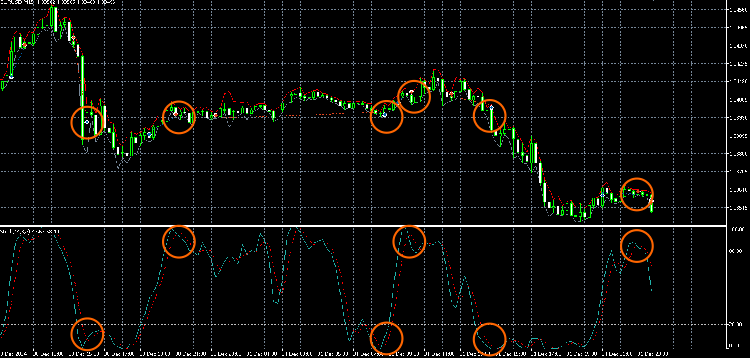
 BBandsPsar
BBandsPsar is a custom hybrid indicator that fuses Bollinger Bands’ volatility framework with the Parabolic SAR’s trend-following logic. By integrating these two methodologies, it effectively reconciles market volatility with emerging trend dynamics within a single, cohesive tool.
 Execution Cost Sensitivity Analyzer
A pure-MQL5 script that measures how robust a strategy's edge is to execution costs. It reads a Date,Profit,Volume CSV of closing deals and models each deal's cost as a fixed part plus a per-lot part. It prints the breakeven cost per deal, the cushion (the multiple of an assumed realistic cost at which the net profit reaches zero), the net profit and profit factor re-priced at the assumed cost, the share of winners the cost turns into losers, and a composite A+ to F cost-robustness score with recommendations. If no file is present it generates a reproducible sample and analyzes it, so the output is visible on the first run. No external libraries, no Python, no AI.
Chart Navigator MT5 Light
Chart Navigator MT5 Light — a mini-chart for quickly navigating the price chart and instantly jumping to your markers on it
Profit Loss calendar
P/L Calendar — Monthly Profit & Loss at a Glance. P/L Calendar shows you, day by day, exactly how your account performed this month — so you can spot your best and worst days, track your win rate, and see your trading rhythm without digging through the terminal's history tab.