 MetaTrader 5
 Experts
 Indicators
 Scripts
 Libraries
 Storage
Join our fan page

- Published by:
-
Cristian David Castillo Arrieta
 Finance and International Business professional with a specialization in Financial Management. Self-taught MQL5 and Python developer focused on algorithmic trading, multi-asset portfolio construction, and quantitative risk management.
 - Views:
- 8979
- Rating:
- Published:
- Updated:
-
 You are missing trading opportunities:
- Free trading apps
- Over 8,000 signals for copying
- Economic news for exploring financial markets
Registration Log inYou agree to website policy and terms of use
If you do not have an account, please register -
 Need a robot or indicator based on this code? Order it on Freelance
Go to Freelance
Need a robot or indicator based on this code? Order it on Freelance
Go to Freelance
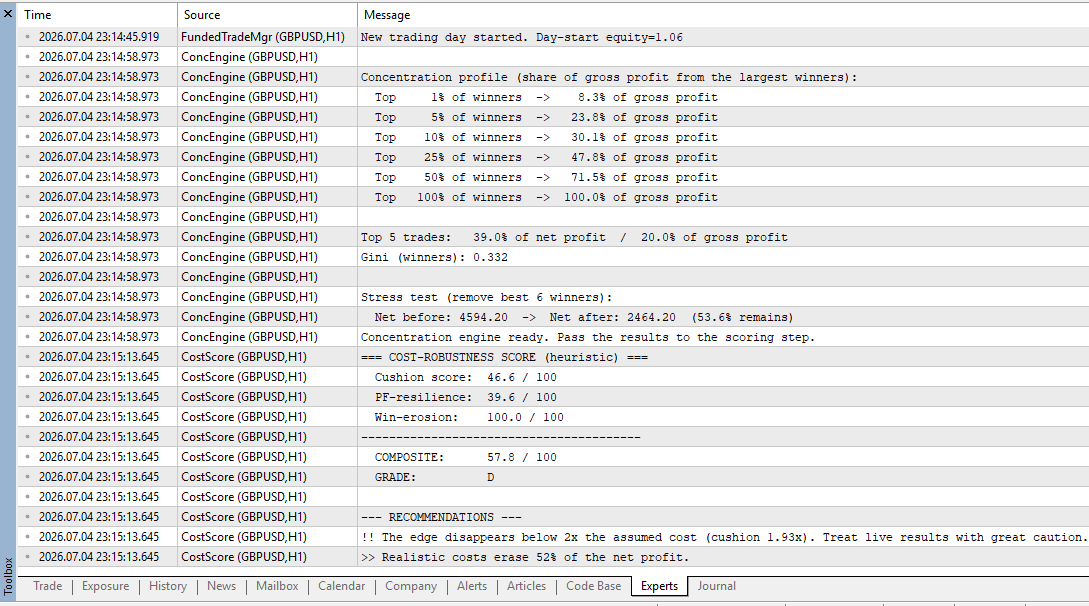
A backtest charges only the costs you assume. Net profit and profit factor are measured at that cost, so they never show how close the edge sits to the cost line. This tool answers the question directly: how much execution cost can the strategy absorb before its edge is gone?
The script reads a Date,Profit,Volume file (one row per closing deal) and prints a full report in the Experts tab:
- Breakeven cost per deal — the cost level at which the net profit reaches zero (the average edge per deal).
- Cushion — the multiple of an assumed realistic cost that the edge can absorb before the net hits zero.
- Net and profit factor at the assumed cost — the whole record re-priced, plus a cost-sensitivity curve from 0 to 3 times the assumed cost.
- Win erosion — the winning deals that the assumed cost turns into losers.
- A composite score (A+ to F) combining the cushion, the profit-factor resilience, and the win erosion, with written recommendations.
Input. Place a CSV named in the input parameter (default Trades.csv) in the terminal MQL5\Files folder, with the header Date,Profit,Volume and one row per closing deal. The Volume column is optional: if it is missing, the cost is applied per deal rather than per lot. On the first run, if no file is found, the script generates a reproducible sample and analyzes it, so the output is visible immediately. The helper ExportCost.mq5 writes the file from the trade history: copy its function into your Expert Advisor and call it from OnTester(), or run it as a standalone script.
Parameters. InpFileName (the CSV to read); InpCostPerLot and InpCostFixed (the assumed per-lot and per-deal cost); InpCushionTarget (the cushion that scores full marks); InpThinMult (the thin-winner threshold); InpErosionTol (the win-erosion tolerance); InpWeightCushion, InpWeightPF, InpWeightErosion (the three dimension weights, normalized automatically).
The tool is written in pure MQL5. It needs no external libraries, no Python and no DLLs.
 EA KCI Embeded Sniper
The KCI Embedded Sniper is an algorithmic trading solution designed for high-precision reversal entries. Unlike conventional Expert Advisors that rely on external indicator dependencies (which often suffer from thread desynchronization and latency), this EA features a fully embedded Kinetic Compression Index (KCI) engine. By transplanting the entire mathematical framework of the KCI—calculating Velocity Quotients, Kinetic Displacement, Energy Dispersion, and Phase Velocity—directly into the EA’s core logic, we have eliminated "asynchronous lag." The result is a lightning-fast sniper engine that validates market exhaustion (Singularity) and momentum extremes (Williams %R) with micro-second precision, operating solely on completed bars to ensure zero-repaint performance.
 KCI Standard: A Pure Kinematic Computing Engine for Market Singularity Detection
The Kinetic Compression Index (KCI) is a custom oscillator designed to detect market exhaustion and localized compression events. By calculating its kinematic metrics internally rather than relying on external standard indicator handles, the KCI reduces overhead and simplifies buffer management for Expert Advisor (EA) integration. This article details the mathematical foundation, system architecture, buffer mapping, and practical integration guides for developers looking to implement this tool in MetaTrader 5.
BBandsPsar
BBandsPsar is a custom hybrid indicator that fuses Bollinger Bands’ volatility framework with the Parabolic SAR’s trend-following logic. By integrating these two methodologies, it effectively reconciles market volatility with emerging trend dynamics within a single, cohesive tool.
Stochastic Protector
This Expert Advisor monitors the Stochastic oscillator to automatically close positions based on user-selected conditions: crossovers above overbought or below oversold, entry into overbought/oversold zones, or exit from those zones. Positions are filtered for closure by profit state (loss, profit, or both). An optional Test Mode enables basic entry signals when the %D line crosses configurable offset levels around the midline (50).