 MetaTrader 5
 Experts
 Indicators
 Scripts
 Libraries
 Storage
Join our fan page

Advanced Trade History Exporter: MAE, MFE and Time-Based Excursions (Points) - script for MetaTrader 5

- Views:
- 3677
- Rating:
- Published:
- Updated:
-
 You are missing trading opportunities:
- Free trading apps
- Over 8,000 signals for copying
- Economic news for exploring financial markets
Registration Log inYou agree to website policy and terms of use
If you do not have an account, please register -
 Need a robot or indicator based on this code? Order it on Freelance
Go to Freelance
Need a robot or indicator based on this code? Order it on Freelance
Go to Freelance
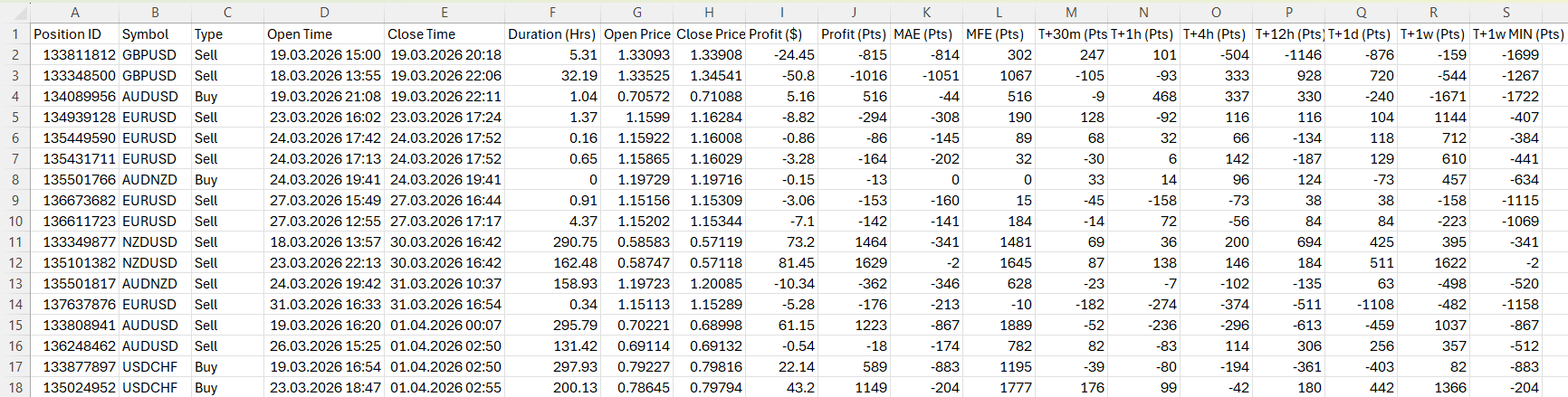
Evaluating your trading edge requires more than just looking at your win rate and net profit. You need to know how efficient your entries and exits are. Are your stop losses too wide? Are you leaving money on the table by closing too early?
This script analyzes your historical deals, reconstructs your trades, and calculates advanced quantitative metrics, outputting everything into a clean .csv file that you can open directly in Excel.
Key Features & Metrics Calculated:
-
MAE (Maximum Adverse Excursion): Calculates the maximum number of points the market moved against your position during the lifespan of the trade. Helps you optimize your stop-loss placement.
-
MFE (Maximum Favorable Excursion): Calculates the maximum number of points the market moved in your favor before the trade was closed. Helps you identify if you are giving back too many unrealized gains.
-
Forward Returns (Time-Based Excursions): Analyzes the exact price difference relative to your entry price at specific future intervals (T+30m, T+1h, T+4h, T+12h, T+1d, T+1w). This answers the quantitative question: "What if I had just held the trade for exactly X hours?" If a future time period hasn't occurred yet, it safely outputs n/a .
-
T+1w MIN (Forward Risk): Calculates the absolute worst-case drawdown (maximum adverse points) that occurred over the entire 1-week period following your entry. If the trade never went against you during that week, it reports 0 .
Output Format: The script generates a CSV file with the following columns: Position ID | Symbol | Type | Open Time | Close Time | Duration (Hrs) | Open Price | Close Price | Profit ($) | Profit (Pts) | MAE (Pts) | MFE (Pts) | T+30m | T+1h | T+4h | T+12h | T+1d | T+1w | T+1w MIN
Input Parameters
-
Start Date: Choose how far back in your terminal's history you want the script to scan (Default: 2026.01.01 ).
How to Use
-
Download the .mq5 source code file.
-
In your MetaTrader 5 terminal, go to the top menu and click File -> Open Data Folder.
-
Navigate to the MQL5\Scripts folder and place the .mq5 file inside.
-
Open the MetaEditor (press F4 on your keyboard).
-
In the MetaEditor Navigator, find the script under the Scripts folder, open it, and click the Compile button at the top (or press F7).
-
Back in the MT5 terminal, open the Navigator panel (Ctrl+N).
-
Expand the Scripts folder, find Export_MAE_MFE_Points , and drag it onto any open chart.
-
Set your desired Start Date and click OK.
-
The script will process your history and save a file named TradeHistory_Stats_Points.csv in your MQL5\Files folder.
 Frontend EA : UI cleanup + quick-trading layer for MT5
A chart-cleanup + quick-trading layer for MT5
 Calculate Lot Percent
Function for lot calculation from deposit percentage
ASQ Order Executor
ASQ Order Executor — Institutional order execution wrapper for MQL5 EAs ASQ Order Executor provides institutional-grade order execution with automatic retry logic, slippage monitoring, partial fill handling, requote management, and comprehensive execution statistics. Drop it into any EA for production-ready trade execution.
 Super Trend
The Supertrend indicator plots an ATR-based dynamic trend line on the MetaTrader 5 chart, switching between a green uptrend and red downtrend line with optional buy/sell arrow signals at every trend reversal.