 MetaTrader 5
 Experts
 Indicators
 Scripts
 Libraries
 Storage
Join our fan page

Calculate Lot Percent - library for MetaTrader 5

- Views:
- 1984
- Rating:
- Published:
- Updated:
-
 You are missing trading opportunities:
- Free trading apps
- Over 8,000 signals for copying
- Economic news for exploring financial markets
Registration Log inYou agree to website policy and terms of use
If you do not have an account, please register -
 Need a robot or indicator based on this code? Order it on Freelance
Go to Freelance
Need a robot or indicator based on this code? Order it on Freelance
Go to Freelance
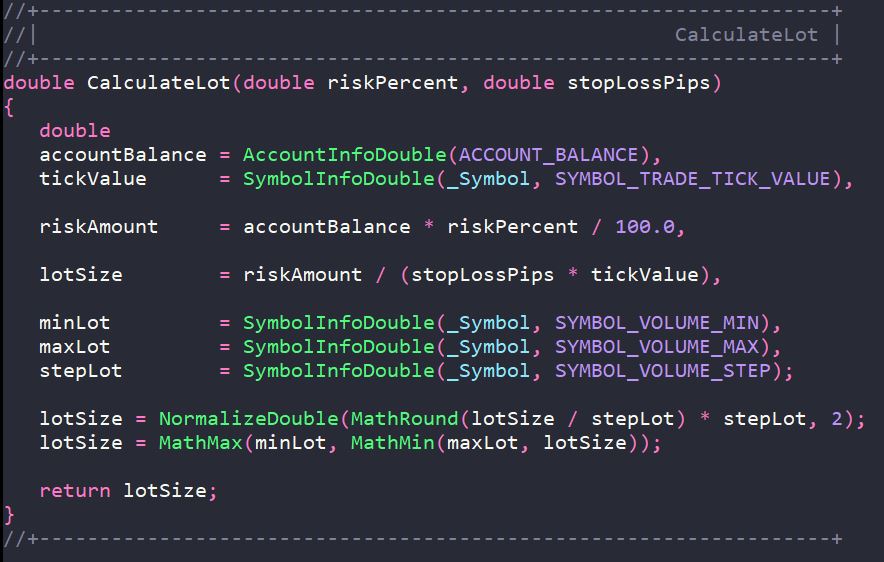
The CalculateLot function is designed to automatically calculate the trading lot size based on risk management principles. It allows a trader to specify the percentage of the account balance he is willing to risk in a trade and determine the optimal position volume based on this.
Syntax
double CalculateLot(double riskPercent, double stopLossPips);
Parameters
Параметр        Тип     Описание
riskPercent     double  Процент от текущего баланса счета, которым трейдер готов рискнуть. Указывается в абсолютном значении (например, 2.0 = 2% от баланса).
stopLossPips    double  Расстояние до уровня Stop Loss в пунктах. Для 5-значных котировок указывается количество стандартных пунктов (например, 1000 = 1000 пунктов = 100 пипсов).
Return value
The function returns the normalised lot volume ( double ), which:
-
Conforms to the rounding rules to the volume step ( VOLUME_STEP );
-
Does not exceed the maximum allowed volume ( VOLUME_MAX );
-
Is not less than the minimum allowed volume ( VOLUME_MIN ).
If the calculated value exceeds the allowed limits, the function returns a limited value (minLot or maxLot).
Operating algorithm
-
Obtaining account and symbol parameters
-
Current balance ( ACCOUNT_BALANCE )
-
Tick value ( SYMBOL_TRADE_TICK_VALUE )
-
Minimum, maximum and step of lot change
-
-
Calculation of risk amount in deposit currency
riskAmount = баланс × (риск% / 100) -
Calculation of lot volume
lotSize = riskAmount / (stopLossPips × tickValue)
-
Normalisation and validation
-
Rounding to the nearest step ( VOLUME_STEP )
-
Minimum and maximum value validation
-
Examples of use
Example 1. Basic use in an Expert Advisor
//+------------------------------------------------------------------+
//| |
//+------------------------------------------------------------------+
void OnTick()
{
   //--- Set risk 1.5% of balance and stop loss 500 pips
   double lot = CalculateLot(1.5, 500);

   //--- Check that the lot is calculated correctly
   if(lot > 0.0)
     {
      //--- Get current prices
      double ask = SymbolInfoDouble(_Symbol, SYMBOL_ASK);

      //--- Calculate levels
      double sl = ask - 500 * _Point;
      double tp = ask + 1500 * _Point;

      //--- Open a position
      trade.Buy(lot, _Symbol, ask, sl, tp);
     }
}
Example 2. Use in a script with error checking
//+------------------------------------------------------------------+
//| |
//+------------------------------------------------------------------+
void OnStart()
{
   double riskPercent  = 2.0;   // Risk 2% of the balance
   double stopLossPips = 1000;  // Stop loss 1000 points

   double lot = CalculateLot(riskPercent, stopLossPips);

   //--- Output information about the calculation
   Print("=== Lot calculation results ===");
   Print("Account Balance: ", AccountInfoDouble(ACCOUNT_BALANCE));
   Print("Risk, %: ", riskPercent);
   Print("The amount of risk: ", AccountInfoDouble(ACCOUNT_BALANCE) * riskPercent / 100.0);
   Print("Stop loss, points: ", stopLossPips);
   Print("Ticking cost: ", SymbolInfoDouble(_Symbol, SYMBOL_TRADE_TICK_VALUE));
   Print("Calculated lot: ", lot);
   Print("================================");

   if(lot <= 0.0)
     {
      Alert("Error: Lot calculation failed. Check the risk and stop loss parameters.");
     }
}
Translated from Russian by MetaQuotes Ltd.
Original code: https://www.mql5.com/ru/code/71010
 XANDER Gold Recovery
Keltner Channel strategy for XAUUSD with optional Progressive Recovery System and basket level risk control. Source code for educational purposes.
 Self-Aware Trend System
Self-Aware Trend System (SATS) is an advanced MQL5 indicator that combines an adaptive SuperTrend engine with a Trend Quality Index (TQI) dashboard, offering dynamic signal detection, risk management levels, and self-learning calibration for smarter, more reliable trade entries.
Frontend EA : UI cleanup + quick-trading layer for MT5
A chart-cleanup + quick-trading layer for MT5
 Advanced Trade History Exporter: MAE, MFE and Time-Based Excursions (Points)
Utility script that exports your MetaTrader 5 trading history to a CSV file. It automatically calculates Maximum Favorable Excursion (MFE), Maximum Adverse Excursion (MAE), and Forward Returns (Time-Based Excursions) in whole points for deep quantitative analysis in Excel. It will allow you to understand whether you close your trades too early and can help optimize overall trading execution.