 MetaTrader 5
 Experts
 Indicators
 Scripts
 Libraries
 Storage
Join our fan page

News Spread Risk Dashboard (Spike and Gap Monitor) - indicator for MetaTrader 5

- Views:
- 3930
- Rating:
- Published:
- Updated:
-
 You are missing trading opportunities:
- Free trading apps
- Over 8,000 signals for copying
- Economic news for exploring financial markets
Registration Log inYou agree to website policy and terms of use
If you do not have an account, please register -
 Need a robot or indicator based on this code? Order it on Freelance
Go to Freelance
Need a robot or indicator based on this code? Order it on Freelance
Go to Freelance
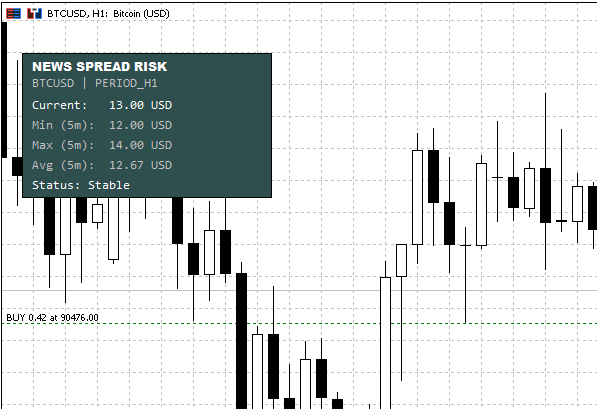
Full Description (Marketing + Explanation)
Overview
News Spread Risk Dashboard is a lightweight chart-overlay indicator designed to help traders immediately recognize dangerous market conditions where spread expansion can destroy entries, exits, and risk control—especially during high-impact news, rollover, session transitions, and illiquid periods (weekend open, holidays, thin books).
Instead of guessing whether the market is “safe to trade,” the indicator continuously measures the real Ask–Bid difference and visualizes spread risk as a clean, compact panel on the chart.
What You Get on the Chart
The dashboard shows a rolling snapshot of spread conditions:
- Current Spread (live)
- Min (Window) spread
- Max (Window) spread
- Avg (Window) spread
- Status line: Stable or RISK with the reason
The background automatically switches color when a warning condition is detected—so the signal is visible at a glance.
Why This Matters (Practical Use Cases)
Spread spikes often occur exactly when traders are most vulnerable:
- News releases: spreads widen before and after the event
- Liquidity gaps: session open/close, rollover, holidays
- Fast markets: sudden volatility can cause spread “bursts”
- Scalping & tight stops: even small spikes can invalidate trade logic
This dashboard is a risk filter: it helps you decide when to wait, reduce size, widen stops, or skip entries.
Warning Logic (Two Modes)
You can choose how the warning triggers:
1) Relative Spike Detection (Recommended)
The indicator warns when the live spread becomes a multiple of its own recent behavior:
- Warning if Current ≥ Avg × Risk Multiplier
- Example: Multiplier 1.5 means “warn when spread is 1.5× the recent average”
This is robust across different symbols because it adapts to normal spread conditions.
2) Absolute Threshold (Fixed Limit)
The indicator warns when the live spread reaches a fixed limit:
- Warning if Current ≥ Threshold
- Supports Symbol-Specific Thresholds (per instrument)
- Example format:
EURUSD:3.0,GBPUSD:3.5,USDJPY:2.5,USDCAD:3.2,XAUUSD:30.0,US30:8.0
- Example format:
This is ideal if you already know exactly what spread level makes a setup invalid for each market.
Display Units (Forex, Crypto, Metals, Indices)
To keep readings meaningful, the indicator supports multiple display modes:
- Smart Auto
- Forex: pips
- Non-Forex: price difference (Ask–Bid)
- Price Difference (always)
- Spread Percentage (universal risk metric)
- Classic Pips (forced)
- Raw Points (forced)
Alerts (Optional)
When a risk condition is detected, you can enable alerts with a cooldown to prevent spam:
- Popup alert
- Sound alert
- Push notification
Performance & Stability
- Uses a millisecond timer for smooth updates (useful for crypto and fast feeds)
- Stores samples in a rolling window (default 300 seconds)
- Includes a minimum sample interval and a safety cap to prevent “array explosion”
- Debug logging can be enabled for diagnostics (not recommended for live)
Recommended Settings
- Start with:
- Display Mode: Smart Auto
- Warning Mode: Relative
- Risk Multiplier: 1.5 to 2.0
- Window: 300 seconds
- If you trade specific symbols consistently, enable Symbol-Specific Thresholds and tune values per instrument.
Notes / Limitations
- This indicator measures spread behavior, not slippage or execution quality directly.
- Spread values depend on your broker’s feed and symbol contract specification.
- For very illiquid symbols, consider increasing the minimum sample interval or reducing update speed.
Wick Rejection Scanner Dashboard (Multi-Symbol / Multi-TF)
Scan multiple symbols and timeframes for wick-based rejection candles and display the latest signals in a clean on-chart dashboard with strength scoring, signal age, optional markers, and alerts.
 Viral (1M+ views) 4 Hour Range Strategy coded and tested
This EA is intended to test a popular trading strategy. My own backtest shows that this strategy does not work as it was intended
The Playground Series v1 to V4 - A combination of trading concepts
The Playground EA series was created for experimentation with Fair Value Gaps (FVGs) and liquidity concepts
 CPlotManager (Auto Buffer and Plot Manager)
Automates MQL5 buffer and plot index management. Eliminates manual counting, simplifies Z-order layering, and handles complex plot types (Candles, Color Lines) with a single line of code.