JET Market Monitor HK50 and HK50 PRO: the HK50 stocks in one heat map on your MetaTrader 5 chart


JET Market Monitor HK50 is a new indicator for MetaTrader 5 that shows the stocks of the Hang Seng index in one panel, right on your chart. The stocks are traded on the Hong Kong Stock Exchange (HKEX; regular session 09:30–12:00 and 13:00–16:00, Hong Kong time, with a lunch break in between and the closing auction until 16:10), with prices in HKD. The index has 95 stocks. It comes in two editions: JET Market Monitor HK50, free, a heat map of the 10 stocks with the largest weight in the index, with a 15-minute delay, and JET Market Monitor HK50 PRO, which adds real-time data, all the stocks of the index grouped by sector, more ways to organize the map, a list mode, a details box, price lines and your own lists.
Both are indicators only: they never open, close or change orders.
What it shows
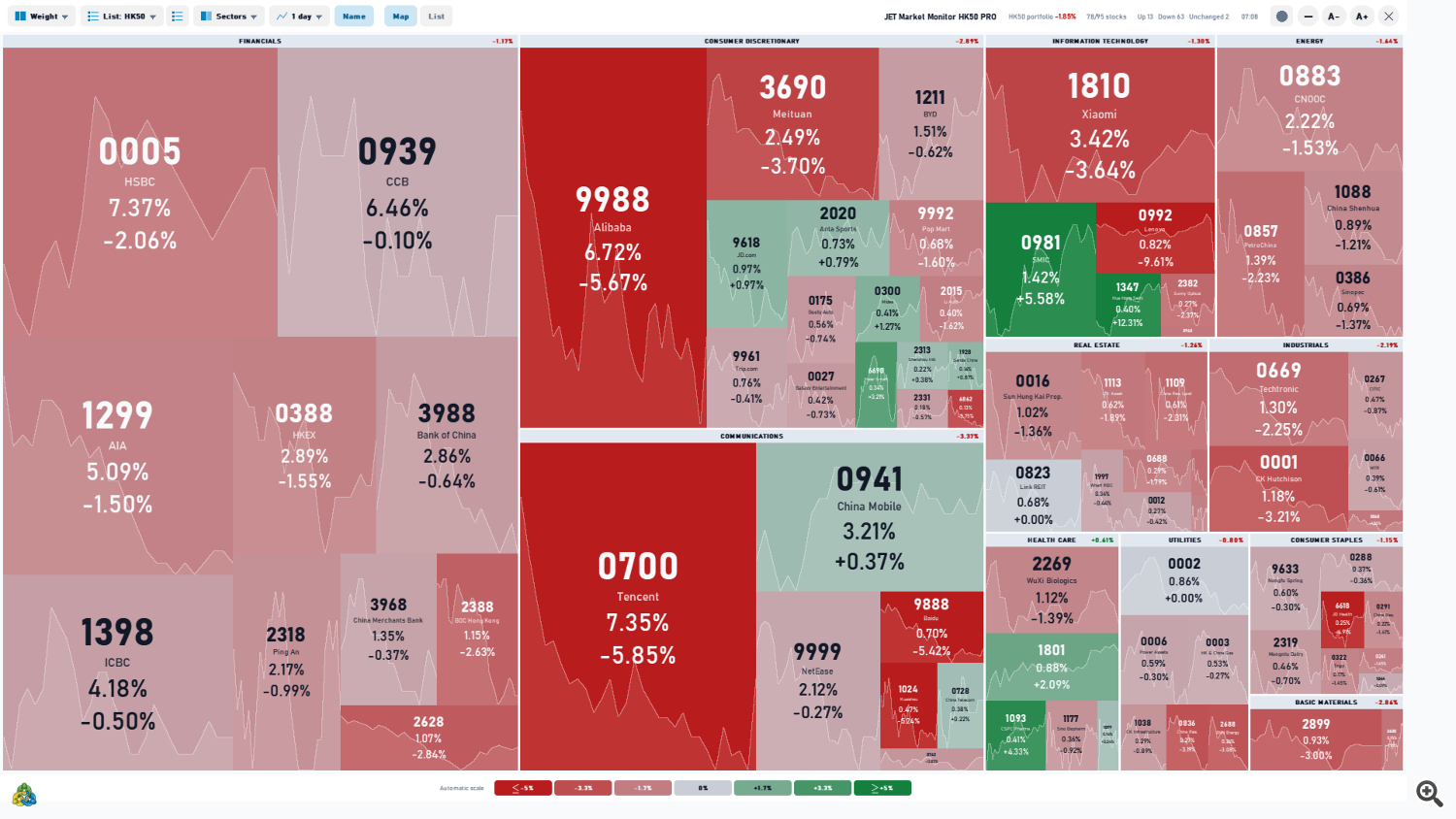
Each box of the heat map is a stock. Its size follows the stock's weight in the index and its color follows the daily change: green up, red down, gray at 0.00%. The stocks are grouped into 11 sectors, with the sector's daily change on its title bar, so you can see at a glance which sectors are leading and which are lagging. In the free edition, the 10 stocks are shown in a single block ordered by weight, with data delayed by 15 minutes.
- In each box: symbol, company name (can be turned off) and change, plus the turnover in PRO; smaller boxes show fewer lines.
- Top bar (PRO): weighted change of the HK50 portfolio, number of stocks up, down and unchanged, and session status. In the free edition: title, the badge "15-min delay · PRO in real time" and session status.
- Color scale with a legend at the bottom.
- Dark and light themes (the free edition is dark only), 11 languages (automatic from the terminal), adjustable panel size.
- [–] button: collapses the panel to its title bar (the indicator keeps running).
- X button: removes the indicator and restores the chart.

Free or PRO?
| Free | PRO | |
|---|---|---|
| Data | 15-minute delay | real time |
| Stocks | the 10 with the largest weight in the index | all the HK50 stocks found at your broker + your own lists |
| Organize by (box size) | Weight | Weight, Turnover (when the broker provides it), Daily, Weekly, Monthly or Yearly change |
| Group | none (single block ordered by weight) | by sector (11 sectors) or by change |
| Price line in each box | — | 1 day to 1 year, or this year |
| List mode with sortable columns | — | yes |
| Details box and click to open the chart | — | yes |
| Your own lists | — | up to 30 lists of up to 200 symbols |
| Color scale | fixed (±3%) | fixed or automatic |
| 11 languages, panel size | yes | yes |
| Theme | dark only | dark or light |
| Price chart behind the panel | — | yes |
| Top bar: portfolio change and stocks up / down / unchanged | — | yes |
| Refresh | every 60 seconds | from 200 ms |
What PRO adds
- Real-time data and all the stocks of the index, grouped by sector, with the top-bar statistics, the light theme and the price chart behind the panel.
- Organize by weight, turnover (when the broker provides it) or daily, weekly, monthly or yearly change.
- Group by change: POSITIVE and NEGATIVE blocks, besides the sectors.
- Price line in the background of each box: 1 day, 2 days, 1 week, 1 month, 3 months, 6 months, 1 year or this year.
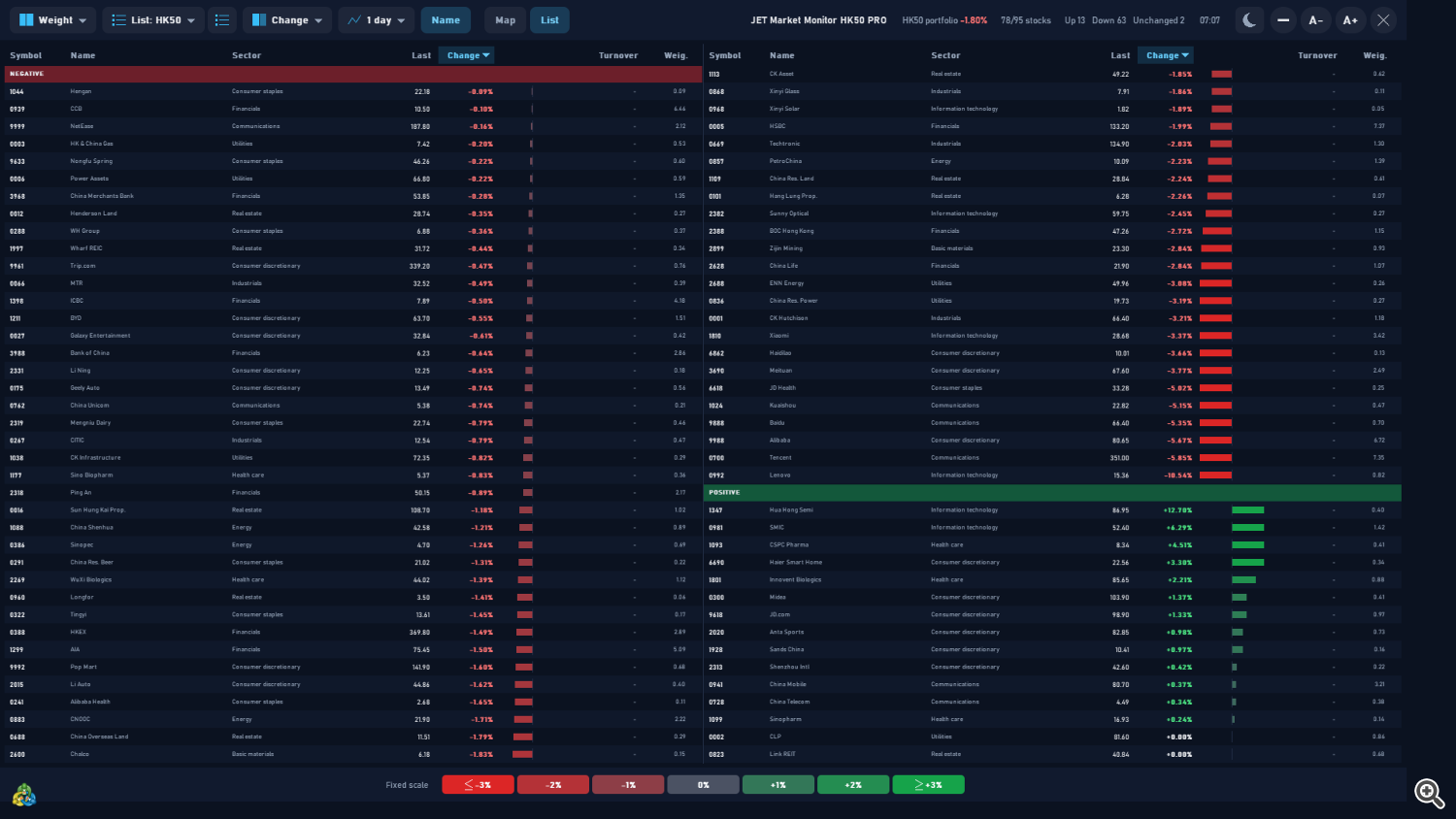
- List mode: Symbol, Name, Sector, Last, Change, Turnover and Weight columns; click a header to sort; A−/A+ adjust the text size.
- Details box: rest the mouse on a stock to see the daily change, full name, "Market open" or "Market closed", previous close, open, high and low. A click opens the stock's chart in a new window or switches the current chart (your choice in the settings).
- Your own lists with any symbol from your broker; the built-in editor searches symbols as you type. Lists are saved on your computer and remain available after restarting MetaTrader 5.
- Automatic color scale, adapting to the size of the day's moves.

Works on most brokers
- Requires a broker that offers Hong Kong stocks or stock CFDs in MetaTrader 5.
- The index has 95 stocks (list below). If your broker does not offer all of them, or offers only some, the panel shows the stocks available and calculates on them. In the free edition, the map shows the 10 with the largest weight among them.
- The indicator finds the stocks automatically on most brokers. If one is not found, enter its name in the Symbol names input, in the format TICKER=SYMBOL; ...
- Prices, turnover and any quote delay depend on your broker's data feed. In the free edition, the data is shown with a 15-minute delay.
- If the account has no Hong Kong stocks, the indicator opens normally and shows a notice.
Stocks of the index (95, by sector)
- Consumer discretionary: Alibaba (9988), Anta Sports (2020), BYD (1211), Chow Tai Fook (1929), Galaxy Entertainment (0027), Geely Auto (0175), Haidilao (6862), Haier Smart Home (6690), JD.com (9618), Laopu Gold (6181), Li Auto (2015), Li Ning (2331), Meituan (3690), Midea (0300), New Oriental (9901), Pop Mart (9992), Sands China (1928), Shenzhou Intl (2313), Trip.com (9961)
- Industrials: CATL (3750), CITIC (0267), CK Hutchison (0001), J&T Express (1519), JD Logistics (2618), MTR (0066), OOIL (0316), Techtronic (0669), Weichai Power (2338), Xinyi Glass (0868), ZTO Express (2057)
- Financials: AIA (1299), Bank of China (3988), BOC Hong Kong (2388), CCB (0939), China Life (2628), China Merchants Bank (3968), HKEX (0388), HSBC (0005), ICBC (1398), Ping An (2318)
- Real estate: China Overseas Land (0688), China Res. Land (1109), China Res. Mixc (1209), CK Asset (1113), Hang Lung Prop. (0101), Henderson Land (0012), Link REIT (0823), Longfor (0960), Sun Hung Kai Prop. (0016), Wharf REIC (1997)
- Consumer staples: Alibaba Health (0241), Budweiser APAC (1876), China Res. Beer (0291), Hengan (1044), JD Health (6618), Mengniu Dairy (2319), Nongfu Spring (9633), Tingyi (0322), WH Group (0288)
- Health care: BeOne Medicines (6160), CSPC Pharma (1093), Hansoh Pharma (3692), Innovent Biologics (1801), Sino Biopharm (1177), Sinopharm (1099), WuXi AppTec (2359), WuXi Biologics (2269)
- Communications: Baidu (9888), China Mobile (0941), China Telecom (0728), China Unicom (0762), Kuaishou (1024), NetEase (9999), Tencent (0700)
- Information technology: BYD Electronic (0285), Hua Hong Semi (1347), Lenovo (0992), SMIC (0981), Sunny Optical (2382), Xiaomi (1810), Xinyi Solar (0968)
- Utilities: China Res. Power (0836), CK Infrastructure (1038), CLP (0002), ENN Energy (2688), HK & China Gas (0003), Power Assets (0006)
- Energy: China Shenhua (1088), CNOOC (0883), PetroChina (0857), Sinopec (0386)
- Basic materials: Chalco (2600), China Hongqiao (1378), CMOC (3993), Zijin Mining (2899)
Inputs
Display
- View = Map. Other option: List.
- Organize by (box size) = Weight in the index. Other options: Turnover (when the broker provides it), Daily change, Weekly change, Monthly change, Yearly change. Sets what the size of the boxes follows.
- Group = By sector. Other option: By change (positive / negative).
- Price line inside the boxes = 1 day. Options: None, 1 day, 2 days, 1 week, 1 month, 3 months, 6 months, 1 year, This year.
- Company name under the symbol = true. Turn it off to show only the symbols.
- List at start (name of one of your lists; empty = HK50) = (empty). Type the name of one of your lists to open the indicator with it; empty opens the HK50.
- Color scale = Fixed (configured limit). Other option: Automatic (follows the day).
- Limit of the fixed scale (daily change, %) = 3.0. Daily change at which a box reaches the strongest green or red with the fixed scale.
Price chart
- Show the price chart behind the panel = false. Shows the candles of the chart behind the panel.
- Panel opacity over the chart (%) = 85. Used when the price chart is shown behind the panel.
Click on a stock
- Action = Open a new chart. What a click on a stock does: nothing, open its chart in a new window, or switch the current chart to it.
- Timeframe of the opened chart = M5. Timeframe of the chart opened or switched by the click.
Symbols
- Symbol names, only if one is not found (TICKER=SYMBOL; ...) = (empty). Use it only when a stock is not found automatically: HKEX ticker on the left, the symbol name at your broker on the right, e.g. 700=0700.HK; separate several pairs with semicolons.
- Write the symbols found to the Experts log = false. Lists in the Experts tab of the Toolbox the symbol found for each stock, useful to check the coverage at your broker.
Panel
- Theme = Dark. Other option: Light.
- Language = Terminal language. Or one of the 11 languages.
- Size (%) = 100. Panel size, useful on high-resolution screens.
- Refresh interval (ms, 200 or more) = 500. How often the panel is updated.
In the free edition, only Company name under the symbol, the Symbols group, Language and Size (%) can be changed; the other settings are fixed (map of the 10 largest stocks, dark theme, fixed scale of ±3%, refresh every 60 seconds).
Tips and frequent questions
- "HK50 stocks not found on this broker": the account has no Hong Kong stocks or stock CFDs, or they have other names. Look for them in the Symbols window (Ctrl+U) and, if they exist, enter their names in Symbol names.
- Fewer stocks than expected? The coverage depends on the symbols your broker offers. Turn on Write the symbols found to the Experts log to see which were found, and add the missing ones with Symbol names.
- Turnover shows "Not available on this broker": organizing by turnover and the Turnover column need volume data from the broker.
- Outside the session (09:30–16:10, Hong Kong time) the map shows the last session and the details box shows "Market closed"; during the lunch break (12:00–13:00) the map keeps the morning values and the details box shows "Lunch break".
- Free edition at the open: in the first 15 minutes of the session, each stock shows the previous close at 0.00%, because the data is delayed by 15 minutes.
- Every box at full green or red on a strong day? Raise Limit of the fixed scale or switch to the automatic scale (PRO).
- Text too small or too large? Change Size (%); in the list mode, also use A−/A+.
- Strategy Tester: on the first run the panel shows "Loading stock data" while the tester loads the history of each stock; this happens only in the tester.
- Reading the map: colors and sizes describe what has already happened in the session; they do not forecast the next move.
Download
- JET Market Monitor HK50 — free heat map of the 10 stocks with the largest weight in the index, data delayed by 15 minutes.
- JET Market Monitor HK50 PRO — real-time data and all the features above.
Questions and suggestions: send me a private message through my MQL5 profile.
JET Market Monitor HK50 is not affiliated with, sponsored or endorsed by Hang Seng Indexes Company Limited or Hong Kong Exchanges and Clearing Limited. Hang Seng Index is a trademark of Hang Seng Data Services Limited; the name is used only to describe the stocks displayed.
Trading involves risk of loss. The indicator displays market data; it does not predict prices and does not guarantee results.




