
Stop Guessing Lot Sizes on MT5: How to Automate Exact Risk & Visual Order Execution

Most retail traders spend hours analyzing entries and indicators, yet they still size their positions by guesswork, or by using the same fixed lot size across EURUSD, Gold (XAUUSD), US100.
In live market conditions, consistent risk management is the only mathematical edge you fully control. Here is how position sizing actually works under the hood in MetaTrader 5, and why manual calculations often fail when volatility spikes.
1. The True Formula Behind MT5 Position Sizing
To risk an exact percentage of your account on any trade, you cannot simply divide your dollar risk by the number of pips. Every instrument on MetaTrader 5 has a different Tick Size, Tick Value, and Contract Size.
The exact mathematical formula is:
Lot Size = Risk Amount ($) / (Stop Loss Distance in Ticks x Tick Value per Lot)
For example, risking $100 with a 200-point Stop Loss on EURUSD requires a completely different lot size than risking $100 with a 200-point Stop Loss on XAUUSD or US100. Calculating this manually while price is moving fast leads to hesitation or costly mistakes.
2. The 3 Most Common Execution Errors on MetaTrader 5
- Ignoring Margin Requirements Before Entry: Even if your lot calculation is mathematically right, high-leverage instruments or tight stops can trigger an Insufficient Margin rejection right at the moment of entry.
- Violating Broker Stops Level: Placing a pending order (Buy Limit, Sell Limit, Buy Stop, Sell Stop) with a Stop Loss too close to the entry or current price causes order rejections, forcing you to waste precious seconds adjusting numbers.
- Confusing Balance vs. Equity Risk: When you already have floating trades open, calculating risk on static Balance instead of live Equity can silently over-leverage your account.
3. How to Automate Visual Risk and Execution on Your Chart
Instead of switching between external calculators and the standard MT5 order window, you can handle everything directly on your chart using a visual risk engine.
With Altopium Smart Risk and Visual Order Placer, you can:
- Deploy Interactive Chart Lines: Drag your Entry, Stop Loss, and Take Profit levels visually on the chart to automatically detect Market, Limit, or Stop setups.
- Switch Risk Modes Instantly: Calculate position size by % Balance, % Equity, or a Fixed Currency Amount in real time.
- Verify Live Metrics Before Clicking: See exact lot size, Risk-to-Reward ratio, stop distance, and required margin update dynamically as you move your lines.
- Prevent Invalid Orders: Built-in safety checks warn you immediately if a Stop Loss is too close for your risk parameters before you send the order.
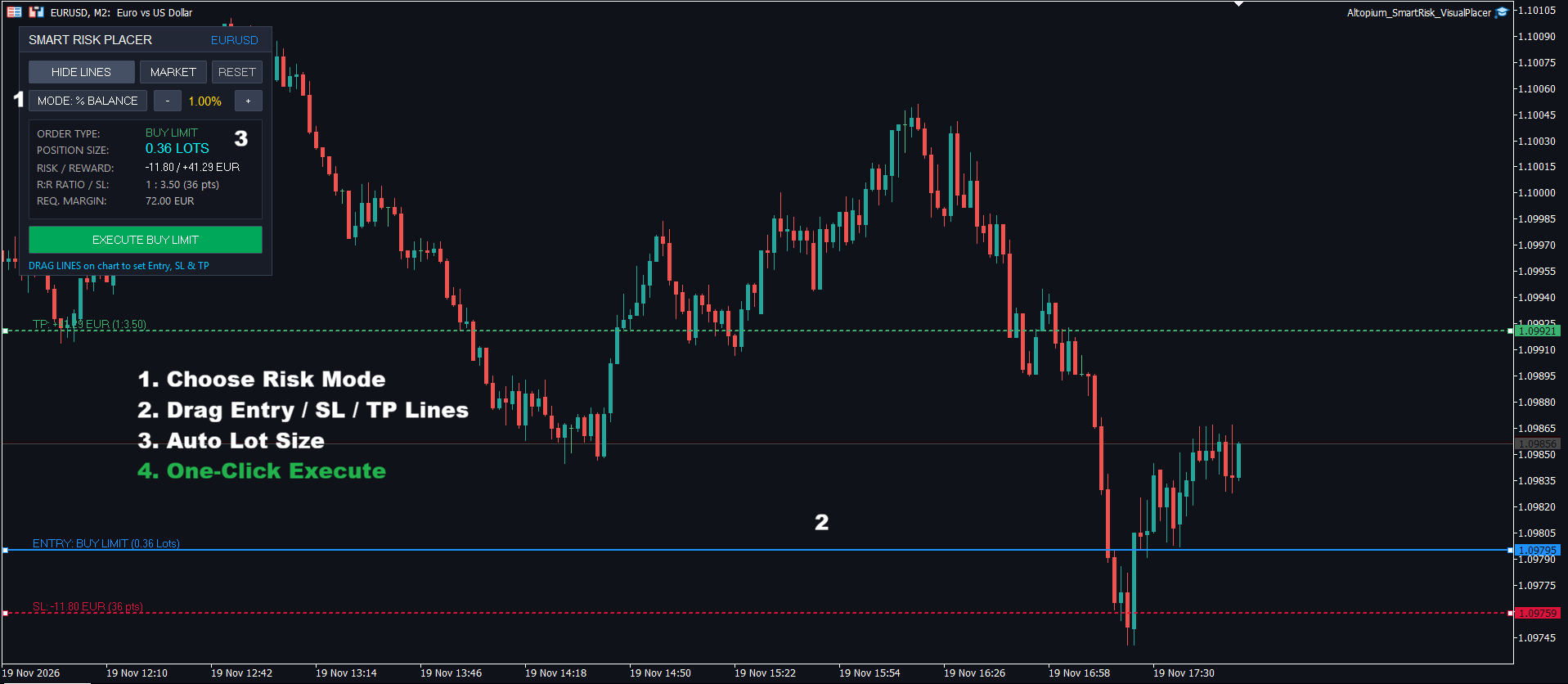
Get Altopium Smart Risk and Visual Order Placer on the MQL5 Market: https://www.mql5.com/it/market/product/209037
Final Thoughts :
Whether you trade Forex, Indices, or Commodities, removing manual math from your execution workflow saves focus and protects your capital from avoidable human errors.
Feel free to leave a comment below if you have questions about position sizing formulas or risk management workflows in MetaTrader 5!




