This guide explains everything about the Four Edge Expert Advisor: what it does, how the four strategies work, every setting, the config files, backtesting, and the settings I use on my own accounts.
Product page: https://www.mql5.com/en/market/product/205284
Important: Nothing in this guide is financial advice or a recommendation to buy, to trade or to use particular settings. All examples, including my own settings, are shown to explain how the program works. Trading leveraged products involves a substantial risk of loss. Past results - live or backtested - do not guarantee future results.
Contents
- What Four Edge is
- The verified live accounts
- Installation and first start
- The control panel
- The four strategies and all their settings
- Position sizing
- Safety and reliability features
- Config files
- Backtesting
- Using another broker: symbol names and server time
- The Experts journal
- My settings
- Frequently asked questions
1. What Four Edge is
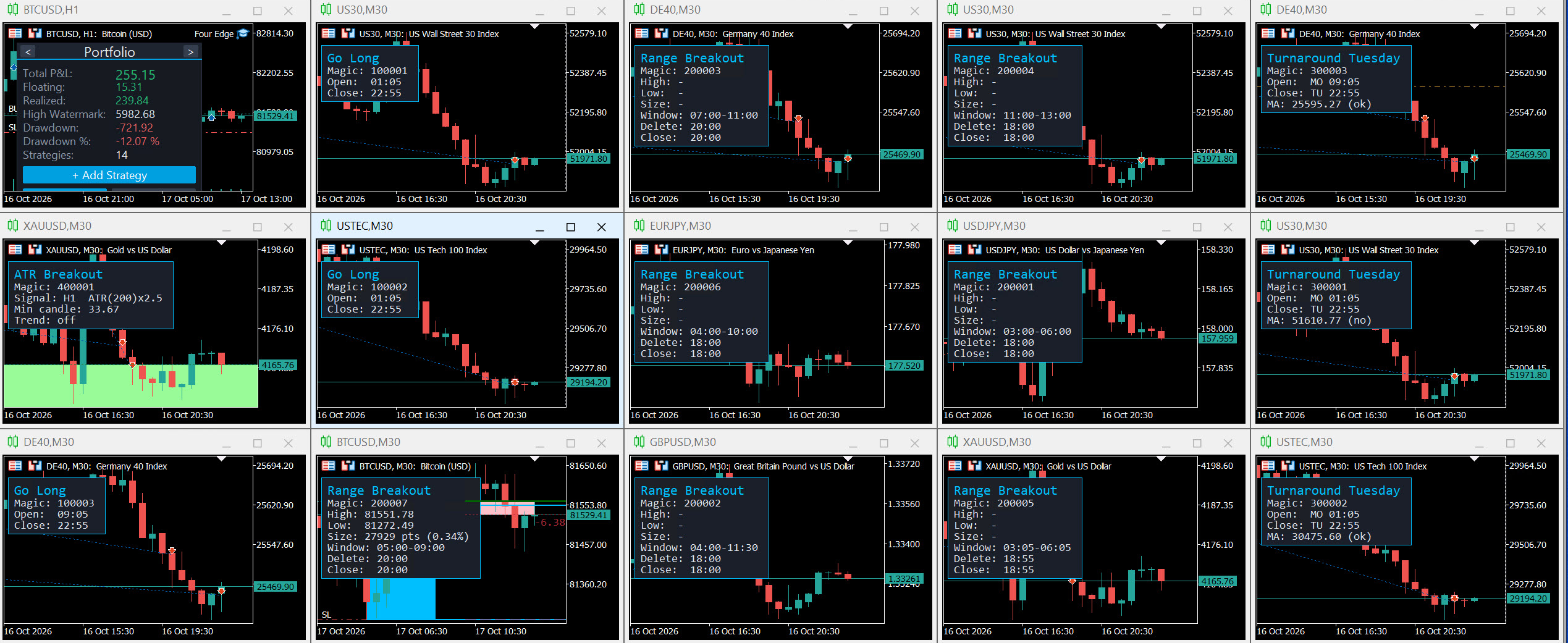
Four Edge is a portfolio Expert Advisor for MetaTrader 5. You attach it to one chart, and it runs any number of strategy instances on any symbols. Each instance has its own symbol, magic number, settings and statistics. Instances are added, edited and deleted at runtime through a panel on the chart.
The four strategy concepts are not secret. I have explained them openly for years, and some of them exist as individual robots. Four Edge is the portfolio program around them: one chart instead of many, the control panel, portfolio and per-strategy statistics, recovery after restarts, and the safety logic described in section 7.
2. The verified live accounts
I show the results on two live accounts, both publicly verified through MQL5 Signals:
- Four Edge account: https://www.mql5.com/en/signals/2392411
This account runs Four Edge as its only Expert Advisor, exactly as it is sold. It was funded once with the initial deposit. No further deposits or withdrawals are planned, so its growth curve reflects the trading alone. - Long-term account: https://www.mql5.com/en/signals/2223417
My main account trades the same four strategy concepts as individual robots and has the longer history. On this account I make deposits and withdrawals so that I do not keep too much unused capital in it. Please read its statistics with that in mind.
Both accounts use the settings shown in section 12. The results of these accounts are no promise for the future.
3. Installation and first start
- Open any chart (any symbol, any timeframe) and attach Four Edge. Allow algorithmic trading.
- The panel appears in the top left corner. With no strategies yet, it shows the empty portfolio.
- Click + Add Strategy, choose one of the four strategies, enter symbol, magic number and settings, and confirm.
- The strategy is active immediately and is saved as a config file (see section 8). It loads again automatically after every restart.
Requirements:
- A hedging account if several strategies trade the same symbol (the default account type at most brokers).
- Every strategy instance needs a unique magic number. The magic number identifies its orders, positions and statistics.
- Run only one Four Edge per terminal. All instances of the program in one terminal read the same config folder - two copies would trade every strategy twice.
- A VPS is recommended for continuous operation.
Which chart to use: the strategies run on the ticks of the chart the EA is attached to. On a live chart, a built-in heartbeat also runs them once per second when that chart's symbol is quiet, so a strategy on a symbol that trades around the clock (for example BTCUSD) keeps working at weekends even if the EA sits on a forex chart.
Inputs: the EA has only three inputs, for the look of the panel: panel width, row height and font size. Everything else is configured per strategy in the panel or in the config files.
4. The control panel
Portfolio view
The first page of the panel shows the whole portfolio:
| Field | Meaning |
|---|---|
| Total P&L | Realized plus floating profit of all strategy instances. |
| Floating | Profit of all open positions of the instances. |
| Realized | Profit of all closed positions of the instances (including commissions and swaps), rebuilt from the account history. |
| High Watermark | The highest equity reached by the Four Edge portfolio (starting balance plus the realized and floating results of its own strategies). |
| Drawdown / Drawdown % | Distance of the current equity from the high watermark, in money and percent. |
| Strategies | Number of active strategy instances. |
Buttons: + Add Strategy, Open All (opens a chart for every strategy) and Close All (closes those charts again).
Strategy views
With the arrows in the header you page through the strategy instances. Each page shows type, symbol, magic number, open positions, floating and realized profit, and the strategy's own high watermark and drawdown (measured from the peak of its own result).
Buttons:
- Edit Settings - opens the settings dialog. Symbol and magic number are fixed after creation; everything else can be changed at runtime.
- Open Chart - opens an M30 chart for the strategy with its info box, the open positions (entry, stop loss, take profit, running profit) and, for Range Breakout, the range box.
- Delete - stops the strategy after a confirmation and deletes its config file. Open positions of a deleted strategy are left untouched - close them yourself if you want to.
The settings dialog
The dialog works like the MetaTrader input window: one column, sections, a scrollbar, and a tooltip for every setting when you hover over it. Settings that do not apply to the current mode are hidden (for example "Risk Money" while the volume mode is "Percent").
5. The four strategies and all their settings
All times are broker server times (see section 10). Values in the column "File value" are what is written in the config files.
Settings shared by all strategies
| Setting | Meaning | File value |
|---|---|---|
| Symbol | Exact symbol name at your broker. Fixed after creation. | text, e.g. US30 |
| Magic | Unique id of the instance. Fixed after creation. | number |
| Commentary | Comment attached to the orders (empty = no comment). | text |
| Volume | Position sizing mode, see section 6. | 0 Fixed, 1 Managed, 2 Percent, 3 Money |
| Lots | Lot size (Fixed) or base lot size (Managed). | number |
| LotsPerMoney | Managed: lots are multiplied by floor(balance / this amount). | number |
| RiskPercent | Percent: percent of the balance risked per trade. | number |
| RiskMoney | Money: fixed amount risked per trade. | number |
Strategy 1: Go Long
Buys at a fixed time of day and closes at the close time. Without a stop the position is held until the close time; a position left over from a previous day is closed at the next opportunity. One attempt per day: if the order is rejected, there is no second try that day.
Optional filter IsWaitNewHigh: instead of buying exactly at the open time, Four Edge waits (until the close time) for the price to exceed the high of the day that was made before the open time.
| Setting | Meaning | File value |
|---|---|---|
| TimeOpenHour / TimeOpenMin | Entry time. | hour 0-23 / minute 0-59 |
| IsClose | Close the position at the close time. | 1 on, 0 off |
| TimeCloseHour / TimeCloseMin | Close time. | hour / minute |
| TpCalcMode / TpValue | Take profit: off, percent of the entry price, or points. | 0 Off, 2 Percent, 3 Points / number |
| SlCalcMode / SlValue | Stop loss, same modes. | 0 Off, 2 Percent, 3 Points / number |
| BeCalcMode / BeTriggerValue / BeBufferValue | Break-even: once the profit reaches the trigger, the stop moves to entry plus buffer. | 0 Off, 1 Percent, 2 Points / number / number |
| TslCalcMode / TslTriggerValue / TslValue / TslStepValue | Trailing stop: activates at the trigger, keeps the distance TslValue behind the price, moves only in steps of at least TslStepValue. | 0 Off, 1 Percent, 2 Points / numbers |
| IsWaitNewHigh | The new-high filter described above. | 1 on, 0 off |
Strategy 2: Range Breakout
Measures the highest and lowest price between the range start and range end. After the range end it places a buy stop above the high and a sell stop below the low (plus an optional buffer). Pending orders are deleted at the delete time - or at the close time, if that comes first and closing is on. Open positions are closed at the close time. A window whose end is earlier than its start is an overnight window (for example 22:00-02:00).
While the window is still open, the chart shows the range as it grows ("live"); entries always use the final range of the complete window. Each side (buy and sell) gets one send attempt per session: if the broker rejects an order, that side is not tried again until the next session.
| Setting | Meaning | File value |
|---|---|---|
| TimeStartHour / TimeStartMin | Range window start. | hour / minute |
| TimeEndHour / TimeEndMin | Range window end - entries are armed from here. | hour / minute |
| TimeDeleteHour / TimeDeleteMin | Pending orders are deleted and no new entries are placed from here. | hour / minute |
| IsClose / TimeCloseHour / TimeCloseMin | Close open positions at this time. | 1 on, 0 off / hour / minute |
| OrderBufferPoints | Entry offset in points beyond the range high and low. | number |
| TargetCalcMode / TargetValue | Take profit: off, factor of the range size, percent of price, or points. | 0 Off, 1 Factor, 2 Percent, 3 Points / number |
| StopCalcMode / StopValue | Stop loss, same modes. Factor 1.0 places the stop at the opposite side of the range. | 0 Off, 1 Factor, 2 Percent, 3 Points / number |
| BeCalcMode ... / TslCalcMode ... | Break-even and trailing stop as described for Go Long. | 0 Off, 1 Percent, 2 Points |
| MaxBuy / MaxSell / MaxTrades | Maximum long, short and total entries per session. | number |
| MinRangePercent / MaxRangePercent | Skip the session if the range is smaller / larger than this percent of price. | number |
Strategy 3: Turnaround Tuesday
On the open day at the open time it buys, if the filters agree, and closes on the close day at the close time. If the close time cannot be used (for example no prices on a holiday), the position is closed at the next possible time. One attempt per week.
| Setting | Meaning | File value |
|---|---|---|
| DayOpen / DayClose | Weekday of entry and of exit. | 0 Sunday, 1 Monday, 2 Tuesday ... 6 Saturday |
| TimeOpenHour / TimeOpenMin | Entry time on the open day. | hour / minute |
| TimeCloseHour / TimeCloseMin | Exit time on the close day. | hour / minute |
| IsMaFilter | Enter only while the price is below the moving average. | 1 on, 0 off |
| MaTimeframe / MaPeriods / MaMethod / MaAppPrice | Moving average settings. | timeframe code / number / 0 SMA, 1 EMA, 2 SMMA, 3 LWMA / 1 Close, 2 Open, 3 High, 4 Low, 5 Median, 6 Typical, 7 Weighted |
| IsWaitNewHigh | Enter only once the price exceeds the day's high made before the open time. | 1 on, 0 off |
| TpCalcMode ... / SlCalcMode ... / BeCalcMode ... / TslCalcMode ... | As described for Go Long. | see Go Long |
Strategy 4: ATR Breakout
At every new candle of the signal timeframe it checks the last closed candle: its range must be larger than ATR times the multiplier, and it must close near its extreme. A bullish candle opens a buy, a bearish candle a sell. Each signal candle is traded at most once.
| Setting | Meaning | File value |
|---|---|---|
| Timeframe | Signal timeframe. | timeframe code |
| ATRPeriod / ATRMultiplier | The candle range must exceed ATR(period) x multiplier. | numbers |
| CloseProximity | The close must lie within this percent of the candle range from the extreme. | number |
| MinBodyRatio | Minimum body as percent of the full candle (0 = off). | number |
| TpCalcMode / TpValue, SlCalcMode / SlValue | Take profit and stop loss. | 0 Off, 2 Percent, 3 Points / number |
| TslCalcMode / TslTriggerValue / TslValue | Trailing stop. | 0 Off, 2 Percent, 3 Points / numbers |
| UseTrendFilter / TrendTF / TrendMAPeriod / TrendMAMethod | Trade only in the direction of a moving average (buys above, sells below). | 1 on, 0 off / timeframe code / number / 0 SMA, 1 EMA, 2 SMMA, 3 LWMA |
Timeframe codes
| M1 | M5 | M15 | M30 | H1 | H4 | D1 | W1 | MN1 |
|---|---|---|---|---|---|---|---|---|
| 1 | 5 | 15 | 30 | 16385 | 16388 | 16408 | 32769 | 49153 |
6. Position sizing
| Mode | How the lot size is calculated |
|---|---|
| Fixed (0) | Always Lots . |
| Managed (1) | Lots x floor(balance / LotsPerMoney ). Example: Lots 0.01, LotsPerMoney 1000, balance 5,400 gives 0.05 lots. |
| Percent (2) | The loss at the stop loss equals RiskPercent of the balance. |
| Money (3) | The loss at the stop loss equals RiskMoney . |
The loss is calculated with the broker's own profit calculation, including currency conversion (for example DE40 in EUR, JPY pairs or gold on a USD account).
Percent or Money with the stop loss OFF: then the full price counts as the stop distance. The setting then defines the position value as a share of the balance. Example: RiskPercent 100 with no stop means a position worth about 100% of the balance (1:1 exposure); RiskPercent 50 means about 50%. This is how Go Long and Turnaround Tuesday are sized in my settings.
If the calculated size is below the broker's minimum lot, the trade is skipped instead of rounded up, so the configured risk is never exceeded. The journal explains each such skip (section 11).
7. Safety and reliability features
- Checks before every order: stop level and spread, free margin, lot size.
- Duplicate-order protection: an entry is marked as attempted before it is sent. If the broker's answer is lost (connection problem), the strategy does not send it again; a position that appears later is recognised and adopted.
- Recovery after restart: open positions, pending orders, today's entries and all statistics are rebuilt from the account, so a restart or a VPS reboot does not lead to duplicate entries.
- Late closing: if a close time passes without a tradable price, positions are closed at the next possible time.
- Heartbeat: on live charts the strategies also run when the chart symbol is quiet (section 3).
- No DLLs, external services, martingale or grid.
8. Config files
Every strategy instance is stored as a small text file. The folder depends on where the EA runs:
| Where | Folder |
|---|---|
| Live or demo chart | <terminal data folder>\MQL5\Files\FourEdge\ (File - Open Data Folder in MetaTrader) |
| Strategy tester | <common data folder>\Files\FourEdgeTester\ (usually C:\Users\<name>\AppData\Roaming\MetaQuotes\Terminal\Common\Files\FourEdgeTester\ ) |
At every start the Experts journal prints the exact folder in use, and it also tells you when the folder is empty.
File name: <Type>_<Symbol>_<Magic>.txt , for example RangeBreakout_GBPUSD_200002.txt . Type is one of GoLong , RangeBreakout , TurnaroundTuesday , ATRBreakout .
Content: one Key=Value per line, as listed in section 5. Lines starting with # are comments. A missing key gets its default value. Example:
Type=GoLong Symbol=US30 Magic=100001 Commentary=GoLong IsWaitNewHigh=0 Volume=2 RiskPercent=100.0000 SlCalcMode=0 TimeOpenHour=1 TimeOpenMin=5 IsClose=1 TimeCloseHour=22 TimeCloseMin=55
How to create files:
- The easiest way: add the strategy with the panel on a live or demo chart. Four Edge writes the file itself, complete with every key. Copy it wherever you need it.
- Or write or copy a file with any text editor and place it in the folder.
Files are read when the EA starts. After changing files by hand, remove the EA from the chart and attach it again. Changes made with the panel on a live chart are saved immediately.
9. Backtesting
Without config files
If the tester folder contains no config files, Four Edge runs one strategy so that there is always something to see: the ATR Breakout with its default settings on the tested symbol, magic number 400001, with the broker's minimum lot. The defaults are: signal timeframe H1, ATR period 200, multiplier 2.5, close within 25% of the candle extreme, no body filter, take profit 2% and stop loss 0.5% of the price, no trailing stop, no trend filter. The journal confirms this at the start of the test.
The signal timeframe is H1 regardless of the timeframe chosen in the tester.
With config files
- Place config files in the tester folder (see section 8). The symbols in the files must exist in your terminal.
- In the strategy tester, choose Four Edge, any symbol of your portfolio and a modelling mode (real ticks are the most precise).
- Start the test. All strategies in the folder are tested together as one portfolio.
Notes:
- The MetaTrader tester does not pass keyboard input to chart panels. Therefore strategies cannot be added during a test; the panel then shows the tester folder instead. Settings can be changed only with the toggle buttons, and such changes apply to that test run only - the files are never modified by a test.
- For custom symbols (for example data with a _qdm suffix), use those exact symbol names in the tester files. That is why live and tester files are kept in separate folders.
- Backtests are simulations. They show how the rules behaved on past data, not what will happen in the future.
10. Using another broker: symbol names and server time
My settings are made for IC Trading, whose server time is GMT+2 in winter and GMT+3 in summer (it follows the US daylight saving time). All times in the settings are in this server time.
- Symbol names: brokers name symbols differently (for example DE40 , GER40 , DAX40 ). Use your broker's exact name in the file name and in the Symbol line.
- Same time offset: if your broker also uses GMT+2/+3, you can keep all times.
- Different offset: shift every time by the difference. Example: a broker on GMT+0 with UK daylight saving time is 2 hours behind: 22:55 becomes 20:55, 09:05 becomes 07:05. If your broker changes its offset on different dates than IC Trading, the difference changes for a few weeks in spring and autumn.
- Weekdays: a time shift across midnight also moves the weekday (relevant for Turnaround Tuesday).
- Contract sizes differ between brokers. Percent and Money sizing adapt automatically; with Fixed or Managed lots, check the lot sizes.
11. The Experts journal
Four Edge writes understandable messages to the Experts journal:
- At start: the version, the config folder in use, the number of loaded strategies, and what was recovered.
- CP-SKIP lines explain, once per day and per reason, why a strategy did not enter - for example a range outside the size filters, a price already beyond the range, a lot size below the minimum, not enough free margin, or a stop too close for the broker.
- CP-SLOW lines appear only if a processing step took unusually long (for example while the terminal loads price history).
12. My settings
These are the settings of my own live accounts at IC Trading (server time GMT+2/+3). They are shown to explain how the program can be configured. They are not a recommendation and not financial advice. They may not suit your account size, risk tolerance or broker, and I may change them at any time.
Overview
| Strategy | Symbol | Magic | Main settings | Sizing |
|---|---|---|---|---|
| Go Long | US30 | 100001 | buy 01:05, close 22:55, no stop | 100% of balance |
| Go Long | USTEC | 100002 | buy 01:05, close 22:55, no stop | 100% of balance |
| Go Long | DE40 | 100003 | buy 09:05, close 22:55, no stop | 100% of balance |
| Turnaround Tuesday | US30 | 300001 | buy Mon 01:05, close Tue 22:55, price below D1 SMA(25), no stop | 50% of balance |
| Turnaround Tuesday | USTEC | 300002 | buy Mon 01:05, close Tue 22:55, price below D1 SMA(9), no stop | 50% of balance |
| Turnaround Tuesday | DE40 | 300003 | buy Mon 09:05, close Tue 22:55, price below D1 SMA(40), no stop | 50% of balance |
| Range Breakout | USDJPY | 200001 | range 03:00-06:00, delete 18:00, close 18:00, stop 1 x range, min range 0.1% | 1% of balance |
| Range Breakout | GBPUSD | 200002 | range 04:00-11:30, delete 18:00, close 18:00, stop 1 x range, min range 0.1% | 1% of balance |
| Range Breakout | DE40 | 200003 | range 07:00-11:00, delete 20:00, close 20:00, stop 1 x range | 0.5% of balance |
| Range Breakout | US30 | 200004 | range 11:00-13:00, delete 18:00, close 18:00, stop 1 x range | 0.5% of balance |
| Range Breakout | XAUUSD | 200005 | range 03:05-06:05, delete 18:55, close 18:55, stop 1% | 1% of balance |
| Range Breakout | EURJPY | 200006 | range 04:00-10:00, delete 18:00, close 18:00, stop 1 x range, min range 0.1% | 1% of balance |
| Range Breakout | BTCUSD | 200007 | range 05:00-09:00, delete 20:00, close 20:00, stop 1 x range | 1% of balance |
| ATR Breakout | XAUUSD | 400001 | H1, ATR(200) x 2.5, TP 2%, stop 0.5% | 0.5% of balance |
All times are IC Trading server time (GMT+2/+3). "No stop" with percent sizing means the position value is that share of the balance (section 6).
The complete files
To use a file: create a text file with the name shown, paste the content, adapt the symbol names and times to your broker (section 10), and place it in the config folder (section 8).
GoLong_US30_100001.txt
Type=GoLong Symbol=US30 Magic=100001 Commentary=GoLong IsWaitNewHigh=0 Volume=2 Lots=0.01 LotsPerMoney=1000 RiskPercent=100.0000 RiskMoney=5000.00 TpCalcMode=0 TpValue=0.0000 SlCalcMode=0 SlValue=5.0000 TimeOpenHour=1 TimeOpenMin=5 IsClose=1 TimeCloseHour=22 TimeCloseMin=55 BeCalcMode=0 BeTriggerValue=0.0000 BeBufferValue=0.0500 TslCalcMode=0 TslTriggerValue=0.0000 TslValue=100.0000 TslStepValue=10.0000
GoLong_USTEC_100002.txt
Type=GoLong Symbol=USTEC Magic=100002 Commentary=GoLong IsWaitNewHigh=0 Volume=2 Lots=0.01 LotsPerMoney=1000 RiskPercent=100.0000 RiskMoney=5000.00 TpCalcMode=0 TpValue=0.0000 SlCalcMode=0 SlValue=5.0000 TimeOpenHour=1 TimeOpenMin=5 IsClose=1 TimeCloseHour=22 TimeCloseMin=55 BeCalcMode=0 BeTriggerValue=0.0000 BeBufferValue=0.0500 TslCalcMode=0 TslTriggerValue=0.0000 TslValue=100.0000 TslStepValue=10.0000
GoLong_DE40_100003.txt
Type=GoLong Symbol=DE40 Magic=100003 Commentary=GoLong IsWaitNewHigh=0 Volume=2 Lots=0.01 LotsPerMoney=1000 RiskPercent=100.0000 RiskMoney=5000.00 TpCalcMode=0 TpValue=0.0000 SlCalcMode=0 SlValue=5.0000 TimeOpenHour=9 TimeOpenMin=5 IsClose=1 TimeCloseHour=22 TimeCloseMin=55 BeCalcMode=0 BeTriggerValue=0.0000 BeBufferValue=0.0500 TslCalcMode=0 TslTriggerValue=0.0000 TslValue=100.0000 TslStepValue=10.0000
TurnaroundTuesday_US30_300001.txt
Type=TurnaroundTuesday Symbol=US30 Magic=300001 Commentary=TurnaroundTuesday IsWaitNewHigh=0 Volume=2 Lots=0.01 LotsPerMoney=1000 RiskPercent=50.0000 RiskMoney=2500.00 TpCalcMode=0 TpValue=0.0000 SlCalcMode=0 SlValue=5.0000 TimeOpenHour=1 TimeOpenMin=5 TimeCloseHour=22 TimeCloseMin=55 DayOpen=1 DayClose=2 IsMaFilter=1 MaTimeframe=16408 MaPeriods=25 MaMethod=0 MaAppPrice=1 BeCalcMode=0 BeTriggerValue=0.0000 BeBufferValue=0.0500 TslCalcMode=0 TslTriggerValue=0.0000 TslValue=100.0000 TslStepValue=10.0000
TurnaroundTuesday_USTEC_300002.txt
Type=TurnaroundTuesday Symbol=USTEC Magic=300002 Commentary=TurnaroundTuesday IsWaitNewHigh=0 Volume=2 Lots=0.01 LotsPerMoney=1000 RiskPercent=50.0000 RiskMoney=2500.00 TpCalcMode=0 TpValue=0.0000 SlCalcMode=0 SlValue=5.0000 TimeOpenHour=1 TimeOpenMin=5 TimeCloseHour=22 TimeCloseMin=55 DayOpen=1 DayClose=2 IsMaFilter=1 MaTimeframe=16408 MaPeriods=9 MaMethod=0 MaAppPrice=1 BeCalcMode=0 BeTriggerValue=0.0000 BeBufferValue=0.0500 TslCalcMode=0 TslTriggerValue=0.0000 TslValue=100.0000 TslStepValue=10.0000
TurnaroundTuesday_DE40_300003.txt
Type=TurnaroundTuesday Symbol=DE40 Magic=300003 Commentary=TurnaroundTuesday IsWaitNewHigh=0 Volume=2 Lots=0.01 LotsPerMoney=1000 RiskPercent=50.0000 RiskMoney=2500.00 TpCalcMode=0 TpValue=0.0000 SlCalcMode=0 SlValue=5.0000 TimeOpenHour=9 TimeOpenMin=5 TimeCloseHour=22 TimeCloseMin=55 DayOpen=1 DayClose=2 IsMaFilter=1 MaTimeframe=16408 MaPeriods=40 MaMethod=0 MaAppPrice=1 BeCalcMode=0 BeTriggerValue=0.0000 BeBufferValue=0.0500 TslCalcMode=0 TslTriggerValue=0.0000 TslValue=100.0000 TslStepValue=10.0000
RangeBreakout_USDJPY_200001.txt
Type=RangeBreakout Symbol=USDJPY Magic=200001 Commentary=RangeBreakout Volume=2 Lots=0.01 LotsPerMoney=1000 RiskPercent=1.0000 RiskMoney=50.00 OrderBufferPoints=0 TargetCalcMode=0 TargetValue=0.0000 StopCalcMode=1 StopValue=1.0000 TimeStartHour=3 TimeStartMin=0 TimeEndHour=6 TimeEndMin=0 TimeDeleteHour=18 TimeDeleteMin=0 IsClose=1 TimeCloseHour=18 TimeCloseMin=0 BeCalcMode=0 BeTriggerValue=0.0000 BeBufferValue=0.0500 TslCalcMode=0 TslTriggerValue=0.0000 TslValue=100.0000 TslStepValue=10.0000 MaxBuy=1 MaxSell=1 MaxTrades=1 MinRangePercent=0.1000 MaxRangePercent=100.0000
RangeBreakout_GBPUSD_200002.txt
Type=RangeBreakout Symbol=GBPUSD Magic=200002 Commentary=RangeBreakout Volume=2 Lots=0.01 LotsPerMoney=1000 RiskPercent=1.0000 RiskMoney=50.00 OrderBufferPoints=0 TargetCalcMode=0 TargetValue=0.0000 StopCalcMode=1 StopValue=1.0000 TimeStartHour=4 TimeStartMin=0 TimeEndHour=11 TimeEndMin=30 TimeDeleteHour=18 TimeDeleteMin=0 IsClose=1 TimeCloseHour=18 TimeCloseMin=0 BeCalcMode=0 BeTriggerValue=0.0000 BeBufferValue=0.0500 TslCalcMode=0 TslTriggerValue=0.0000 TslValue=100.0000 TslStepValue=10.0000 MaxBuy=1 MaxSell=1 MaxTrades=1 MinRangePercent=0.1000 MaxRangePercent=100.0000
RangeBreakout_DE40_200003.txt
Type=RangeBreakout Symbol=DE40 Magic=200003 Commentary=RangeBreakout Volume=2 Lots=0.01 LotsPerMoney=1000 RiskPercent=0.5000 RiskMoney=37.50 OrderBufferPoints=0 TargetCalcMode=0 TargetValue=0.0000 StopCalcMode=1 StopValue=1.0000 TimeStartHour=7 TimeStartMin=0 TimeEndHour=11 TimeEndMin=0 TimeDeleteHour=20 TimeDeleteMin=0 IsClose=1 TimeCloseHour=20 TimeCloseMin=0 BeCalcMode=0 BeTriggerValue=0.2000 BeBufferValue=0.0100 TslCalcMode=0 TslTriggerValue=0.0000 TslValue=100.0000 TslStepValue=10.0000 MaxBuy=1 MaxSell=1 MaxTrades=1 MinRangePercent=0.0000 MaxRangePercent=100.0000
RangeBreakout_US30_200004.txt
Type=RangeBreakout Symbol=US30 Magic=200004 Commentary=RangeBreakout Volume=2 Lots=0.01 LotsPerMoney=1000 RiskPercent=0.5000 RiskMoney=12.50 OrderBufferPoints=0 TargetCalcMode=0 TargetValue=0.0000 StopCalcMode=1 StopValue=1.0000 TimeStartHour=11 TimeStartMin=0 TimeEndHour=13 TimeEndMin=0 TimeDeleteHour=18 TimeDeleteMin=0 IsClose=1 TimeCloseHour=18 TimeCloseMin=0 BeCalcMode=0 BeTriggerValue=0.0000 BeBufferValue=0.0500 TslCalcMode=0 TslTriggerValue=0.0000 TslValue=100.0000 TslStepValue=10.0000 MaxBuy=1 MaxSell=1 MaxTrades=1 MinRangePercent=0.0000 MaxRangePercent=100.0000
RangeBreakout_XAUUSD_200005.txt
Type=RangeBreakout Symbol=XAUUSD Magic=200005 Commentary=RangeBreakout Volume=2 Lots=0.01 LotsPerMoney=1000 RiskPercent=1.0000 RiskMoney=50.00 OrderBufferPoints=0 TargetCalcMode=0 TargetValue=0.0000 StopCalcMode=2 StopValue=1.0000 TimeStartHour=3 TimeStartMin=5 TimeEndHour=6 TimeEndMin=5 TimeDeleteHour=18 TimeDeleteMin=55 IsClose=1 TimeCloseHour=18 TimeCloseMin=55 BeCalcMode=0 BeTriggerValue=0.0000 BeBufferValue=0.0500 TslCalcMode=0 TslTriggerValue=0.0000 TslValue=100.0000 TslStepValue=10.0000 MaxBuy=1 MaxSell=1 MaxTrades=1 MinRangePercent=0.0000 MaxRangePercent=100.0000
RangeBreakout_EURJPY_200006.txt
Type=RangeBreakout Symbol=EURJPY Magic=200006 Commentary=RangeBreakout Volume=2 Lots=0.01 LotsPerMoney=1000 RiskPercent=1.0000 RiskMoney=50.00 OrderBufferPoints=0 TargetCalcMode=0 TargetValue=0.0000 StopCalcMode=1 StopValue=1.0000 TimeStartHour=4 TimeStartMin=0 TimeEndHour=10 TimeEndMin=0 TimeDeleteHour=18 TimeDeleteMin=0 IsClose=1 TimeCloseHour=18 TimeCloseMin=0 BeCalcMode=0 BeTriggerValue=0.0000 BeBufferValue=0.0500 TslCalcMode=0 TslTriggerValue=0.0000 TslValue=100.0000 TslStepValue=10.0000 MaxBuy=1 MaxSell=1 MaxTrades=1 MinRangePercent=0.1000 MaxRangePercent=100.0000
RangeBreakout_BTCUSD_200007.txt
Type=RangeBreakout Symbol=BTCUSD Magic=200007 Commentary=RangeBreakout Volume=2 Lots=0.01 LotsPerMoney=1000 RiskPercent=1.0000 RiskMoney=500.00 OrderBufferPoints=0 TargetCalcMode=0 TargetValue=0.0000 StopCalcMode=1 StopValue=1.0000 TimeStartHour=5 TimeStartMin=0 TimeEndHour=9 TimeEndMin=0 TimeDeleteHour=20 TimeDeleteMin=0 IsClose=1 TimeCloseHour=20 TimeCloseMin=0 BeCalcMode=0 BeTriggerValue=0.0000 BeBufferValue=0.0500 TslCalcMode=0 TslTriggerValue=0.0000 TslValue=100.0000 TslStepValue=10.0000 MaxBuy=1 MaxSell=1 MaxTrades=1 MinRangePercent=0.0000 MaxRangePercent=100.0000
ATRBreakout_XAUUSD_400001.txt
Type=ATRBreakout Symbol=XAUUSD Magic=400001 Commentary=ATR Breakout Timeframe=16385 ATRPeriod=200 ATRMultiplier=2.5000 CloseProximity=25.0000 MinBodyRatio=0.0000 Volume=2 Lots=0.01 LotsPerMoney=1000 RiskPercent=0.5000 RiskMoney=25.00 TpCalcMode=2 TpValue=2.0000 SlCalcMode=2 SlValue=0.5000 TslCalcMode=0 TslTriggerValue=0.5000 TslValue=0.3000 UseTrendFilter=0 TrendTF=16408 TrendMAPeriod=200 TrendMAMethod=1
13. Frequently asked questions
Do I need one chart per symbol? No. One chart with one Four Edge runs all strategies on all symbols.
Can I run several copies of Four Edge? Not in the same terminal - they share the config folder and would trade every strategy twice. Use one copy with all strategies.
Which chart and timeframe should I use? Any. The strategies use their own symbols and timeframes.
What happens to my positions if I delete a strategy? Nothing - they stay open. Close them yourself if you want to.
What happens after a restart? Everything is restored from the config files and the account history: positions, pending orders, entries of the current session and the statistics.
Why did a strategy not trade today? Look for a CP-SKIP line in the Experts journal - it names the reason.
Can I use Four Edge together with other EAs? Yes, as long as the magic numbers are different. The statistics count only Four Edge's own magic numbers.
Questions? Please write in the comments of the product page. I answer personally.
Disclaimer: Trading leveraged products involves a substantial risk of loss and is not suitable for everyone. Nothing in this guide is financial advice or a recommendation. Live results and backtests do not guarantee future results. Only trade money you can afford to lose, and test on a demo account first.