SMC Structure Map Order Blocks FVG for MT5 — User Guide

1. What it is
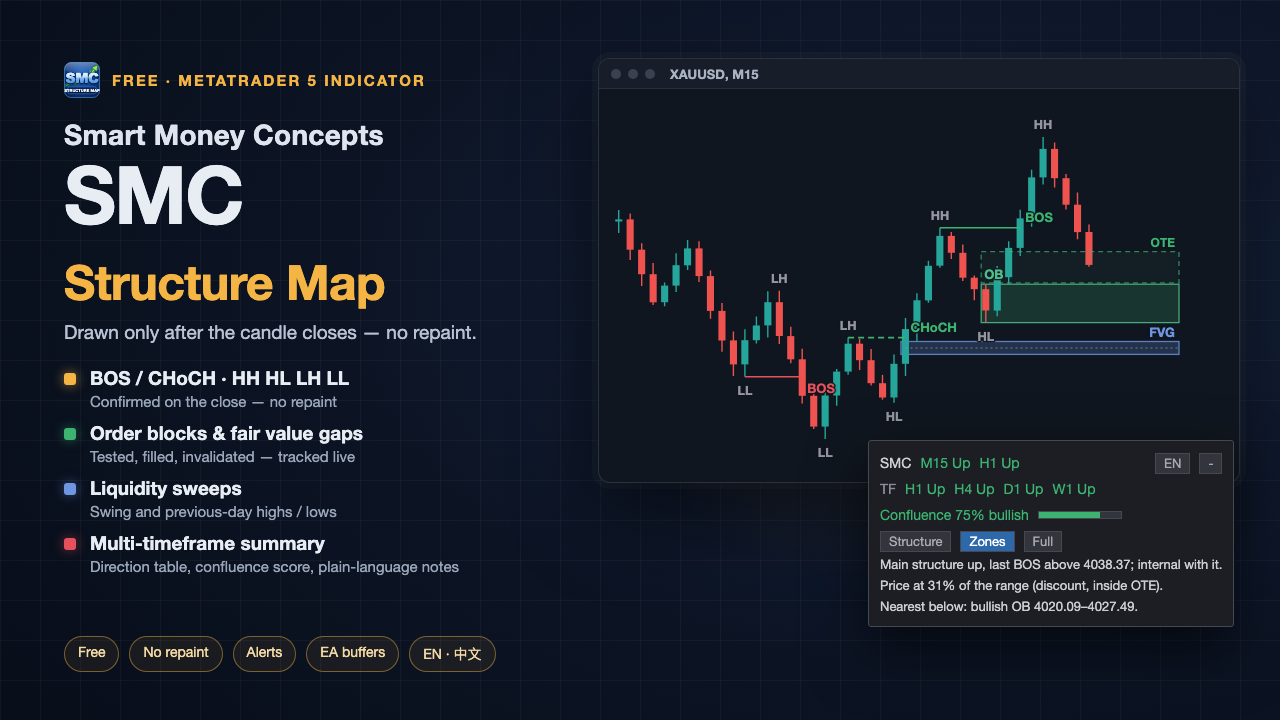
SMC Structure Map is an SMC (market structure, order blocks, fair value gaps) indicator for MetaTrader 5. It marks, with fixed and published rules:
- market structure: swing highs and lows, BOS, CHoCH;
- order blocks (OB) and fair value gaps (FVG), and what happens to them afterwards;
- liquidity sweeps;
- on the panel: higher-timeframe direction, a confluence score and plain-language notes, plus an optional premium / discount range with OTE.
Everything is drawn from closed candles only. What you see on history is exactly what you would have seen live — nothing is redrawn later.
It is an analysis tool. It does not trade, does not give buy or sell instructions and promises no profit. It is completely free with no locked features, needs no registration and connects to no
outside service.
2. Features
Market structure
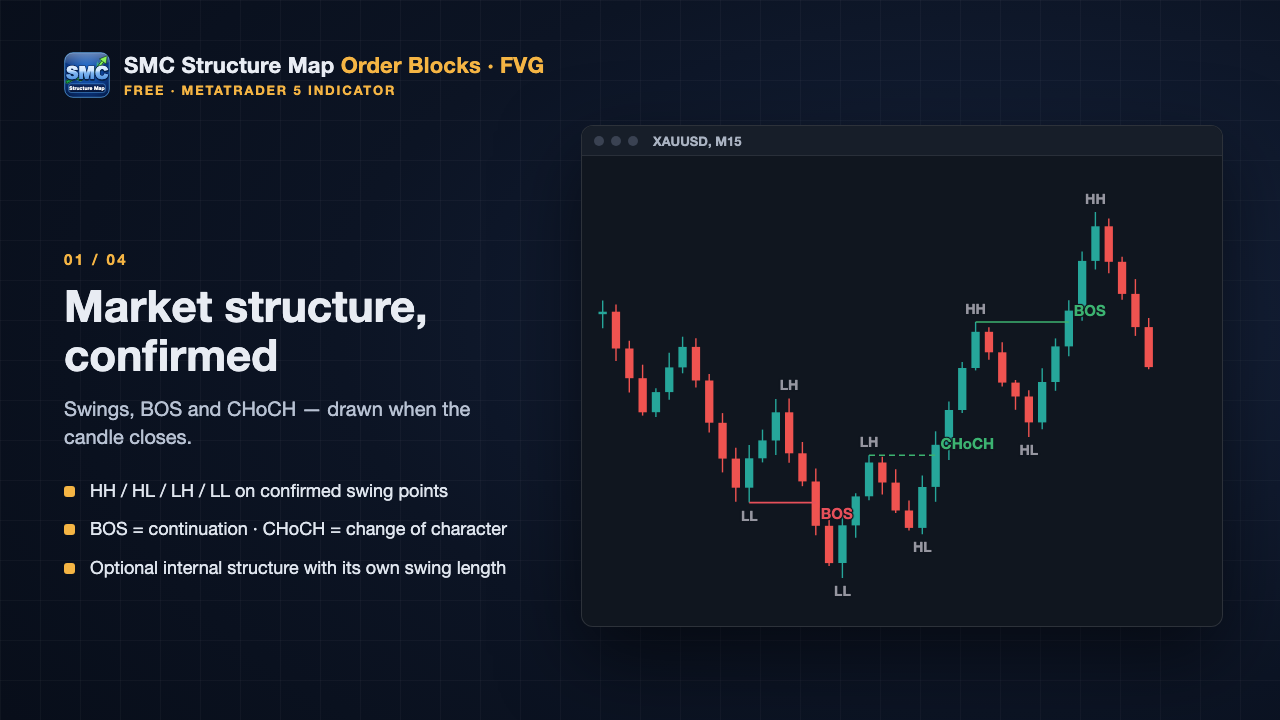
- Confirmed swing highs and lows labelled HH / HL / LH / LL; nearly equal highs or lows labelled EQH / EQL.
- BOS (continuation) or CHoCH (change of character) when a candle closes beyond a swing level.
- Optional internal structure (shorter swing length, thinner and lighter lines). It never changes the main structure direction.
Order blocks and fair value gaps
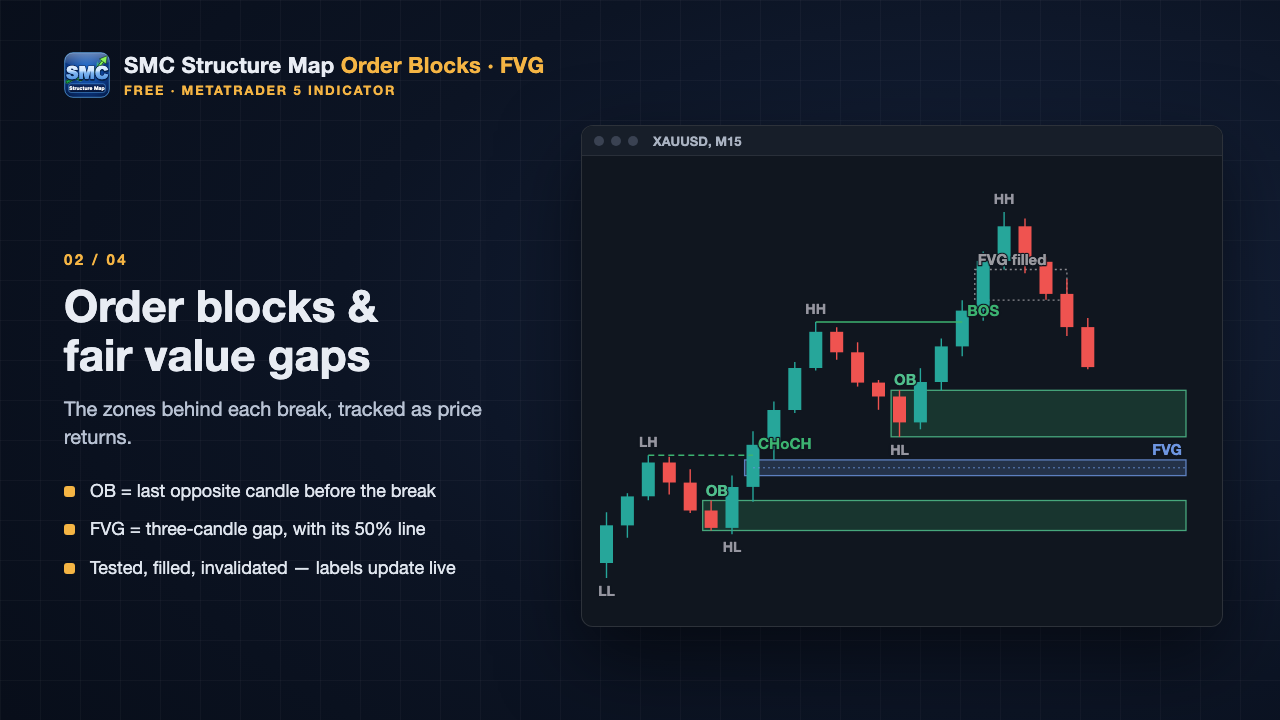
- Order block: the last opposite candle before a structure break.
- FVG: a three-candle gap, with its 50% line and fill percentage.
- States update as price comes back: OB tested / invalid; FVG touched / 50% / filled / gapped.
- By default the 3 zones nearest to price are drawn per type and direction; the panel tells you how many are not shown.
Liquidity sweeps
- A candle runs beyond a confirmed swing high / low or the previous day's high / low and closes back inside.
Higher timeframe overlay (optional)
- Structure, OBs and FVGs of one higher timeframe on the current chart, labelled with the timeframe, e.g. [H1] OB .
Panel summary
- Main structure direction of up to 4 higher timeframes.
- Confluence score 0–100% with published rules and weights (§5). It is not a win rate and not a trade signal.
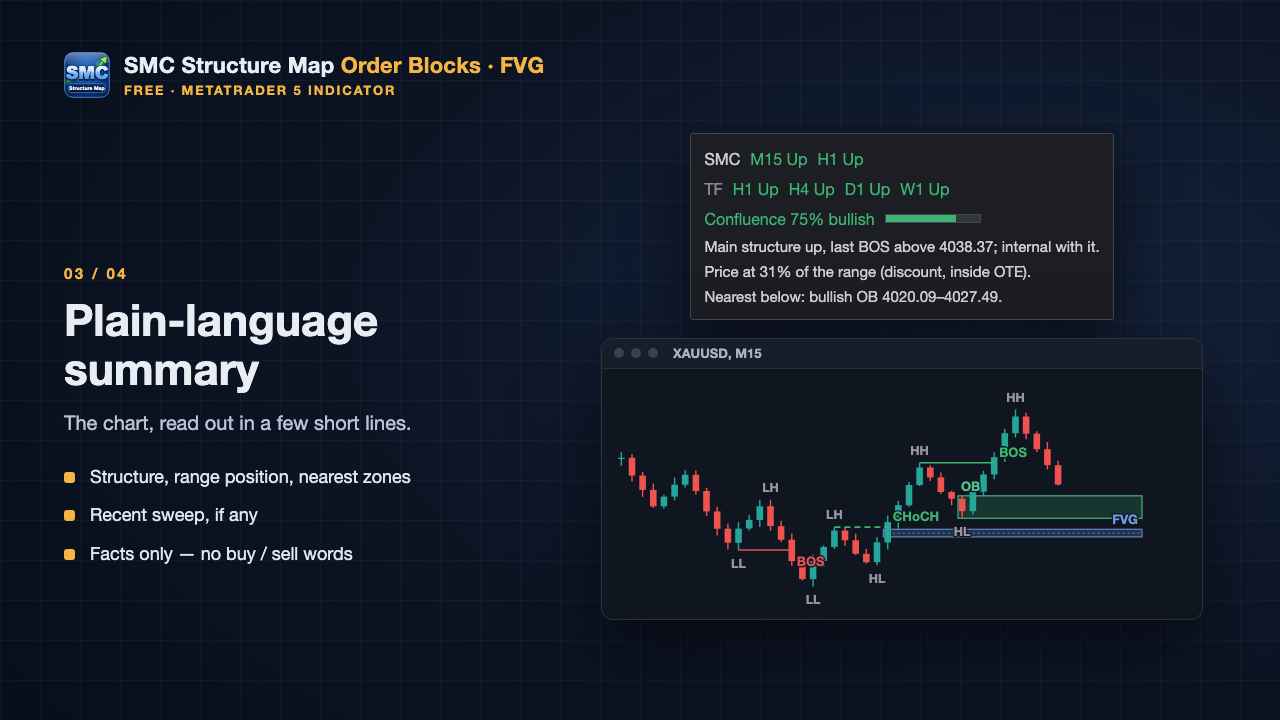
- Plain-language notes: structure, where price sits in the range, the nearest zones, the latest sweep — facts only.
Premium, discount and OTE (optional)
- 50% line of the latest swing range, premium / discount halves and the 61.8–78.6% OTE retracement.
Alerts
- Pop-up, sound or MT5 push after the candle closes. No replay of old events, one alert per event across charts, push messages rate-limited.
Also
- Three display presets and one-click toggles; switching does not recalculate anything.
- Draggable panel that remembers its place per chart.
- English and Chinese, following the terminal language by default.
- Auto colors for dark and light charts; sharp on high-DPI screens.
- 14 data buffers for EA developers (§10).
3. The rules
There is no single official definition of SMC, and different indicators draw different things. These are the rules this indicator uses — all of them, no hidden conditions.
3.1 Swing points
- Swing high: the candle's high is above the N candles on its left and not below the N candles on its right. Swing low: the opposite.
- N = 5 for main structure, N = 2 for internal structure (both adjustable).
- A swing point is confirmed only when all N candles on its right have closed. It therefore always appears N candles after the actual high or low. This delay is part of the rule, not lag.
- Compared with the previous swing of the same kind: HH (higher high), LH (lower high), HL (higher low), LL (lower low). If the difference is within 0.1 × ATR(14) it is labelled EQH / EQL.
3.2 BOS and CHoCH
- Each structure tracks only the latest confirmed swing high and the latest confirmed swing low. A newly confirmed swing replaces the old one.
- A close strictly above the swing high is an upward break; a close strictly below the swing low is a downward break. A wick through the level without a close beyond it does not count.
- Break in the same direction as the current structure → BOS. In the opposite direction → CHoCH, and the direction flips.
- When no direction exists yet, the first break only sets the direction; it is not labelled BOS or CHoCH.
- Each swing level can be broken only once.
3.3 Order blocks
- Created only by main-structure BOS / CHoCH.
- Upward break: the last bearish candle (close below open) before the break; downward break: the last bullish candle. The search goes back at most 20 candles and not past the latest opposite swing point. If there is none, no OB is drawn.
- Zone = that candle's full high-to-low range.
- A later candle reaches the zone → tested. A bullish OB with a candle closing below its low (bearish OB: closing above its high) → invalid.
"Order block" here is a rule-based price zone. It does not mean the indicator sees real institutional orders.
3.4 Fair value gaps
- Three closed candles A, B, C: C's low above A's high → bullish FVG; C's high below A's low → bearish FVG.
- Gaps smaller than 0.2 × ATR(14) are ignored.
- The FVG appears when C closes, not earlier.
- Fill is measured by how deep later wicks reach, and it only grows: near edge = touched, middle = 50%, far edge = filled.
- If price gaps over the whole FVG with no trading inside, it is marked gapped, not filled.
3.5 Liquidity sweeps
- Reference levels: the swing high / low currently tracked by main structure, and the previous day's high / low (intraday timeframes only).
- Sweep above: the candle's high is strictly above the level and its close strictly below it. Sweep below: the opposite.
- Only the same candle going through and closing back counts. Each level counts only its first sweep.
- Marked Sweep ; previous-day levels as Sweep PDH / Sweep PDL .
3.6 Higher timeframe
- Uses closed higher-timeframe candles only. The higher-timeframe candle that is still forming is ignored until it closes.
- Higher-timeframe events appear on the current chart at the moment that higher-timeframe candle closed.
- If higher-timeframe history is still downloading on first load, the panel shows ... and the overlay appears by itself when ready
4. Why it does not repaint
- Each mark is drawn only after all the candles it needs have closed. Once drawn, its position and price never change.
- A zone's state can change (for example from untested to tested). That is what happened to the zone later, not a rewrite of history.
- Invalid or filled zones are hidden by default. The Inactive button on the panel shows them in grey; nothing is deleted from history.
- History is recalculated only when you change inputs, missing history is filled in, or the number of bars to analyse changes. Then everything is rebuilt from scratch under the new conditions.
During development the bar-by-bar result in the Strategy Tester was compared with a one-time history load: both matched event for event.
5. Panel: timeframes, confluence score, notes
5.1 Higher-timeframe direction
The first 4 of M15, H1, H4, D1, W1 that are above the chart timeframe, using the same main-structure rules on closed candles:
| Chart | Timeframes on the panel |
|---|---|
| M1 / M5 | M15 · H1 · H4 · D1 |
| M15 | H1 · H4 · D1 · W1 |
| H1 | H4 · D1 · W1 |
| H4 | D1 · W1 |
| D1 | W1 |
... = data still loading, - = not enough history.
5.2 Confluence score 0–100%
Bullish and bearish sides each get a score = the sum of the weights of the conditions that are met. The panel shows the higher side, e.g. Confluence 75% bullish ; when both are equal it shows balanced .
| Condition (bullish; bearish is symmetric) | Weight |
|---|---|
| Chart main structure is up | 25 |
| Higher timeframes: 20 ÷ number of timeframes for each one that is up | 20 |
| Internal structure is up | 15 |
| Close in the discount half: 10; main structure up and close inside OTE: 15 | 15 |
| Close inside a valid bullish OB or an unfilled bullish FVG | 15 |
| A sweep below within the last 20 closed candles | 10 |
Hover the score to see both sides and every condition (√ / ×).
The score only tells you how many confirmed conditions point the same way right now. It is not a win rate and not a trade signal: a high score does not mean price will go up, a low one does not mean it will go down.
5.3 Plain-language notes
Up to 5 lines, facts only, for example:
- Main structure up, last BOS above 4038.37 (10.23 14:00); internal structure with it.
- Price at 31% of the range (discount, inside OTE), range 3998.40–4061.20.
- Nearest below: bullish OB 4020.09–4027.49.
- 10.23 09:15: swept the previous-day low 4001.75 and closed back.
When internal structure points the other way, the first line says "internal structure against it (pullback)".
On a short chart, lines are dropped from the bottom so the buttons always stay visible.
6. Premium, discount and OTE
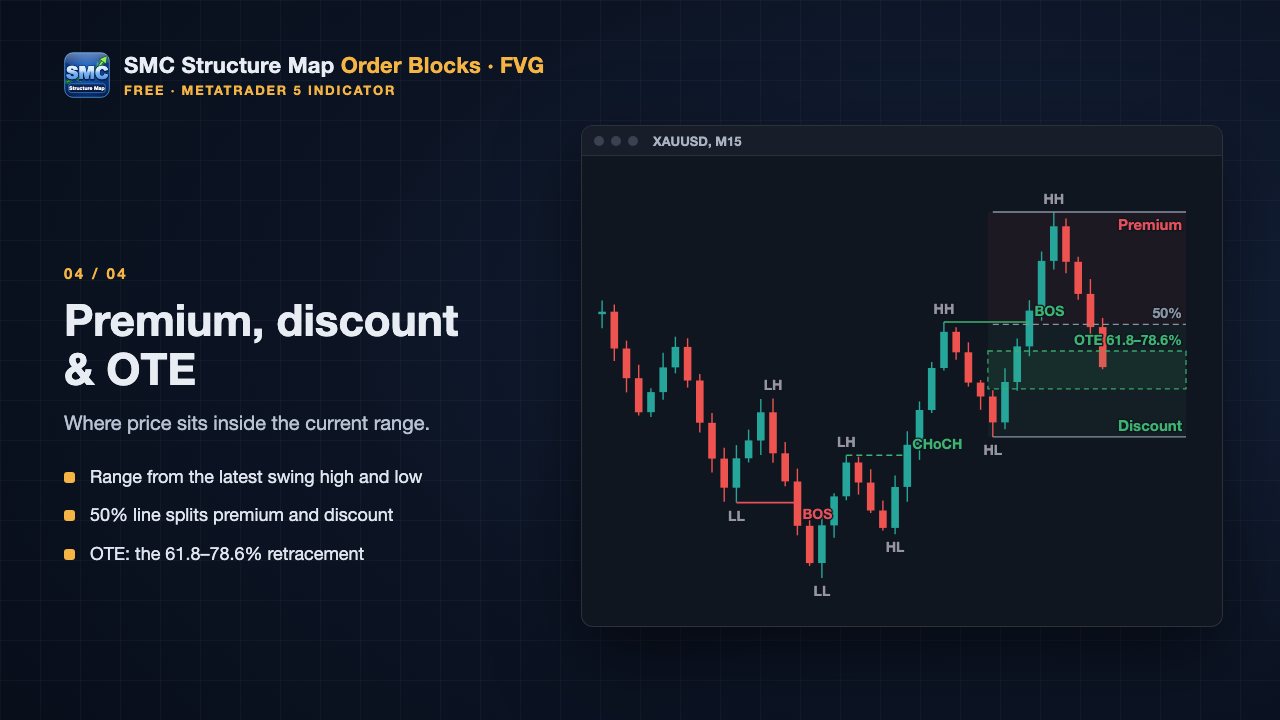
- Range: from the earlier of the latest confirmed swing high and swing low to the last closed candle — the highest high and lowest low of that stretch.
- Middle = 50%. Upper half = premium, lower half = discount.
- OTE: with main structure up, the 61.8–78.6% retracement down from the high; with structure down, 61.8–78.6% up from the low. No OTE while the direction is not set.
- Only the current range is drawn. No extension targets.
- Off by default; turn it on with the Range button. It is calculated even when hidden, because the score and notes use it.
7. Installation and first use
- Download SMC Structure Map Order Blocks FVG from the Market: [MARKET LINK].
- Open a chart (for example XAUUSD M15), drag the indicator from Navigator → Indicators → Market onto it and press OK.
- After a few seconds the structure, zones and the panel appear. The default inputs work as they are.
- Higher-timeframe overlay: click the button with the timeframe name on the panel ( H1 by default). To use another timeframe, change Higher timeframe in the inputs.
- Alerts: turn on Alerts (master switch) in the Alerts group of the inputs (§9).
The panel
| Where | What it does |
|---|---|
| First row | Main structure direction (Up / Down / not set); higher-timeframe direction when the overlay is on. On the right, 中 / EN switches the language, - / + collapses / expands the panel |
| Timeframe and score rows | See §5 |
| Structure Zones Full | Display presets (below) |
| Main Internal OB FVG | Show / hide each module |
| Sweeps H1 Inactive Range Summary | Sweeps, higher-timeframe overlay, grey invalid zones, premium / discount range, panel summary |
| Last two rows | How many zones are shown and not shown; analysis range (since when, how many bars) |
| Preset | Shows |
|---|---|
| Structure | Main structure lines, direction and swing points |
| Zones (default) | Main structure + the nearest valid OBs / FVGs |
| Full | Main and internal structure, OB, FVG, sweeps |
- Presets change only what is shown, not the calculation. After you toggle a single module, no preset button is highlighted (custom mix).
- Higher timeframe, Inactive, Range and Summary are independent of the presets.
- Drag the panel by any empty spot. Its place and all toggles are saved per chart and kept after timeframe changes and terminal restarts.
- Hover any mark to see its type, price, source time, confirmation time and current state.
8. Inputs
For anything the panel can switch (preset, language, colors, inactive zones, summary, range, higher-timeframe on / off), the input value is used on first load only; afterwards the panel decides. This way switching the display never recalculates.
| Input | Default | Notes |
|---|---|---|
| Draw on the chart | true | false = calculate only, draw nothing (for EAs, §10) |
| Structure | ||
| Swing length | 5 | Candles needed on each side of a main swing. Larger = bigger structure, later confirmation |
| Internal structure swing length | 2 | Swing length of internal structure |
| Bars to analyse | 3000 | Changing it moves the starting point, so the earliest structure can differ |
| ATR period | 14 | Used for the minimum FVG size and the EQH / EQL tolerance |
| Equal high / low tolerance (x ATR) | 0.1 | Affects labels only |
| Zones | ||
| Order block lookback (bars) | 20 | How far back to look for the opposite candle |
| Minimum FVG size (x ATR) | 0.2 | Smaller gaps are ignored |
| Zones shown per type and direction | 3 | |
| Which zones to show | Nearest | Nearest = closest to price; Newest = most recently formed |
| Higher timeframe | ||
| Show one higher timeframe | false | Can also be switched on the panel |
| Higher timeframe | H1 | Must be above the chart timeframe; otherwise the panel says why, it is never silently changed |
| Display (first load only) | ||
| Display preset | Zones | Structure / Zones / Full |
| Also show invalidated / filled zones | false | In grey |
| Language | Auto | Auto (terminal) / English / 中文 |
| Colors | Auto | Auto (chart background) / Dark / Light |
| Panel summary | true | Timeframes, score, notes |
| Premium / discount range and OTE | false | |
| Alerts | See §9 |
9. Alerts
Set them in the Alerts (on candle close) group of the inputs:
| Input | Default | Notes |
|---|---|---|
| Alerts (master switch) | false | |
| BOS / CHoCH | true | Chart timeframe main structure |
| First touch of an OB / FVG | true | |
| OB invalidated, FVG 50% / filled / gapped | false | The other zone state changes |
| Sweeps | false | |
| Higher-timeframe BOS / CHoCH | false | Needs the higher timeframe on |
| Pop-up / Sound / Push | true / false / false | Push needs your MetaQuotes ID in Tools → Options → Notifications |
- Alerts come after the candle closes, so they are one candle later than the moment price touched the level.
- Loading the indicator, changing the timeframe or restarting the terminal does not replay old events; events missed while disconnected are not sent afterwards either.
- Several charts with the same symbol and timeframe in one terminal alert once per event.
- More than 3 events on one candle are merged into one message. Push: at most 6 per minute, the rest merged.
- No alerts in the Strategy Tester.
Example: SMC XAUUSD M15 | Bullish BOS 4123.45 (M15 bar closed 10:15) . The language follows the panel; times are trade-server time.
10. For EA developers (buffers)
Read with iCustom + CopyBuffer . Pass false as the first input to get a copy that only calculates — no drawing, no alerts:
int h = iCustom(_Symbol, _Period, "Market\\SMC Structure Map Order Blocks FVG", false);
Market products are installed in MQL5\Indicators\Market\ , hence the Market\\ prefix.
| Buffer | Meaning | Value |
|---|---|---|
| 0 | Main structure direction | -1 down, 0 not set, 1 up |
| 1 | Main structure event | ±1 BOS, ±2 CHoCH, ±3 first break; positive = up |
| 2 | Broken level | Swing price |
| 3 | Internal structure event | Same as buffer 1 |
| 4 / 5 | New bullish OB low / high | Only on the BOS / CHoCH candle that created it |
| 6 / 7 | New bearish OB low / high | Same |
| 8 / 9 | New bullish FVG low / high | Only on candle C |
| 10 / 11 | New bearish FVG low / high | Same |
| 12 | Sweep above: reference level | If several on one candle, the one closest to the close |
| 13 | Sweep below: reference level | Same |
- No event = EMPTY_VALUE . The forming candle (shift 0) is always EMPTY_VALUE — read shift 1 and older.
- Events are written on the candle that confirms them and never change afterwards. Reading shift 1 when a new candle opens is enough.
- On first load wait until the history is calculated: if BarsCalculated(h) is less than Bars(_Symbol,_Period) , try again on the next tick.
- To change other inputs, pass them in order; every input group header also takes a position, filled with "" . Example with the higher timeframe off:
iCustom(_Symbol,_Period,"Market\\SMC Structure Map Order Blocks FVG",
        false,"",5,2,3000,14,0.1,"",20,0.2,3,0,"",false);
Skipping a group position shifts every input after it and the indicator reports invalid inputs . - These are calculation buffers, so they do not show in the MT5 Data Window; CopyBuffer works normally.
- Chart timeframe only. The panel's timeframes, score and notes are not in the buffers.
11. FAQ
| What you see | Why / what to do |
|---|---|
| Swing points appear several candles late | Normal: 5 candles (Swing length) on the right must close first |
| Price touched a zone but the alert came later | Alerts are sent after the candle closes |
| Fewer zones than expected | By default only the 3 nearest per type and direction are drawn; the bottom of the panel shows how many are hidden. Change Zones shown per type and direction |
| An OB / FVG disappeared | It became invalid or was filled. Turn on Inactive on the panel to see it in grey |
| Changed language / preset in the inputs, nothing seems to change | A changed input overrides the panel once; for everyday use, click the panel buttons |
| Higher-timeframe button shows ... | Higher-timeframe history is still downloading; it appears by itself |
| Panel says "H1 must be above H1" | The higher timeframe must be above the chart timeframe |
| It draws differently from another SMC indicator | SMC has no single definition; the rules used here are in §3 |
| No push notifications | Enter your MetaQuotes ID in Tools → Options → Notifications and enable them |
| Several charts of one symbol, only one alert | Normal: one alert per event |
| My EA reads only empty values at shift 0 | Normal; read shift 1 |
| Strategy Tester | Works; visual mode shows the marks forming bar by bar. No alerts in the tester |
12. Limitations
- MetaTrader 5 only.
- SMC concepts have no single definition. This indicator follows the rules in §3; other tools may differ.
- Uses only price (OHLC) and ATR — no volume, order book or outside data. "Order block" and "liquidity" are names for price patterns, not real institutional orders or stop clusters.
- Confirmation has a delay by design: swings wait for candles on the right, breaks wait for the close. That is the price of not repainting.
- The confluence score and notes describe the current state. They do not predict price and are not trading advice.