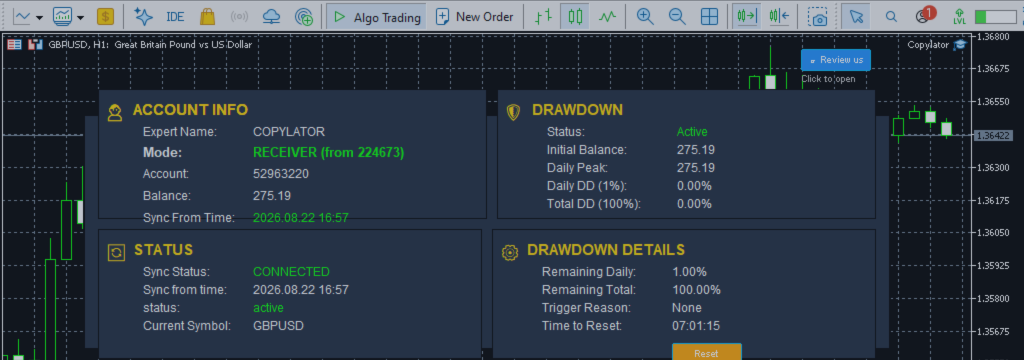

Product link:
https://www.mql5.com/en/ market/product/191385
Scalping is one of the most demanding trading styles to replicate through an MT5 Trade Copier. Positions may remain open for only a few seconds or minutes, expected profits can be relatively small, and execution costs can represent a significant portion of the trade result.
For this reason, a configuration that works well for swing trading or longer-term strategies should not automatically be considered suitable for scalping.
Scalping copy trading requires particular attention to latency, spread, slippage, execution quality, lot sizing, symbol mapping, margin, and trading-session selection.
With COPYLATOR, traders can configure multiple aspects of the copying process, but the quality of the final execution also depends on the Sender broker, Receiver broker, VPS/network environment, market conditions, and account configuration.
1. Why Scalping Is Different From Other Copy Trading Strategies
The fundamental difference between scalping and longer-term trading is the size of the expected price movement relative to trading costs.
Consider a strategy targeting approximately 10 pips. If the Receiver experiences 2 pips of additional execution cost or slippage, a substantial portion of the expected movement has already been consumed.
Expected profit target: 10 pips Additional execution cost: 2 pips Remaining movement: 8 pips
The exact impact depends on the instrument, entry and exit conditions, spread, commission, slippage, and strategy design. The important principle is that small-cost differences matter much more when the expected trade movement is small.
2. Latency Is a Critical Factor
Latency is the time required for information and trade instructions to travel through the copying and execution process.
A simplified copy-trading sequence looks like this:
Sender detects trade
        ↓
Sender execution
        ↓
Trade Copier detects the position
        ↓
Information transmitted
        ↓
Receiver processes the trade
        ↓
Receiver sends order
        ↓
Receiver broker executes
For scalping, every part of this sequence matters.
A delay that is insignificant for a position intended to remain open for several hours may become important for a position intended to capture only a few pips.
3. VPS Location and Network Distance
A VPS is strongly recommended when operating a scalping copier continuously.
The objective is to place the MT5 terminals in an environment with a stable internet connection and low network latency to the relevant broker infrastructure.
However, VPS location alone does not guarantee better execution. Broker routing, liquidity, server load, network conditions, and market volatility can all affect actual execution.
A practical setup is:
VPS | +-- MT5 Sender Terminal | +-- MT5 Receiver Terminal(s) | +-- COPYLATOR
Running the required terminals in the same VPS environment can also reduce unnecessary communication between separate physical machines.
4. One Chart Per Terminal
COPYLATOR is designed for a single-chart installation per MT5 terminal.
For a dedicated scalping environment, keeping the terminal focused on the copier can help simplify the setup and reduce unnecessary workload.
A clean environment can include:
- Only the required MT5 terminal(s)
- COPYLATOR running on the required chart
- Automated Trading enabled
- Minimal unnecessary indicators
- Minimal unnecessary Expert Advisors
- A stable VPS connection
This does not mean that every additional chart automatically creates a measurable execution problem. Rather, a dedicated environment makes it easier to control resource usage and diagnose delays.
5. Spread Is Extremely Important for Scalping
Spread represents an immediate trading cost and can be particularly important when the strategy targets small price movements.
For example, a strategy targeting a relatively small profit may become much less attractive if the Receiver frequently experiences wider spreads.
COPYLATOR includes a MaxSpread parameter that can be used to reject copying when the Receiver's spread exceeds the configured limit.
The key point is that the relevant spread is the Receiver's spread.
Sender Spread
      ≠
Receiver Spread
The Receiver executes the trade under its own broker's market conditions. Therefore, a setup that works with a low-spread account may behave differently on an account with wider spreads.
6. How to Configure the Spread Filter
The appropriate MaxSpread value depends on:
- Instrument
- Average spread
- Strategy profit target
- Commission structure
- Trading session
- Market volatility
For a scalping strategy, setting the filter too high can allow trades during unfavorable spread conditions.
Setting it too low can cause legitimate trades to be skipped.
Therefore, the correct approach is to measure the Receiver's actual spread during the strategy's trading sessions and select a threshold based on that evidence.
7. Slippage Cannot Be Completely Eliminated
Even with low latency and a tight spread, the Receiver may not receive exactly the same execution price as the Sender.
This difference is known as slippage.
It can increase during:
- Major economic news
- Sudden volatility
- Low-liquidity periods
- Market openings
- Rapid price movements
Consequently, a scalping strategy should be evaluated using actual Receiver execution rather than assuming that the Sender's historical results will be reproduced exactly.
8. News Releases and Scalping
Major economic announcements can create exceptionally fast price movements.
During these periods, several conditions may change simultaneously:
- Spread can widen.
- Slippage can increase.
- Liquidity can change.
- Execution prices can move rapidly.
- Orders can be filled differently between accounts.
For strategies that are not specifically designed for news trading, avoiding these periods may reduce execution uncertainty.
A trader can combine a trading schedule with an external economic-calendar workflow and configure the copier's trading restrictions accordingly.
9. Time Filters for Scalping
Scalping performance can vary significantly between trading sessions.
Liquidity, volatility, spread, and execution conditions are not constant throughout the day.
COPYLATOR provides day and time filtering options that allow traders to define when copying is permitted.
The configuration can be designed around the strategy's tested trading window rather than allowing copying throughout the entire day.
Example
Trading window: Start: 07:00 GMT End: 16:00 GMT
The actual schedule should be determined by the strategy and the market being traded. Traders should also account for broker server time and the configured GMT-based time parameters.
10. Session Selection
Scalping does not necessarily perform equally well during every market session.
Traders should evaluate the actual spread and execution conditions of their instruments during each session.
| Session | What to Monitor |
|---|---|
| Asian | Spread and liquidity on the selected instruments |
| London | Liquidity, volatility and execution |
| New York | Liquidity, volatility and news events |
| Session Overlaps | Spread, volatility and slippage |
Rather than assuming that one session is universally superior, traders should evaluate the specific instrument and strategy.
11. Lot Sizing for Scalping
Lot sizing is especially important for frequent trading strategies.
COPYLATOR supports several volume-management methods:
- Fixed Lot
- Lot Multiplier
- Balance Ratio
- Maximum Lot Cap
Each method produces a different relationship between the Sender's position and the Receiver's position.
12. Fixed Lot
Fixed Lot is useful when the trader wants a predictable volume on the Receiver.
Sender Volume:
0.50

Receiver Fixed Lot:
0.10
This approach can make volume behavior straightforward to monitor.
However, the same fixed lot does not necessarily represent the same percentage risk across accounts of different sizes.
13. Balance Ratio
Balance-ratio scaling can adjust the Receiver's volume according to the relationship between account balances.
This can be useful when the Sender and Receiver accounts have different capital sizes.
However, balance-ratio scaling does not guarantee identical monetary risk because leverage, contract specifications, stop-loss distance, symbol characteristics, and broker conditions can differ.
14. Lot Multiplier
A lot multiplier can increase or decrease the copied volume relative to the Sender.
For example:
Sender: 1.00 lot Lot Multiplier: 0.50 Calculated Receiver volume: 0.50 lot
For scalping, conservative multipliers should be considered carefully because high trade frequency can amplify the effect of an aggressive volume setting.
15. Maximum Lot Cap
The Max Lot Size parameter provides an upper limit on copied volume.
This can be particularly useful when an unusual Sender position or volume calculation could otherwise produce a larger-than-intended Receiver position.
Calculated volume: 1.20 lots
Maximum Lot Size:  0.50 lots

Receiver volume:
0.50 lots
A maximum lot cap controls volume; it does not guarantee a specific monetary or percentage risk.
16. Symbol Mapping Must Be Tested
Scalping leaves very little time to recover from a symbol-mapping problem.
For example:
Sender: EURUSD Receiver: EURUSD.a
COPYLATOR's automatic symbol mapping can attempt to identify the corresponding Receiver symbol.
If automatic mapping cannot find the appropriate symbol, the system can notify the user and manual mapping can be configured.
Example Manual Mapping
EURUSD:EURUSD.a
XAUUSD:XAUUSDm
Every mapping should be verified on the actual Receiver broker before live scalping.
17. Why Same-Broker Accounts Can Simplify Scalping
Using the same broker for Sender and Receiver can reduce some differences in symbol naming and trading specifications.
However, using the same broker does not guarantee identical execution.
Different accounts can still experience differences caused by:
- Account type
- Liquidity
- Execution conditions
- Spread
- Commission
- Server conditions
Therefore, same-broker copying can simplify configuration but should not be treated as a guarantee of identical fills.
18. Margin Management
Scalping strategies can generate multiple trades within a relatively short period.
If the Receiver account does not have sufficient free margin, an otherwise valid copied trade can be rejected.
Before live deployment, monitor:
- Free Margin
- Margin Level
- Maximum simultaneous exposure
- Maximum lot size
- Frequency of trades
Conservative volume settings can help prevent excessive margin usage.
19. Drawdown Protection for Scalping
Frequent trading can create rapid sequences of wins and losses.
COPYLATOR's Advanced Drawdown Protection can be configured on the Receiver to monitor account-level drawdown.
Depending on configuration, when the configured drawdown limit is exceeded, new copying can be blocked and, if CloseOrdersOnDrawdown is enabled, COPYLATOR-opened positions can be closed and COPYLATOR pending orders can be deleted.
For scalping, traders should carefully test the interaction between rapid trading activity and drawdown protection before using it on a live account.
20. Partial Close in Scalping
Some scalping strategies reduce position size progressively as price moves in the intended direction.
For example:
Initial position: 1.00 lot Partial close: 0.50 lot Remaining: 0.50 lot
COPYLATOR supports Partial Close, allowing part of a copied position to be closed while the remaining volume stays open.
This can be useful when the Sender strategy uses staged exits.
21. Real-Time SL/TP Synchronization
Scalping strategies can sometimes modify Stop Loss or Take Profit shortly after entry.
COPYLATOR supports real-time SL/TP synchronization, including changes made after a trade has already been opened.
This is important because a copier that only copies the original entry but fails to synchronize subsequent stop changes can produce materially different Receiver behavior.
22. Pending Orders and Scalping
Some scalping systems use pending orders rather than direct market entries.
COPYLATOR supports common pending-order types, including:
- Buy Limit
- Sell Limit
- Buy Stop
- Sell Stop
Pending orders should be tested carefully because broker restrictions such as Stop Level, Freeze Level, minimum distance, and symbol trading conditions can affect whether an order can be placed or modified.
23. Hedging vs Netting
COPYLATOR supports both Hedging and Netting account environments, with differences in how positions are represented and synchronized.
Hedging accounts can maintain multiple independent positions for the same symbol.
Netting accounts maintain a single net position per symbol.
For scalping systems that frequently open, modify, partially close, and reverse positions, the account model should be tested carefully because position management behavior can differ.
24. Reverse Mode and Scalping
COPYLATOR's Reverse Mode can convert Buy trades into Sell trades and vice versa, with corresponding SL/TP adjustments.
However, Reverse Mode changes the strategy's market exposure.
It can also change:
- Applicable spread conditions
- Swap conditions for overnight positions
- SL/TP relationship
- Position direction
- Potential execution characteristics
For a scalping system, Reverse Mode should therefore be validated using actual Receiver results rather than assumed to preserve the original strategy's performance.
25. Commission Must Also Be Considered
Spread is not the only cost relevant to scalping.
Some brokers offer very tight spreads but charge commissions, while other account types may incorporate more of the trading cost into the spread.
Therefore, a realistic evaluation should consider:
Spread
+
Commission
+
Slippage
+
Swap, if applicable
=
Trading Cost
The smaller the expected profit per trade, the more important this complete cost calculation becomes.
26. Why Sender Performance Does Not Guarantee Receiver Performance
A common mistake is to assume that if a scalping strategy is profitable on the Sender, the Receiver should automatically produce the same result.
The actual process is more complicated:
Sender Strategy ↓ Sender Execution ↓ Copy Latency ↓ Receiver Spread ↓ Receiver Execution ↓ Receiver Slippage ↓ Receiver Commission ↓ Receiver Net Result
Therefore, historical Sender performance should be treated as a reference rather than a guarantee of Receiver performance.
27. What Should Be Tested on Demo?
A scalping copier should be tested under realistic conditions before live deployment.
The following checklist is recommended:
- End-to-end execution latency
- Receiver spread during active trading hours
- Entry slippage
- Exit slippage
- Commission
- Symbol mapping
- Pending-order execution
- SL/TP synchronization
- Partial Close synchronization
- Lot multiplier behavior
- Balance-ratio behavior
- Maximum lot cap
- Margin usage
- Drawdown protection
- Time-filter behavior
- News-period behavior
28. Measure the Actual Delay
Instead of assuming that a VPS or broker is fast enough, measure actual execution behavior.
A useful test is to compare:
Sender execution time
        vs.
Receiver execution time
Repeat the test under different market conditions.
Latency during a quiet market can be very different from latency during a major volatility event.
29. Test During Real Trading Sessions
A scalping copier should not be evaluated only during quiet market conditions.
Test during the actual sessions in which the strategy is intended to operate.
Record:
| Metric | What to Observe |
|---|---|
| Spread | Normal and elevated conditions |
| Latency | Sender-to-Receiver delay |
| Slippage | Entry and exit difference |
| Execution | Rejected or delayed orders |
| Margin | Peak usage |
| Synchronization | SL/TP and volume changes |
30. A Practical Scalping Configuration Checklist
Before going live, review the following:
- Use a stable VPS environment.
- Keep the MT5 environment dedicated and lightweight.
- Install COPYLATOR correctly with one chart per terminal.
- Verify Sender and Receiver modes.
- Verify SenderAccountNumber on each Receiver.
- Confirm Automated Trading is enabled.
- Verify every symbol mapping.
- Measure Receiver spread.
- Configure MaxSpread according to the strategy.
- Choose conservative lot settings.
- Configure MaxLotSize where appropriate.
- Check available margin.
- Configure SL/TP synchronization correctly.
- Test Partial Close if the strategy uses it.
- Test pending orders if applicable.
- Configure the appropriate trading hours.
- Consider major news periods.
- Configure drawdown protection.
- Run an extended demo test.
- Compare Sender and Receiver results after costs.
31. Common Mistakes in Scalping Copy Trading
Mistake 1: Using a High Spread Limit
A loose spread filter can allow trades during conditions where transaction costs consume too much of the expected movement.
Mistake 2: Ignoring Slippage
Low spread alone does not guarantee good scalping execution.
Mistake 3: Using Excessive Lot Multipliers
Frequent trades combined with aggressive volume scaling can rapidly increase exposure.
Mistake 4: Not Testing Symbol Mapping
A mapping failure can prevent a trade from being copied at the moment it matters.
Mistake 5: Ignoring Margin
Rapid sequences of trades can consume margin faster than expected.
Mistake 6: Assuming Sender Results Equal Receiver Results
Differences in execution cost and broker conditions can materially affect short-duration strategies.
Mistake 7: Testing Only During Quiet Markets
A system should also be tested during the volatility conditions in which it is expected to operate.
32. Recommended Testing Workflow
Step 1 Install COPYLATOR ↓ Step 2 Configure Sender / Receiver ↓ Step 3 Verify Symbol Mapping ↓ Step 4 Configure Lot Management ↓ Step 5 Configure MaxSpread ↓ Step 6 Configure Trading Hours ↓ Step 7 Configure Drawdown Protection ↓ Step 8 Run Demo Scalping Test ↓ Step 9 Measure Spread + Slippage + Latency ↓ Step 10 Compare Net Results ↓ Step 11 Review Configuration ↓ Step 12 Consider Live Deployment
33. The Main Principle of Scalping Copy Trading
The objective is not simply to make the copier as fast as possible.
The objective is to build a complete execution environment in which unnecessary sources of cost and delay are controlled.
Low Latency
     +
Controlled Spread
     +
Acceptable Slippage
     +
Correct Symbol Mapping
     +
Controlled Lot Size
     +
Sufficient Margin
     +
Appropriate Trading Hours
     +
Reliable Synchronization
     =
Better-Controlled Scalping Environment
This does not guarantee profitability. It simply addresses the operational factors that can materially affect the replication of a short-duration strategy.
Conclusion
Scalping is one of the most demanding applications for an MT5 Trade Copier because the expected price movement can be small relative to spread, commission, slippage, and execution differences.
A successful configuration therefore requires more than simply installing a copier.
Latency should be measured, the Receiver's spread should be monitored, MaxSpread should be configured appropriately, lot sizing should remain controlled, symbol mappings should be verified, margin should be monitored, and trading hours should match the strategy's tested conditions.
COPYLATOR provides tools such as Multi-Sender/Multi-Receiver support, real-time SL/TP synchronization, flexible lot management, MaxSpread filtering, symbol mapping, Partial Close, Reverse Mode, time filters, and drawdown protection that can be used to build a structured MT5 copy-trading environment.
Nevertheless, the copier cannot remove market execution risk. The Receiver broker, liquidity, spread, slippage, commissions, VPS/network conditions, and market volatility all remain important.
For this reason, a scalping configuration should be tested on the actual intended Receiver environment before live deployment. The most meaningful test is not whether the Sender produced a profitable history, but whether the complete Sender-to-Receiver process can reproduce the strategy's execution characteristics after real trading costs.
Product link:
https://www.mql5.com/en/ market/product/191385