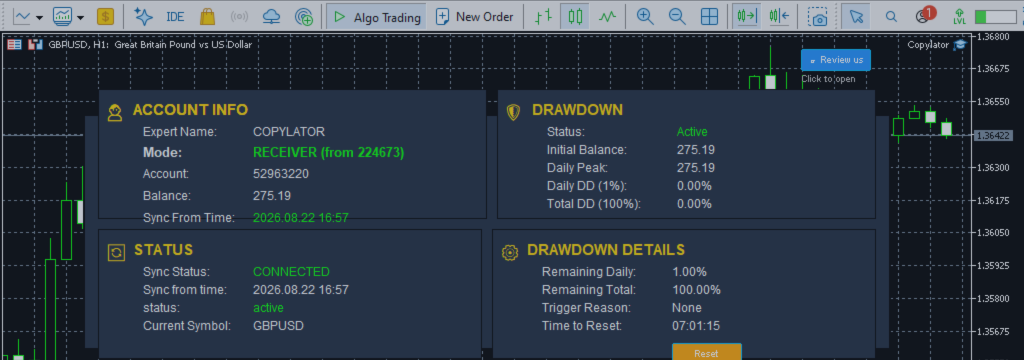
MT5 Trade Copier: Understanding Sender and Receiver Modes in Copy Trading

Product link:
https://www.mql5.com/en/ market/product/191385
Every professional copy trading system is built around two fundamental roles: the Sender and the Receiver. Understanding exactly what each role does—and, just as importantly, what it does not do—is the foundation of a correctly configured MT5 trade copier.
In COPYLATOR – MT5 Trade Copier, the separation between Sender and Receiver is designed to make multi-account trade replication flexible. The Sender provides trading information from its account, while each Receiver independently determines how that information should be applied to its own account.
This distinction becomes particularly important when one Sender is connected to multiple Receivers. Different Receiver accounts may have different balances, brokers, symbol names, risk controls, lot sizes, and trading restrictions. Keeping the decision-making functions on the Receiver allows each account to operate according to its own configuration.
1. Sender and Receiver: The Basic Concept
The simplest way to understand the architecture is:
- Sender = broadcasts trading events.
- Receiver = receives those events and decides how to execute them.
The Sender monitors its own MT5 trading account and reports events such as:
- Opening a market position
- Creating a pending order
- Changing Stop Loss
- Changing Take Profit
- Changing trade volume
- Partially closing a position
- Fully closing a position
- Deleting or modifying pending orders
The Receiver reads those events and applies its own configuration before executing the corresponding action.
2. Why Sender and Receiver Must Be Separated
The separation is not simply a technical preference. It is particularly useful in multi-account trading environments.
Imagine one Sender account connected to ten different Receiver accounts. The ten accounts may have:
- Different account balances
- Different brokers
- Different symbol names
- Different lot requirements
- Different risk limits
- Different trading schedules
- Different directional preferences
- Different drawdown limits
If all trade-copying decisions were made by the Sender, every Receiver would be forced to use the same rules. That would severely limit the usefulness of a multi-account copier.
Instead, COPYLATOR allows the Sender to provide the source trading information while each Receiver independently determines how that information should be copied.
3. What the Sender Actually Does
The Sender has an intentionally focused responsibility: observe and publish trading events from its own account.
Its primary tasks include:
- Monitoring the Sender account continuously
- Detecting newly opened market positions
- Detecting newly created pending orders
- Detecting Stop Loss modifications
- Detecting Take Profit modifications
- Detecting partial closes
- Detecting volume changes
- Detecting complete position closures
- Detecting pending-order modifications or deletions
- Publishing the relevant information for connected Receivers
The Sender therefore acts as the source of trading information. It does not need to know whether a particular Receiver will copy a trade, reject it, reverse it, reduce its volume, or block it because of a local risk rule.
Example: One Sender, Multiple Receivers
Sender Account | +---- Receiver A | +---- Receiver B | +---- Receiver C | +---- Receiver D
The Sender can broadcast the same trading event to all connected Receivers. Each Receiver can then process that event according to its own configuration.
4. What the Receiver Actually Does
The Receiver has the broader decision-making role. It receives the Sender's events and determines whether and how those events should be replicated.
Depending on the configuration, the Receiver may:
- Accept or reject a trade
- Apply day restrictions
- Apply time restrictions
- Check the configured spread limit
- Copy only Buy trades
- Copy only Sell trades
- Reverse Buy into Sell or Sell into Buy
- Calculate the appropriate lot size
- Apply a lot multiplier
- Use balance-ratio scaling
- Apply a maximum lot cap
- Map the Sender symbol to the Receiver symbol
- Apply custom Stop Loss or Take Profit settings
- Synchronize Stop Loss and Take Profit changes
- Replicate pending orders when enabled
- Process partial closes and volume changes
- Apply drawdown protection
These functions are account-specific. That is why they are configured on the Receiver side.
5. Filters Belong to the Receiver
Filters determine whether a Receiver should act on a particular trading event. They therefore belong to the Receiver.
Day and Time Filters
A Receiver can restrict when it is allowed to copy trades. For example, one Receiver can operate only during a configured trading window while another Receiver can use a different schedule.
The Sender continues reporting what happens on its own account. The Receiver decides whether the event is permitted under its local configuration.
Spread Filter
The Receiver can use its configured spread limit to avoid opening copied trades when the spread on the Receiver's broker exceeds the permitted value.
This is especially relevant when Sender and Receiver accounts use different brokers because the trading conditions can differ between terminals.
Direction Filters
A Receiver can be configured to copy only long trades or only short trades.
For example:
| Sender Event | Receiver Configuration | Possible Receiver Action |
|---|---|---|
| Buy | Buy-only | Copy |
| Sell | Buy-only | Ignore |
| Buy | Sell-only | Ignore |
| Sell | Sell-only | Copy |
6. Reverse Mode Is a Receiver-Side Decision
Reverse Mode changes the direction of a copied trade:
- Sender Buy → Receiver Sell
- Sender Sell → Receiver Buy
Because this transformation concerns how a particular Receiver executes the Sender's signal, it is configured on the Receiver.
COPYLATOR can also adjust the associated Stop Loss and Take Profit logic when Reverse Mode is used, subject to the account type and the configured trade conditions.
7. Lot Sizing Is Determined by the Receiver
The Sender reports its own trade volume, but the Receiver may use that information differently depending on its configuration.
COPYLATOR supports several lot-management approaches, including:
- Fixed Lot Size
- Lot Multiplier
- Balance-Ratio Scaling
- Maximum Lot Size
For example, suppose the Sender opens:
Sender Volume = 1.00 lot
One Receiver might use a fixed 0.10 lot, while another might use a multiplier or balance ratio to calculate a different volume.
This is another reason lot sizing cannot logically be imposed by the Sender: the appropriate volume depends on the Receiver account's configuration and trading environment.
8. Symbol Mapping Is a Receiver-Side Function
Different MT5 brokers can use different names for the same underlying instrument.
For example:
Sender: XAUUSD Receiver: XAUUSDm
The Receiver can automatically attempt to identify the corresponding symbol. If automatic mapping cannot find a suitable symbol, a manual mapping can be configured, for example:
XAUUSD:XAUUSDm
This mapping is local to the Receiver because the Receiver is the terminal that needs to identify the correct tradable symbol on its own broker.
9. Drawdown Protection Belongs to Each Receiver
Drawdown protection is another important example of why Receiver-side configuration is necessary.
A Sender's account balance and equity are not the same as those of a Receiver. Therefore, the Sender's drawdown cannot automatically represent the Receiver's risk.
COPYLATOR provides Receiver-side drawdown protection that can monitor configured daily and total drawdown thresholds.
Depending on the configuration, reaching a drawdown limit can:
- Block new copying
- Block modifications and pending-order copying
- Close COPYLATOR-opened positions when configured
- Delete COPYLATOR pending orders when configured
This allows different Receiver accounts to use different protection levels according to their own account conditions.
10. Partial Closes and Volume Changes
A trade does not necessarily remain at its original volume throughout its lifetime.
For example:
Original position: 1.00 lot Partial close: 0.40 lot Remaining volume: 0.60 lot
A modern trade copier must recognize that this is a volume change rather than a completely new position.
COPYLATOR includes Partial Close Support, allowing a Receiver to process partial position closures while keeping the remaining copied volume open.
This becomes particularly important when the Sender manages positions dynamically and takes partial profits during a trade.
11. Stop Loss and Take Profit Synchronization
The Receiver is also responsible for applying Stop Loss and Take Profit synchronization according to its settings.
This includes situations where:
- SL is added after the position opens
- TP is added after the position opens
- SL is manually modified
- TP is manually modified
- A copied trade changes during its lifecycle
When supported by the account type and configuration, the Receiver synchronizes these changes with the corresponding copied trade.
12. Pending Orders Are Also Processed by the Receiver
Pending orders introduce another layer of synchronization because the order exists before it becomes a market position.
COPYLATOR can work with common MT5 pending order types, including:
- Buy Limit
- Sell Limit
- Buy Stop
- Sell Stop
The Receiver processes the pending-order event according to its own configuration, including symbol mapping, volume management, direction settings, and other applicable controls.
13. Common Mistakes Caused by Confusing Sender and Receiver Roles
Mistake 1: Trying to Configure Filters on the Sender
A trader may expect a filter configured on the Sender to automatically control all Receivers.
However, copying decisions are made by the Receiver. If different Receiver accounts require different trading schedules or restrictions, those settings should be configured independently on each Receiver.
Mistake 2: Enabling Reverse Mode on the Wrong Terminal
If the intention is to reverse copied trades, Reverse Mode must be configured on the Receiver that should perform the reversal.
Mistake 3: Expecting Sender Lot Size to Automatically Determine Receiver Risk
The Sender's volume is simply part of the source trade information. The Receiver can apply its own lot-management method.
Mistake 4: Using Sender Drawdown as Receiver Protection
Each Receiver account has its own equity, balance, open positions, and risk exposure. Drawdown protection therefore needs to be configured for the Receiver account that needs protection.
Mistake 5: Looking for Broker Symbol Settings on the Sender
Symbol mapping is needed because the Receiver must identify the correct instrument available in its own MT5 terminal. Therefore, mapping is handled on the Receiver side.
14. A Simple Mental Model
A useful way to visualize the architecture is to imagine two separate rooms.
In the first room, the Sender watches its trading account. Whenever something happens, it creates a trading-event message.
In the second room, the Receiver receives that message and evaluates it against its own settings.
                SENDER
                   |
                   | Trading Event
                   v
              RECEIVER
                   |
        +----------+----------+
        |          |          |
      Filters    Lot Size   Risk Rules
        |          |          |
        +----------+----------+
                   |
                   v
             Receiver Account
The Sender provides information. The Receiver determines how that information is applied.
15. One Sender Can Serve Different Receiver Strategies
The separation becomes especially useful when multiple Receivers are connected to the same Sender.
| Receiver | Possible Configuration |
|---|---|
| Receiver A | Normal direction + balance ratio |
| Receiver B | Reverse Mode + fixed lot |
| Receiver C | Buy-only + maximum lot cap |
| Receiver D | Sell-only + stricter drawdown protection |
The exact configuration is determined by the account owner's requirements. The Sender does not need a separate configuration for each Receiver.
16. Multi-Sender and Multi-Receiver Architecture
COPYLATOR also supports more complex configurations.
Multiple Sender instances can provide trading information to different Receivers, while Receiver terminals identify the appropriate source through the configured SenderAccountNumber.
Sender A -------- Receiver 1 \------- Receiver 2 Sender B -------- Receiver 3 \------- Receiver 4
This architecture can be useful for signal distribution, multi-account management, portfolio replication, and other MT5 copy-trading workflows.
17. Sender and Receiver Configuration Checklist
Sender Terminal
- Set Mode = SENDER
- Confirm the correct MT5 trading account
- Attach COPYLATOR to the required chart
- Enable Automated Trading
- Keep the MT5 terminal running
- Verify that the Sender is detecting trading activity
Receiver Terminal
- Set Mode = RECEIVER
- Enter the correct SenderAccountNumber
- Enable Automated Trading
- Configure applicable day restrictions
- Configure applicable time restrictions
- Configure the spread limit
- Configure Buy-only or Sell-only filtering if required
- Configure Reverse Mode if required
- Choose the lot-sizing method
- Configure Custom SL/TP if required
- Configure symbol mappings when necessary
- Configure drawdown protection
- Verify the dashboard and synchronization status
18. One Chart Per MT5 Terminal
COPYLATOR is designed for a single-chart installation per MT5 terminal. This keeps the Sender/Receiver configuration clear and avoids unnecessary duplication of the same copier instance inside one terminal.
When managing several accounts, each MT5 terminal can be configured according to its role and account requirements.
19. Why Correct Role Assignment Matters
When a setting appears to have no effect, the first question should be:
“Is this setting configured on the terminal that is responsible for making this decision?”
For example:
| Function | Primary Location |
|---|---|
| Monitoring source account | Sender |
| Broadcasting trading events | Sender |
| Day restrictions | Receiver |
| Time restrictions | Receiver |
| Spread control | Receiver |
| Direction filtering | Receiver |
| Reverse Mode | Receiver |
| Lot management | Receiver |
| Symbol mapping | Receiver |
| Drawdown protection | Receiver |
| SL/TP synchronization | Receiver |
20. Important Practical Considerations
Correct configuration is only one part of reliable copy trading. The relevant MT5 terminals must also remain connected and running.
If a Sender or Receiver terminal is stopped, disconnected, or unable to communicate for a period of time, synchronization can be affected. For continuous operation, running MT5 terminals on a stable VPS is often a practical solution.
Before using the system with real funds, it is also advisable to perform a complete demo test. Test opening, modification, partial closing, full closing, pending orders, SL/TP synchronization, symbol mapping, lot sizing, and applicable risk controls.
21. Recommended Setup Workflow
- Install COPYLATOR on the Sender MT5 terminal.
- Set the Sender to SENDER mode.
- Verify that Automated Trading is enabled.
- Install COPYLATOR on the Receiver MT5 terminal.
- Set the Receiver to RECEIVER mode.
- Enter the correct Sender account number.
- Configure symbol mapping if required.
- Choose the desired lot-management method.
- Configure filters and risk controls on the Receiver.
- Verify the synchronization/dashboard status.
- Perform controlled demo trades.
- Test modifications, partial closes, and complete closures.
- Confirm that the Receiver behaves according to its configuration.
- Keep the terminals continuously running during normal operation.
22. The Key Principle to Remember
The entire architecture can be reduced to one simple rule:
SENDER   =   OBSERVE + BROADCAST

RECEIVER =   RECEIVE + DECIDE + EXECUTE
The Sender communicates what happened on its account.
The Receiver determines what should happen on its own account.
Once this distinction is understood, configuring a trade copier becomes considerably easier. Instead of searching for a setting on the wrong terminal, you can identify whether the setting concerns the source event or the execution decision.
23. Final Checklist
- Sender: Monitor and broadcast source-account events.
- Receiver: Process and execute copied events.
- Filters: Configure them on the Receiver.
- Reverse Mode: Configure it on the Receiver.
- Lot Management: Configure it according to the Receiver account.
- Symbol Mapping: Configure it for the Receiver's available symbols.
- Drawdown Protection: Configure it independently for each Receiver.
- SL/TP: Verify synchronization settings on the Receiver.
- Partial Closes: Test volume-change synchronization.
- Multi-Account Setup: Verify the correct SenderAccountNumber.
- Operation: Keep the required MT5 terminals running.
- Testing: Test the complete trade lifecycle on demo before live deployment.
Conclusion
The Sender and Receiver are two complementary parts of an MT5 trade copier, but they have different responsibilities.
The Sender broadcasts trading information from its own account. The Receiver interprets that information and determines how it should be copied according to its own account, configuration, risk controls, and trading environment.
This architecture allows one source account to serve multiple Receivers while allowing every Receiver to maintain independent settings for lot management, filters, direction, symbol mapping, SL/TP handling, and drawdown protection.
Understanding this separation is one of the most important steps toward configuring COPYLATOR correctly. Configure the Sender to communicate the source activity, and configure each Receiver to control how that activity is replicated.
Product link:
https://www.mql5.com/en/ market/product/191385




