QIF PRO User Manual – Market Regime Engine for MetaTrader 5

QIF PRO User Manual – Market Regime Engine for MetaTrader 5

15 September 2026, 10:55
Dario Cadeddu
0
22

QIF PRO – Market Regime Engine is a market-state and transition indicator for MetaTrader 5 designed to help traders understand what kind of market phase is developing.

Most indicators focus primarily on direction. QIF PRO takes a different approach: it analyzes the condition of the market itself and classifies it into three main states:

NEUTRAL — CHARGE — RELEASE

It also provides a set of adaptive metrics describing market activity, structural quality, transition strength, relative instability and directional context.

QIF PRO is not a BUY/SELL signal generator.

Its purpose is to provide a structured view of the market environment so that discretionary traders, systematic strategies and Expert Advisors can make decisions with additional context.

This manual explains how to read QIF PRO, how its states and metrics should be interpreted, how to configure it and how to access its public data buffers from an Expert Advisor.

QIF PRO – Market Regime Engine for MetaTrader 5 is available on the MQL5 Market.


1. Installing QIF PRO

After purchasing QIF PRO from the MQL5 Market, install it in MetaTrader 5 using the same MQL5 account used for the purchase.

Once installed, QIF PRO will be available from the MetaTrader 5 Navigator under Indicators.

Attach it to the desired chart and timeframe.

For most users, the default settings and AUTO mode are the recommended starting point.


2. Understanding the QIF PRO interface

QIF PRO displays the current market regime directly on the chart.

The three possible states are:

  • NEUTRAL
  • CHARGE
  • RELEASE

The information panel also displays the main metrics used by the engine:

  • Energy
  • Quality
  • Risk
  • Confidence
  • Structure
  • Transition Strength
  • Directional Bias

The important concept is that QIF PRO should be read as a market-context engine, not as an entry system.

A change in state tells you that the condition of the market has changed according to the QIF engine.

It does not automatically tell you to open a trade.

Fig 1 charge_release.png

Fig. 1 – Example of a standard QIF transition from CHARGE to RELEASE. The market first develops a structured preparation phase and then enters a qualified expansion phase.


3. The three market states

NEUTRAL

NEUTRAL means that QIF PRO does not currently detect an active qualified transition.

This does not mean that the market is flat or inactive.

Price can rise, fall or move quickly while QIF remains NEUTRAL.

The state simply indicates that the internal requirements for CHARGE or RELEASE are not currently satisfied.

NEUTRAL can therefore appear during quiet periods, irregular conditions, directional movements without a qualified QIF transition, or situations in which the internal structure is not sufficiently coherent.

Fig 5 neutral state.png

Fig. 2 – QIF PRO in NEUTRAL state. No active qualified transition is currently detected.


CHARGE

CHARGE represents a phase of organized compression or latent market tension.

The market is developing structure, but the conditions required for a qualified expansion have not yet been confirmed.

CHARGE is therefore best understood as a preparation state.

It is not an entry signal and it does not guarantee that RELEASE will follow.

A CHARGE phase can terminate and return to NEUTRAL if the required conditions weaken.

QIF PRO uses confirmation, minimum holding, abort and cooldown logic to reduce unnecessary state changes.

Fig 3 Charge state.png

Fig. 3 – Example of an active CHARGE phase. Market conditions are becoming structured, but RELEASE has not yet been confirmed.


RELEASE

RELEASE represents a qualified market expansion phase.

The state appears when the internal QIF conditions related to activity, structure, transition quality and other filters satisfy the requirements of the engine.

The most important point is:

RELEASE does not mean BUY.

RELEASE identifies the market condition, not the trading direction.

A RELEASE can occur during an upward or downward expansion.

Directional context is measured separately through Directional Bias.

Fig 4 release state.png

Fig. 4 – Example of an active RELEASE phase. QIF PRO identifies qualified expansion independently from the direction of the trade.


4. Two paths to RELEASE

QIF PRO can reach RELEASE through two different paths.

Standard Release

The standard sequence is:

NEUTRAL → CHARGE → RELEASE

The market first develops a structured preparation phase and subsequently satisfies the requirements for qualified expansion.

The transition shown in Fig. 1 is an example of this standard sequence.

Direct Release

QIF PRO can also identify:

NEUTRAL → RELEASE

This condition is called Direct Release.

Direct Release is designed to recognize strong, well-structured expansions that develop without a clearly established CHARGE phase beforehand.

Because the preparation phase is absent, the conditions required for Direct Release are intentionally stricter.

From the user's point of view, both Standard Release and Direct Release are displayed simply as:

RELEASE

The distinction belongs to the internal state-transition logic.

Fig 2 neutral_release.png

Fig. 5 – Example of Direct Release. A qualified expansion develops directly from NEUTRAL without a preceding CHARGE phase.


5. Reading the QIF PRO metrics

QIF PRO uses several adaptive metrics to describe the current market environment.

Most of them are expressed on a scale from:

0 to 100

Directional Bias uses a different scale ranging from negative to positive values.

These readings are relative measurements, not probabilities.


Energy

Energy describes the relative intensity of current market activity and expansion.

A higher Energy reading means that current activity is elevated compared with the recent reference history.

An Energy value of 80 does not mean that there is an 80% probability of a large price movement.

It simply means that current Energy is relatively high compared with the normalization window used by the indicator.


Quality

Quality measures how clean and coherent the current market condition is.

Higher Quality generally indicates a more organized market structure.

Lower Quality indicates a less coherent or more irregular environment.


Risk

Risk measures relative market noise, disorder and instability.

This metric must not be confused with financial risk.

QIF Risk is:

not account risk, not position risk and not monetary risk.

It describes the condition of the market, not the amount of money exposed in a trade.


Confidence

Confidence measures the degree of agreement between the internal QIF components.

Higher Confidence means that the different internal measurements are more strongly aligned.

Confidence is not a probability of profit.

For example, a Confidence reading of 80 does not imply an 80% probability that a trade will succeed.


Structure

Structure measures how coherent the recent directional price structure is.

It helps the engine distinguish more organized movement from irregular or unstable price behavior.

Structure is also available through a public data buffer for Expert Advisor integration.


Transition Strength

Transition Strength measures the intensity of the current change or acceleration in market conditions.

It contributes to the identification of transitions between different market regimes and plays an important role when RELEASE conditions develop.


Directional Bias

Directional Bias describes the directional context of the recent structured movement.

Its scale runs approximately from:

-100 to +100

Positive values indicate bullish directional context.

Negative values indicate bearish directional context.

Values near zero indicate limited directional dominance.

The QIF panel summarizes this context as bullish, neutral or bearish.

Directional Bias is intentionally kept separate from the market state.

For example, both of the following are valid QIF conditions:

RELEASE + Bullish Bias

RELEASE + Bearish Bias

Directional Bias should therefore not be interpreted as a standalone entry signal.


6. Adaptive normalization

Most QIF PRO metrics are normalized relative to the recent history of the instrument being analyzed.

This is important because different financial instruments operate on very different price and volatility scales.

EURUSD, USDJPY and XAUUSD, for example, cannot be compared effectively using the same absolute price-movement values.

QIF PRO therefore evaluates many internal conditions in relative terms.

An Energy value of 80 means that current Energy is high compared with the recent reference period used by the indicator.

It does not mean:

  • an 80% probability of a price move;
  • an 80% probability of profit;
  • an absolute market-strength value of 80%.

This adaptive approach helps the same core engine operate across instruments with different market characteristics.


7. Multi-market and multi-timeframe operation

QIF PRO was designed as a general market-regime engine rather than as an indicator optimized for one specific currency pair.

It can be applied to different MetaTrader 5 instruments, including Forex, metals, indices and commodities, provided that sufficient historical data are available.

During internal validation, the same default configuration was evaluated on:

EURUSD, GBPUSD, USDJPY, USDCAD and XAUUSD

using H1 closed-bar data from two different broker feeds.

Each dataset contained 5,000 closed bars, producing a validation matrix of 50,000 H1 bars in total.

The purpose of this validation was to evaluate the consistency and portability of the market-state engine across different instruments and broker feeds.

It was not a profitability backtest and should not be interpreted as evidence of expected trading returns.

Fig 6.jpg

Fig. 6 – QIF PRO running across different markets and timeframes. The same market-state framework can be applied to instruments with different price and volatility characteristics.


8. Cross-asset behavior and tick volume

Different instruments can have very different volatility structures and data characteristics.

Gold, for example, behaves differently from major Forex pairs and can also show greater differences in tick-volume data between brokers.

QIF PRO uses adaptive normalization and keeps the contribution of tick volume limited and relative rather than treating it as absolute exchange volume.

This helps reduce excessive dependence on broker-specific tick-volume characteristics.

It does not mean that two brokers will always produce identical QIF states.

Differences in historical prices, tick volume, data coverage and broker backfills can still produce differences.

The objective is cross-market robustness, not guaranteed feed invariance.

Fig 7.png

Fig. 7 – Example of QIF PRO applied to XAUUSD. Adaptive normalization allows the same core logic to operate on a market with characteristics that differ significantly from major Forex pairs.


9. Additional market example

The state displayed by QIF PRO must always be interpreted in the context of the symbol and timeframe being analyzed.

The same instrument can show different states on different timeframes because each timeframe represents a different market structure.

For example, a short timeframe may already be in RELEASE while a higher timeframe remains NEUTRAL.

Neither state is necessarily incorrect: they describe different layers of market behavior.

Fig 8.png

Fig. 8 – Additional example of QIF PRO operating on a different market context. Market state should always be interpreted together with the active symbol and timeframe.


10. Closed-bar operation

QIF PRO is designed around closed-bar logic.

The current forming candle is not used as the final confirmed market state.

For systematic use, the most recent confirmed state should therefore be read from the latest completed candle.

In MetaTrader terminology:

shift 1 = latest closed bar

This is particularly important when QIF PRO is accessed from an Expert Advisor.

The state machine also uses mechanisms including:

  • confirmation bars;
  • minimum state duration;
  • CHARGE abort logic;
  • RELEASE exit logic;
  • cooldown periods.

These mechanisms help reduce excessive state switching and improve the stability of the regime classification.


11. Historical recalculation and closed-bar stability

QIF PRO should not be confused with an indicator that continuously changes a completed signal because of movements inside the current candle.

Its decision logic is based on completed bars.

Under unchanged historical source data, the confirmed state is derived from closed-bar information.

However, MetaTrader can sometimes receive revised historical information from the broker, including:

  • corrected historical prices;
  • additional bars;
  • historical backfills;
  • changes in the available data sequence.

If the underlying historical data change, QIF PRO can deterministically rebuild the affected calculations.

As a consequence, affected historical values may also change.

This is different from intrabar instability caused by treating the still-forming candle as a final signal.


12. Operating modes

QIF PRO includes four operating modes.

AUTO

AUTO is the recommended starting point for most users.

It provides the standard general-purpose configuration intended for normal use.


BALANCED

BALANCED uses the baseline balanced configuration.

It provides a compromise between responsiveness and confirmation.


FAST

FAST uses shorter operating windows and faster confirmation.

This makes QIF PRO more responsive to changes in market conditions.

The trade-off is that a faster configuration can also react more frequently to short-lived changes.


ROBUST

ROBUST uses longer windows and more conservative confirmation.

It favors stability over responsiveness and can be useful when fewer, more strongly confirmed state transitions are preferred.


13. Recommended workflow

For a first use of QIF PRO, start with:

Mode = AUTO

Then observe the current state.

If QIF PRO is NEUTRAL, no active qualified transition is currently detected.

If it moves to CHARGE, a structured preparation phase is developing.

If it moves to RELEASE, the requirements for qualified expansion have been satisfied.

At that point, your own methodology should still determine:

  • direction;
  • entry;
  • Stop Loss;
  • position size;
  • trade management;
  • exit.

QIF PRO provides market context around those decisions.

It does not replace them.


14. Using QIF PRO with different trading styles

QIF PRO can be used as a context filter with different trading approaches.

Breakout strategies

A breakout trader may use CHARGE as a preparation condition and RELEASE as confirmation that qualified expansion has developed.

This does not mean that every CHARGE will lead to a breakout.


Trend-following strategies

A trend-following strategy may use RELEASE as a regime filter and combine it with independent directional rules.

Directional Bias can provide additional context, but it should not replace the normal entry logic of the strategy.


Mean-reversion strategies

A mean-reversion strategy may decide to reduce or suspend new exposure during strong RELEASE phases.

The exact implementation depends on the strategy.


Discretionary trading

A discretionary trader can use the QIF panel to quickly understand whether the market is:

neutral, building pressure or actively expanding.

This can provide a compact view of the current market environment without converting QIF PRO into an entry signal.


15. Main inputs

QIF PRO provides configurable parameters for both general users and advanced users.

For most users, the default values are the recommended starting point.

Fig 9 inputs.png

Fig. 9 – QIF PRO input parameters. The default configuration is the recommended starting point for most users.


Mode

Available modes:

  • AUTO
  • FAST
  • BALANCED
  • ROBUST

Use Tick Volume

Enables the limited relative tick-volume contribution used by the activity engine.

Tick volume is not treated as absolute exchange volume.

Show Panel

Shows or hides the QIF information panel.

Max Bars

Defines the maximum amount of historical data processed by the indicator.

Structure Lookback

Defines the reference window used for market-structure analysis.

Activity Short Lookback

Defines the short-term activity window.

Activity Long Lookback

Defines the longer-term reference window used by the activity engine.

Volume Lookback

Defines the reference window used for relative tick-volume analysis.

Normalization Window

Defines the rolling historical reference used by the adaptive normalization engine.

Advanced state-machine inputs

Advanced parameters also control elements such as:

  • CHARGE confirmation;
  • RELEASE confirmation;
  • exit confirmation;
  • minimum CHARGE duration;
  • minimum RELEASE duration;
  • cooldown;
  • CHARGE abort conditions;
  • classic RELEASE conditions;
  • Direct Release conditions.

These settings allow experienced users to modify the responsiveness and selectivity of the state engine.

For most users, changing them is not necessary.


16. CPU-efficient calculation

QIF PRO uses an incremental calculation model.

During normal operation, the indicator avoids recalculating the complete available history on every tick.

A full rebuild is performed only when necessary, for example after initialization, relevant parameter changes or changes in the available market history.

This approach helps keep resource usage under control when QIF PRO is used across multiple charts.


17. Expert Advisor integration

QIF PRO can be accessed from an Expert Advisor through:

iCustom()

and

CopyBuffer()

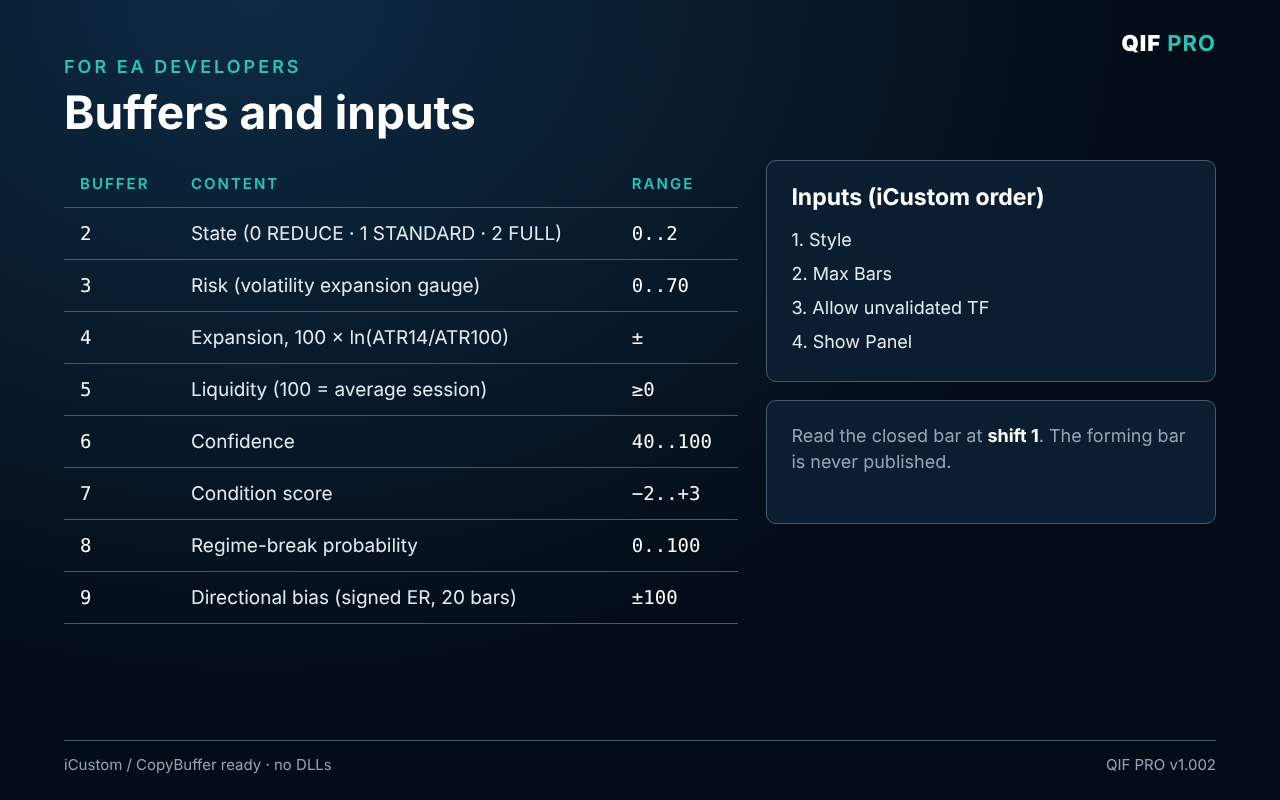
The indicator exposes public data buffers that can be read by automated strategies.

Fig 10.png

Fig. 10 – QIF PRO successfully accessed by an Expert Advisor through iCustom and CopyBuffer.


The public data buffers are:

Buffer 2 — State

  • 0 = NEUTRAL
  • 1 = CHARGE
  • 2 = RELEASE

Buffer 3 — Risk

0–100

Buffer 4 — Energy

0–100

Buffer 5 — Quality

0–100

Buffer 6 — Confidence

0–100

Buffer 7 — Structure

0–100

Buffer 8 — Transition Strength

0–100

Buffer 9 — Directional Bias

-100 to +100

For automated use, the recommended reference is the latest completed candle:

shift = 1

Comparing the value at shift 1 with shift 2 can also allow an EA to determine whether a new QIF state has just appeared.


18. Example of automated use

An existing Expert Advisor may already contain its own BUY and SELL logic.

QIF PRO can then be used as an additional market-regime filter.

For example, a trend-following EA might allow new trades only when:

State = RELEASE

while continuing to use its own rules for direction, entry, Stop Loss, position sizing and exit.

Another strategy might use:

State = CHARGE

as a preparation condition.

A different system might reduce activity during NEUTRAL conditions.

These are examples of possible integrations, not recommended trading rules.

QIF PRO does not define the complete trading logic of the Expert Advisor.


19. Important interpretation rules

Several QIF metrics can be misunderstood if they are treated as trading probabilities.

The following distinctions are therefore fundamental.

RELEASE does not mean BUY or SELL.

It identifies qualified market expansion.

CHARGE does not guarantee a breakout.

A CHARGE phase can return to NEUTRAL without reaching RELEASE.

Directional Bias is not a standalone trading signal.

It provides directional context.

Confidence is not a probability of profit.

It measures the internal agreement of the QIF components.

Risk is not account or monetary risk.

It measures relative market disorder and instability.

Energy is not a forecast.

It measures current relative market activity.


20. QIF PRO and risk management

QIF PRO does not calculate:

  • trading volume;
  • Stop Loss distance;
  • Take Profit;
  • monetary risk;
  • account drawdown;
  • portfolio exposure.

These belong to the trader's risk-management framework.

QIF PRO describes the market environment.

It does not manage the financial risk of a trade.

Traders who also need position sizing and monetary risk calculations can use QRM Risk Calculator, the free companion utility available on the MQL5 Market. For more extensive pre-trade risk governance, portfolio controls and trade validation, Quantum Risk Manager Pro provides a separate risk-management layer.

Proper position sizing, risk limits and independent entry and exit rules remain necessary.


21. Frequently asked questions

Is RELEASE a BUY signal?

No.

RELEASE indicates qualified market expansion.

Direction must be determined independently.


Is CHARGE always followed by RELEASE?

No.

A CHARGE phase can abort and return to NEUTRAL.


Can RELEASE occur without CHARGE?

Yes.

This is called Direct Release.

Direct Release uses stricter internal conditions because no preceding CHARGE phase has been established.


Does QIF PRO repaint?

QIF PRO uses closed-bar logic.

The current forming candle is not treated as the final confirmed market state.

If MetaTrader subsequently receives corrected or backfilled historical data, the affected historical calculations may be rebuilt.

This should be distinguished from changing a final state simply because the current candle is still moving.


Which mode should I use?

For most users, AUTO is the recommended starting point.


Can QIF PRO be used on Gold?

Yes.

XAUUSD was included in the internal cross-market validation matrix.


Can QIF PRO be used on different timeframes?

Yes.

Different timeframes represent different market structures, so QIF states should always be interpreted in the context of the timeframe being analyzed.


Can I use QIF PRO inside an Expert Advisor?

Yes.

The public data buffers can be accessed through iCustom and CopyBuffer.

For systematic use, the latest closed bar should normally be read using:

shift = 1


Does high Confidence mean that a trade is likely to win?

No.

Confidence measures agreement between the internal QIF components.

It is not a statistical probability of trade success.


Does high Risk mean that I should reduce my lot size?

Not automatically.

QIF Risk describes relative market noise and instability.

It is not monetary or account risk.

Position sizing should be managed independently.


22. Practical interpretation example

Suppose QIF PRO is currently in NEUTRAL.

The market then moves into CHARGE.

This tells you that the internal market structure is becoming more organized and that a preparation phase has developed.

You do not enter a trade simply because CHARGE has appeared.

Later, QIF PRO moves into RELEASE.

Qualified expansion conditions are now active.

At this point, your own strategy can evaluate:

  • direction;
  • price structure;
  • entry setup;
  • Stop Loss;
  • expected reward;
  • position size.

QIF PRO has provided the market context.

Your trading methodology still makes the trading decision.


23. Final considerations

QIF PRO is designed to separate two questions that traders often combine:

What is the market doing structurally?

and

What trade should I take?

QIF PRO addresses the first question.

It classifies the market into:

NEUTRAL — CHARGE — RELEASE

and adds information about:

Energy, Quality, Risk, Confidence, Structure, Transition Strength and Directional Bias.

The second question — whether to trade, in which direction, with what position size and with which entry and exit rules — remains part of the user's trading methodology.

That distinction is fundamental.

QIF PRO is designed to provide market context, not to replace a complete trading system.


QIF PRO – Market Regime Engine for MetaTrader 5

Read the regime. Trade with context.