
Product link:
https://www.mql5.com/en/ market/product/191385
One of the most important steps when deploying an MT5 Trade Copier is also one of the most frequently skipped: demo testing before using real money.
Installing an Expert Advisor, selecting Sender and Receiver modes, and establishing a connection does not automatically mean that the entire copy-trading setup is correctly configured.
In a real multi-account environment, many variables can affect the result. Broker symbol names, account balances, lot settings, trading permissions, SL/TP configuration, filters, pending orders, drawdown protection, and even terminal connectivity can all influence how copied trades behave.
A properly structured demo test gives traders the opportunity to identify configuration problems before real capital is exposed.
Why Demo Testing Matters
A trade copier sits between the original trading action and the execution on another account. Even when the copier is functioning correctly, the Sender and Receiver may have different account conditions.
For example:
- The accounts may have different balances.
- The brokers may use different symbol names.
- The minimum lot sizes may differ.
- The volume step may be different.
- Trading sessions may differ.
- Spreads may be different.
- One account may use Hedging while another uses Netting.
These differences make testing particularly important before live deployment.
What Should Be Tested?
A professional demo test should not consist of simply opening one trade and checking whether it appears on the Receiver.
The complete copying workflow should be tested.
Important areas include:
- Sender-to-Receiver connectivity
- Market order copying
- Pending order replication
- Symbol mapping
- Lot management
- SL/TP synchronization
- Position modifications
- Position closing
- Spread filtering
- Day and time filtering
- Buy-only and Sell-only filtering
- Drawdown protection
- Manual and automatic reset behavior
- Disconnection and reconnection behavior
1. Start With One Sender and One Receiver
The safest way to begin testing is to keep the configuration simple.
Use:
1 Sender + 1 Receiver
Do not begin with a large multi-account configuration.
First verify that the basic connection and trade-copying workflow operates correctly between a single Sender and Receiver.
Once the basic configuration is confirmed, additional Receiver terminals can be introduced gradually.
2. Verify Sender Configuration
On the Sender terminal, verify that the copier is running correctly and that automated trading is enabled.
Check the important configuration parameters and make sure the intended account is being used as the source.
The Sender terminal should remain connected and running throughout the test.
3. Verify Receiver Configuration
On the Receiver terminal, confirm that:
- The copier is running in RECEIVER mode.
- The correct Sender account number is configured.
- Automated trading is enabled.
- The required symbols are available.
- Lot-management settings are correct.
- Any filters are configured as intended.
A wrong Sender account number or incorrect mode can prevent the expected copying behavior even if the terminals themselves are connected.
4. Test Market Orders
The first practical trade test should use normal market orders.
Open a Buy or Sell position on the Sender and verify that the corresponding position appears on the Receiver.
Check:
- Symbol
- Direction
- Volume
- Entry price
- Stop Loss
- Take Profit
- Trade comment
The Receiver's exact execution price may differ from the Sender because the accounts are separate trading environments. The purpose of this test is to verify that the copying logic and configuration are functioning correctly.
5. Test Lot Management
Lot sizing should be tested carefully, especially when the Sender and Receiver have different account balances.
COPYLATOR supports multiple volume-management methods, including:
- Fixed Lot
- Lot Multiplier
- Balance-Ratio Scaling
- Maximum Lot Cap
Test the selected method with several trades and confirm that the Receiver volume matches the intended configuration.
Remember that balance-ratio scaling does not guarantee identical monetary or percentage risk between accounts because symbol specifications, leverage, SL distance, contract size, and broker conditions can differ.
6. Test Symbol Mapping
Symbol mapping is one of the most important areas to test when the Sender and Receiver use different brokers.
For example, the Sender may use:
XAUUSD
while the Receiver may use:
XAUUSDm
In this situation, the appropriate symbol mapping must be confirmed.
COPYLATOR supports automatic symbol detection and also allows manual symbol mapping when automatic matching is not appropriate.
Never assume that two brokers use identical symbol names. Verify the actual symbols available in the Receiver's Market Watch.
7. Test SL/TP Synchronization
SL/TP synchronization should be tested as a complete process rather than only during the initial trade opening.
For example:
- Open a trade on the Sender.
- Verify the Receiver position.
- Modify the Stop Loss on the Sender.
- Verify that the Receiver updates.
- Modify the Take Profit.
- Verify the Receiver again.
- Remove or add protective levels where applicable.
COPYLATOR supports real-time SL/TP synchronization, including synchronization of stops added after the position has already been opened.
8. Test Pending Orders
Market orders are only part of the trade lifecycle.
A complete demo test should also include pending orders such as:
- Buy Limit
- Sell Limit
- Buy Stop
- Sell Stop
Verify that the pending order is replicated correctly and that important parameters are synchronized.
Then allow the pending order to trigger and confirm that the resulting position behaves as expected.
9. Test Position Closing
Opening a copied trade successfully is not enough.
The closing process should also be tested.
Open a test position on the Sender and close it manually. Then verify that the Receiver responds correctly.
This confirms that the complete trade lifecycle—not just the initial order—is functioning properly.
10. Test Filters
COPYLATOR provides several filtering capabilities that should be tested before live deployment.
These may include:
- Maximum Spread
- Buy Only
- Sell Only
- Day Filter
- Time Filter
For example, if a Receiver is configured for Buy Only, test both a Buy and a Sell on the Sender.
The Buy should be handled according to the configuration, while the Sell should be rejected or skipped by the filter.
Similarly, test the time filter using a controlled schedule and verify that trades outside the permitted window are not copied.
11. Test Maximum Spread Protection
The Maximum Spread filter is particularly useful when traders want to avoid copying trades under excessively wide-spread conditions.
The setting is measured in points.
During testing, deliberately configure a restrictive threshold and observe whether trades are filtered when the Receiver spread exceeds the configured value.
This allows the trader to verify that the filter behaves as expected before relying on it in live conditions.
12. Test Drawdown Protection
Drawdown protection should also be tested rather than simply assumed to work.
COPYLATOR supports daily and total drawdown controls based on the configured Equity or Balance measurement.
Depending on the configuration, reaching the drawdown limit can:
- Block new copying.
- Close existing positions.
- Delete pending orders.
Test the selected behavior on a demo account and verify what happens when the configured threshold is reached.
13. Test the Reset Mechanism
After testing drawdown protection, verify the reset behavior.
COPYLATOR supports automatic daily reset as well as manual reset functionality.
When using a manual reset, the current balance becomes the new baseline for the total drawdown calculation.
Testing this behavior helps ensure that the trader understands exactly how the configured protection will operate during live trading.
14. Test Disconnection and Recovery
Connectivity is another important part of a professional copier test.
Temporarily disconnecting or stopping one terminal can help demonstrate how the system behaves when communication is interrupted.
After reconnecting, verify:
- Whether the copier returns to an online state.
- Whether the Sender and Receiver remain correctly configured.
- Whether new trades are processed normally.
- Whether synchronization resumes as expected.
These tests are particularly valuable for traders using VPS environments where occasional connectivity problems can occur.
15. Test the Dashboard
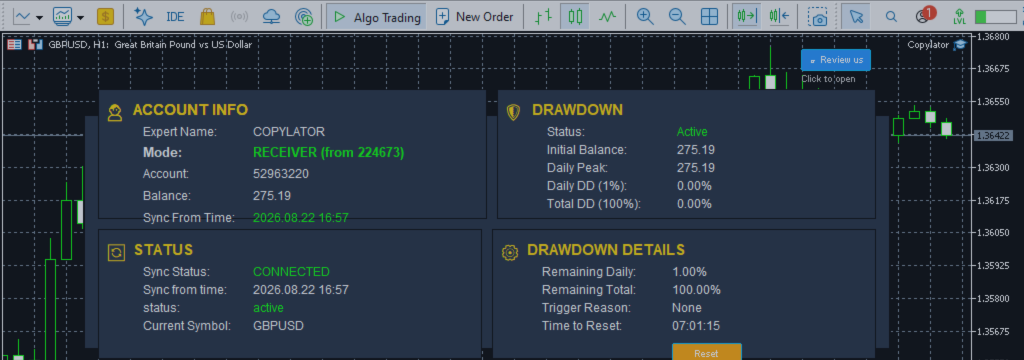
The COPYLATOR dashboard provides useful operational information, including account details, copier mode, synchronization status, Receiver information, and other monitoring data.
During demo testing, become familiar with the dashboard before going live.
You should know how to recognize a normal operating state and how to identify a configuration or connection problem.
Demo vs. Live Execution
It is important to understand that demo testing cannot perfectly reproduce every aspect of live trading.
Live and demo environments can differ in areas such as:
- Slippage
- Liquidity
- Spread behavior
- Execution speed
- Market depth
- Broker execution policies
Nevertheless, demo testing remains extremely valuable because it can identify a large number of configuration and operational problems before real capital is exposed.
The fact that demo execution is not identical to live execution is therefore not a reason to skip testing.
A Practical Demo Testing Sequence
A structured testing sequence can make the process much easier.
- Install the copier on one Sender terminal.
- Install it on one Receiver terminal.
- Verify Sender and Receiver modes.
- Confirm the Sender account number.
- Enable automated trading.
- Test a Buy order.
- Test a Sell order.
- Test SL and TP synchronization.
- Modify an existing position.
- Test position closing.
- Test pending orders.
- Test symbol mapping if required.
- Test lot-management settings.
- Test spread and direction filters.
- Test day and time restrictions.
- Test drawdown protection.
- Test reset behavior.
- Test terminal reconnection.
- Repeat the process with additional Receiver accounts.
Testing Different Account Sizes
If the live setup will contain accounts with different balances, demo testing should reproduce those differences as closely as practical.
For example, if one Receiver is significantly larger than another, test the lot-management configuration on both accounts.
This is especially important when using balance-ratio scaling or multipliers.
The goal is to confirm that the resulting trade volume remains within the intended limits.
From Demo to Live: Use a Phased Approach
After the demo tests are successful, moving directly into large live positions is usually unnecessary.
A more controlled approach is to begin with a small live exposure and verify the setup under real market conditions.
A practical progression can be:
Demo testing
      ↓
Small live position size
      ↓
Verify real execution
      ↓
Monitor several trades
      ↓
Gradually increase exposure
This approach gives the trader an opportunity to identify differences between the demo and live environments without immediately exposing a large amount of capital.
Common Mistakes to Avoid
Several mistakes occur repeatedly during copier deployment.
- Going live immediately after installation.
- Testing only one market order.
- Ignoring symbol-mapping warnings.
- Failing to verify the Sender account number.
- Using the wrong Sender/Receiver mode.
- Forgetting to enable automated trading.
- Not testing SL/TP modifications.
- Not testing pending orders.
- Ignoring lot-size differences between accounts.
- Never testing drawdown protection.
- Never testing reconnection behavior.
- Running multiple configurations without first validating a basic setup.
Pre-Live Checklist
Before activating a live copy-trading setup, verify the following:
| Item | Verified |
|---|---|
| Sender configuration | ✓ |
| Receiver configuration | ✓ |
| Sender account number | ✓ |
| Automated trading | ✓ |
| Symbol mapping | ✓ |
| Lot management | ✓ |
| SL/TP synchronization | ✓ |
| Market orders | ✓ |
| Pending orders | ✓ |
| Trade closing | ✓ |
| Filters | ✓ |
| Drawdown protection | ✓ |
| Reset behavior | ✓ |
| Connection recovery | ✓ |
Conclusion
Demo testing should be considered an essential part of deploying an MT5 Trade Copier.
Installing an EA and establishing a connection is only the beginning. A professional setup should be tested across the complete trade lifecycle, including market orders, pending orders, SL/TP synchronization, position modifications, closing, lot management, symbol mapping, filters, drawdown protection, and connection recovery.
COPYLATOR – MT5 Trade Copier provides a broad range of features for multi-account trade replication and risk management, but the effectiveness of those features ultimately depends on correct configuration and appropriate testing.
The safest workflow is simple: configure, test on demo, verify, start small, monitor, and only then increase exposure.
The time spent testing a copy-trading system is small compared with the potential cost of discovering a configuration problem after real money is already at risk.
Product link:
https://www.mql5.com/en/ market/product/191385




