
How to Install, Use Set Files, and Run SuperScalp Gold on MT5
📌 Navigation Index
1️⃣ What is SuperScalp Gold?
2️⃣ Set Files and Recommended Risk Levels
3️⃣ How to Test SuperScalp Gold in Strategy Tester
4️⃣ Common Issues and Troubleshooting
5️⃣ Practical Usage Recommendations
6️⃣ Support After Purchase
────────────────────────────────────────────────────────────
SuperScalp Gold is an automated trading system developed specifically for XAUUSD, designed for scalping and intraday trading on the M15 timeframe.
This guide will help you understand what SuperScalp Gold is, how to install it on MT5, how to use the recommended set files, how to test it in Strategy Tester, and how to troubleshoot common issues.
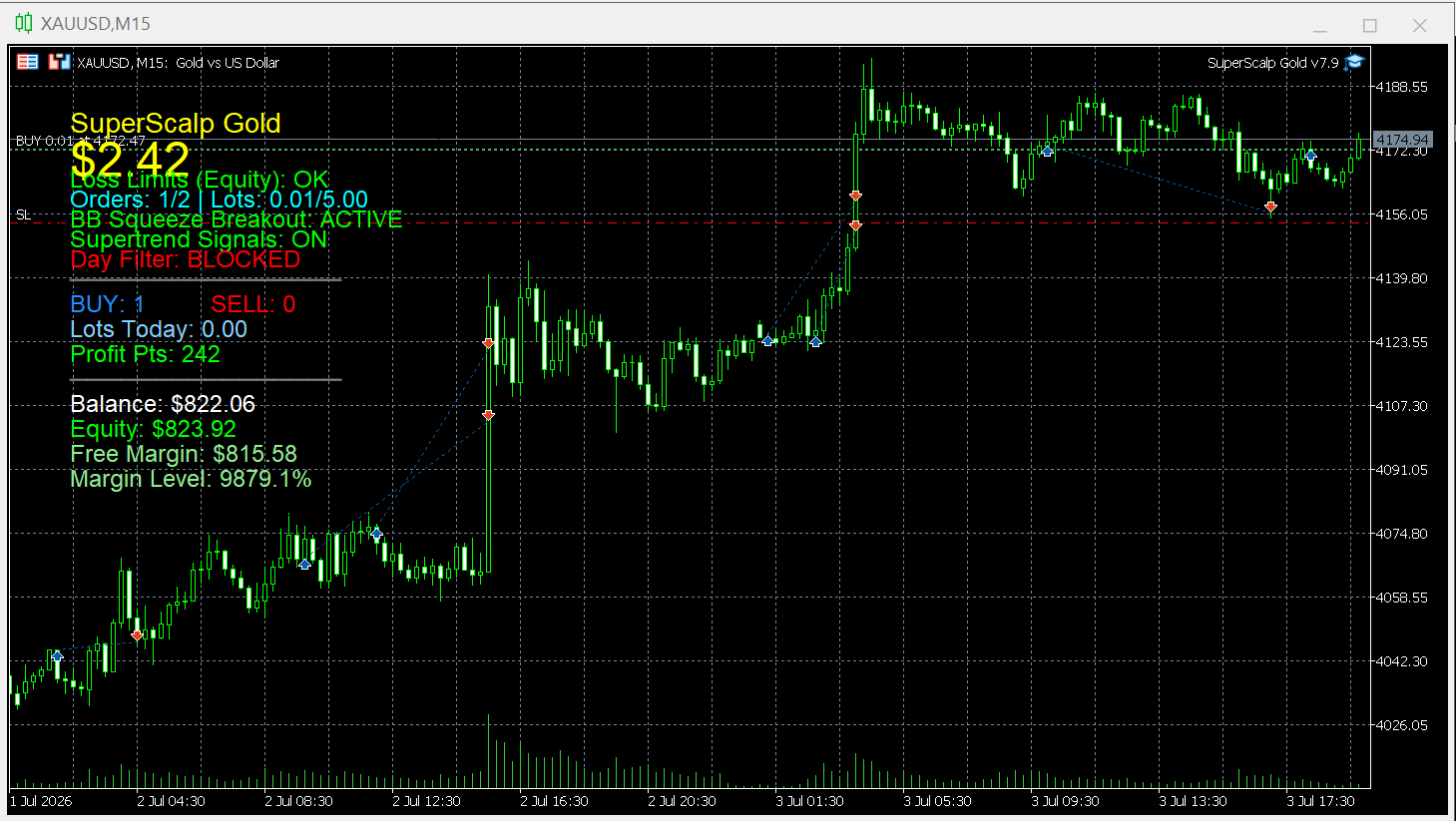
📌 1) What is SuperScalp Gold?
🔹 What asset does SuperScalp Gold trade?
SuperScalp Gold is designed specifically for XAUUSD (Gold).
The EA is optimized to identify short-term trading opportunities on gold, with a focus on high-quality trade setups rather than excessive trade frequency.
🔹 Trading style
SuperScalp Gold is a scalping / intraday EA.
It is built to capture short-term opportunities by combining trend analysis, signal filtering, and automated trade management.
Trade frequency
This EA is not designed to trade continuously all the time.
Instead, it focuses on quality over quantity.
- Approximate trading frequency: 5–10 trades per week
- Based on a standard 5 trading-day week
- The number of trades may vary depending on market conditions, spread, broker environment, and signal quality filters
🔹 What market conditions is it designed for?
SuperScalp Gold is best suited for market conditions with:
- Good liquidity
- Healthy volatility without excessive instability
- Clear intraday structure or directional movement
- Stable spread and execution
Since this is a fully automated EA running continuously, it will monitor the market at all times and only execute trades when all internal entry conditions are met.
📂 2) Set Files and Recommended Risk Levels
Recommended basic setup
- Symbol: XAUUSD
- Timeframe: M15
- Minimum deposit: 500 USD (recommended 1000 USD or higher)
- Account type: ECN or Raw spread
- Leverage: 1:100 to 1:500
- Account mode: Hedge (recommended)
- VPS: Recommended for stable operation
SuperScalp Gold supports multiple risk profiles to suit different account sizes and trading styles.
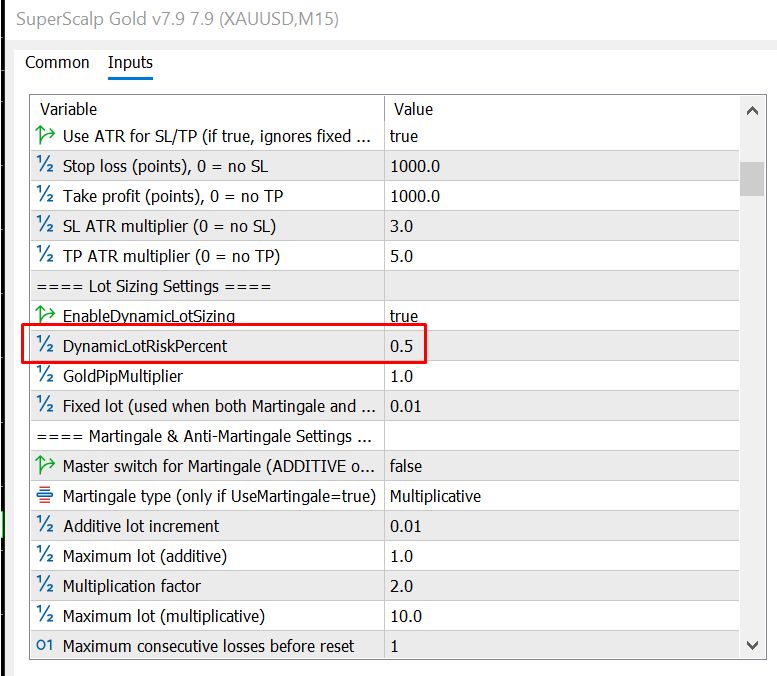
Risk is managed through the following parameter:
This parameter controls the EA’s dynamic risk model used to calculate position size based on account size and stop loss distance.
In general:
- a lower DynamicLotRiskPercent = lower risk and lower drawdown
- a higher DynamicLotRiskPercent = higher risk and potentially higher return, but also higher drawdown
Recommended set file levels
🟢 Safe Set File — DynamicLotRiskPercent = 0.5 ( Recommended low-risk set file for prop firms)
[superscalpgold_m15_xauusd_dynamic_0.5.set] - 📥 Download the attached set files below this blog post.
- Lowest risk level
- Recommended for new users
- Suitable if you prefer stability and want to observe the EA first
- This is the recommended starting point
🟡 Safe Set File — DynamicLotRiskPercent = 1.0 ( Recommended)
[superscalpgold_m15_xauusd_dynamic_1.set] - 📥 Download the attached set files below this blog post.
- Still relatively conservative
- Offers a higher growth pace compared to 0.5
- Suitable for users who already understand how the EA behaves
🟠 Set File — DynamicLotRiskPercent = 2.0
[superscalpgold_m15_xauusd_dynamic_2.set] - 📥 Download the attached set files below this blog post.
- Medium risk level
- Higher return potential, but drawdown will also increase accordingly
- Recommended only after you are familiar with the system
🔴 Set File — DynamicLotRiskPercent = 3.0
[superscalpgold_m15_xauusd_dynamic_3.set] - 📥 Download the attached set files below this blog post.
- Higher risk level
- Profit fluctuation and drawdown will become more noticeable
- Not recommended if your priority is low-risk operation
🔥 Set File — DynamicLotRiskPercent = 5.0
[superscalpgold_m15_xauusd_dynamic_5.set] - 📥 Download the attached set files below this blog post.
- Very aggressive risk level
- Suitable only for users who fully understand the system and can accept significant drawdown
- Not recommended for beginners
Which set file should I start with?
If you are new to SuperScalp Gold, the recommended order is:
- DynamicLotRiskPercent = 0.5 → best starting point
- DynamicLotRiskPercent = 1.0 → for users who want a slightly faster growth profile with still controlled risk
- Only consider 2.0 or higher after you understand the EA, your broker conditions, and your acceptable drawdown level
Important notes about set files
- Set files should be used on XAUUSD M15
- Results may vary across brokers due to:
- spread
- execution speed
- market close time
- contract specifications
If needed, you can contact me to receive a recommended set file tailored to your broker, account size, and risk preference.
🧪 3) How to Test SuperScalp Gold in Strategy Tester
If you want to verify the EA before running it on a live account, you can use the Strategy Tester in MT5.
Recommended testing setup
Symbol
- XAUUSD
Timeframe
- M15
Which set file should be used for testing?
You should test with the same set file that you plan to use on your real account.
For example:
- if you want a conservative setup → use DynamicLotRiskPercent = 0.5
- if you want to simulate your intended live configuration → use the corresponding set file for that setup
Important backtesting notes
1) Spread
Scalping EA results can be very sensitive to spread.
If your backtest spread is unrealistically low or significantly different from your live broker conditions, the results may not reflect real trading performance.
2) Broker environment
The same EA and the same set file may produce different results across brokers due to differences in:
- price feed
- spread
- execution speed
- market close time
3) Data quality
Backtest quality depends heavily on the quality of historical data.
If your data is incomplete or inconsistent, the results may differ significantly from live trading.
If you want to compare with the live signal
To make your Strategy Tester results closer to the live signal, try to use:
- the same symbol
- the same M15 timeframe
- the same set file
- a broker with similar spread and execution conditions
- a similar testing period if possible
❗ 4) Common Issues and Troubleshooting
1) The indicator gives a signal, but the EA does not open a trade
This is one of the most common questions from new users.
Please check the following:
- Is Algo Trading enabled?
- Are you using the correct chart: XAUUSD M15?
- Is SuperScalp Gold EA attached to the chart correctly?
- Have you loaded the correct set file?
- Does your broker allow trading on that symbol normally?
- Does the dashboard or Experts tab show any unusual status?
- Were all internal EA entry conditions actually met at that moment?
Important note:
A signal from the indicator does not always mean the EA must open a trade immediately.
The EA includes additional filters and trade management logic, so not every visual signal will result in an executed order.
2) No trades appear after installation
This does not necessarily mean something is wrong.
SuperScalp Gold focuses on high-quality entries, so it may not trade continuously.
Please check:
- whether you are on XAUUSD M15
- whether the EA is attached correctly
- whether the dashboard is active
- whether Algo Trading is enabled
- whether the correct set file is loaded
Also, if market conditions are not suitable, the EA may simply wait for better setups.
3) The set file does not seem to work
If you load a set file but the EA does not behave as expected, please check:
- whether the set file is specifically for SuperScalp Gold
- whether it is intended for XAUUSD M15
- whether you are using the correct EA version
- whether your broker conditions differ too much from the original setup
If needed, feel free to message me and I can send you a more suitable set file based on your broker and account size.
4) My results are different from the live signal
This is completely normal and can happen for many reasons, such as:
- broker differences
- spread differences
- slippage
- VPS / execution speed
- different set files
- different account size or risk level
- different start date
The live signal should be viewed as a real trading reference, not a guarantee that every account will produce identical results.
5) Market Close Protection / End of Week Protection needs adjustment
Some brokers have different market close times on Friday.
If you are using Market Close Protection or End of Week Protection, please check:
- what time your broker closes the market on Friday
- what the broker server time is
- whether your current protection settings are aligned with that broker
If you send me your broker’s Friday market close time, I can help adjust the settings more accurately.
💡 5) Practical Usage Recommendations
To get started more smoothly with SuperScalp Gold, I recommend:
- Use XAUUSD M15
- Start with the default configuration or DynamicLotRiskPercent = 0.5
- Set Enable Dashboard display = true
- Allow the EA enough time to operate before evaluating performance
- Use a broker with low spread and stable execution
- Contact me if you want a recommended set file based on your account size + broker
🤝 6) Support After Purchase
After purchasing SuperScalp Gold, you can contact me via MQL5 Messages for additional support, including:
- recommended set files based on account size
- conservative / balanced / aggressive configurations
- broker-specific setup suggestions
- troubleshooting when the EA does not open trades
- adjusting Market Close Protection / End of Week Protection
Download & Support:
🔗 Product:
https://www.mql5.com/en/market/product/171846
👤 Support:
https://www.mql5.com/en/users/minhnguyen1504
🛒 All Products:
https://www.mql5.com/en/users/minhnguyen1504/seller
For any questions, installation support, or recommended settings, please feel free to contact me through MQL5 messages.


