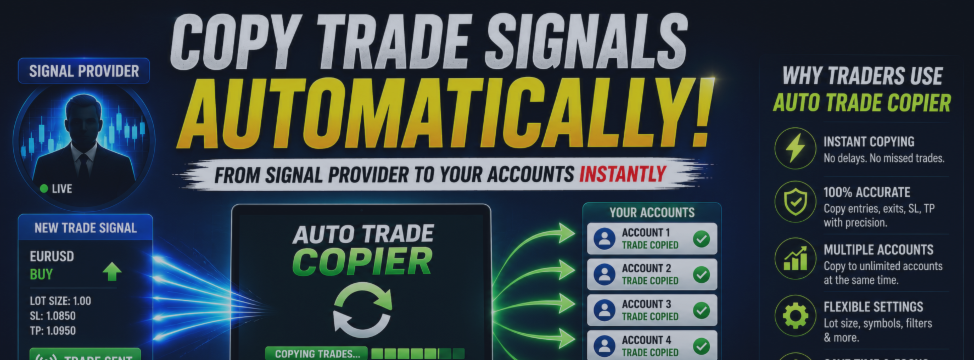
📢 TradeCopier v6.2 Released: Smarter Trading with Pair Filtering & Precision Risk Management

Telegram to MetaTrader 5 Signal Copier Gets Major Upgrades
🚀 Overview
We're excited to announce the release of TradeCopier v6.2 – a powerful update to your favoriteTelegram to MetaTrader 5 Signal Copier. This version introduces two highly requested features that give you more control over your trading while maintaining the seamless automation you've come to rely on.
Whether you're a full-time trader managing multiple strategies or a part-time investor looking for hands-off execution, these new features will transform how you use the copier.
✨ What's New in Version 6.2
1. 🎯 Allowed Pairs Filter – Trade Only What You Want
Gone are the days of manually filtering signals or trading pairs you don't want. The new Allowed Pairs feature puts you in complete control.
How It Works:
- Enter a comma-separated list of pairs you want to trade (e.g., xauusd,eurusd,gbpusd )
- The EA will ONLY execute signals for these pairs
- Leave it empty to accept ALL pairs (default behavior)
Why You'll Love It:
- ✅ Focus on Your Strategy: Trade only the pairs that match your trading plan
- ✅ Reduce Noise: Ignore signals for pairs you're not interested in
- ✅ Risk Management: Avoid trading unfamiliar or volatile pairs
- ✅ Multi-Strategy Compatible: Perfect for copying signals from multiple channels
Example Use Cases:
Scenario: You only trade Gold and EURUSD
Setting: allowedPairsList = xauusd,eurusd
Result: Only Gold and EURUSD signals are executed
Scenario: You want to trade everything
Setting: allowedPairsList = (leave empty)
Result: All pairs are accepted (same as before)
2. 💰 Precision Risk Amount Mode – Exact SL Every Time
The Risk Amount Mode has been completely reimagined to give you surgical precision over your risk management.
How It Works:
Previously, Risk Amount mode calculated lot size based on your risk amount. Now, you get two controls:
- Risk Amount: The dollar amount you want to risk (e.g., $10)
- Risk Amount Lot Size: The fixed lot size you want to use (e.g., 0.01)
The Magic Formula:
When a trade is opened:
- EA checks the current entry price
- Calculates how many pips/points would result in your risk amount loss
- Sets the SL at the EXACT price where loss = your risk amount
Visual Example:
📊 Risk Amount SL Calculation for EURUSD Entry: 1.1000 | Action: BUY Lot Size: 0.01 | Risk Amount: $10 Tick Size: 0.00001 | Tick Value: $0.10 Risk per Point: $0.10 Points to Risk: 100 Calculated SL: 1.0990
Result: If price drops to 1.0990, your loss is exactly $10 – not a penny more!
Why You'll Love It:
- ✅ Exact Risk Control: Know exactly how much you'll lose
- ✅ Consistent Lot Sizes: Use the same lot size while controlling risk
- ✅ No Guesswork: SL is calculated mathematically, not estimated
- ✅ Fallback Protection: If calculation is invalid, uses signal SL
3. 🔄 Improved Take All TP & Move to Breakeven
We've completely overhauled the logic for managing multiple positions when one hits TP.
The Problem Before:
Sometimes the EA would try to close or move positions that had already hit TP, causing confusion and errors.
The Solution Now:
Scenario: You have 3 BUY positions on EURUSD
- Position 1: Hits TP ✅ (auto-closes)
- Position 2: Still running
- Position 3: Still running
With enableTakeAllTP = true :
🔴 Take All TP: Closing all remaining EURUSD positions (2 remaining) ✅ Closed position 12345 for EURUSD ✅ Closed position 12346 for EURUSD ✅ Closed 2 remaining positions for EURUSD
→ All remaining positions are closed immediately
With enableMoveToBE = true :
🟡 Move to BE: Moving remaining EURUSD positions to breakeven (2 remaining) ✅ Moved position 12345 to breakeven at 1.1000 ✅ Moved position 12346 to breakeven at 1.1000 ✅ Moved 2 positions to breakeven for EURUSD
→ All remaining positions have SL moved to breakeven
Smart Features:
- ✅ Skips positions that already hit TP
- ✅ Only processes positions that are still running
- ✅ Clear logging shows exactly what happened
- ✅ No more "already closed" errors
📊 Updated Dashboard
The dashboard now shows more information at a glance:
| Row | Label | Description |
|---|---|---|
| 22 | Allowed Pairs | Shows filtered pairs or "ALL" |
| 23 | Risk Amount Lot | Shows fixed lot size for Risk Amount mode |
🔧 Complete Input Parameters
Trading Settings
| Parameter | Description | Default |
|---|---|---|
| tradePerSignal | Total trades per signal | 1 |
| lotMode | Dynamic, Static, or Risk Amount | Dynamic |
| riskPercent | Risk % (if Dynamic) | 2.0% |
| riskAmount | Risk $ (if Risk Amount) | $10 |
| riskAmountLotSize | Lot size for Risk Amount mode | 0.01 |
| staticLots | Fixed lot size (if Static) | 0.01 |
Management Settings
| Parameter | Description | Default |
|---|---|---|
| enableSLManagement | Enable SL Management | true |
| enableTPManagement | Enable TP Management | true |
| enableCloseSignals | Enable Close Signals | true |
| enablePendingOrders | Enable Pending Orders | true |
| enableTakeAllTP | Close all when one hits TP | true |
| enableMoveToBE | Move remaining to breakeven | true |
New! Filtering
| Parameter | Description | Default |
|---|---|---|
| allowedPairsList | Pairs to trade (comma-separated) | "" (all pairs) |
Read the full setup here
💡 Usage Examples
Example 1: Gold Only, Fixed Risk
allowedPairsList = xauusd lotMode = Risk Amount riskAmount = 50 riskAmountLotSize = 0.02
Result: Only trades Gold, uses 0.02 lots, SL set for exact $50 loss
Example 2: Major Pairs, Dynamic Risk
allowedPairsList = eurusd,gbpusd,usdjpy lotMode = Dynamic riskPercent = 1.5
Result: Only trades EURUSD, GBPUSD, USDJPY, uses 1.5% risk per trade
Example 3: All Pairs, Take All TP
allowedPairsList = (empty) enableTakeAllTP = true enableMoveToBE = false
Result: Trades all pairs, closes all positions when one hits TP
🎯 Who Should Upgrade?
✅ Upgrade If You:
- Want to filter which pairs to trade
- Need precise risk control with fixed lot sizes
- Use multiple positions per signal
- Want to see exactly where your SL is placed
- Value clear logging and debugging
🤔 Consider Testing If You:
- Use Risk Amount mode extensively (new behavior)
- Have complex multi-position strategies
- Want to verify TP/management behavior
🐛 Fixed Issues
- ❌ "CreateTradeAnnotation not declared" error – FIXED
- ❌ Positions already hit TP being processed – FIXED
- ❌ Confusing SL calculation in Risk Amount mode – IMPROVED
- ❌ Missing logs for TP management – ADDED
📞 Support & Community
- Developer: @spack_king on
- Telegram: Telegram Support
- Support: https://ulonet-technology.com/contact.html
⭐ Quick Start Guide
Step 1: Install
Copy the EA to your MQL5/Experts folder and compile
Step 2: Configure
- Set your lot mode
- Enter allowed pairs (or leave empty)
- Configure risk settings
- Enable/disable features
Step 3: Launch
Attach to any chart and start receiving signals!
Trade Smarter. Not Harder.
Version 6.2 • Built with ❤️
Tags: #MetaTrader5 #ForexTrading #SignalCopier #TradingBot #MT5 #AutomatedTrading #RiskManagement #TelegramBot


![[EURUSD]: Weekly Liquidity Activation Points (LAP), October 12-16, 2026](https://c.mql5.com/6/1035/splash-preview-777305.png "[EURUSD]: Weekly Liquidity Activation Points (LAP), October 12-16, 2026")
![[Nasdaq]: Weekly Liquidity Activation Points (LAP), October 12-16, 2026](https://c.mql5.com/6/1035/splash-preview-777311.png "[Nasdaq]: Weekly Liquidity Activation Points (LAP), October 12-16, 2026")
![[XAUUSD]: Weekly Liquidity Activation Points (LAP), October 12-16, 2026](https://c.mql5.com/6/1035/splash-preview-777299.png "[XAUUSD]: Weekly Liquidity Activation Points (LAP), October 12-16, 2026")