
USD Economic Strength Index: The Fundamental Macro Dashboard

Markets move on macroeconomic data, not laggy technical lines. When high-impact news like NFP, CPI, or GDP drops, traditional price-action indicators get instantly obliterated.
The USD Economic Strength Index is an elite institutional-grade matrix built natively for MetaTrader 5. Instead of relying on external websites or manual calculations, this optimized dashboard automatically captures, analyzes, and weighs live macroeconomic metrics directly from your broker's built-in MetaTrader 5 Economic Calendar feed in real-time. It transforms chaotic economic surprises into a single, clean Directional Bias Matrix for Gold (XAUUSD) and all major USD currency pairs.
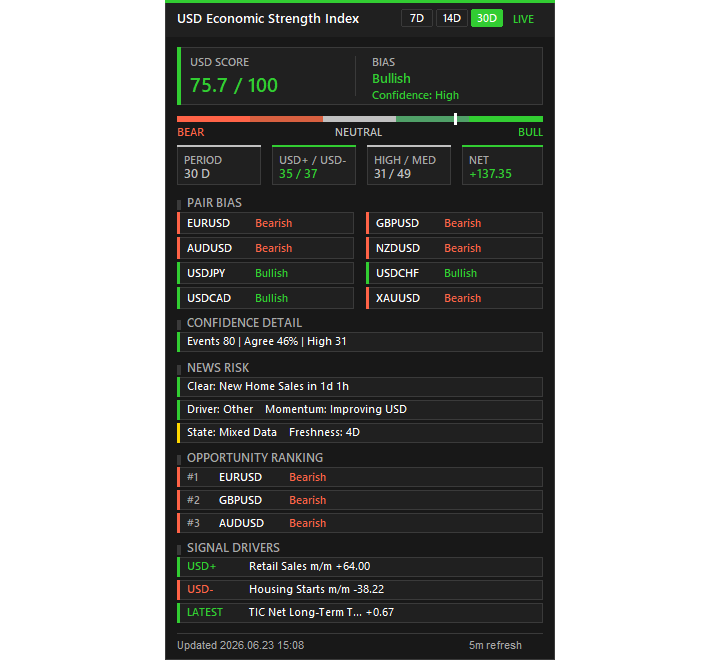
Metric Breakdown
-
7D, 14D, & 30D Lookback Depth: Use the dashboard's interactive buttons to change data processing range instantly between fast-acting short-term momentum or steady long-term trends.
-
USD+ / USD- Distribution: Displays the exact mathematical win/loss ratio of economic data (e.g., 14 data points beating expectations vs. 6 missing).
-
HIGH / MED Impact Filter: Displays exactly how many high-impact events (e.g., interest rate decisions) and medium-impact events (e.g., consumer sentiment) are being processed in the active matrix.
-
NET Momentum: The absolute sum of all economic surprise data combined. Positive reflects general outperformance; negative displays an economy missing key expectations.
-
Signal Drivers: Displays the strongest positive driver, the worst negative miss, and the most recent raw release to hit the global wires.
Technical Input Parameters Explained
-
Lookback Period (7, 14, 30 Days) — Selects the default timeframe window to track historical calendar events upon indicator launch.
-
Apply Decay Weighting (True/False) — Toggles the institutional time-decay algorithm for news relevancy.
-
Refresh Interval, Minutes (Default: 5) — Dictates how frequently the indicator recalculates backend calendar data.
-
Dashboard Theme — Toggles UI graphics between a sleek Dark Mode or a clean Light Mode.
-
Dashboard X, Y — Adjusts the exact pixel coordinate placement of the matrix panel anywhere on your chart window.
-
Enable Dashboard Alerts (True/False) — Master switch for the system alert notifications.
-
Popup Alerts / Push Notifications — Dictates how you receive alerts (desktop pop-up message boxes or direct push notifications sent straight to your mobile device).
-
Bullish Score Alert Level / Bearish Score Alert Level — Sets the exact boundary levels that trigger macro expansion/contraction alerts (e.g., 70 and 30).
-
News Risk Lookahead, Hours (Default: 48) — Lookahead depth for upcoming market volatility risks.
-
News Caution Window, Minutes — The countdown buffer period to help manage open positions prior to major data releases.


![[XAUUSD]: Weekly Liquidity Activation Points (LAP), October 12-16, 2026](https://c.mql5.com/6/1035/splash-preview-777299.png "[XAUUSD]: Weekly Liquidity Activation Points (LAP), October 12-16, 2026")
![[BRENT]: Weekly Liquidity Activation Points (LAP), October 12-16, 2026](https://c.mql5.com/6/1035/splash-preview-777303.png "[BRENT]: Weekly Liquidity Activation Points (LAP), October 12-16, 2026")
