Multi-Timeframe Market Structure: Why the Higher Timeframe Keeps Breaking Your Entries

You found the setup. Clean Change of Character on M15, a sharp Order Block, price tapping straight into it. Textbook. You take the long, stop tucked under the block — and price barely pauses before slicing through it and dropping another fifty pips. Your analysis was not wrong. Your entry timeframe was just the only one you bothered to look at, and the H4 above it was in the middle of a clean downtrend you never checked.
That is the single most common way a good Smart Money read turns into a losing trade. Not bad structure reading — bad altitude. You read one floor of the building and assumed the whole tower agreed with you.
This post is about reading market structure across several timeframes at once: what alignment actually means, how to score it without lying to yourself, and how to stop the quiet habit of zooming until a chart agrees with the trade you already wanted.
This is the fourth post in the series. The last one covered the confluence score — how to weigh several signals on one chart into a single number. There, multi-timeframe agreement was just one ingredient worth a +15 bonus. Here it gets the full post it was promised, because vertical alignment across timeframes is a different question from horizontal stacking on a single one.
The Entry Timeframe Is the Most Convincing Liar
Every timeframe has its own structure, and they routinely disagree. A clean uptrend on M15 — higher highs, higher lows, the works — is very often nothing more than a pullback inside an H4 downtrend. Same price, same candles, two completely different stories depending on how far back you stand.
The trap has a name: timeframe shopping. Under pressure you do not pick a timeframe and commit to it. You scroll until one of them confirms the trade your gut already wants, then you call that "confluence." A reversal trader drops to M5 to justify a long. A trend trader pulls up to H1 to ignore the M15 breakdown right in front of him. The chart did not lie. You chose which floor to read.
The higher timeframe does not erase your entry chart — it contextualises it. A long on M15 inside a bearish D1 is not invalid, but it is a counter-trend scalp with a short target, not a swing you sit in for three days. Knowing which one you are taking, before you click, is most of the battle.
Top-Down, Not Tab-Switching
The professional framing is top-down: the higher timeframe carries the narrative — where the market is trying to go — and the lower timeframe carries the timing — when to actually get in. Higher timeframe for the bias, lower timeframe for the trigger. Almost every coherent Smart Money playbook is some version of that sentence.
The problem is never the concept. It is the operational cost of doing it live. Reading top-down by hand means four chart tabs open, switching between them, re-reading the swing structure on each one from scratch, and holding all four pictures in your head at the exact moment price is moving and your four-second clock is running. By the time you have reconstructed the D1 trend, the M15 entry is gone — or worse, you skip the check entirely and tell yourself you "kind of remember" what the H4 looked like.
What you actually want is one place that reads the same structural logic on several timeframes simultaneously and keeps it updated, so the top-down check is a glance instead of a project.
What "Alignment" Actually Means (No Hand-Waving)
"The timeframes are aligned" is a phrase people throw around without ever defining it. So here is a definition you can actually act on: alignment means the same structural direction on more than one timeframe — and structure has a precise, mechanical definition, not a vibe.
A timeframe is bullish when its last two swings print a higher high and a higher low. It is bearish when they print a lower high and a lower low. Anything else — a higher high but a lower low, mixed swings — is a range, which is the honest label for "no trend right now." This is exactly how the Multi-Timeframe panel in the MSOB Dashboard classifies each timeframe, and it is worth seeing the rule laid out plainly:
| Structure on that timeframe | Label shown | Colour |
|---|---|---|
| Higher high AND higher low (last two swings) | BULL | Green |
| Lower high AND lower low (last two swings) | BEAR | Red |
| Mixed swings — no clean direction | RNG (range) | Gray |
Two details matter here. First, this is real swing structure, computed from the actual highs and lows of roughly the last three hundred candles on each timeframe — not a moving-average cross or an oscillator dressed up as structure. Second, the swing sensitivity is the same setting you already use on your main chart, so the higher-timeframe reads are consistent with how you read structure everywhere else. The panel runs four slots, configurable, and they default to M15, H1, H4 and D1 — a clean ladder from entry timing to swing context.
BOS vs ChoCH — Catching the Turn on the Floor Above
A trend label alone is half the picture. The panel also prefixes each timeframe with its most recent break: BO for a Break of Structure (continuation) or CH for a Change of Character (the first crack of a reversal). So a cell does not just read "BEAR" — it reads "BO BEAR" or "CH BEAR," and that prefix is doing real work.
The mechanism is the same structural logic, applied to the latest break: a close back above the relevant prior swing high is a bullish break — tagged a ChoCH if that timeframe was trending down (the trend is being challenged), or a BOS if it was already trending up (the trend is continuing). The mirror image holds for a close below the prior swing low.
Why you care: a fresh ChoCH on a higher timeframe is an early warning that the narrative above you may be flipping. If your H4 just printed "CH BULL" after a long downtrend, your habitual shorts on M15 are suddenly fighting a turn, and your counter-trend longs just became the higher-probability side. You do not trade the ChoCH itself — you re-rank which direction deserves your attention.
The Alignment Counter and the +15 It Feeds
At the top of the panel sits a single readout: X/4 aligned. It counts how many of the four timeframes currently share the trend of the chart you are actually on. It is colour-coded so you can read it without thinking: green when three or four agree, gold when only two do, gray when the timeframes are in open disagreement.
| Counter | What it means | What to do |
|---|---|---|
| 3–4 / 4 — green | Higher and lower timeframes agree on direction | Trade with it — your entries are with the current, not against it |
| 2 / 4 — gold | Split, usually entry timeframe against the higher ones | Cut conviction. Either a higher-timeframe turn is starting or you are early |
| 0–1 / 4 — gray | Timeframes disagree — no shared story | Counter-trend scalps only, or stand down and wait |
This counter is also the one place the multi-timeframe picture reaches back into the confluence score from the previous post. When a clear trend is defined on your chart and three or more timeframes line up with it, the confluence score gets a +15 boost — the only component of that score that is genuinely vertical. Everything else in the score is read off your single chart; this is the part that asks the floors above to vote. That is why a setup can look complete on your entry chart and still fall short of green: the timeframes above quietly disagreed, and the model refused to pretend otherwise.
A Worked Example — When M15 Says Buy and H4 Says No
Picture the panel in the situation that costs traders the most money: a tempting entry the higher timeframes do not support.
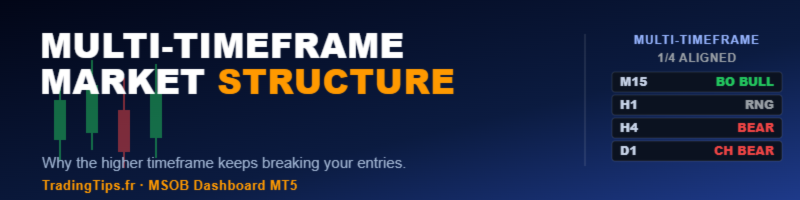
Read it the way you would read it live. Say your M15 has just turned up — the cell reads "BO BULL." But H1 reads "RNG," and both H4 and D1 read "BEAR." Standing on your M15 chart, the counter says 1/4 aligned, painted gray. The translation is blunt: your bullish leg on M15 is a pullback inside a bearish higher-timeframe structure. The clean trade here is not the long your eyes wanted — it is to let the pullback exhaust and look for a short in the direction H4 and D1 are already pointing.
That is the entire value of seeing four timeframes at once. The panel does not block the trade. It just refuses to let you pretend the two floors above you do not exist — which is precisely the information your bias was busy hiding.
How to Trade With It (and How Not To)
Take entry-timeframe triggers only in the direction of the higher-timeframe alignment. Green counter, pointing your way, is the cue to start hunting an entry on your lower timeframe — not a buy button, a green light to begin the process you already trust.
Read gold as "not yet, or something is turning." A 2/4 almost always means your entry timeframe has split from the ones above it. Find which timeframe diverges and why before you do anything. Most counter-trend losses are gold setups taken as if they were green.
Treat a fresh higher-timeframe ChoCH as a pre-alert, not a signal. "CH" appearing on H4 or D1 tells you the narrative above may be changing. That is a reason to re-rank direction, watch closely, and wait for the lower timeframe to confirm — not a reason to enter on the spot.
Never trade the counter alone. This is the honest part, the same as every post in this series. A timeframe-alignment readout does not size your position, does not know about the news print in twenty minutes, and has no opinion on whether your stop is sane. It answers exactly one question — do the floors above agree with the floor I am standing on — and nothing more. Position sizing is a separate job; a free ATR-based position size calculator handles that side so the two decisions stay clean.
Build the Habit, Then Automate It
You can absolutely do this by hand, and once is worth it. Open M15, H1, H4 and D1. On each, mark the last two swing highs and lows, decide bullish, bearish or range by the rule above, and count how many agree with the chart you intend to trade. Doing that manually a few times rewires how you see a setup — you stop reading a single chart in isolation and start reading altitude.
The catch is the one from the earlier posts: by the time price reaches your zone you have a handful of seconds, and four tabs are not getting re-read in that window. That is what the Multi-Timeframe panel in the Market Structure Order Block Dashboard MT5 automates — it classifies structure on all four timeframes every tick, prints BULL, BEAR or RNG with the BOS/ChoCH prefix, and keeps the aligned counter live, so the top-down check is already done before your bias gets a vote.
To be clear about what it is and is not: seeing four timeframes agree will not make you profitable. It removes one specific, expensive mistake — trading the entry chart as if it were the whole market. The edge still comes from a verified strategy and the discipline to skip the setups that the floors above do not support. The panel just makes "is the higher timeframe with me?" a question you can answer in one glance instead of four.
Wrap-Up
Most blown Smart Money trades are not analysis failures. They are altitude failures — a correct read on one timeframe, taken straight into the teeth of the two above it. Multi-timeframe alignment fixes that by forcing the one check timeframe shopping is designed to avoid: stand on your entry chart, then ask whether the floors above actually agree. Green, trade it. Gold, wait. Gray, walk away or scalp it small and fast.
Pick your four timeframes this week — entry, intermediate, and two for context — and before every entry, count the agreement out loud. You will be surprised how many of your worst trades were 1/4 setups you took because the one chart you looked at told you what you wanted to hear.
Related Reading
- Confluence Scoring for Smart Money Setups: Turning Several Signals Into One Number in MT5 — how multi-timeframe alignment feeds the wider confluence score.
- Pending ChoCH: How to Detect Market Structure Reversals Before Confirmation — the structure-break logic this panel reads on every timeframe.
Tools Referenced
- Market Structure Order Block Dashboard MT5 — the Multi-Timeframe panel, plus structure, Order Blocks, Fair Value Gaps, liquidity, Kill Zones and live confluence scoring in one dashboard.
- Position Size Calculator ATR — free risk-based lot sizing companion, so direction and size stay separate decisions.
Risk warning: trading leveraged instruments involves substantial risk of loss and is not suitable for all investors. A multi-timeframe alignment panel is an educational decision-support tool computed from current chart structure; it is not a signal, not a guarantee, and not investment advice. The timeframes, swing sensitivity and labels described here reflect one specific implementation and will not suit every market or style. Always verify any approach on your own data, on your own broker feed, and with your own risk parameters before committing capital.
Related post: Not All Order Blocks Deserve a Trade: Validating SMC Zones with Session Volume Profile in MT5 - a volume-based filter that removes weak order blocks before the multi-timeframe check.



